
In This Article
Corner space in a home office is usually wasted — until you put a height adjustable corner desk there instead. A height adjustable corner desk wraps an L-shaped work surface into the corner of a room and pairs it with an electric or crank-driven frame, so you get more usable desktop than a straight desk of the same footprint, plus the freedom to move between sitting and standing throughout the day. That second part matters more than most shoppers realize: OSHA’s guidance on computer workstations points out that alternating between postures and taking movement breaks reduces the musculoskeletal strain that comes from sitting still for hours.
The tricky part is that “corner desk” and “standing desk” searches turn up dozens of near-identical listings, and the actual differences — motor count, weight capacity, how the corner join is engineered, what happens to your cables — are buried in spec sheets nobody reads before checkout. We dug through real spec sheets, verified current listings on amazon.com, and pulled together honest aggregated review sentiment (never invented quotes) to help you shop faster.
Below, you’ll find 7 real corner standing desk options spanning entry-level to premium, a quick-reference comparison table, and a full buyer’s guide covering setup, common mistakes, long-term costs, and safety standards. This article contains affiliate links, and as an Amazon Associate we may earn from qualifying purchases — full disclosure is at the bottom of the page.
What Is a Height Adjustable Corner Desk?
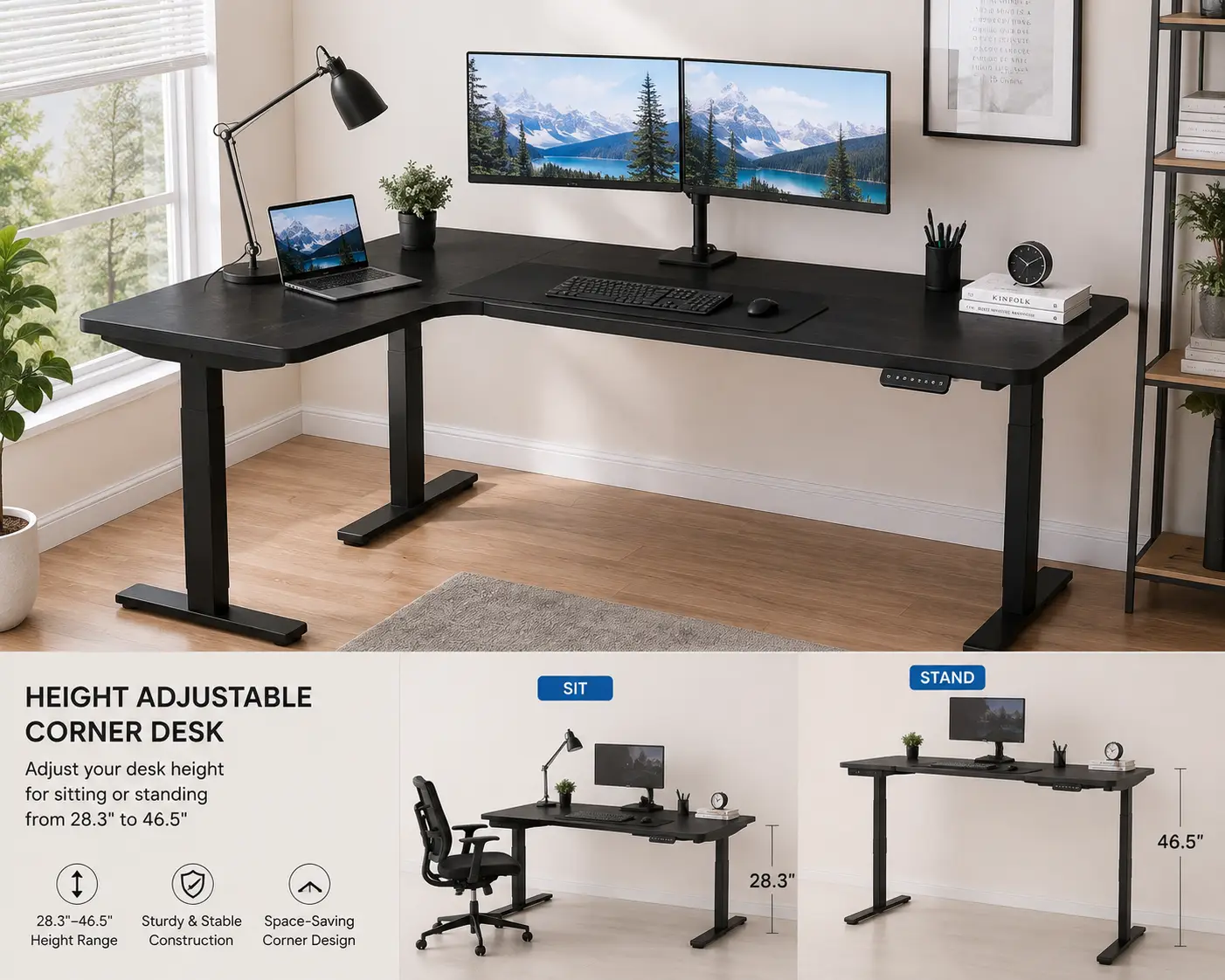
A height adjustable corner desk is an L-shaped work surface built to fit into a room corner, mounted on a motorized or manually adjustable frame that raises and lowers the whole desktop. Unlike a fixed-height corner desk, it lets you switch between sitting and standing positions, and unlike a straight electric standing desk, it wraps around the corner to add extra surface area without extending further into the room.
Most models in this category use either a dual-motor or triple-motor lifting system, since a corner desk’s L-shaped top puts uneven weight on the frame and needs extra lifting power to stay level. That third motor — usually mounted at the corner joint — is one of the biggest differences between a budget corner desk and a premium one, and it’s a detail worth watching for as you compare listings.
Quick Comparison Table
| Product | Best For | Motor Setup | Weight Capacity | Price Range |
|---|---|---|---|---|
| FEZIBO 55×32 L-Shaped Corner Desk | Tightest budgets | Dual motor | ~176 lbs | Under $300 |
| VIVO DESK-E1L94N Corner Desk | Small home offices | Dual motor | ~176 lbs | $300–$400 |
| SHW 55-Inch L-Shaped Corner Desk | Cable-heavy setups | Single/dual motor | ~220 lbs | $350–$450 |
| FLEXISPOT 71×63 Corner Desk | Multi-monitor power users | Dual motor | Up to 275 lbs | $500–$650 |
| VIVO DESK-E3CTB Corner Desk | Reversible room layouts | Dual motor | ~225 lbs | $450–$550 |
| UncagedErgonomics L-Shaped Corner Desk | Stability under heavy loads | Triple motor | 275+ lbs | $700–$900 |
| Progressive Automations Corner Ryzer (FLT-05) | Custom, commercial-grade builds | Triple motor | 300+ lbs | $800–$1,000 |
Looking at the table, the split is pretty clean: the first three picks are built for people who mostly want the corner footprint and basic sit-stand function without a big spend, the middle two add reversible layouts and heavier weight limits for dual-monitor setups, and the last two exist for buyers who treat desk stability as non-negotiable — home studios, drafting work, or anyone running three-plus monitors on one surface. None of these price ranges are exact — check the current listing for today’s number, since Amazon pricing shifts often.
💬 One click helps other shoppers make an informed choice too! 😊
Top 7 Height Adjustable Corner Desks
1. FEZIBO 55×32 L-Shaped Corner Desk — lowest price of entry
The FEZIBO corner desk is the one to look at first if budget is the deciding factor, since it consistently undercuts most of the category while still delivering electric height adjustment. Its dual-motor frame moves the desktop through a roughly 28.7-to-47.6-inch range, and the splice-board top — two panels joined at a 120-degree corner seam — keeps shipping and assembly simpler than a one-piece surface. A built-in controller with 4 programmable memory presets means you’re not re-adjusting height every session, which matters more than it sounds once you’ve done it manually for a week.
Who it’s for: first-time standing-desk buyers, students, and anyone furnishing a starter home office who wants the corner layout without committing $500+. What the spec sheet doesn’t say outright, but aggregated reviews consistently mention, is that the desk performs well at low-to-mid height but some buyers report noticeable wobble at full standing height with heavier monitor arms attached — a common tradeoff at this price tier. Reviews also frequently praise the straightforward assembly and the value for a first desk.
Pros:
- ✅ Lowest price point in this roundup
- ✅ Genuine electric lift with 4 memory presets
- ✅ Splice-board design simplifies shipping and setup
Cons:
- ❌ Some wobble reported at full height with added monitor weight
- ❌ Lower 176-lb weight capacity limits heavy dual-monitor arms
Price runs under $300 at the time of writing, and for that price, it’s a genuinely solid value pick if your setup stays light — a laptop, one monitor, and standard accessories.
2. VIVO DESK-E1L94N Corner Desk — best for tight spaces
The VIVO DESK-E1L94N is built at a compact 47×47-inch footprint, making it the pick for smaller rooms or apartment offices where a full-size L-shaped desk simply won’t fit. Its dual-motor frame covers a similar height range to most desks in this class, and VIVO backs it with memory height presets so returning to your preferred sit or stand position is a one-button action rather than a guess-and-check exercise.
Who it’s for: renters, apartment dwellers, and anyone converting a bedroom corner into a workspace where every square foot counts. Based on comparing the specs against larger corner desks in this list, the smaller top means less usable surface for a multi-monitor rig, but it also means the desk fits into corners a 60-inch model physically can’t. Reviews commonly note that the compact size makes it easy to maneuver during assembly and that the rustic wood-grain finish reads nicer in person than typical laminate desktops.
Pros:
- ✅ Compact 47×47 in. footprint fits small rooms
- ✅ Electric memory-preset height adjustment
- ✅ Attractive finish options beyond plain black laminate
Cons:
- ❌ Smaller surface limits multi-monitor setups
- ❌ 176-lb capacity is on the lower end of this list
Expect a price in the $300–$400 range, positioning it as a small step up from FEZIBO with a size tradeoff, not a capability one.
3. SHW 55-Inch L-Shaped Corner Desk — best cable management
SHW‘s 55-inch corner desk stands out for a detail a lot of competitors skip: a dedicated cable management tray built into the frame, alongside a memory-preset controller for repeatable height settings. The right-facing corner design and oak-toned finish give it a more traditional-office look than the black-frame gaming aesthetic common in this category.
Who it’s for: home-office workers who’ve dealt with a rat’s nest of power bricks and HDMI cables under a desk and want that solved at the design stage rather than with an aftermarket sleeve. What most buyers overlook with cable trays specifically is that they don’t just look tidier — they keep cords out of the path of the lifting mechanism, which is a real mechanical stress point on desks that get raised and lowered daily. Aggregated customer feedback frequently highlights the cable tray and the presets as the standout features, while a recurring complaint centers on the desktop’s laminate finish showing scratches more easily than expected.
Pros:
- ✅ Integrated cable management tray
- ✅ Memory height presets for consistent daily use
- ✅ Traditional wood-tone finish suits professional offices
Cons:
- ❌ Laminate top reportedly scratches more easily than premium finishes
- ❌ Fewer color/finish options than some competitors
Pricing typically falls between $350 and $450, which is reasonable given the added cable-management hardware most budget desks lack entirely.
4. FLEXISPOT 71×63 Corner Desk — best for multi-monitor power users
The FLEXISPOT 71×63-inch corner desk is built for buyers who’ve outgrown a smaller surface — the sheer footprint accommodates a triple-monitor arm, a laptop dock, and desk accessories without feeling cramped. Its dual-motor frame is rated for up to 275 lbs depending on configuration, meaningfully higher than the entry-level picks above, and the anti-collision sensor stops the desk automatically if it hits an obstacle while moving, a safety detail that matters once you’ve got bookshelves or filing cabinets nearby.
Who it’s for: remote professionals running multiple monitors, video editors, or anyone whose desk doubles as a command center. Based on comparing specs across this list, FLEXISPOT sits in the sweet spot between “budget desk that might wobble under load” and “commercial-grade desk priced for a business.” Reviews consistently cite FLEXISPOT’s responsive customer service and multi-year motor warranty as reasons buyers trust the brand for a desk they’ll use daily for years, though the larger footprint does mean it needs a genuinely spacious corner to avoid feeling oversized in a small room.
Pros:
- ✅ Spacious 71×63 in. surface for multi-monitor setups
- ✅ Up to 275-lb weight capacity
- ✅ Anti-collision sensor and strong warranty support
Cons:
- ❌ Needs a larger room to avoid feeling cramped
- ❌ Higher price point than entry-level options
Expect to pay in the $500–$650 range at the time of writing — a fair middle-market price for the added capacity and safety features.
5. VIVO DESK-E3CTB Corner Desk — best reversible layout
VIVO‘s DESK-E3CTB is a 63×55-inch reversible L-shaped desk, meaning the corner orientation can be configured left- or right-facing depending on your room layout — a detail that matters more than it seems once you’ve tried to fit a fixed-orientation desk into the “wrong” corner. It carries a 225-lb weight rating and the same memory-preset height system VIVO uses across its lineup, with a black-on-black finish that reads modern rather than utilitarian.
Who it’s for: anyone who’s moved apartments before, or expects to, and doesn’t want a desk that only works in one specific corner configuration. What the spec sheet doesn’t spell out, but real customer feedback repeatedly confirms, is that the reversible design genuinely simplifies both initial assembly and any future room rearrangement — you’re not stuck re-buying a desk because your new office has the corner on the opposite wall. A recurring theme in aggregated reviews is that assembly, while doable solo, goes noticeably faster with a second person.
Pros:
- ✅ Reversible left/right corner configuration
- ✅ 225-lb weight capacity handles dual monitors comfortably
- ✅ Clean, modern black finish
Cons:
- ❌ Assembly is easier with two people
- ❌ Sits at a higher price than VIVO’s smaller E1L94N model
Pricing generally lands between $450 and $550, positioned as a mid-tier upgrade over VIVO’s compact model.
6. UncagedErgonomics L-Shaped Corner Desk — best for stability under heavy loads
UncagedErgonomics, a brand that’s been in the sit-stand desk space since 2012, builds its L-shaped corner desk around a triple-motor frame — the third motor sits at the corner leg and does the real work of keeping an asymmetrically loaded L-shaped top level as it rises. Rated for 275+ lbs, it’s engineered for setups a lighter dual-motor frame would struggle with: multiple monitor arms, a dock, a printer, and accessories all mounted permanently.
Who it’s for: creative professionals, developers with elaborate multi-monitor rigs, or anyone who has personally felt a cheaper standing desk wobble mid-adjustment and decided never again. Based on comparing this frame’s engineering to the dual-motor models earlier in this list, the extra motor isn’t a marketing gimmick — a corner desk’s L-shape genuinely does put uneven torque on the frame, and a third lift point measurably reduces the flex you’d otherwise feel at the far end of the L. Aggregated reviews consistently describe the frame as noticeably sturdier than big-box alternatives, with occasional notes that the higher price only makes sense if you actually need the extra capacity.
Pros:
- ✅ Triple-motor frame minimizes wobble under heavy loads
- ✅ 275+ lb weight capacity
- ✅ Established brand with a decade-plus track record
Cons:
- ❌ Premium price relative to dual-motor competitors
- ❌ Overkill for light, single-monitor setups
At $700–$900, this is a considered purchase rather than an impulse buy — but for heavy, permanent setups, the stability difference is real.
7. Progressive Automations Corner Ryzer Frame (FLT-05) — best for custom, commercial-grade builds
The Progressive Automations Corner Ryzer frame takes a different approach than the rest of this list: it’s a frame-only product, sold without a desktop, aimed at buyers who want commercial-grade linear-actuator engineering under a tabletop of their own choosing. Progressive Automations builds actuators for medical and industrial equipment as its core business, and that manufacturing pedigree shows up in the Ryzer’s triple-motor design, adjustable-width legs, and 300+ lb capacity rating.
Who it’s for: buyers who already have (or want to source separately) a specific corner desktop — reclaimed wood, a custom laminate, a glass top — and want the most robust lifting mechanism available to put under it, plus small business or studio setups where desk failure isn’t an option. What most shoppers overlook here is that buying a frame separately from the top actually gives you more control over final height range and desktop material than any pre-matched desk-and-frame bundle can offer. Reviews and independent write-ups consistently frame this as a premium, durability-first choice rather than a value pick, with the adjustable-width legs called out repeatably as a genuine differentiator for irregular corner dimensions.
Pros:
- ✅ Commercial-grade triple-motor frame from an actuator manufacturer
- ✅ Adjustable-width legs fit irregular corner dimensions
- ✅ 300+ lb weight capacity, among the highest in this list
Cons:
- ❌ Desktop sold separately, adding to total cost
- ❌ Highest total investment in this roundup once a top is added
Frame pricing typically runs $800–$1,000 before a desktop, which puts total project cost above every other option here — but for a genuinely custom, commercial-grade build, it’s the most capable frame on this list.
How to Set Up and Get the Most from Your New Corner Desk
Getting a height adjustable corner desk right starts before the first screw goes in. Measure your corner twice — width along both walls and ceiling height if you’re mounting shelving above — because even a couple of inches off can mean the desk doesn’t sit flush, and a corner desk is far more sensitive to wall irregularities (baseboards, outlets, vents) than a straight desk. Assembly typically takes 60–120 minutes; the triple-motor models in this list generally take longer due to the extra corner leg and wiring.
Once it’s built, resist the urge to jump straight to standing all day. A sensible first-30-days routine looks like: start with 2–3 standing sessions of 20–30 minutes daily, use the memory presets to lock in your ideal sit and stand heights (elbows at roughly 90 degrees, monitor top at eye level), and route cables through the frame’s built-in management — SHW’s tray or FLEXISPOT’s channel — before they get tangled in the lift mechanism. A common first-month mistake is setting the standing height too high, which forces shoulders up; recheck it after a week once your posture settles.
Maintenance is minimal but not zero: wipe down telescoping legs periodically, avoid overloading one side of the L past the rated capacity, and don’t ignore unusual grinding sounds from the motor — that’s usually a sign a cable or object is obstructing the lift column, not a motor failure.
Find Your Match: Real-World Corner Desk Scenarios
If you’re a freelance writer working from a spare bedroom on a tight budget, the FEZIBO or VIVO DESK-E1L94N make the most sense — light daily use, one or two monitors, and a price point that doesn’t eat into freelance income before it arrives. If you’re a software developer running three monitors and a mechanical keyboard for 8+ hours a day, the FLEXISPOT 71×63 or UncagedErgonomics frame justify their higher price through weight capacity and stability you’ll actually load-test daily.
If you’re setting up a small business back office — a studio, an agency’s first hire, a home-based consultancy — the Progressive Automations Corner Ryzer frame paired with a custom top signals a level of permanence and professionalism a big-box desk doesn’t, and the commercial-grade actuators mean it’s built to outlast a typical furniture refresh cycle. And if you’re simply optimizing an apartment corner that’s currently dead space, the compact VIVO DESK-E1L94N or reversible DESK-E3CTB solve the layout problem without requiring a room redesign.
Solving the Most Common Corner Desk Problems
Wobble at standing height is the most frequently reported issue with budget corner desks, and it’s almost always a torque problem: the L-shape puts weight further from the center leg than a straight desk does. The fix is either a triple-motor frame (like UncagedErgonomics or the Progressive Automations Ryzer) or, on dual-motor desks, keeping heavy items closer to the corner join rather than the far ends of the L.
Cable chaos is the second-most common complaint, and it’s largely solved by desks with built-in management — SHW‘s tray and FLEXISPOT‘s channel both exist specifically for this — combined with running cables loosely enough to flex through a full height range without snagging. A desk that won’t fit the intended corner is usually a measurement issue caught too late; always confirm both wall lengths and check the manufacturer’s minimum corner clearance before ordering. Finally, uneven height memory (the desk “forgetting” presets) is typically a controller reset issue, not a hardware failure — most brands’ support teams can walk you through recalibration in a few minutes rather than requiring a return.
How to Choose a Height Adjustable Corner Desk
- Confirm your corner’s exact dimensions first. Measure both walls and account for baseboards or outlets that might block flush placement.
- Match weight capacity to your actual setup. Add up monitor arms, dock, printer, and accessories — don’t just eyeball it.
- Prioritize motor count for heavier loads. Dual motor is fine for light use; triple motor earns its price once you’re past two monitors.
- Check the height range against your height. A desk that bottoms out too high or tops out too low defeats the ergonomic point entirely.
- Look for memory presets. Manually adjusting height every session gets old fast and discourages actually using the sit-stand function.
- Factor in cable management. It’s a small feature that prevents a real daily annoyance.
- Compare total cost, not just sticker price. Frame-only options like Progressive Automations need a separate desktop budgeted in.
Height Adjustable Corner Desk vs. Traditional Desk
| Factor | Height Adjustable Corner Desk | Traditional Fixed Desk |
|---|---|---|
| Posture flexibility | Sit or stand on demand | Fixed position only |
| Corner space use | Maximizes usable surface | Often wastes corner space |
| Weight capacity | Model-dependent, up to 300+ lbs | Generally static, high but immovable |
| Best for | Multi-monitor, long work sessions | Simple, low-maintenance setups |
| Upfront cost | Higher ($250–$1,000+) | Lower ($100–$300 typical) |
The comparison makes the tradeoff clear: a traditional desk wins on upfront price and simplicity, but a height adjustable corner desk wins on both space efficiency and the postural flexibility that ergonomics guidance recommends for long computer-based workdays. Independent testers at CNN Underscored have reached a similar conclusion after hands-on testing of dozens of standing desks: the models that get recommended are consistently the ones with strong motors and genuine stability, not just a low price. For anyone spending 6+ hours a day at a desk, the price gap tends to look smaller once you factor in how much of that time benefits from movement.
✨ Ready to stop working from a desk that fights your posture? Compare today’s prices on the picks above and find your fit! 🔍
Common Mistakes to Avoid When Buying a Corner Standing Desk
The single biggest mistake is buying based on price alone without checking weight capacity against your real setup — a desk rated for 176 lbs sagging under two monitor arms and a laptop dock is a common, avoidable regret. A close second is skipping the corner measurement step; a desk that’s a perfect match on paper can still fail to sit flush if a baseboard or outlet interferes with the frame’s legs.
Buyers also frequently underestimate assembly time and difficulty, especially on triple-motor frames, and end up frustrated mid-build without having budgeted the extra hour or the second pair of hands many reviews recommend. Finally, don’t ignore the motor warranty length — it’s one of the more reliable proxies for how confident a manufacturer is in its own mechanism, and it varies more between brands than most shoppers expect going in.
Features That Actually Matter (and Ones That Don’t)
Motor count, weight capacity, and memory presets are the three features worth paying extra for — they directly affect daily usability and long-term reliability. Anti-collision sensors matter more than they sound like they would, especially in smaller rooms where a desk is likely to bump a wall or shelf during adjustment.
On the other hand, RGB lighting, app connectivity, and cosmetic frame color upgrades are nice-to-haves that don’t affect how well the desk actually functions day to day — spend there only after the functional specs already meet your needs. Desktop material (laminate vs. real wood veneer) affects looks and scratch resistance more than it affects durability of the lifting mechanism itself, so don’t let finish alone drive the decision if budget is tight.
Long-Term Cost and Maintenance
A height adjustable corner desk is a multi-year purchase, and total cost of ownership looks different from the sticker price. Budget desks in the $250–$400 range typically carry 1–3 year warranties on the motor, while premium picks like UncagedErgonomics and Progressive Automations often back their frames with longer coverage — a meaningful hedge against the motor being the part most likely to eventually need service.
Maintenance costs are low across the board: no recurring subscription, no consumable parts beyond an occasional replacement cable clip. The real long-term value calculation is use-based — a $900 triple-motor desk used daily for 8+ years works out to roughly $0.30 a day, which changes the “expensive” framing considerably once you look past the upfront number.
Safety, Regulations, and Standards
Desk stability isn’t just a comfort issue — it’s a recognized safety category. The Consumer Product Safety Commission’s Anchor It campaign focuses primarily on storage furniture tip-overs, but the underlying principle — that furniture stability testing protects households, especially with kids or pets around — applies directly to desks with a motorized, moving top-heavy surface.
In the office furniture industry specifically, look for frames tested to ANSI/BIFMA standards, the recognized US benchmark for desk and table strength, stability, and durability testing. Not every budget desk publishes BIFMA test results, but established brands — FLEXISPOT, UncagedErgonomics, and Progressive Automations among them — generally do, and it’s a reasonable tiebreaker when two desks look similar on paper. Beyond certification, basic safety practice matters too: anchor tall furniture near the desk separately, keep cables clear of the lift mechanism, and don’t exceed the stated weight capacity, which is rated for the whole surface, not per side of the L.
Frequently Asked Questions
❓ Is a height adjustable corner desk worth it over a regular corner desk?
❓ What size height adjustable corner desk fits a small bedroom office?
❓ How much weight can a height adjustable corner desk hold?
❓ Do height adjustable corner desks wobble at standing height?
❓ How long does it take to assemble a height adjustable corner desk?
Conclusion
A height adjustable corner desk earns its higher price over a fixed desk by solving two problems at once: making better use of an awkward corner and giving you the ability to actually move throughout your workday, something ergonomics guidance has flagged as meaningfully better for long computer-based work sessions. Whether you land on the budget-friendly FEZIBO for a first office setup or the commercial-grade Progressive Automations Corner Ryzer frame for a permanent multi-monitor build, the right pick comes down to matching weight capacity and motor count to what you’ll actually load onto it daily — not just the number on the price tag.
Take the comparison table back to your own room dimensions and your own setup before deciding, since the “best” desk on this list is really the one that fits your corner, your monitors, and your budget at the same time.
✨ Don’t miss these exclusive deals! 🔍 Take your home office setup to the next level with this carefully curated lineup. Click a highlighted item to check current pricing and availability. These picks will help you get a more comfortable, more productive workday the whole household will appreciate!
Recommended for You
- Desk With Hidden Monitor Lift: 7 Best Options to Try in 2026
- Folding Wood Desk: 7 Best Picks for Small Spaces in 2026
- 7 Best Removable Desk Wheels for a Mobile Workspace (2026)
Disclaimer: This post contains affiliate links. As an Amazon Associate, I earn from qualifying purchases made through these links, at no additional cost to you.
✨ Found this article helpful? Share it with someone who needs it! 💬🤗