
In This Article
What Is a Desk With Hidden Monitor Lift?
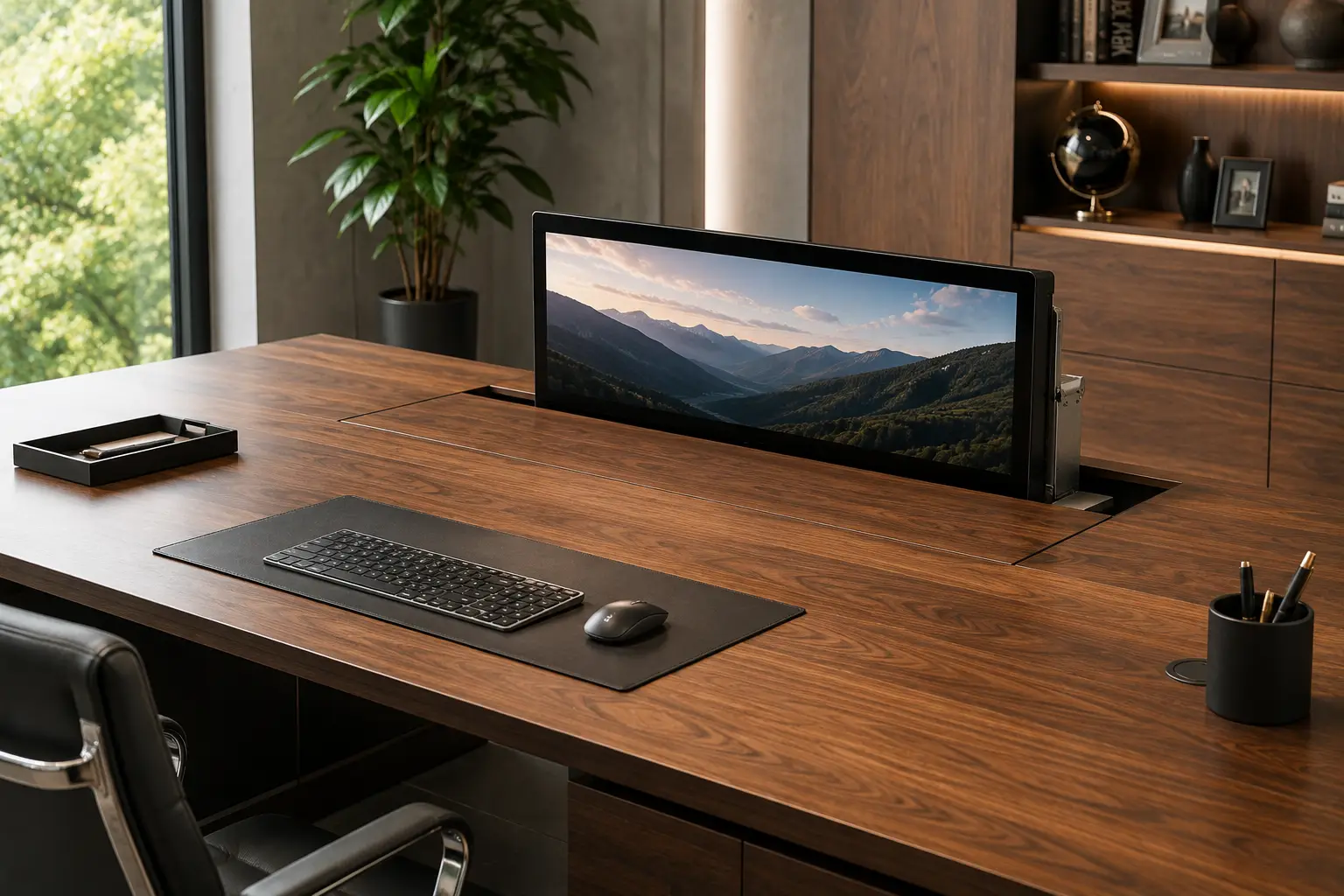
A desk with hidden monitor lift is a workstation designed to conceal a computer monitor beneath or inside the desktop when the screen is not being used. With a manual, gas-assisted, pneumatic, or motorized mechanism, the monitor can rise into viewing position when you need it and disappear back into the desk when you want a clean, unobstructed surface.
Unlike an ordinary computer desk, a desk with hidden monitor lift is designed around two functions at once: a productive workstation when the monitor is raised and a clean table or work surface when the display is lowered. This makes the concept particularly useful in multipurpose rooms, home offices, classrooms, conference spaces, and minimalist work areas.
If you’ve ever wanted a computer setup that disappears when you’re finished working, the difference is immediately obvious. A conventional monitor stays visible all day, even when the desk is being used for writing, meetings, crafts, or other activities. A hidden monitor lift changes that equation by moving the display below the desktop when it isn’t needed. Current hidden-monitor systems range from manual spring-assisted mechanisms to motorized vertical lifts, with some desks offering integrated cable management and keyboard storage as part of the design. (Computer Comforts)
But choosing the right system introduces a few variables of its own: monitor weight, screen size, lift travel, desktop depth, cable routing, mechanism type, and whether you want a complete desk or a lift mechanism that can be installed into a custom desktop. This guide breaks down exactly what a complete hidden-monitor workstation includes, compares seven real options worth considering in 2026, and walks through the practical decisions that determine whether your setup feels seamless or frustrating.
We’ll also cover the hidden monitor desk question specifically — whether you should buy a complete desk or build your own — plus how manual and motorized monitor lifts compare when you use the desk every day.
Quick Comparison: Top Desk With Hidden Monitor Lift Options at a Glance
| Product | Type | Lift System | Monitor / Storage Feature | Best For |
|---|---|---|---|---|
| RightAngle Delta View | Complete computer desk | Gas-assisted | Hidden monitor + keyboard/mouse storage | Classrooms and multipurpose workspaces |
| zioxi M1 Pop-Up Computer Desk | Complete hidden-monitor desk | Manual push-down mechanism | Hidden monitor + keyboard storage | Schools and shared workspaces |
| Computer Comforts Hide-Away LCD Table | Complete computer desk | Spring-assisted manual lift | Hidden LCD + keyboard tray | Education and training rooms |
| Firgelli Hidden Monitor Lift System | DIY lift solution | Motorized column lift | Concealed monitor installation | Custom home-office builds |
| Greene Manufacturing PCD Pop-Up Monitor Desk | Commercial workstation | Bearing trolley system | Hidden monitor compartment | Computer labs and classrooms |
| HorizonLine Monitor Lift Desk | Hidden-monitor workstation | Lift / pneumatic design | Concealed monitor workspace | Modern office environments |
| Custom Hidden Monitor Lift Desk | Custom furniture | Motorized or manual | Personalized monitor storage | Premium home offices |
Looking at the table above, the biggest decision is whether you want a complete desk with hidden monitor lift or a mechanism that you install into your own desktop. Complete systems such as RightAngle Delta View, zioxi M1, and Computer Comforts Hide-Away LCD Table are designed around the lifting mechanism from the beginning, which reduces compatibility problems. RightAngle’s Delta View, for example, uses a gas-assisted monitor lift that does not require power and includes integrated cable management and storage. (raproducts.com)
The DIY route is more flexible. A system such as the Firgelli motorized monitor lift can be built into a custom desktop, giving you more control over materials, dimensions, monitor placement, and overall appearance. Firgelli’s 2026 guide notes that column lifts are commonly suited to computer monitors in the roughly 15–35 lb range and emphasizes sizing the lift for the monitor plus the desktop lid resistance rather than monitor weight alone. (Firgelli Automations)
💬 Bookmark this comparison — it’s the fastest way to see which desk with hidden monitor lift matches your workspace before you scroll through all seven full reviews below.
Top 7 Desk With Hidden Monitor Lift Options: Expert Analysis
1. RightAngle Delta View — best complete hidden monitor desk
If you want a purpose-built desk with hidden monitor lift rather than modifying a normal desk yourself, the Delta View is one of the most straightforward options to consider.
The Delta View is designed as a single- or dual-user computer desk for classrooms and training environments. Its Hover vertical gas-assisted monitor lift allows the display to pop up with a light push and return below the desktop when it isn’t needed. The mechanism doesn’t require electrical power, which removes one of the biggest complications associated with motorized hidden-monitor systems. (raproducts.com)
The desk also incorporates storage for the keyboard and mouse, integrated cable management, removable access panels, and optional locking hardware. That combination makes it more than a desk with a monitor compartment — it is essentially a complete workstation that can switch between computer use and a clear tabletop. (raproducts.com)
The biggest advantage is simplicity. You don’t need to calculate actuator force, build a custom lid, or figure out how the cables should move when the monitor rises. The furniture and lift mechanism were designed as one system.
Pros:
- ✅ Gas-assisted monitor lift does not require power
- ✅ Monitor disappears beneath the desktop when not in use
- ✅ Integrated keyboard and mouse storage
- ✅ Built-in cable management
- ✅ Available in single and dual configurations
- ✅ Optional locking system
Cons:
- ❌ More specialized than a conventional home-office desk
- ❌ Primarily designed for institutional and training environments
- ❌ Complete furniture system can cost more than a DIY build
The Delta View makes the most sense when reliability and simplicity matter more than having complete control over the desk dimensions. It is particularly well suited to classrooms, training spaces, and rooms that need to switch quickly between computer work and other activities.
2. zioxi M1 Pop-Up Computer Desk — best for disappearing monitors
The zioxi M1 takes the hidden-monitor concept seriously: the desk can function as a normal table, then transform into a computer workstation when the monitor is raised.
The M1 uses a manual push-down-and-release mechanism. According to zioxi, pushing the mechanism down causes the computer screen, keyboard, and mouse to rise vertically, while pushing it down again hides the monitor inside the desk. The system is available in single, double, and triple configurations, as well as larger multi-user arrangements. (zioxi)
One of the strongest features is its flexibility. The manufacturer says the system can accommodate TFT monitors and all-in-one PCs, with options for display height and tilt adjustment. It also provides a dedicated tray for storing keyboards, mice, and other accessories when the workstation is hidden. (zioxi)
For institutions where security matters, zioxi also offers locking options and remote-management features through its onView system. That allows organizations to manage monitor positions, power, desk availability, and locking across multiple desks. (zioxi)
Pros:
- ✅ Monitor completely disappears into the desktop
- ✅ Manual operation avoids dependence on motors
- ✅ Available in single, double, and triple configurations
- ✅ Built-in keyboard and accessory storage
- ✅ Optional locking and security features
- ✅ Custom sizes and finishes available
Cons:
- ❌ Primarily targeted at commercial and educational environments
- ❌ Less practical for someone wanting a simple home-office desk
- ❌ Custom configurations can increase the overall cost
The M1 is especially interesting if the goal isn’t simply hiding a monitor but making the entire workstation disappear when it’s not being used.
3. Computer Comforts Hide-Away LCD Table — best manual monitor lift
If you prefer a mechanical system without motors, the Computer Comforts Hide-Away LCD Table is worth a look.
This desk with hidden monitor lift uses a heavy-duty spring-assisted mechanism rather than a motor, gas cylinder, pulley, or powered actuator. Computer Comforts says the system supports most flat-panel monitors in the 7–30 lb range and provides vertical and horizontal adjustment as well as pivot and swivel capability. (Computer Comforts)
The workstation also includes a keyboard and mouse tray, integrated cable-management trays, and removable access panels. When the monitor is lowered, the recessed bay helps create a clearer tabletop and sightline, which is particularly useful in classrooms and training rooms where the same surface needs to serve multiple purposes. (Computer Comforts)
Another advantage is that the system is available in single- and double-user configurations and can be customized with different laminate and paint combinations.
Pros:
- ✅ No electrical power required for the monitor lift
- ✅ Spring-assisted mechanism is straightforward to operate
- ✅ Supports many common flat-panel monitor sizes
- ✅ Horizontal, vertical, pivot, and swivel adjustment
- ✅ Integrated cable management
- ✅ Keyboard and mouse tray included
Cons:
- ❌ Less suitable for unusually heavy monitors
- ❌ Commercial-style design may not suit every home office
- ❌ Requires more dedicated furniture space than a simple monitor arm
For schools, training rooms, and multipurpose work areas, this is one of the more practical choices because the monitor can disappear without adding another powered device to the room.
4. Firgelli Hidden Motorized Monitor Lift — best for a DIY desk with hidden monitor lift
If you already have a desktop you love and don’t want to replace the entire desk, a motorized lift mechanism may be the better route.
Firgelli’s 2026 guide specifically covers how to build a desk with a hidden motorized monitor lift, including the desktop cutout, hinged lid, cable management, and actuator sizing. The guide notes that a column lift keeps the monitor guided vertically while the actuator provides the lifting force. (Firgelli Automations)
This approach gives you considerably more freedom. You can use a solid wood desktop, standing desk frame, custom office cabinet, or even a built-in workstation and add the monitor lift underneath it.
But DIY also introduces more variables. Firgelli points out that the actuator needs to lift not just the monitor but also the desktop lid and overcome friction in the mechanism. Its guide recommends leaving substantial force headroom rather than sizing the actuator exactly to the monitor’s weight. (Firgelli Automations)
Pros:
- ✅ Works with custom desktops
- ✅ Motorized operation
- ✅ Excellent flexibility for monitor placement
- ✅ Can create a highly minimalist finished appearance
- ✅ Suitable for custom home-office projects
- ✅ Allows control over desktop materials and dimensions
Cons:
- ❌ Requires DIY installation
- ❌ Desktop must be cut and modified
- ❌ Cable routing becomes more complicated
- ❌ Incorrect actuator sizing can cause problems
- ❌ More engineering work than buying a complete desk
This is the option we’d choose for someone who already has a high-quality desk and wants the hidden-monitor functionality without replacing the furniture.
5. Greene Manufacturing PCD Pop-Up Monitor Desk — best for computer labs
The Greene Manufacturing PCD is designed around shared workspaces where the computer needs to disappear when the workstation is being used for another purpose.
The PCD Series uses a rear internal compartment that accommodates an LCD monitor on a bearing trolley system. The work surface can be lifted to access the monitor, and the screen can then be stowed away when it isn’t required. The rear compartment also provides space for keyboard, mouse, and power-strip storage. (Greene Manufacturing)
That makes this desk with hidden monitor lift particularly useful in computer labs, classrooms, and training areas. Instead of leaving monitors permanently exposed, the workstation can be converted into a clearer table when the computers aren’t being used.
Pros:
- ✅ Concealed monitor compartment
- ✅ Designed for shared computer environments
- ✅ Keyboard and mouse storage
- ✅ Internal cable and power management space
- ✅ Durable workstation design
- ✅ Suitable for classroom and lab use
Cons:
- ❌ Commercial furniture rather than a typical home desk
- ❌ Requires more space than a compact workstation
- ❌ Pricing is generally quote-based
If you’re furnishing a classroom, computer lab, or training environment, this type of commercial workstation makes considerably more sense than trying to adapt ordinary home-office furniture.
6. HorizonLine Monitor Lift Desk — best modern hidden-monitor concept
The HorizonLine-style monitor lift desk is aimed at shoppers who want the clean appearance of a modern desk while keeping the technology hidden when it’s not needed.
A good hidden-monitor desk needs to solve more than the lifting motion. The monitor must fit inside the available compartment, cables must move without snagging, the lid must open and close without hitting the screen, and the monitor needs to reach a comfortable viewing height.
This is why monitor compatibility should always be checked before buying. Hidden monitor desks vary significantly in the size and type of display they can accommodate, and the available lift mechanisms can have different weight and travel limits. Current hidden-monitor guidance recommends checking monitor size, weight, lift travel, cable routing, and whether dual-monitor support is required before choosing a mechanism. (SmartBuy)
Pros:
- ✅ Clean minimalist appearance
- ✅ Conceals monitor clutter
- ✅ Useful for multipurpose rooms
- ✅ Can work well with modern office interiors
- ✅ Focuses on space efficiency
Cons:
- ❌ Compatibility varies by configuration
- ❌ Hidden mechanisms require additional desktop depth
- ❌ May cost more than a conventional desk
This is the style to consider when appearance matters just as much as workstation functionality.
7. Custom Hidden Monitor Lift Desk — best premium option
For a truly integrated setup, a custom desk with hidden monitor lift gives you the greatest control.
Instead of adapting the monitor to an existing compartment, you design the desk around your exact screen, viewing height, keyboard, speakers, computer, and cable requirements.
A custom build can combine a motorized lift with a hinged desktop panel, concealed cable channels, under-desk PC storage, wireless charging, power outlets, and even multiple monitor positions. Firgelli’s 2026 build guide specifically highlights the importance of designing the desktop cutout and cable path around the monitor’s movement. (Firgelli Automations)
The downside is obvious: custom furniture requires more money, planning, and installation work.
Pros:
- ✅ Fully customized dimensions
- ✅ Can support unique monitor configurations
- ✅ Maximum control over appearance
- ✅ Can integrate cable management and power
- ✅ Excellent for premium home offices
Cons:
- ❌ Highest overall cost
- ❌ Requires careful planning
- ❌ Motorized versions need electrical components
- ❌ Repairs and modifications can be more complicated
If you’re building a permanent home office and care about having a completely clean desktop when the computer is off, custom construction can be worth the investment.
How to Set Up a Desk With Hidden Monitor Lift, Step by Step
Getting the installation right is where most DIY builders struggle, so here’s the process to follow.
- Measure the monitor first. Record the screen width, height, depth, weight, and VESA mounting dimensions before selecting the lift.
- Choose the lift mechanism. Decide between manual, gas-assisted, spring-assisted, pneumatic, and motorized designs.
- Measure the required retracted height. The lift must fit completely below the desktop without interfering with drawers, legs, or other components.
- Plan the desktop opening. The opening needs enough clearance for the monitor and lid movement. Firgelli’s guide gives approximately 24–26 inches wide by 10–12 inches deep as a typical starting point for a 24-inch monitor, although the exact dimensions depend on the specific display and lift. (Firgelli Automations)
- Plan cable movement before installation. HDMI, DisplayPort, power, USB, and other cables need enough slack to move safely with the monitor.
- Install the lift securely. The mechanism should be mounted to a structurally sound part of the desk rather than relying only on a thin desktop panel.
- Test the full travel without the monitor first. Check the lid, hinges, clearance, and cable path before adding the expensive equipment.
- Install the monitor and balance the system. Make sure the lift can handle the combined monitor and lid load with sufficient capacity.
- Test repeatedly. Raise and lower the monitor several times and listen for rubbing, binding, cable tension, or uneven movement.
✨ Ready to build your hidden-monitor workstation? Compare the full lineup above and check the monitor size, lift capacity, and available desk depth before buying.
Common Mistakes to Avoid When Buying a Desk With Hidden Monitor Lift
Even experienced DIY builders get tripped up by a handful of predictable errors, and most of them are avoidable with a little planning.
The biggest mistake is choosing a lift based only on monitor weight. A motorized hidden monitor system may also need to lift a hinged desktop lid and overcome friction in the mechanism. Firgelli specifically warns that builders often size the actuator only for the monitor and forget the lid resistance, recommending additional force headroom instead. (Firgelli Automations)
Another common mistake is ignoring the monitor’s dimensions. A 32-inch monitor may fit comfortably on the desktop but be too wide or tall for the hidden compartment. Always measure the display itself rather than relying only on the advertised screen size.
Cable management is another major issue. A monitor that rises several inches or more needs cables with enough slack and a controlled route. Poor cable routing can cause HDMI or power cables to snag, bend sharply, or pull against the monitor ports.
Buyers also frequently forget about the desktop lid. The lid needs enough clearance to open without hitting the monitor, and it needs to close flush when the display is hidden.
Finally, don’t assume every hidden monitor lift works with every desk. Some systems are designed as complete furniture, while others are mechanisms intended for custom installation. A lift that works perfectly in a commercial workstation may require substantial modification to work in a standard home-office desk.
Desk With Hidden Monitor Lift vs. Traditional Computer Desk
The comparison users actually care about is real-world functionality rather than the novelty of hiding a monitor.
| Factor | Hidden Monitor Desk | Traditional Computer Desk |
|---|---|---|
| Monitor visibility | Hidden when not in use | Always visible |
| Desktop appearance | Clean when monitor is lowered | Monitor remains on surface |
| Setup complexity | Higher | Low |
| Cable management | Requires careful planning | Usually simple |
| Space efficiency | Excellent for multipurpose rooms | Good for dedicated offices |
| Cost | Usually higher | Generally lower |
| Maintenance | Lift mechanism requires attention | Minimal |
| Flexibility | Monitor can disappear | Monitor stays permanently positioned |
The biggest advantage of a desk with hidden monitor lift is flexibility. The same surface can function as a computer workstation and then become a clean table when the monitor is lowered.
A traditional computer desk wins on simplicity. There is no mechanism to install, no motor to maintain, and no hidden compartment taking up space beneath the desktop.
Neither system is automatically better. If you work eight hours a day at the same workstation, a conventional desk may be more practical. If your room serves multiple purposes or you strongly prefer a minimalist appearance, the hidden-monitor approach becomes much more compelling.
Desk With Hidden Monitor Lift for Beginners: What to Buy First
If your search led you here specifically looking for a desk with hidden monitor lift, the decision tree is simpler than it looks.
Start with a complete system such as RightAngle Delta View, zioxi M1, or Computer Comforts Hide-Away LCD Table if you don’t want to engineer the mechanism yourself. These products are designed around hidden monitor functionality from the beginning. (raproducts.com)
Choose a Firgelli motorized lift if you already own a desk or want to build a custom desktop around your monitor. This route offers considerably more flexibility but requires accurate measurements and careful cable management. (Firgelli Automations)
For classrooms and computer labs, commercial systems such as the Greene Manufacturing PCD are more appropriate because they are designed around shared workstations and concealed computer storage. (Greene Manufacturing)
And if aesthetics are your highest priority, a custom-built hidden monitor desk gives you the greatest freedom over materials, dimensions, monitor configuration, and overall appearance.
Hidden Monitor Desk: Do You Actually Need One?
Short answer: only if the ability to hide your monitor solves a real problem in your room.
A desk with hidden monitor lift makes the most sense when the same room needs to serve multiple functions. A home office might become a dining area, craft table, meeting space, or bedroom desk after work. A classroom can switch between computer-based instruction and lectures. A conference room can hide displays when they’re not needed.
The biggest benefit isn’t necessarily saving physical space. It’s reducing visual clutter. When the monitor disappears, the desk becomes a much cleaner surface.
For dedicated computer workstations where the monitor is always needed, the additional complexity may not be worth it.
Long-Term Cost and Maintenance
Buying the desk is only half the cost equation — keeping the lift mechanism working smoothly matters just as much.
A manual lift generally has fewer electronic components to worry about, while a motorized system adds power supplies, actuators, switches, and potentially control electronics. This doesn’t automatically make motorized systems unreliable, but it does give you more components that may eventually need service.
Cable management also deserves long-term attention. Inspect moving cables periodically for rubbing or excessive bending, especially if the monitor is raised and lowered multiple times every day.
For motorized systems, keep the lift mechanism free from objects that could obstruct its travel. A pencil, cable, or small accessory caught beneath a moving lid can interfere with the mechanism.
DIY systems require particular attention to mounting strength. The lift should remain firmly attached to the desk even when the monitor is fully extended.
Commercial systems can have an advantage here because the lift and furniture are engineered together. RightAngle, for example, incorporates cable management and removable access panels into the Delta View design. (raproducts.com)
Safety, Installation, and Standards for Hidden Monitor Desks
A hidden monitor lift involves moving mechanical components, so safety should be part of the design rather than an afterthought.
The first consideration is the lift’s rated capacity. Never assume that a lift rated for a certain monitor weight automatically accounts for the weight of the desktop lid or other moving components.
The second is pinch protection. Motorized systems should have appropriate safety features where moving panels can create pinch points. Some motorized monitor-lift systems specifically include anti-pinch functionality that stops or reverses the mechanism when an obstruction is detected. (Lyln AV Equipment Company Limited)
Cable routing is another safety issue. Cables should never be allowed to become trapped between moving components.
Finally, the desk itself needs to remain stable. A monitor rising several inches above a desktop changes the center of mass, especially with large displays. Make sure the desk frame is stable enough for the lift and monitor combination you are installing.
What to Expect: Everyday Performance
Specs only tell part of the story; here’s how these systems actually feel during everyday use.
A manual desk with hidden monitor lift is usually the simplest experience. You physically push or release the mechanism, the monitor rises, and the workstation is ready. There is no motor noise and no power requirement. RightAngle’s Delta View and Computer Comforts’ Hide-Away LCD Table are examples of systems built around this philosophy. (raproducts.com)
Motorized systems feel more premium because the monitor can rise at the push of a button. This is especially useful with heavier displays or when the desk is used multiple times per day. However, the mechanism needs sufficient force and careful installation.
The difference becomes even more noticeable with large monitors. A lightweight 24-inch display is relatively easy to lift, while a larger 32-inch or ultrawide display may require a more capable mechanism and more space below the desktop.
For multipurpose rooms, the hidden position is where the system really earns its value. When the monitor disappears, the surface can immediately become a writing area, meeting table, or general workspace.
Frequently Asked Questions
❓ What is a desk with hidden monitor lift?
❓ Can a desk with hidden monitor lift work with any monitor?
❓ Are hidden monitor lifts manual or motorized?
❓ Is a desk with hidden monitor lift worth it?
❓ Can I build a desk with hidden monitor lift myself?
Conclusion
A well-designed desk with hidden monitor lift solves a problem that ordinary computer desks simply don’t address: what to do with the monitor when you aren’t using the computer.
The right choice depends entirely on your priorities. RightAngle Delta View makes sense if you want a complete gas-assisted workstation with integrated storage and cable management. zioxi M1 is a strong option when you want the entire computer workstation to disappear into the desk. Computer Comforts Hide-Away LCD Table is particularly practical for education and training environments, while a Firgelli motorized lift is the better route for DIY builders who already have a desktop or want a completely customized setup. (raproducts.com)
Commercial systems such as the Greene Manufacturing PCD are better suited to classrooms and computer labs, while custom hidden-monitor furniture gives premium home-office users the most control over appearance and dimensions. (Greene Manufacturing)
Whichever direction you choose, the fundamentals stay the same: measure your monitor first, check the lift capacity, plan the cable path, make sure the desktop opening has enough clearance, and test the mechanism before putting your expensive monitor on it.
✨ Don’t miss these exclusive deals! 🔍 Take your desk with hidden monitor lift setup to the next level with this carefully curated lineup. Click a highlighted item to check current pricing and availability. These picks will help you create a cleaner, more flexible workspace without sacrificing everyday monitor functionality!
Recommended for You
- 7 Best Removable Desk Wheels for a Mobile Workspace (2026)
- Ergonomic Chair for Knee Pain: 7 Picks That Actually Help (2026)
- Monitor Arm Clamp: 7 Best Picks for 2026 (Don’t Overpay)
Disclaimer: This post contains affiliate links. As an Amazon Associate, I earn from qualifying purchases made through these links, at no additional cost to you.
✨ Found this article helpful? Share it with someone who needs it! 💬🤗