
In This Article
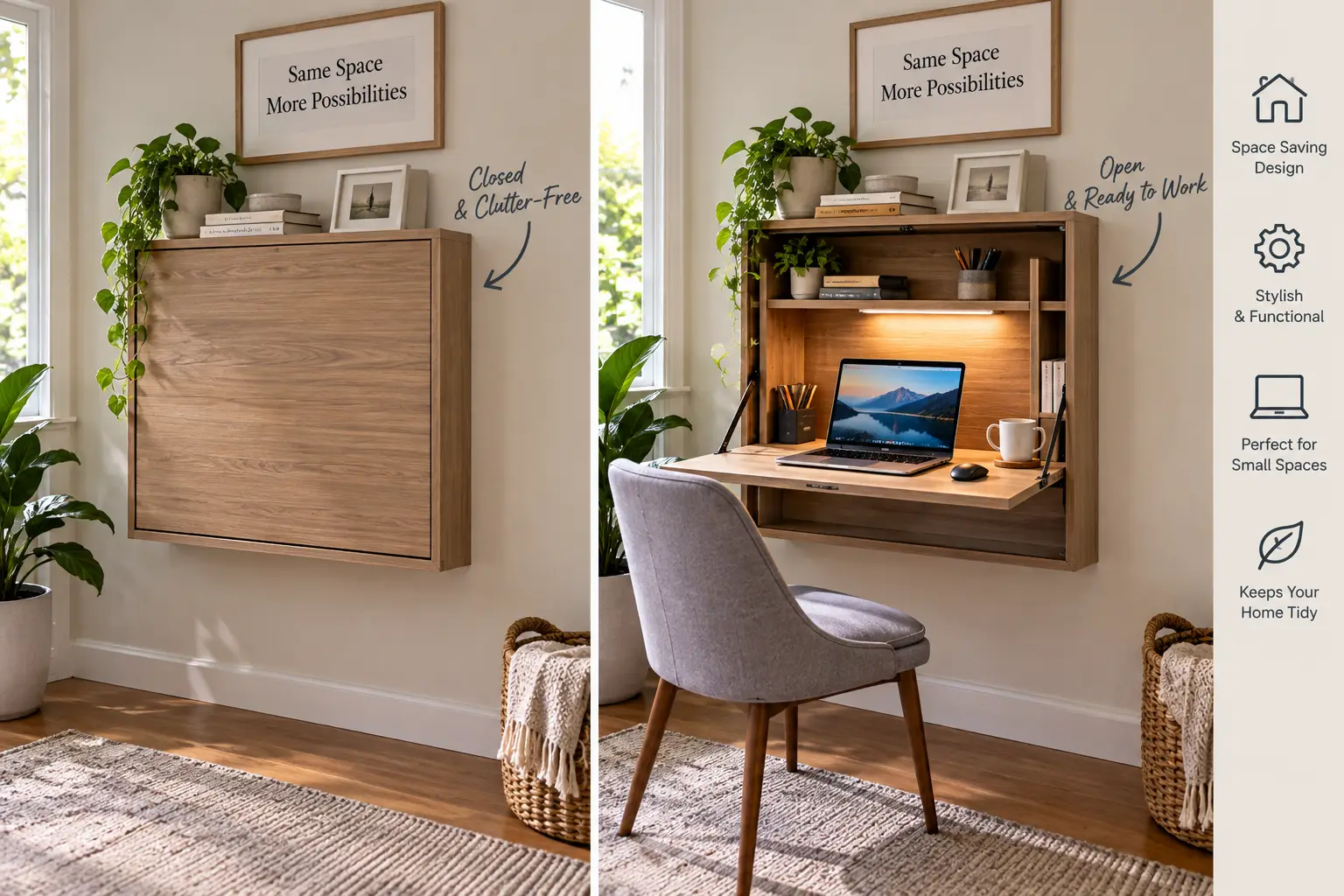
If your “home office” is really just a laptop balanced on a kitchen counter, you already know the problem: computer gear is bulky, cabled, and visually loud, and most rooms weren’t designed to hide it. A concealed computer desk solves that by folding your entire workstation — monitor, keyboard, tower, cables, and all — behind a door, panel, or wall-mounted cabinet the moment you’re done for the day.
What Is a Concealed Computer Desk? A concealed computer desk is a workstation designed to fully hide the monitor, keyboard, cables, and CPU behind doors, panels, or a fold-down front, so the room reads as a cabinet, armoire, or blank wall instead of an office when it’s closed.
That single design idea covers a surprisingly wide range of furniture: swing-door computer armoires, lockable file-cabinet desk combos, and compact wall-mounted fold-down units that disappear into a 4-inch-deep footprint. Picking the right style matters more than picking the “best” brand, because a studio-apartment renter and a homeowner converting a guest room have almost opposite needs. This guide walks through seven real, currently available products spanning entry-level fold-downs to a furniture-grade swing-door cabinet, then digs into how to choose, what to avoid, and how a concealed computer desk actually performs once the novelty wears off. As Wikipedia’s overview of computer desks explains, this category of furniture has always been about providing a working surface while housing or concealing office equipment, peripherals, and cabling — a concealed computer desk is really just that idea taken to its logical extreme, full concealment instead of partial.
Quick Comparison Table
| Product | Style | Price Range | Best For |
|---|---|---|---|
| Sauder Harvey Park Computer Cabinet | Swing-door armoire | Around $575–$750 | Full-room concealment |
| Tribesigns L-Shaped Desk with Lockable Cabinet | L-desk + locking file cabinet | Around $300–$450 | Home offices needing security |
| Tangkula Foldable Wall Mounted Desk | Fold-down wall cabinet | Around $80–$130 | Studio apartments |
| boknight Foldable Desk with Built-In Socket | Fold-down wall cabinet | Around $90–$150 | Renters needing an outlet |
| HOMCOM Wall Mounted Fold Out Desk | Fold-down wall cabinet | Around $90–$160 | Budget dorm or guest rooms |
| SEI Furniture Minford Fold-Out Desk | Secretary-style cabinet | Around $150–$250 | Living rooms and hallways |
| VINGLI Computer Armoire with Doors | Swing-door armoire | Around $200–$350 | Mid-size home offices |
Looking at the table above, the split is really between two families: fold-down wall units that trade storage volume for a tiny footprint, and armoire-style cabinets that hide more gear but need floor space. The Sauder Harvey Park Computer Cabinet sits at the top for anyone who wants a full workstation that vanishes completely, while the Tangkula Foldable Wall Mounted Desk and similar fold-downs are built for square footage most desks can’t touch. Buyers juggling both a desktop tower and document storage should lean toward the Tribesigns or VINGLI cabinets, since neither fold-down design has room for a full-size CPU.
💬 One click helps other shoppers make an informed choice too! 😊
Top 7 Concealed Computer Desks: Expert Analysis
1. Sauder Harvey Park Computer Cabinet — most complete concealment
The Sauder Harvey Park Computer Cabinet is the closest thing on this list to a piece of furniture that simply doesn’t look like a desk at all. Behind its swing-out doors sits a slide-out keyboard and mouse shelf, a dedicated CPU bay, a lower file drawer with full-extension slides, and cubbyhole storage for pens, notes, and a cork bulletin board built into the left door. Every one of those features earns its keep: the flip-down molding over the keyboard tray means you’re not fighting a fixed shelf height, and the barrister-style lower door flips up and slides back into the cabinet rather than swinging out and blocking your knees, which matters a lot in a tight room.
What most buyers overlook with a cabinet like this is that “furniture-grade” also means furniture-scale — this is a genuinely heavy, freestanding piece, so it suits a den or spare bedroom far better than a studio apartment. Reviews consistently report that assembly takes two people and roughly two to three hours, but that the finished cabinet feels sturdy rather than particle-board flimsy, which is a common complaint about cheaper armoires. It’s best for homeowners who want a dedicated concealed computer desk that reads as a walnut cabinet in a formal living space, and less suited to renters who’ll need to disassemble it for a move.
Pros:
- ✅ Genuinely hides monitor, CPU, and cables completely
- ✅ Slide-out keyboard shelf plus a lockable-style file drawer
- ✅ Furniture-grade walnut finish suits formal rooms
Cons:
- ❌ Heavy and awkward to move or reassemble
- ❌ Takes real floor space compared to wall-mounted options
At a price point around $575–$750, the Sauder Harvey Park Computer Cabinet is the priciest pick here, and it earns that price mainly through concealment quality and durability rather than smart-features — check the current price before buying, since furniture pricing shifts with promotions.
2. Tribesigns L-Shaped Desk with Lockable Cabinet — best for security-conscious buyers
The Tribesigns L-Shaped Desk with Lockable Cabinet pairs a 63-inch L-shaped work surface with a rolling lateral file cabinet that has locking cabinet doors and a hanging-file drawer — a rare combination on this list, since most concealed computer desk designs sacrifice either desk space or lock security to hit their price point. The cabinet’s four casters let you park it out of sight in a closet or against a wall when you’re not working, effectively making the “concealment” mobile rather than fixed in place.
The practical upside is that a locking cabinet door protects paperwork, external drives, or a spare laptop, not just clutter — a genuine consideration for households with kids or shared living spaces. Reviews consistently mention that the heavy-duty metal frame and 1.2-inch compressed board keep the desktop from flexing under a monitor arm, though a handful of buyers note the cabinet’s swivel wheels can drift on hardwood floors without a rug or wheel locks. This model is best for people who need an actual, sizeable desk (not just a fold-down shelf) but still want the file cabinet — and by extension, the clutter — visually and physically separated from the desk itself.
Pros:
- ✅ Full-size 63-inch L-shaped work surface
- ✅ Locking cabinet doors for real security
- ✅ Rolling casters make repositioning easy
Cons:
- ❌ Two-piece design needs more total floor space
- ❌ Casters can drift on hard flooring without locks
In the $300–$450 range, this is a strong value pick if you need both desk real estate and a genuinely lockable concealed storage cabinet in one set.
3. Tangkula Foldable Wall Mounted Desk — lightest footprint for tiny rooms
The Tangkula Foldable Wall Mounted Desk is a floating cabinet that folds flat against the wall when not in use and drops down into a work surface with built-in shelving and hooks when you need it. Because the entire unit mounts to the wall rather than sitting on the floor, it reclaims nearly all of the square footage a traditional desk would consume — a genuine advantage in apartments where every square foot of floor space affects usable room.
What the spec sheet doesn’t say, but the design implies, is that this style trades storage volume for space savings: there’s enough room for a laptop, a small monitor, and a few supplies on the shelves, but not a desktop tower or a printer. Reviews consistently point to straightforward installation with the included hardware, provided you’re mounting into studs rather than bare drywall — a detail worth taking seriously, since furniture tip-overs injure thousands of people in the U.S. every year according to Consumer Reports’ anchoring guide, and any wall-mounted piece needs to be anchored properly. This concealed computer desk is best for students, renters, and anyone furnishing a small home office who values reclaiming floor space over maximizing storage.
Pros:
- ✅ Near-zero floor footprint when folded up
- ✅ Simple hardware-included wall installation
- ✅ Built-in hooks and shelving for small items
Cons:
- ❌ Not enough depth for a desktop tower
- ❌ Requires solid stud mounting for full weight capacity
At around $80–$130, it’s one of the most affordable ways to add a legitimate hidden computer desk to a room that has no space to spare.
4. boknight Foldable Desk with Built-In Socket — most convenient power access
The boknight Foldable Desk with Built-In Socket takes the same fold-down wall-cabinet concept as the Tangkula but adds a built-in electrical socket inside the cabinet itself, which solves one of the most common annoyances with wall-mounted computer desks: routing an extension cord to a laptop charger every time you fold the desk down. When folded up, it becomes a shallow floating cabinet; folded down, it reveals a full work surface with the outlet positioned for easy laptop or monitor charging.
This is the kind of feature that looks minor on paper but changes daily use significantly — Based on comparing the specs against competing fold-downs, the built-in socket is what separates a desk you’ll actually use every day from one that becomes a plant shelf because plugging in is annoying. Reviews consistently report that the mid-century styling looks intentional rather than utilitarian, which matters if the desk will live in a bedroom or living room rather than a dedicated office. It’s best for renters and small-space dwellers who want a genuinely hidden desk with storage but refuse to deal with visible cords every time they sit down to work.
Pros:
- ✅ Built-in socket eliminates extension-cord hassle
- ✅ Mid-century design blends into living spaces
- ✅ Storage compartment stays hidden when folded
Cons:
- ❌ Socket placement isn’t adjustable
- ❌ Weight capacity is lower than freestanding desks
Priced around $90–$150, this is a smart upgrade pick over basic fold-downs if daily laptop charging is part of your routine.
5. HOMCOM Wall Mounted Fold Out Desk — best budget entry point
The HOMCOM Wall Mounted Fold Out Desk rounds out the fold-down category with a straightforward, no-frills design: a wall-mounted cabinet with a fold-out desktop and a storage shelf, sold at one of the lowest price points among wall-mounted concealed computer desk options. HOMCOM also sells a version with an attached blackboard panel, which doubles as a household message center when the desk is folded shut — a small but genuinely useful bit of multi-purpose design.
The tradeoff for the low price is fairly predictable: the engineered-wood construction and single storage shelf mean this isn’t built for heavy daily laptop use or a monitor arm, and reviews consistently describe it as best suited to occasional tasks — paying bills, light homework, or a temporary work-from-home setup — rather than an all-day workstation. What most buyers overlook is that “fold out” also means the hinge hardware takes the brunt of repeated daily use, so treating it gently extends its lifespan considerably. This concealed computer desk is best for guest rooms, mudrooms, or anyone testing whether a wall-mounted setup fits their routine before spending more.
Pros:
- ✅ Lowest price point in the fold-down category
- ✅ Optional blackboard panel adds household use
- ✅ Compact enough for hallways and mudrooms
Cons:
- ❌ Lighter-duty hinges than pricier competitors
- ❌ Limited storage for anything beyond a laptop
At roughly $90–$160, it’s an accessible way to try a hidden computer desk without a major investment.
6. SEI Furniture Minford Fold-Out Convertible Desk — best for living-room placement
The SEI Furniture Minford Fold-Out Convertible Desk takes a different approach from the wall-mounted units: it’s a 22-inch-wide freestanding secretary-style cabinet that looks like a narrow accent cabinet when closed and unfolds into a compact desk when opened. Because it doesn’t require wall mounting, it can be repositioned freely, which makes it a realistic option for renters who can’t drill into walls or who move frequently.
Here’s what to weigh with this style: the narrow footprint keeps it from dominating a living room or hallway, but it also limits desktop depth for a larger monitor setup. Reviews consistently describe the black finish as blending well with existing furniture rather than reading as “office equipment,” which is precisely the point of a concealed computer desk in a shared living space. It’s best for people who want a computer desk with doors that genuinely disappears among other furniture — a bookshelf, a console table, a sideboard — rather than announcing itself as a workstation.
Pros:
- ✅ No wall mounting required, fully freestanding
- ✅ Narrow profile fits hallways and living rooms
- ✅ Finish blends with existing furniture styles
Cons:
- ❌ Limited desktop depth for larger monitors
- ❌ Smaller storage capacity than armoire-style cabinets
Expect to pay in the $150–$250 range, positioning it as a solid mid-tier pick between fold-down cabinets and full armoires.
7. VINGLI Computer Armoire with Doors — best mid-range full concealment
The VINGLI Computer Armoire with Doors offers swing-door concealment similar in concept to the Sauder cabinet but at a noticeably lower price point, making it the most accessible way to get genuine full-cabinet concealment rather than a compact fold-down. Inside, it typically includes a keyboard shelf, an open shelf for a CPU or accessories, and adjustable interior shelving behind lockable-style doors.
On paper, this means you get most of the concealment benefit of a premium armoire — hiding a monitor, keyboard, and cables completely behind closed doors — without paying premium-armoire prices. What the spec sheet doesn’t say, but aggregated reviews reveal, is that engineered-wood armoires in this price tier are noticeably lighter and easier to move than solid furniture-grade cabinets like the Harvey Park, which is a genuine upside for anyone who anticipates rearranging a room. It’s best for buyers who want a true computer armoire desk experience — closed doors, full concealment, dedicated cubbies — without committing to a $600+ piece of furniture.
Pros:
- ✅ Full swing-door concealment at a mid-range price
- ✅ Lighter and easier to reposition than premium armoires
- ✅ Adjustable interior shelving for varied gear
Cons:
- ❌ Less structurally heavy-duty than premium cabinets
- ❌ Interior storage smaller than the Harvey Park
At around $200–$350, the VINGLI Computer Armoire with Doors is the value sweet spot for shoppers who specifically want a closed-door cabinet rather than a wall-mounted fold-down.
Quick Recap: All 7 Picks at a Glance
| Product | Concealment Style | Ideal Room | Verdict |
|---|---|---|---|
| Sauder Harvey Park Computer Cabinet | Full swing-door armoire | Den, spare bedroom | Best overall concealment |
| Tribesigns L-Shaped Desk with Lockable Cabinet | Desk + locking cabinet | Home office | Best for security |
| Tangkula Foldable Wall Mounted Desk | Wall fold-down | Studio apartment | Best space-saver |
| boknight Foldable Desk with Built-In Socket | Wall fold-down | Rental apartment | Best for power access |
| HOMCOM Wall Mounted Fold Out Desk | Wall fold-down | Guest room | Best budget pick |
| SEI Furniture Minford Fold-Out Desk | Freestanding secretary cabinet | Living room, hallway | Best furniture blend |
| VINGLI Computer Armoire with Doors | Full swing-door armoire | Home office | Best value armoire |
Read across these seven picks and a pattern emerges: price correlates more with concealment completeness and build weight than with brand name. The Tangkula, boknight, and HOMCOM fold-downs all solve the same problem — near-zero floor footprint — at similar price points, so the real decision between them comes down to whether you need a built-in outlet or extra storage. Buyers deciding between Sauder and VINGLI should note that both deliver true full concealment, but the price gap reflects material weight and hardware quality more than functional differences.
How to Choose a Concealed Computer Desk
Picking the right concealed computer desk comes down to a short list of decisions that matter more than color or brand:
- Measure your wall space, not just floor space. Wall-mounted fold-downs need clearance to swing open fully, which can eat more vertical space than expected.
- Decide whether you need a full CPU tower to fit. Most fold-down desks only accommodate a laptop; armoire-style cabinets are the only ones on this list built for a full desktop tower.
- Check the weight rating against your actual monitor and equipment. A hidden computer desk that flexes under a 27-inch monitor will loosen hinges faster than the listed rating suggests.
- Confirm mounting requirements before buying. Wall-mounted models need stud access; freestanding armoires don’t, which matters enormously for renters.
- Factor in daily friction. A desk that takes real effort to fold down or open tends to get used less — the built-in socket on the boknight Foldable Desk is a good example of removing friction rather than adding features.
- Think about noise and neighbors. Hinges and cabinet doors in apartment buildings can be surprisingly loud; look for soft-close hardware in reviews if you’re in shared housing.
- Match the finish to the room it’ll actually live in, not the room you’re currently planning around, since concealed desks tend to outlast redecorating cycles.
Running through this checklist before buying prevents the single most common regret buyers report: choosing a compact fold-down desk and then discovering it can’t fit a desktop tower, printer, or second monitor once the “temporary” home office becomes permanent.
Concealed Computer Desk vs Open Computer Desk: Why Hide Your Setup?
An open computer desk keeps everything visible and instantly accessible — no doors to open, no folding required, just sit down and work. A concealed computer desk trades a few seconds of setup time for a room that doesn’t read as an office the rest of the day. The right choice really depends on how the room functions when you’re not working.
In a dedicated home office, an open desk usually wins on convenience: multitasking between a monitor, notes, and a second screen is faster without doors in the way, and cable management systems built into open desks (grommets, trays, under-desk baskets) handle clutter reasonably well on their own. But in any multi-purpose room — a bedroom, living room, guest room, or studio apartment — a concealed computer desk earns its keep by letting the room serve its primary purpose the other 20 hours of the day. Reviews across the fold-down and armoire categories consistently mention this exact tradeoff: buyers accept slightly less convenience in exchange for a room that photographs and feels like a bedroom or living room rather than an office annex.
There’s also a resale and rental angle worth considering. A wall-mounted concealed computer desk like the Tangkula Foldable Wall Mounted Desk requires drilling into studs, which isn’t reversible without patchwork, while a freestanding option like the SEI Furniture Minford Fold-Out Convertible Desk or the VINGLI Computer Armoire with Doors can simply be moved out when you relocate. For renters specifically, that distinction often outweighs the small footprint advantage of wall mounting.
Wall-Mounted Fold-Down Desks vs Freestanding Computer Armoires
| Factor | Wall-Mounted Fold-Down | Freestanding Armoire |
|---|---|---|
| Floor footprint | Near zero | Moderate to large |
| Installation | Requires stud mounting | No installation needed |
| CPU tower fit | Rarely | Usually |
| Move-friendly | Difficult (wall-anchored) | Easy |
| Typical price | $80–$180 | $200–$750 |
| Best for | Studios, renters short on floor space | Home offices, permanent setups |
The table makes the tradeoff explicit: wall-mounted fold-downs like the Tangkula Foldable Wall Mounted Desk and boknight Foldable Desk with Built-In Socket win decisively on footprint but lose on both storage capacity and moving flexibility. Freestanding armoires like the VINGLI Computer Armoire with Doors and Sauder Harvey Park Computer Cabinet flip that equation, sacrificing some floor space in exchange for genuinely fitting a full computer setup and traveling with you to a new address. Neither style is objectively better — the right pick depends entirely on whether floor space or storage capacity is the scarcer resource in your specific room.
✨ Don’t miss these exclusive deals! 🔍 Take your home office setup to the next level with this carefully curated lineup. Click a highlighted item to check current pricing and availability. These picks will help you reclaim your space without sacrificing a real workstation.
Common Mistakes to Avoid When Buying a Concealed Computer Desk
Even with a clear favorite in mind, a handful of avoidable mistakes account for most of the buyer’s-remorse reviews across this category.
Mistake 1: Ignoring stud placement before buying a wall-mounted model. A concealed computer desk that hangs on drywall anchors alone is a tip-over and pull-out risk once loaded with a monitor and books — studs are non-negotiable for anything heavier than a laptop.
Mistake 2: Underestimating hinge fatigue. Fold-down desks get opened and closed daily; cheaper hinge hardware loosens faster than buyers expect, so checking review mentions of “wobble after months” is worth the extra five minutes of research.
Mistake 3: Assuming “computer desk” means room for a tower. Several products in this category, including most wall-mounted fold-downs, are laptop-only by design — verify interior depth before assuming a desktop PC will fit.
Mistake 4: Skipping the weight-capacity math. A 27-inch monitor, keyboard, and a stack of books can easily exceed a lightweight fold-down’s rated capacity even if none of those items looks heavy individually.
Mistake 5: Buying for the photo, not the room. A concealed computer desk that looks great in a showroom photo can feel cramped in a narrow hallway — measuring the actual swing radius of doors and fold-down panels prevents this.
Avoiding these five mistakes upfront does more for long-term satisfaction than choosing between any two similarly specced products.
What to Expect: Everyday Performance
Spec sheets rarely capture what a concealed computer desk actually feels like to live with day to day. In practice, the fold-down and swing-door mechanisms add somewhere between five and fifteen seconds to your start-of-work and end-of-work routine — trivial in isolation, but noticeable if you’re constantly switching between tasks throughout the day rather than settling in for one long session.
Cable management is the other everyday factor that spec sheets gloss over. Armoire-style cabinets like the Sauder Harvey Park Computer Cabinet and VINGLI Computer Armoire with Doors have enough interior depth to loosely coil cables behind the CPU shelf, so closing the doors doesn’t require unplugging anything. Fold-down desks are less forgiving: because the desktop panel itself becomes the door, any cable running to a wall outlet needs a pass-through slot or, as with the boknight Foldable Desk with Built-In Socket, an outlet mounted inside the cabinet — without one of those two solutions, you’re unplugging your laptop charger every single time you close the desk, which gets old fast.
Sound is a smaller but real consideration too, and it ties back to a broader ergonomics point: a healthy workstation setup should adapt to the environment it’s used in rather than forcing a one-size-fits-all layout. A hinge that clunks shut in an open-plan apartment is a different problem than the same hinge in a detached home office, so it’s worth reading reviews specifically from apartment dwellers when evaluating fold-down models.
Concealed Computer Desks for Small Apartments, Dorms, and Renters
Renters and small-space dwellers face two constraints that homeowners generally don’t: limited ability to modify walls, and the real possibility of moving within a year or two. Both constraints point toward specific picks on this list.
For dorm rooms and studio apartments where wall modification is off the table entirely, freestanding options like the SEI Furniture Minford Fold-Out Convertible Desk deliver concealment without a single screw going into a wall — it simply sits against a wall like any other cabinet and can be carried out at move-out. For renters who do have permission to mount into studs (worth confirming with a landlord in writing), the Tangkula Foldable Wall Mounted Desk or boknight Foldable Desk with Built-In Socket deliver the smallest possible footprint, which matters enormously in rooms under 200 square feet.
A practical tip that applies to nearly every renter scenario: buy anchor hardware rated for your actual wall type before mounting anything, and patch and re-paint the mounting holes at move-out rather than leaving them exposed — a five-minute job that avoids a deposit dispute entirely. Budget-conscious renters furnishing a first apartment should also weigh the HOMCOM Wall Mounted Fold Out Desk against the freestanding VINGLI Computer Armoire with Doors: the HOMCOM wins on price and footprint, while the VINGLI wins on capacity and reusability across future apartments.
How to Set Up and Maintain Your Concealed Computer Desk
Getting a concealed computer desk right on day one prevents most of the frustration that shows up in negative reviews months later.
Locate studs before you measure anything. For any wall-mounted model, run a stud finder across the intended wall first, then plan the desk’s position around stud locations rather than the reverse — centering a design choice around convenience over structural support is the single most common installation mistake.
Dry-fit before committing to screws. Hold the mounting bracket or cabinet frame against the wall and mark hole locations precisely; fold-down hinges are unforgiving of even small misalignments, since a crooked mount makes the desktop panel bind when opening or closing.
Test the swing radius with the desk empty first. Before loading a monitor or books onto a fold-down panel, open and close it several times to confirm nothing — a door frame, a light switch, a floor lamp — interferes with the motion.
Establish a light maintenance routine. Tighten hinge screws every few months, since daily opening and closing naturally loosens hardware over time; a loose hinge caught early is a thirty-second fix, while one ignored for a year can crack the surrounding panel.
Keep cables coiled loosely, not zip-tied tight, inside armoire-style cabinets, so opening the doors doesn’t yank a connector loose — a small habit that meaningfully extends the life of your cable connections.
Following this sequence during the first 30 days — stud location, dry fit, swing test, and a maintenance reminder set on your phone — heads off the majority of complaints that show up in one- and two-star reviews across this entire category.
Real-World Scenarios: Matching the Right Concealed Desk to Your Life
The graduate student in a 300-square-foot studio. Budget is tight, the desk needs to disappear completely between study sessions, and there’s no tolerance for lost floor space. The Tangkula Foldable Wall Mounted Desk or HOMCOM Wall Mounted Fold Out Desk fits this profile well — both cost under $160, mount flush to a wall, and handle laptop-only use without complaint.
The remote worker sharing a living room with a partner or roommate. The desk needs to look like furniture, not office equipment, and ideally shouldn’t require wall modification since the lease may not allow it. The SEI Furniture Minford Fold-Out Convertible Desk or VINGLI Computer Armoire with Doors both solve this: freestanding, furniture-styled, and closeable in seconds before guests arrive.
The homeowner converting a guest bedroom into a permanent home office. Space isn’t as constrained, security for paperwork matters, and a full desktop tower needs to fit somewhere. The Tribesigns L-Shaped Desk with Lockable Cabinet or Sauder Harvey Park Computer Cabinet are built for exactly this — real desk space, real storage, and in the Tribesigns’ case, an actual lock.
Matching your situation to one of these three profiles — rather than starting from a specific product and working backward — tends to produce far higher satisfaction than shopping by price alone.
Long-Term Cost and Maintenance
The sticker price of a concealed computer desk is only part of the total cost of ownership. Wall-mounted models add a modest but real one-time cost for proper anchoring hardware if it isn’t included — typically $10–$20 for quality metal brackets rather than the plastic hardware sometimes bundled with budget units. Freestanding armoires avoid that cost entirely but may require professional or DIY assembly help, especially heavier pieces like the Sauder Harvey Park Computer Cabinet, where reviews consistently recommend a second set of hands.
| Cost Factor | Fold-Down Wall Desks | Freestanding Armoires |
|---|---|---|
| Upfront price | Lower | Higher |
| Anchoring hardware | Sometimes extra | Not needed |
| Assembly difficulty | Easy, 1 person | Moderate–hard, 2 people |
| Expected lifespan | 3–6 years typical | 6–10+ years typical |
| Resale/move value | Low (wall-anchored) | Moderate (portable) |
Interpreting this table: fold-down desks like the boknight Foldable Desk with Built-In Socket win on upfront cost but tend to show hinge wear sooner given daily folding, while armoire-style pieces like the VINGLI Computer Armoire with Doors cost more initially but last longer and retain value when moved to a new home. For buyers planning to stay put for years, the lower long-term cost often favors the pricier armoire; for short-term renters, the cheaper fold-down usually wins on total value since it won’t need to survive a decade of use.
Safety, Regulations, and Standards
Safety matters more with concealed computer desks than with standard desks, specifically because wall-mounted models are, by definition, anchored furniture holding real weight above the floor. The CPSC has reported an estimated annual average of 22,500 Americans requiring hospital emergency-department treatment for tip-over injuries, with nearly 44% of those injured being children under 18 — a statistic that applies to furniture broadly, not desks specifically, but it underscores why proper anchoring isn’t optional.
For any wall-mounted concealed computer desk, the CPSC’s Anchor It! campaign recommends mounting into wall studs wherever possible and avoiding plastic zip-tie style anchors, which regulators have flagged as prone to becoming brittle over time. Metal L-brackets, though they require slightly more installation effort, hold up far better under repeated daily folding and closing than lightweight plastic hardware.
For freestanding armoires and cabinets, the relevant safety question shifts from wall anchoring to tip stability — a fully loaded upper cabinet with doors open can shift its center of gravity forward, so placing heavier items on lower shelves is worth doing even without a formal stability standard requiring it. On the ergonomics side, OSHA’s computer workstation guidance doesn’t set binding standards for home furniture, but its core principle — positioning the monitor, keyboard, and chair to keep wrists and neck neutral — applies just as much to a fold-down desk as to a full-size office setup, and it’s worth checking that a compact concealed desk doesn’t force an awkward monitor height before committing to daily use.
Frequently Asked Questions
❓ Is a concealed computer desk sturdy enough for a full desktop computer?
❓ Do I need to mount a wall computer desk into studs?
❓ How much does a concealed computer desk cost?
❓ Can renters use a concealed computer desk without damaging walls?
❓ What's the difference between a hidden computer desk and a computer armoire?
Conclusion
A concealed computer desk isn’t a single product category so much as a spectrum — from a $90 wall-mounted panel that disappears into four inches of depth, to a $700 furniture-grade armoire that hides an entire workstation behind cabinet doors. The right pick genuinely depends on which resource is scarcer in your home: floor space, wall permission, or storage capacity. Renters and studio dwellers tend to land on fold-down options like the Tangkula Foldable Wall Mounted Desk or boknight Foldable Desk with Built-In Socket, while homeowners setting up a permanent, secure workspace usually get more long-term value from the Tribesigns L-Shaped Desk with Lockable Cabinet or Sauder Harvey Park Computer Cabinet.
Whichever style fits, the buying process is the same: confirm stud locations or floor space before ordering, check the interior dimensions against your actual equipment (not just “a laptop”), and budget for proper metal anchoring hardware rather than the plastic hardware sometimes bundled at the lowest price tiers. Do that groundwork up front, and a concealed computer desk becomes one of the rare pieces of furniture that genuinely solves a daily annoyance instead of just rearranging it.
✨ Ready to reclaim your space? Compare today’s prices on these seven concealed computer desk picks and find the one that fits your room. 🛋️
Recommended for You
- 7 Best Free Standing Dual Monitor Stands in 2026 (No Clamp)
- Best Dual Monitor Floor Stand: 7 Top Picks for 2026
- Low Profile Computer Monitor Stand: 7 Best Picks for 2026
Disclaimer: This post contains affiliate links. As an Amazon Associate, I earn from qualifying purchases made through these links, at no additional cost to you.
✨ Found this article helpful? Share it with someone who needs it! 💬🤗