
In This Article
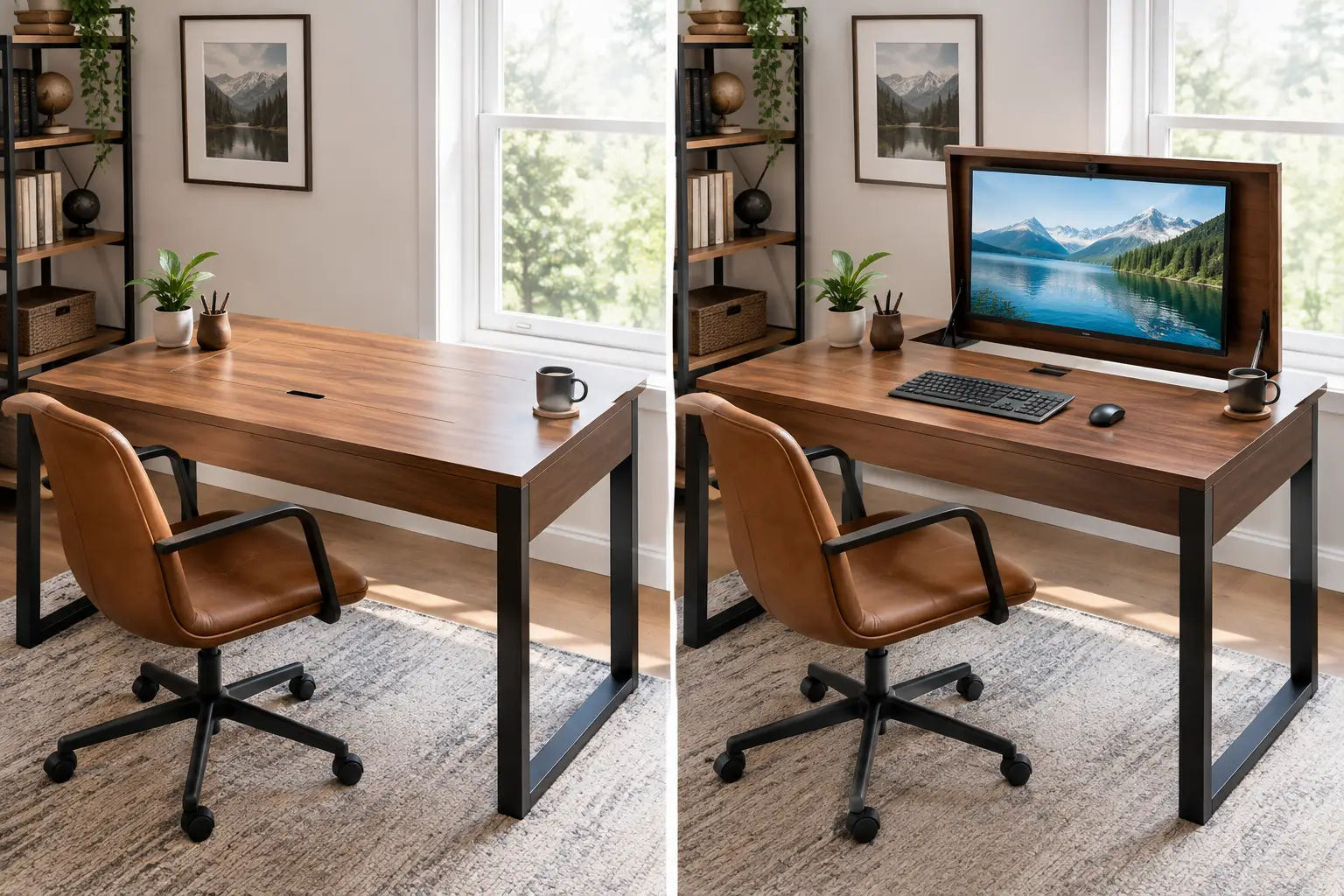
Why a Hidden Computer Monitor Desk Is the Smartest Upgrade for Small Spaces
A hidden computer monitor desk solves a problem most of us never planned for: the home office that also has to be a living room, a guest room, or a dining nook. When the workday ends, a 27-inch screen staring at you from the corner doesn’t exactly scream “relax.” And if you live in a studio apartment, it’s often the single biggest piece of visual clutter in the room.
Here’s the good news. You don’t have to choose between a real workstation and a calm space. A hidden computer monitor desk lets the screen disappear — behind armoire doors, down into a motorized lift, or under a flip-up lid — so the room goes back to being a room in seconds.
What Is a hidden computer monitor desk?
A hidden computer monitor desk is a workstation designed to conceal your screen when it’s not in use. The three main types are computer armoires with closing doors, pop up monitor desk builds using a motorized lift that lowers the display into a cabinet, and lift-top desks with internal compartments for laptops and accessories.
The concept isn’t new, by the way. The enclosed armoire has been hiding household clutter for centuries, and the computer armoire simply adapted that idea for the PC era. What has changed in 2026 is the choice: affordable motorized lifts now make the “screen rises out of the desk” trick something you can build at home rather than commission from a custom furniture maker.
In this guide, you’ll find seven real options available on amazon.com, from classic closed-door armoires to DIY-friendly lift mechanisms. Every pick comes with honest analysis based on spec sheets and aggregated customer feedback — including the drawbacks the listings don’t advertise. You’ll also get setup tips, buyer scenarios, safety advice, and a clear framework to choose the right style for your space and budget.
Quick Comparison: The Best Hidden Computer Monitor Desk Options at a Glance
| Product | Hiding Method | Best For | Approx. Price Range |
|---|---|---|---|
| Sauder Harbor View Computer Armoire | Closing doors | All-around closed-door office | $350–$500 |
| Sauder Carson Forge Armoire | Closing doors | Traditional living rooms | $400–$550 |
| Sauder Palladia Armoire | Closing doors | Maximum storage | $500–$800 |
| Sauder Craft and Sewing Armoire | Closing doors + fold-out surface | Multi-hobby households | $300–$500 |
| VEVOR Motorized TV Lift Stand (120 lbs, 32–70″) | Motorized pop-up | DIY lift desks, larger screens | $150–$250 |
| VEVOR Motorized TV Lift Stand (132 lbs, cabinet-rated) | Motorized pop-up | Cabinet and credenza builds | $150–$250 |
| Costway Lift Top Computer Desk | Lift-top lid + compartments | Laptop users on a budget | $90–$150 |
Looking at the table, the split is clear: armoires are the plug-and-play answer, while the VEVOR lifts are components for a custom build. The Sauder Harbor View Computer Armoire is the safest single recommendation for most readers, but if you want the wow-factor of a screen rising from a desktop, a VEVOR Motorized TV Lift Stand plus a simple cabinet is the most affordable route. The Costway Lift Top Computer Desk only makes sense if your “monitor” is really a laptop.
💬 One click helps other shoppers make an informed choice too! 😊
Top 7 Hidden Computer Monitor Desk Picks: Expert Analysis
1. Sauder Harbor View Computer Armoire — best all-around closed-door office
The Sauder Harbor View Computer Armoire is the most complete “close the doors and the office is gone” solution in this lineup.
It combines a monitor bay, a slide-out keyboard and laptop tray, interior shelving, and full-height doors in a coastal-cottage finish (Antiqued White and Salt Oak are common options). In practice, that means your monitor, keyboard, printer, and paperwork all live behind one set of doors — nothing peeks out once it’s closed. Sauder manufactures most of its furniture in Archbold, Ohio, and parts support has a good reputation.
Based on the design, this armoire suits renters and homeowners who work at home a few days a week and want the room to look “finished” on evenings and weekends. It’s less ideal for heavy multi-monitor setups, since the bay is sized for a single screen.
Customer reviews consistently report two things: assembly is a two-person job (especially lifting the cabinet and hanging the doors), and the finish scratches more easily than buyers expect. Some owners with tall all-in-one computers report needing to lower the desk shelf to fit their screen, so measure carefully.
Pros:
- ✅ Hides monitor, keyboard, and printer behind one door set
- ✅ Adjustable interior shelves adapt to different gear
- ✅ Strong brand parts support after purchase
Cons:
- ❌ Long, heavy assembly that really needs two people
- ❌ Finish shows scratches more easily than solid wood
Typically priced between $350 and $500 at the time of writing, it’s strong value if you want a turnkey solution rather than a DIY project.
2. Sauder Carson Forge Armoire — warm traditional look for living rooms
The Sauder Carson Forge Armoire is built for people whose workstation sits in a room guests actually see.
Its Washington Cherry finish and traditional profile read as “furniture” first and “office” second, which matters when the armoire shares a wall with your sofa or dining table. Behind the doors, you get a work surface, a keyboard area, and storage compartments — so the practical meaning is simple: the room’s style stays intact while your tech stays out of sight.
Here’s what to weigh: this style rewards people who value aesthetics over raw workspace. If you mostly answer email, pay bills, and handle light work on a single monitor, the footprint is reasonable. If you edit video across two screens, you’ll feel cramped quickly.
Aggregated review summaries frequently praise its looks, but some reviewers note it feels less sturdy than other armoires in its class. That’s typical of engineered wood at this price, and it reinforces the case for anchoring it to the wall (more on safety later).
Pros:
- ✅ Classic cherry finish blends into traditional decor
- ✅ Closed doors keep cables and clutter invisible
- ✅ Compact footprint for a full workstation
Cons:
- ❌ Some reviewers report it feels less rigid
- ❌ Limited room for dual-monitor setups
Expect a range of roughly $400 to $550; check the current price, as finishes can vary in cost.
3. Sauder Palladia Armoire — wardrobe-style storage powerhouse
The Sauder Palladia Armoire is the one to pick if storage matters as much as hiding the monitor.
It’s a wardrobe-style computer armoire in a Vintage Oak finish, with a taller profile and more interior space than typical compact armoires. That extra height translates into a practical benefit: files, a printer, office supplies, and your computer all live in one cabinet instead of spreading across the room. The Palladia collection is one of Sauder’s more upscale lines, and the hardware and trim show it.
On paper, this is the best match for full-time remote workers who run a real home business — think bookkeepers, consultants, or online sellers with inventory and paperwork. The trade-off is size: you need a wall wide and tall enough to host it without overwhelming the room.
Review coverage for this model is thinner than for the Harbor View, so I can’t point to a strong consistent pattern of complaints. Roundups describe it as one of the best “hidden storage” armoires, and the usual engineered-wood caveats (careful assembly, gentle cleaning) apply.
Pros:
- ✅ Generous storage for files and peripherals
- ✅ Upscale Vintage Oak finish looks premium
- ✅ True wardrobe-style concealment when closed
Cons:
- ❌ Large footprint dominates small rooms
- ❌ Fewer reviews to judge long-term durability
Usually found between $500 and $800 at the time of writing; it’s a fair price for storage-heavy users, but overkill for casual use.
4. Sauder Craft and Sewing Armoire — multi-purpose hideaway for creative households
The Sauder Craft and Sewing Armoire (sold in Sauder’s Miscellaneous Storage line) is the most flexible option for households that share one workspace across hobbies.
It pairs closing doors with a fold-out work surface and door-mounted storage. In practice, a monitor and keyboard can occupy the main work area for weekday tasks, then the same cabinet transforms into a sewing or craft station on weekends. Roundups note its engineered-wood construction is rated for enough weight to handle a desktop tower plus monitors, though you should confirm the listed capacity before loading it.
This is a smart buy for a family where one person works remotely and another crafts, or for anyone who simply hates single-purpose furniture. It’s not the cleanest pick for a dedicated PC gamer, since its interior is built around flexibility rather than cable routing.
According to aggregated review roundups, reviewers with a year or more of use report it holds up well under daily craft projects. As always, check recent reviews for packaging and shipping damage reports.
Pros:
- ✅ Doubles as office and hobby station
- ✅ Fold-out surface adds workspace when open
- ✅ Door storage keeps small items organized
Cons:
- ❌ Not optimized for computer cable management
- ❌ Fold-out surface needs clearance in front
Generally priced between $300 and $500; excellent value if you’ll truly use both the office and craft functions.
5. VEVOR Motorized TV Lift Stand (120 lbs, 32–70″) — the budget heart of a pop-up monitor desk
The VEVOR Motorized TV Lift Stand (120 lbs, 32–70″) isn’t a desk — it’s the motorized mechanism that turns a cabinet or desk into a monitor lift desk.
Its listed specs include a 120 lb capacity, a heavy-duty powder-coated steel build, a lifting stroke of about 39 inches, remote control, and VESA compatibility from 75 x 75 mm up to 600 x 400 mm. What that means in practice: it can raise a monitor (or several on a bracket) out of a cabinet at the push of a button, and the capacity gives you a lot of headroom over a typical monitor weighing 10–20 lbs.
Here’s what to weigh: VEVOR markets it for 32–70″ TVs, so if you’re mounting a 24–27″ monitor, confirm its VESA pattern and that the bracket arms adjust narrow enough. You’ll also build the enclosure yourself — this is a weekend woodworking project, not a box you unpack.
Reviews consistently stress careful measurement: you need the lift and screen fully concealed when lowered, and the listed height is measured from the lift’s base. Several buyers also mention helpful customer service when they ordered the wrong size.
Pros:
- ✅ Large weight capacity for monitors or multi-screen brackets
- ✅ Remote-controlled, button-press rise and fall
- ✅ Far cheaper than ready-made lift desks
Cons:
- ❌ Requires building your own cabinet or desk
- ❌ TV-sized brackets may need checking for small monitors
Usually under $250 at the time of writing — the best value per wow-factor in this guide, if you’re comfortable with DIY.
6. VEVOR Motorized TV Lift Stand (132 lbs, cabinet-rated) — designed for credenza and cabinet builds
The VEVOR Motorized TV Lift Stand (132 lbs, cabinet-rated) is the variant that VEVOR explicitly sizes for in-cabinet installation, which makes it a natural fit for a credenza-style hidden monitor desk.
The listing rates it for 32–55″ screens freestanding and 32–50″ when installed inside a cabinet, with a 132 lb capacity and remote control. That “in cabinet” rating is the practical difference: VEVOR is telling you the maximum screen that will realistically fit and clear a cabinet opening, which removes some of the guesswork in a DIY build.
Based on comparing the specs, this is the better pick if your plan is a low credenza behind the sofa or at the foot of a bed, with the monitor rising for work. The VEVOR Motorized TV Lift Stand (120 lbs, 32–70″) is better if you want a longer stroke or plan a taller build.
I couldn’t verify a large, model-specific review base distinct from VEVOR’s other lifts, so treat brand-level feedback (solid steel build, attention needed when measuring) as a guide rather than a guarantee for this exact unit.
Pros:
- ✅ Cabinet-rated sizing reduces DIY guesswork
- ✅ Higher 132 lb listed capacity
- ✅ Works well in low credenza-style builds
Cons:
- ❌ Fewer model-specific reviews to rely on
- ❌ Still requires a custom enclosure and lid
Typically between $150 and $250; check the current price, since VEVOR variants shift frequently.
7. Costway Lift Top Computer Desk — budget hideaway for laptop users
The Costway Lift Top Computer Desk is the entry-level answer for people whose “computer monitor” is a laptop screen.
It features a lift-up top surface with hidden compartments and storage shelves underneath, so your laptop, charger, and notebooks disappear when you close the lid. In practice, you get a tidy surface that works as a side table or console when you’re off the clock.
Here’s the honest framing: this desk can’t hide a full-size external monitor, so it only belongs in this list for laptop-first workers, students, or anyone who wants a dorm-friendly way to keep tech out of sight. If you plan to add a 27-inch display later, skip ahead to the armoires or a lift build.
I couldn’t find a consistent review pattern I’d feel comfortable summarizing for this specific model, so check recent Amazon reviews for comments on lid hinge strength and compartment depth before buying.
Pros:
- ✅ Very affordable way to hide a laptop
- ✅ Lift-top creates a clean surface instantly
- ✅ Compact footprint suits dorms and studios
Cons:
- ❌ Cannot conceal a full external monitor
- ❌ Limited review data on long-term hinge durability
Often found around $90 to $150 — strong value for laptop users, poor value for anyone with a desktop monitor.
Detailed Comparison of the Top 7
| Product | Monitor Fit | Assembly Effort | Visual Concealment | Best For |
|---|---|---|---|---|
| Sauder Harbor View Computer Armoire | Single screen; measure tall all-in-ones | High | Full (doors) | Sauder Harbor View Computer Armoire — most homes |
| Sauder Carson Forge Armoire | Single screen | High | Full (doors) | Sauder Carson Forge Armoire — traditional decor |
| Sauder Palladia Armoire | Single screen + storage | High | Full (doors) | Sauder Palladia Armoire — home businesses |
| Sauder Craft and Sewing Armoire | Single screen | Medium–High | Full (doors) | Sauder Craft and Sewing Armoire — shared hobbies |
| VEVOR Motorized TV Lift Stand (120 lbs, 32–70″) | VESA screens; check small-monitor fit | DIY build | Full (pop-up) | VEVOR Motorized TV Lift Stand (120 lbs, 32–70″) — tall custom desks |
| VEVOR Motorized TV Lift Stand (132 lbs, cabinet-rated) | Up to 50″ in cabinet | DIY build | Full (pop-up) | VEVOR Motorized TV Lift Stand (132 lbs, cabinet-rated) — credenzas |
| Costway Lift Top Computer Desk | Laptop only | Low–Medium | Laptop only | Costway Lift Top Computer Desk — dorms and students |
The pattern is simple: armoires win on convenience, lifts win on the “screen appears from nowhere” effect, and the lift-top desk wins only on price. If you’re not handy with tools, the Sauder Harbor View Computer Armoire gives you 90% of the benefit with zero custom work. If you are, a VEVOR Motorized TV Lift Stand delivers a premium-looking result for a fraction of what custom lift furniture costs.
✨ Don’t miss these clever space-saving picks!
🔍 Take your home office to the next level with this carefully curated lineup. Click a highlighted item to check current pricing and availability. These picks will help you get a clutter-free room the whole family will enjoy!
Setting Up Your Hidden Computer Monitor Desk: Your First 30 Days
Getting a hidden computer monitor desk is half the job; setting it up so you actually enjoy closing it is the other half. Here’s a practical rollout.
Week 1: Measure twice, assemble once
Before opening a single box, measure your monitor’s full height on its stand, its depth, and the VESA pattern on the back. Armoire owners routinely discover their screen is an inch or two too tall for the bay. For lift builds, measure from the lift’s base to the screen’s top in the raised position, then confirm everything clears the lid when lowered.
Week 2: Cable management is the real secret
A hidden desk with a bird’s nest of cords inside isn’t hidden — it’s just stuffed. Use a single surge-protected power strip inside the cabinet, label each cable, and leave a service loop so doors or lifts can move without tugging. For motorized lifts, route cables with a flexible cable chain so they fold neatly as the monitor descends.
Week 3: Ergonomics check
Sit at your workstation and confirm the top of the screen is at or slightly below eye level. Armoire keyboard trays often sit lower than a standard desk; that can actually be helpful, but adjust your chair accordingly.
Week 4: Build the “close it” habit
Common mistakes in the first month include leaving coffee mugs inside, closing doors on a hot laptop, and lowering a lift with a cable snagged. Make shutting down a two-minute ritual: clear the surface, power down, close it. That ritual is what turns furniture into a genuine work-life boundary.
Real-World Scenarios: Matching the Right Desk to Your Life
Scenario 1: The studio-apartment remote worker
Maya works from home four days a week in a 450-square-foot studio. Her monitor faces her bed, and she feels like she never leaves the office. Her budget is around $450 and she has no tools beyond a screwdriver. The match: the Sauder Harbor View Computer Armoire. It needs no custom building, and closing the doors at 6 p.m. physically separates work from home. A wall anchor is a must in a small space.
Scenario 2: The living-room gamer and part-time designer
Jordan has a 27-inch monitor in a living room that doubles as the family TV space. He’s handy, owns a drill and circular saw, and wants something that looks high-end. Budget: about $500 including materials. The match: the VEVOR Motorized TV Lift Stand (132 lbs, cabinet-rated) built into a low credenza behind the sofa. The cabinet rating removes guesswork, and the monitor rises only when he sits down to work.
Scenario 3: The college student on a tight budget
Priya uses a laptop exclusively, lives in a shared dorm, and wants her workspace to double as a nightstand. Budget: under $150. The match: the Costway Lift Top Computer Desk. It’s the only option here at her price, and since she has no external monitor, its laptop-only limitation doesn’t matter.
Scenario 4: The family that shares a cabinet
A parent works remotely three days a week; a teenager sews and does crafts on weekends. The match: the Sauder Craft and Sewing Armoire, which earns its footprint twice over by switching roles.
Problem → Solution: Fixing the Most Common Hidden Desk Headaches
Problem 1: “My monitor doesn’t fit in the armoire.” ✅ Solution: Many armoires, including the Sauder Harbor View Computer Armoire, use adjustable shelf pegs. Owners report lowering the desk shelf to gain height. Alternatively, swap your bulky stand for a low-profile VESA mount.
Problem 2: “My computer runs hot with the doors closed.” ✅ Solution: Never run a desktop tower full-tilt inside a closed cabinet. Open the doors while working, drill ventilation holes in the back panel if needed, and shut down (not just sleep) before closing.
Problem 3: “My lift build’s lid doesn’t open smoothly.” ✅ Solution: A common DIY error is sizing the lift only for the monitor and forgetting the lid. The mechanism has to lift the screen and push the lid open in the same stroke. Use lightweight lid material or hinge it so the monitor bracket nudges it open with minimal resistance.
Problem 4: “The armoire wobbles when I type.” ✅ Solution: Tighten every cam lock after the first week, add felt pads under the base for uneven floors, and anchor the unit to a wall stud.
Problem 5: “Cables snag when the lift goes down.” ✅ Solution: Add a cable chain and leave a generous loop. Test the full travel once before mounting the monitor.
How to Choose a hidden computer monitor desk
Use these seven steps to narrow your options quickly.
- Decide how “hidden” you need it to be. Doors hide everything; lifts hide the screen; lift-tops hide only a laptop. Your room and your patience for DIY determine the right level.
- Measure your monitor, not just your room. Height on its stand, depth, weight, and VESA pattern all matter. A great desk that can’t fit your screen is a very expensive bookshelf.
- Count your screens. Most armoires are built around one monitor. Dual-monitor users should lean toward a custom lift build with a dual bracket.
- Be honest about DIY skills. Motorized lifts require building or modifying a cabinet. If that sounds stressful, choose an armoire.
- Plan for airflow and power. A hidden workstation needs ventilation and a surge protector inside.
- Check ergonomics. Keyboard and screen height should align with guidance like OSHA’s computer workstations eTool, which covers screen placement, posture, and keyboard height.
- Factor in safety. Tall armoires need wall anchors, especially in homes with kids.
Following these steps prevents the two most common regrets: a screen that won’t fit and a cabinet that’s too big for the room.
Computer Armoire Desk vs. Monitor Lift Desk vs. Traditional Desk
The computer armoire desk and the monitor lift desk solve the same problem with completely different philosophies.
An armoire treats your whole workstation as something to put away. Close two doors and the monitor, keyboard, printer, and paperwork vanish together. It’s simple, mechanical, and requires no electricity beyond what your computer uses. The trade-off is depth and size: armoires are tall, heavy pieces that claim a full wall section.
A monitor lift desk focuses specifically on the screen. The work surface stays usable as a regular table — for dining, crafts, or homework — while the monitor waits below. The idea of motorized desks that lift a monitor from a compartment beneath the work surface goes back decades; you can see an early version in this 1993 US patent for a desk with a computer workstation. Today’s affordable lifts simply make that concept accessible.
| Feature | Computer Armoire | Monitor Lift Desk | Traditional Desk |
|---|---|---|---|
| Hides monitor | ✅ Yes | ✅ Yes | ❌ No |
| Hides keyboard and paperwork | ✅ Yes | ⚠️ Partially | ❌ No |
| Surface usable for other tasks | ❌ Mostly closed | ✅ Fully | ✅ Fully |
| Skill required | Assembly only | DIY build | Assembly only |
| Best for | Sauder Harbor View Computer Armoire buyers | VEVOR Motorized TV Lift Stand builders | Dedicated offices |
The table makes the decision clear: if you need the surface for other things, a lift desk wins; if you want everything gone, an armoire wins. Traditional desks remain the best ergonomic choice only when you have a dedicated room that never needs to look like anything but an office.
Features That Actually Matter (and Ones That Don’t)
Features that matter
- Interior height and depth. This is the number-one reason buyers return armoires. Check it against your actual monitor.
- Adjustable shelving. Pegged shelves let you adapt to tall screens and future upgrades.
- Slide-out keyboard tray on metal runners. Cheap plastic runners loosen; metal runners with safety stops last.
- Cable access holes. Without them, you’ll be drilling.
- Lift capacity margin. For motorized builds, choose a lift rated well above your monitor’s weight; the extra capacity reduces strain and noise over time.
Features that sound nice but matter less
- Decorative trim and fancy hardware. Nice, but they don’t change how well the desk hides your monitor.
- Ultra-long lift travel. A 39-inch stroke is impressive, but a 24-inch monitor doesn’t need it. Longer travel means a taller cabinet.
- “Integrated” accessories. Built-in message boards or CD racks feel dated and eat interior space you’d rather use for a printer or tower.
Focus your budget on fit, structure, and cable handling — the rest is styling.
Hideaway Computer Desk for Small Apartments and Shared Rooms
If you live in a small apartment, a hideaway computer desk does more than look tidy — it protects your sleep and your sense of being “off the clock.” Seeing a work screen from bed is a constant reminder of unfinished tasks.
For studios, prioritize footprint over features. A compact armoire such as the Sauder Harbor View Computer Armoire or the Sauder Carson Forge Armoire packs a full workstation into a single wall section. For renters who can’t drill extensively, armoires are friendlier than custom lift builds, though you’ll still want to anchor the unit (most leases allow small anchor holes; check yours).
For shared bedrooms or guest rooms, think about noise and light. Armoire doors block screen glow if someone else is sleeping. Motorized lifts make some noise when moving; it’s brief, but worth considering if you’ll raise the screen while a partner sleeps.
For dorms, the Costway Lift Top Computer Desk is the most realistic choice. It doubles as a nightstand, and resident advisors rarely object to a desk that doesn’t require wall mounting.
The bottom line: the smaller your space, the more valuable a hidden computer monitor desk becomes.
Long-Term Cost and Maintenance
The purchase price is only part of the story. Here’s what ownership looks like over five years.
| Option | Upfront Range | Hidden Costs | Maintenance | 5-Year Value |
|---|---|---|---|---|
| Sauder Harbor View Computer Armoire | $350–$500 | Wall anchor, possible delivery | Tighten hardware yearly | High |
| Sauder Palladia Armoire | $500–$800 | Wall anchor | Tighten hardware yearly | High for heavy users |
| VEVOR Motorized TV Lift Stand (120 lbs, 32–70″) | $150–$250 | $100–$300 in materials, tools | Check cables, motor | High if DIY-confident |
| Costway Lift Top Computer Desk | $90–$150 | None | Hinge checks | Medium |
Armoires deliver steady value because there’s nothing electrical to fail; the main long-term issue is engineered-wood wear, so avoid harsh cleaners and dragging the unit across floors. Motorized lift builds have the best wow-to-dollar ratio, but you should budget for enclosure materials and accept that a motor is a wear part. The Costway Lift Top Computer Desk is cheapest upfront, but you’ll likely replace it if you ever add an external monitor.
Maintenance is simple across the board: retighten cam locks and screws after the first month and once a year after that, dust interior shelves so heat doesn’t build up, and for lifts, run the mechanism through its full travel occasionally and inspect cables for wear.
Safety, Regulations, and Standards
Tall furniture tips over more often than most people realize. The US Consumer Product Safety Commission runs the Anchor It! campaign specifically because furniture and TV tip-overs injure and kill children every year. A computer armoire with open doors and a monitor inside is top-heavy, so anchor it to a wall stud no matter what — even if you don’t have kids, visiting children do.
Federal rules have tightened as well. The STURDY Act led to a mandatory federal safety standard for clothing storage units, and while computer armoires may not fall under every provision, the safest assumption is to anchor any tall cabinet.
For motorized lifts, electrical safety matters:
- Use a surge protector with a recognized safety listing (such as UL or ETL).
- Keep the motor’s power supply ventilated — don’t bury it under paperwork.
- Install pinch-point awareness. Keep fingers, pets, and cables away from the lift path. Supervise children around the remote.
- Follow the manufacturer’s weight rating. Never exceed the listed capacity, and include bracket and lid weight in your calculation.
Heat is another quiet risk. Electronics generate heat, and an enclosed cabinet traps it. Open armoire doors during use and shut equipment down before closing.
Common Mistakes to Avoid When Buying a Hidden Computer Monitor Desk
- Buying by photo instead of dimensions. Product photos show small monitors. Your 27-inch screen may not fit.
- Ignoring weight. Armoires can weigh well over 100 lbs assembled. Assemble them in the room where they’ll live.
- Underestimating DIY work. A motorized lift is a component, not a finished desk. Plan the enclosure, lid, and wiring before ordering.
- Forgetting the lid in lift builds. The lift must open the lid while raising the screen. Plan hinges and lid weight.
- Skipping anchoring. It takes 15 minutes and prevents the most serious risk.
- Choosing a laptop desk for a monitor. Lift-top desks like the Costway Lift Top Computer Desk won’t hide an external display.
- Running hot hardware behind closed doors. Ventilation is non-negotiable for desktop towers.
Avoid these and your hidden computer monitor desk will feel like an upgrade, not a compromise.
🚀 Ready to make your monitor disappear?
🔍 Compare the picks above, measure your screen, and click a highlighted product to check current pricing and availability on Amazon. Your clutter-free room is one decision away!
FAQ: Hidden Computer Monitor Desk Questions
❓ Can I hide a 32-inch monitor in a computer armoire?
❓ Is a motorized monitor lift loud?
❓ How much does a pop up monitor desk cost to build?
❓ Do computer armoires work for gaming PCs?
❓ Can renters use a hidden monitor desk?
Conclusion: Pick the Hidden Computer Monitor Desk That Fits Your Life
A hidden computer monitor desk is one of the few home office upgrades that improves both your workday and your evenings. The right pick depends on three things: how completely you want to hide your tech, how much DIY you’re willing to do, and what your monitor actually measures.
For most people, the Sauder Harbor View Computer Armoire is the easiest win — close the doors and the office disappears. The Sauder Carson Forge Armoire suits traditional living rooms, the Sauder Palladia Armoire serves storage-hungry home businesses, and the Sauder Craft and Sewing Armoire earns its space in multi-hobby homes.
If you love a project, the VEVOR Motorized TV Lift Stand (120 lbs, 32–70″) and the cabinet-rated VEVOR Motorized TV Lift Stand (132 lbs, cabinet-rated) let you build a pop-up workstation that looks far more expensive than it is. And for laptop-only users, the Costway Lift Top Computer Desk keeps things tidy on a tight budget.
Whatever you choose, measure first, anchor tall units, and manage your cables. Do that, and you’ll have a workspace that shows up when you need it — and vanishes when you don’t.
🌟 Your clutter-free home office starts now!
💡 Click any highlighted product to check current pricing and availability, and pick the hidden desk that turns your room back into a home after hours!
Recommended for You
- Collapsible Wooden Desk: 7 Best Space-Saving Picks for 2026
- Monitor Stand Free Standing: 7 Best Wobble-Free Picks for 2026
- Dual Laptop Holder: 7 Best Smart Picks for a Clutter-Free 2026 Desk
Disclaimer: This post contains affiliate links. As an Amazon Associate, I earn from qualifying purchases made through these links, at no additional cost to you.
✨ Found this article helpful? Share it with someone who needs it! 💬🤗