
In This Article
If you’ve ever tried to fit a dual-monitor setup, a laptop stand, and a notebook onto a standard 24-inch-deep desk, you already know the struggle. A 48 x 30 desk solves that problem by adding a full 6 extra inches of depth compared to the typical 24-inch desktop — enough room to push your monitor back to a healthy viewing distance while still leaving space up front for your keyboard and mouse. That extra depth is exactly why this footprint has become the go-to choice for remote workers, gamers, and small-business owners who need serious desktop real estate without eating up an entire room.
This guide breaks down what a 48 x 30 desk actually is, who it’s built for, and which real, currently available options are worth your money in 2026. As the Occupational Safety and Health Administration explains in its Computer Workstations guidance, a well-designed desk should provide adequate clearance for your legs and allow proper placement of your monitor, keyboard, and mouse — and a deeper desktop makes that a lot easier to achieve. Below, you’ll find seven real products spanning budget, mid-range, and premium tiers; honest side-by-side comparisons; and practical advice for setting one up correctly.
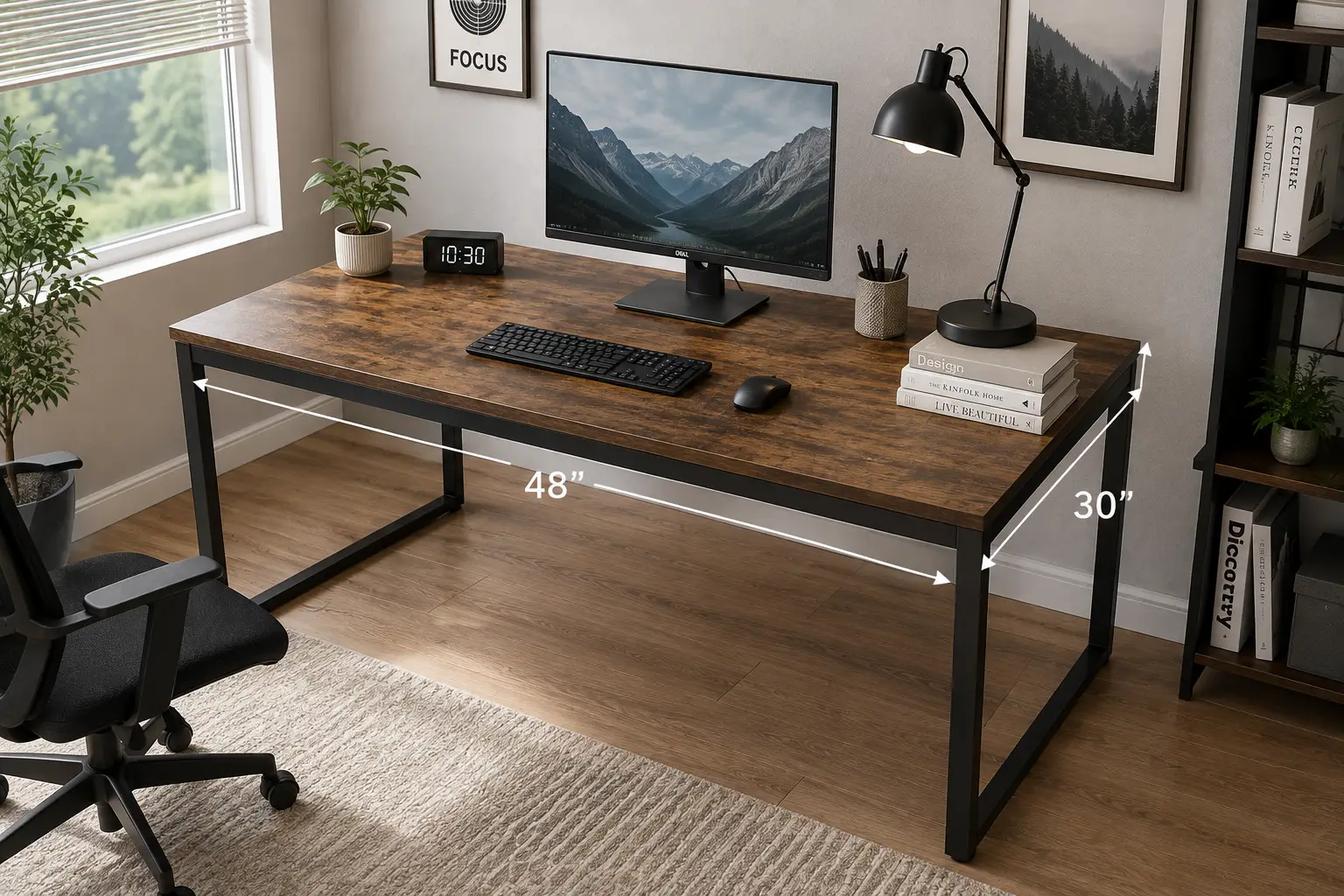
What Is a 48 x 30 Desk? A 48 x 30 desk is a work surface measuring 48 inches wide by 30 inches deep — 6 inches deeper than a standard 24-inch office desk. This extra depth accommodates dual monitors, keyboard trays, and larger equipment while maintaining proper ergonomic viewing distance, making it a popular choice for both fixed-height and height-adjustable standing desks.
Quick Comparison: 7 Best 48 x 30 Desks at a Glance
| Product | Desk Type | Price Range | Best For |
|---|---|---|---|
| FLEXISPOT EN1 | Electric standing | $230–$280 | Best overall value |
| HUANUO 48×30 with Drawers | Electric standing | $190–$250 | Built-in storage |
| Bush Business Furniture Hybrid | Static (fixed height) | $200–$260 | No-motor reliability |
| VIVO DESK-KIT-1B5B | Electric standing | $260–$320 | Heavier equipment |
| VIVO Universal Tabletop | Tabletop only (DIY) | $70–$100 | Reusing an existing frame |
| Fully Jarvis Bamboo | Electric standing | $600–$750 | Eco-conscious buyers |
| UPLIFT V3 Bamboo | Electric standing | $650–$850 | Maximum customization |
Looking at the table above, the FLEXISPOT EN1 and HUANUO 48×30 with Drawers dominate the budget-to-mid tier for anyone who mainly needs reliable height adjustment and storage, while the Fully Jarvis Bamboo and UPLIFT V3 Bamboo sit at the top for buyers who want commercial-grade stability and finish quality. If you already own a compatible frame, the VIVO Universal Tabletop is the cheapest way to get to a 48 x 30 footprint without replacing your whole setup. Note that all prices listed are approximate ranges — check the current listing for exact, up-to-date pricing before you buy.
💬 One click helps other shoppers make an informed choice too! 😊
Top 7 48 x 30 Desks: Expert Analysis
1. FLEXISPOT EN1 — best value one-piece desktop
The FLEXISPOT EN1 earns the top budget spot because it doesn’t cut corners on the one part of a desk you touch every day: the surface. Its 1-inch-thick, seamless one-piece desktop is noticeably denser than the thin, particle-board tops found on many entry-level standing desks, which matters if you’re using a drawing tablet, dual monitors, or other heavy gear that can cause thinner tops to sag over time.
The 176-pound weight capacity, electric height range of roughly 28.1 to 45.7 inches, and 4 programmable memory presets put it in line with desks costing considerably more. Based on comparing the specs against similarly priced competitors, the anti-collision sensor is a standout feature at this price point — it’s typically reserved for pricier models and helps prevent the desk from crashing into shelves or monitor arms during height changes. This is a smart pick for first-time standing-desk buyers or anyone furnishing a home office on a tight budget who still wants a 48 x 30 desk with real durability.
Reviews consistently report that assembly is faster than average for an electric desk, with most buyers finishing setup in under 30 minutes. A recurring theme in customer feedback is appreciation for the quiet motor, especially in shared living spaces or apartments with thin walls.
Pros:
- ✅ 1-inch seamless top resists sagging under heavy monitors
- ✅ Anti-collision detection rare at this price tier
- ✅ Fast, straightforward assembly reported by most buyers
Cons:
- ❌ Single motor lifts slower than dual-motor premium desks
- ❌ Limited to a handful of frame and top color combinations
Priced in the $230–$280 range, the FLEXISPOT EN1 delivers most of what a $600 desk offers for a fraction of the cost, making it the strongest value pick in this roundup.
2. HUANUO 48×30 with Drawers — best built-in storage
The HUANUO 48×30 with Drawers stands out because it solves two problems at once: desk space and storage. Instead of forcing you to buy a separate filing cabinet or drawer unit, this model integrates two smaller top drawers (roughly 11.8″ x 8.9″ x 4.1″) for everyday items like chargers and headphones, plus two wider wood drawers below for documents and office supplies.
What most buyers overlook with two-tier storage desks is how much desktop clutter they eliminate simply by giving cables, notebooks, and accessories a dedicated home. The height range spans approximately 28.3 to 46.5 inches with 4 memory presets, and the frame supports up to 176 pounds — enough for a triple-monitor arm setup plus a laptop dock. The raised monitor stand area at the back is also compatible with C-clamp monitor mounts, a detail that’s easy to miss but genuinely useful if you plan to free up desk space with an arm-mounted display.
Aggregated customer feedback highlights the drawer quality specifically, with reviewers noting the wood drawers feel sturdier than the plastic bins found on some competing storage desks. A common complaint, though, is that the added drawer hardware extends assembly time compared to simpler one-piece desktops.
Pros:
- ✅ Four total drawers eliminate need for separate storage
- ✅ C-clamp monitor mount compatibility built into the frame
- ✅ Deep 30-inch top pairs well with dual-tier organization
Cons:
- ❌ Assembly takes noticeably longer than drawer-free models
- ❌ Single-motor lift, so raising/lowering is on the slower side
At around $190–$250, the HUANUO 48×30 with Drawers offers genuine organizational value that would otherwise require buying separate furniture.
3. Bush Business Furniture Hybrid — best static, no-motor reliability
Not everyone wants — or needs — an electric lift mechanism, and that’s where the Bush Business Furniture Hybrid comes in. This is a fixed-height, 48W x 30D computer table with metal legs, built to commercial-grade specifications rather than typical home-furniture standards. It’s rated to hold up to 200 pounds, which comfortably covers multiple monitors, a full tower PC, and accessories.
Here’s what to weigh with a static desk like this one: you lose the ability to alternate between sitting and standing, but you gain a frame with zero motors, zero controllers, and essentially nothing that can break electronically over the life of the desk. The built-in wire management grommet keeps cables from turning into a tangled mess on the desktop, and the desk ships with hardware to anchor it to the wall — a genuinely important detail given how the Consumer Product Safety Commission’s Anchor It! campaign has worked for a decade to reduce furniture tip-over injuries in American homes, particularly where children are present.
Reviews consistently mention the desk’s stability, crediting the metal-leg design for eliminating the wobble that plagues cheaper laminate desks. The tradeoff most buyers report is the finished-back panel design, which looks great facing any direction but adds a bit of visual bulk compared to open-frame standing desks.
Pros:
- ✅ No motor or electronics means nothing to fail long-term
- ✅ 200 lb capacity handles heavy multi-monitor setups easily
- ✅ Includes wall-anchoring hardware for tip-over prevention
Cons:
- ❌ Fixed height won’t support a sit-stand routine
- ❌ Heavier frame makes repositioning the desk more difficult
At roughly $200–$260, the Bush Business Furniture Hybrid is the pick for buyers who prioritize long-term reliability over height flexibility.
4. VIVO DESK-KIT-1B5B — best for heavier equipment
The VIVO DESK-KIT-1B5B is a complete electric standing desk built around a one-piece 48 x 30-inch top and a 1B-series frame rated to hold up to 220 pounds — noticeably higher than the 176-pound ceiling common among budget competitors. That extra capacity matters in practice if you’re running a dual-PC setup, a large ultrawide monitor plus a secondary display, or audio production equipment that adds up in weight fast.
The one-piece desktop construction avoids the visible seams found on some multi-panel tops, which also translates to slightly better long-term stability since there’s no joint that can loosen or flex over years of use. Memory height presets let you save your ideal sitting and standing positions, and the black finish gives it a clean, minimalist look that fits most home office aesthetics without drawing attention to itself.
Based on comparing specs across this list, the VIVO model splits the difference nicely between the budget FLEXISPOT and HUANUO options and the premium bamboo desks — you’re paying a modest premium for meaningfully higher weight capacity, not for luxury materials. Customer feedback aggregated across retail listings points to smooth height transitions and solid build quality as consistent themes, with occasional notes about the control panel being simpler than premium competitors’ displays.
Pros:
- ✅ 220 lb weight capacity beats most desks in this price range
- ✅ One-piece top eliminates seams and improves rigidity
- ✅ Clean, minimal design suits a range of office styles
Cons:
- ❌ Fewer desktop finish options than boutique brands offer
- ❌ Control panel lacks the advanced display of premium keypads
Expect to pay in the $260–$320 range for the VIVO DESK-KIT-1B5B, a fair price for the added weight capacity it brings to the table.
5. VIVO Universal Tabletop — best for reusing an existing frame
Not every 48 x 30 desk purchase needs to be a full desk. The VIVO Universal Tabletop is exactly what it sounds like: a solid, one-piece 48 x 30-inch desktop, sold separately from any frame, built from durable particleboard and designed to bolt onto VIVO’s own line of adjustable frames via pre-drilled holes.
What the spec sheet doesn’t say, but is worth calling out honestly, is that this option makes the most financial sense specifically for people who already own a compatible VIVO frame and simply want to upgrade from a shallower top to the deeper 30-inch depth — or for anyone comfortable drilling their own mounting holes to fit a different brand’s frame. It’s a genuinely useful, budget-friendly path to a 48 x 30 desk footprint that most “top 10” lists skip over entirely because it isn’t a complete desk on its own.
The maximum recommended weight on the tabletop itself is 100 pounds, which is lower than the complete desk kits above — a reasonable tradeoff given that a tabletop-only product isn’t rated as a full structural unit the way an assembled frame-and-top combination is. Reviews describe the surface finish as close in feel to VIVO’s complete desk kits, with several buyers specifically praising it as a low-cost way to extend the life of an existing standing desk frame rather than replacing the whole unit.
Pros:
- ✅ Dramatically cheaper than buying a full replacement desk
- ✅ Pre-drilled holes streamline installation on VIVO frames
- ✅ Lets you keep a frame you already own and like
Cons:
- ❌ 100 lb weight limit is lower than complete desk kits
- ❌ Non-VIVO frames require you to drill your own holes
At around $70–$100, the VIVO Universal Tabletop is the smartest budget move for anyone upgrading an existing setup rather than starting from scratch.
6. Fully Jarvis Bamboo — best eco-friendly premium pick
The Fully Jarvis Bamboo has built its reputation over multiple product generations, and the 48 x 30-inch bamboo version continues that track record. The solid bamboo desktop is sourced from a rapidly renewable material, finished with a UV coating for durability, and — unlike most engineered-wood tops — genuinely improves with age rather than showing wear quickly.
Underneath, a steel (not aluminum) frame supports up to 350 pounds, one of the higher capacities in this entire roundup, while dual electric motors move the desktop through a wide height range with four programmable presets. What most buyers overlook with bamboo desks generally is how much the natural grain pattern varies piece to piece — that’s a feature for buyers who want a one-of-a-kind look, but it’s worth knowing going in if you expect uniform, factory-perfect consistency.
Reviews consistently point to the frame’s rock-solid stability even at full standing height, a detail that matters more than people expect until they’ve used a wobblier competitor. A common theme in aggregated feedback is that the desk ships in three separate boxes, which can arrive a day or two apart — plan your assembly weekend accordingly rather than expecting everything on your porch at once.
Pros:
- ✅ Sustainably sourced bamboo top with genuine durability
- ✅ 350 lb steel frame among the strongest in this class
- ✅ Reputation for stability built over multiple product generations
Cons:
- ❌ Premium price puts it well above budget alternatives
- ❌ Multi-box shipping can complicate assembly-day planning
Expect to invest between $600 and $750 for the Fully Jarvis Bamboo, a price that reflects genuine materials and frame quality rather than brand markup alone.
7. UPLIFT V3 Bamboo — best for maximum customization
The UPLIFT V3 Bamboo rounds out this list as the most configurable option available, and it’s also the desk independent reviewers circle back to most often. CNN Underscored’s testing of the Uplift line found it to be a handsome, supremely sturdy desk that was easy to use and relatively straightforward to assemble, with strong ergonomic comfort across its full height range — findings that generally carry over to the updated V3 generation.
The dual-motor, 3-stage frame is engineered for smoother lifting under heavy loads while keeping the desk clutter-free, and the advanced keypad, wire grommets, wire tray, and rocker board come standard rather than as pricey add-ons. What sets this desk apart from every other option on this list is sheer choice: dozens of desktop finishes, multiple frame colors, and accessory combinations mean you’re essentially building a desk tailored to your exact workspace rather than picking from a fixed catalog.
Aggregated customer and reviewer sentiment consistently ranks this line among the most stable standing desks tested, with minimal wobble reported even at maximum height with a full monitor arm and equipment load. The tradeoff, unsurprisingly, is price — this is the most expensive desk in this roundup by a meaningful margin, and the sheer number of customization options can feel overwhelming to a first-time buyer who just wants to check out quickly.
Pros:
- ✅ Dual motors deliver the fastest, quietest lift in this lineup
- ✅ Extensive customization across desktop, frame, and accessories
- ✅ Repeatedly recognized by independent reviewers for stability
Cons:
- ❌ Highest price point among all seven desks featured here
- ❌ Overwhelming number of options for first-time buyers
At $650–$850, the UPLIFT V3 Bamboo is the splurge pick for anyone who wants a desk they won’t need to replace or upgrade for years.
Getting Started: Setting Up Your 48 x 30 Desk the Right Way
Unboxing a new desk is exciting, but a few early decisions determine how well it serves you for years. Start by measuring your intended space before assembly — a 48 x 30 desk needs roughly 4 feet of wall width plus at least 3 feet of clearance behind it if you’ve chosen an electric model like the FLEXISPOT EN1 or VIVO DESK-KIT-1B5B, since the frame’s legs splay outward slightly more at full standing height.
During your first 30 days, resist the urge to skip the memory-preset setup on electric models. Programming a genuine sitting height and standing height (rather than eyeballing it each time) is the single biggest factor in whether people actually use a standing desk regularly instead of leaving it stuck at one setting. As a maintenance habit, wipe wood and bamboo tops — like those on the Fully Jarvis Bamboo or UPLIFT V3 Bamboo — with a slightly damp cloth rather than harsh cleaners, which can strip the protective UV coating over time. For laminate tops such as the Bush Business Furniture Hybrid, avoid placing hot mugs directly on the surface, since sustained heat can discolor thermally fused laminate.
One mistake that shows up constantly in early reviews: not anchoring the desk if it will be near young children, particularly static desks with drawers or storage attachments. Take the few extra minutes to install the included anchor hardware — it’s genuinely inexpensive insurance.
Real-World Scenarios: Which 48 x 30 Desk Fits Your Work Style
Consider Maria, a freelance graphic designer working from a spare bedroom on a moderate budget with a single large monitor and a drawing tablet. The FLEXISPOT EN1‘s sag-resistant one-piece top and anti-collision sensor make it a strong fit — she gets standing-desk flexibility without paying premium prices, and the sturdy surface handles her tablet without flexing under pressure.
Then there’s James, a software engineer running triple monitors, an external hard drive dock, and a mechanical keyboard, all while working 8-plus hours a day from home. For him, the extra weight capacity of the VIVO DESK-KIT-1B5B or the outright stability of the UPLIFT V3 Bamboo makes more sense — the added cost buys peace of mind that the frame won’t strain under a genuinely heavy, always-on setup.
Finally, picture Aisha, a small-business owner setting up a permanent reception desk that needs to look professional, hold a computer and paperwork trays, and never require troubleshooting a motor. The Bush Business Furniture Hybrid fits that brief precisely — commercial-grade construction, a finished look from every angle, and nothing electronic to eventually fail during business hours.
Buyer Decision Framework: Which 48 x 30 Desk Should You Choose?
If you sit for most of the day and rarely need to stand, choose a static desk like the Bush Business Furniture Hybrid because you’re paying only for the surface and structure you’ll actually use. If you split your day between sitting and standing, prioritize an electric model with memory presets — the FLEXISPOT EN1 covers this need affordably, while the Fully Jarvis Bamboo and UPLIFT V3 Bamboo cover it at a premium level with added stability and finish quality.
If your equipment load regularly exceeds 175 pounds — multiple monitors, a docking station, a full tower PC — choose the VIVO DESK-KIT-1B5B or Fully Jarvis Bamboo for their higher weight ratings. And if you already own a working standing-desk frame and simply want the deeper 30-inch surface, skip a full desk purchase entirely and choose the VIVO Universal Tabletop instead.
How to Choose a 48 x 30 Desk
- Confirm your available space first. Measure both the wall width and the floor clearance behind the desk, especially for electric models that need room for the frame to extend at standing height.
- Decide between electric and static. Electric models like the FLEXISPOT EN1 add sit-stand flexibility; static desks like the Bush Business Furniture Hybrid trade that flexibility for long-term mechanical simplicity.
- Match weight capacity to your actual equipment. Add up your monitors, PC, and accessories — if you’re near or over 175 pounds, favor the VIVO DESK-KIT-1B5B or Fully Jarvis Bamboo.
- Consider desktop material and finish. Bamboo options like the UPLIFT V3 Bamboo offer durability and aesthetics; laminate and engineered wood keep costs down without sacrificing much daily function.
- Check for built-in storage needs. If you don’t want a separate filing cabinet, the HUANUO 48×30 with Drawers solves that in one purchase.
- Verify frame compatibility if buying a tabletop alone. The VIVO Universal Tabletop is pre-drilled for VIVO frames specifically — confirm compatibility before ordering if you own a different brand.
- Read the warranty terms. Frame and motor warranties vary significantly between budget and premium tiers, and a longer warranty often signals genuine confidence in long-term durability.
Common Mistakes to Avoid When Buying a 48 x 30 Desk
The most frequent mistake is skipping the depth-clearance check behind the desk, especially for electric frames — buyers often measure the desk’s footprint but forget that the frame needs room to extend backward slightly as it rises. A second common error is choosing a static desk purely to save money without considering the ergonomic tradeoffs, when OSHA’s own guidance notes that leg clearance under the desktop should generally fall between 20 and 28 inches to accommodate most users comfortably, a range that’s much easier to hit consistently with height adjustment.
Buyers also frequently underestimate weight capacity, adding a monitor arm, second display, and accessories after the fact and exceeding a budget desk’s 176-pound rating. Finally, many people skip programming memory presets on electric desks entirely, which — based on aggregated user feedback across multiple models — is one of the biggest reasons people stop using the standing function within the first few months.
48 x 30 Desk vs Standard 24-Inch-Deep Desks
The difference between a 48 x 30 desk and a standard 48 x 24 desk comes down almost entirely to that extra 6 inches of depth, but the real-world impact is larger than the number suggests.
| Feature | 48 x 30 Desk | Standard 48 x 24 Desk |
|---|---|---|
| Monitor viewing distance | Comfortably meets 20–40 in. range | Often forces monitor too close |
| Dual-monitor support | Ample room for arms + accessories | Tight, especially with a keyboard tray |
| Drawing tablet / large gear | Fits without crowding keyboard | Frequently overlaps keyboard space |
| Best for | Multi-monitor, creative, gaming setups | Small rooms, laptop-only setups |
Looking at the table above, the extra depth mainly pays off when you’re running more than one monitor or working with peripherals like a drawing tablet or audio interface — situations where 24 inches simply doesn’t leave enough front-to-back room. For laptop-only setups in very tight spaces, a shallower desk can still make sense, since the 6 extra inches do take up meaningfully more floor space in small rooms.
What to Expect: Everyday Performance at a 48 x 30 Desk
On paper, 6 extra inches of depth doesn’t sound dramatic, but in daily use it changes how you sit relative to your screen. Most users find they naturally push their monitor back to a healthier 20-to-40-inch viewing distance — the range recommended in OSHA’s ergonomics guidance — simply because the desk finally gives them room to do so, rather than crowding the monitor forward to make room for a keyboard.
The added depth also means fewer collisions between your keyboard tray and monitor stand, and noticeably more room for a notebook, coffee mug, or second input device without everything competing for the same six inches of space. Electric models in this roundup add a second dimension to daily performance: the ability to genuinely alternate between sitting and standing rather than staying locked into one posture for eight hours, which several ergonomics resources tie to reduced musculoskeletal strain over time.
Long-Term Cost and Maintenance
A budget electric desk like the FLEXISPOT EN1 or HUANUO 48×30 with Drawers carries the lowest upfront cost, but consider the full picture: motors are the component most likely to need eventual replacement or repair, and warranty length varies significantly by brand and tier. Premium options like the Fully Jarvis Bamboo and UPLIFT V3 Bamboo command a higher price today but generally carry longer frame and motor warranties, which can offset the price gap over a 7-to-10-year ownership window.
Static desks like the Bush Business Furniture Hybrid flip this equation entirely — with no motor to maintain, long-term cost is essentially limited to occasional surface care, making it the lowest-maintenance option in this roundup by a wide margin. For the VIVO Universal Tabletop, total cost of ownership depends heavily on the frame you already own; if that frame remains healthy, this is arguably the best value-per-dollar path to a 48 x 30 footprint in the entire lineup.
Features That Actually Matter (and Ones That Don’t)
Weight capacity, one-piece versus multi-panel desktop construction, and genuine memory-preset height adjustment are the features that matter most in daily use — they directly affect stability, longevity, and whether you’ll actually use the sit-stand function consistently. Frame material matters too: steel frames, like those on the Fully Jarvis Bamboo and UPLIFT V3 Bamboo, resist flex and wobble far better than aluminum alternatives at comparable price points.
On the other hand, flashy extras like RGB lighting or an excessive number of memory presets beyond four rarely change day-to-day usability in a meaningful way. Cable management trays and grommets are genuinely useful but shouldn’t be a dealbreaker on their own, since aftermarket cable solutions are inexpensive and widely available if your chosen desk skips them.
Safety, Regulations, and Standards for Home Office Desks
Desk safety isn’t just about ergonomics — it’s also about physical stability in the room. The Consumer Product Safety Commission’s long-running Anchor It! initiative has worked to reduce furniture tip-over injuries nationwide, and while that campaign focuses primarily on dressers and storage units, the same anchoring principle applies to any desk with drawers or a raised monitor shelf, particularly in homes with young children or pets who might climb or lean on furniture.
From an ergonomic-compliance standpoint, OSHA’s Computer Workstations eTool recommends that leg clearance under a desk generally fall between 20 and 28 inches, and that monitors sit within a 20-to-40-inch viewing distance — both easier benchmarks to hit consistently with the extra depth a 48 x 30 desk provides. If your desk includes electrical components, such as the memory-preset controllers on the FLEXISPOT EN1, HUANUO 48×30 with Drawers, or premium bamboo models, confirm the product carries appropriate electrical safety certification before purchase, and always register your product with the manufacturer so you’re notified promptly in the rare event of a recall.
Frequently Asked Questions
❓ What is a 48 x 30 desk good for?
❓ Is a 48 x 30 desk big enough for two monitors?
❓ What's the difference between a 48 x 30 desk and a 48 x 24 desk?
❓ How much does a 48 x 30 standing desk cost?
❓ Can I put a 48 x 30 desktop on any standing desk frame?
Conclusion
Choosing the right 48 x 30 desk really comes down to how you work day to day. If budget and simplicity top your list, the FLEXISPOT EN1 delivers genuine durability without the premium price tag, while the HUANUO 48×30 with Drawers adds built-in storage for buyers who want to consolidate their workspace into one purchase. For anyone who’d rather skip electronics entirely, the Bush Business Furniture Hybrid offers commercial-grade reliability that simply won’t need troubleshooting five years from now.
If your setup demands more weight capacity, the VIVO DESK-KIT-1B5B and Fully Jarvis Bamboo both step up meaningfully, and if you already own a working frame, the VIVO Universal Tabletop is the most budget-conscious way to gain the deeper 30-inch surface. For buyers who want the best of everything — stability, customization, and a reputation independent reviewers keep coming back to — the UPLIFT V3 Bamboo remains the standout premium pick in this lineup.
Whichever direction you go, prioritize genuine weight capacity, verified frame stability, and — if you choose an electric model — actually programming your memory presets so the sit-stand feature gets used rather than ignored.
✨ Don’t miss these exclusive deals!
🔍 Take your home office setup to the next level with this carefully curated lineup of 48 x 30 desks. Click a highlighted item to check current pricing and availability. These picks will help you build a workspace that keeps you comfortable and productive all day long!
Recommended for You
- Wood Computer Monitor Riser: 7 Best Picks for 2026 (Ranked)
- U Shaped Computer Desk: 7 Best Picks for a Better 2026 Office
- Three Monitor Desk: 7 Best Picks for 2026 (Avoid Overpaying)
Disclaimer: This post contains affiliate links. As an Amazon Associate, I earn from qualifying purchases made through these links, at no additional cost to you.
✨ Found this article helpful? Share it with someone who needs it! 💬🤗