
In This Article
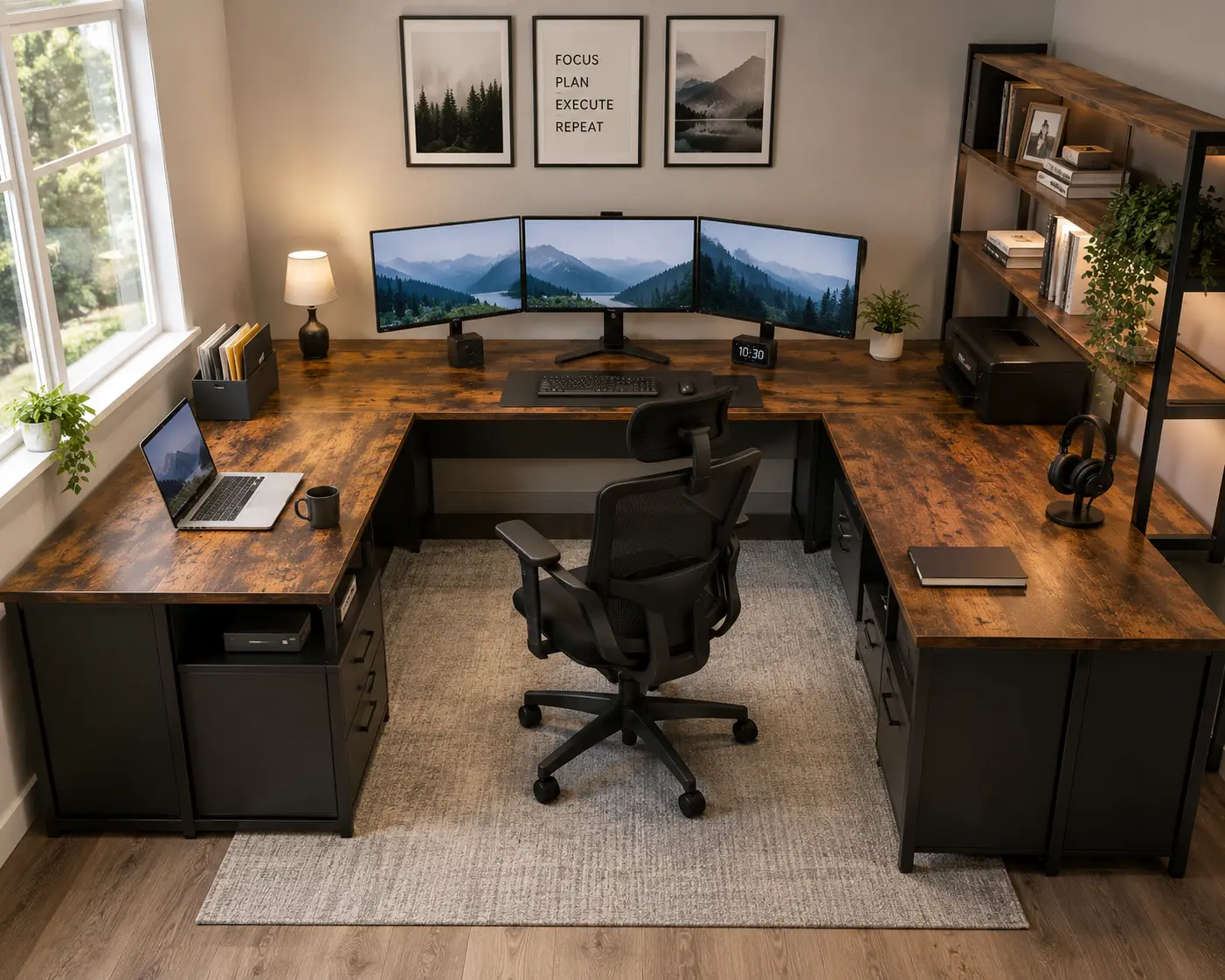
A u shaped computer desk is basically three desks that decided to team up. Instead of squeezing your monitor, keyboard, notebooks, and coffee mug onto one flat surface, you get a wraparound workstation that surrounds you on two or three sides — which is exactly why this style has become the go-to pick for anyone running a multi-monitor setup, a side hustle, or a full-blown streaming rig out of a spare bedroom. If you’ve been comparing a u shaped computer desk against a standard rectangular or L-shaped model and wondering whether the extra footprint is worth it, you’re in the right place.
What Is a U Shaped Computer Desk? In short, it’s a desk built from two return wings plus a center work surface, forming a “U” that wraps around the user on three sides. It typically adds 40-60% more usable surface area than a straight desk of similar width, making it popular for dual-monitor work, gaming rigs, and home offices that double as a printer station or filing area.
We spent time digging through spec sheets, manufacturer documentation, and aggregated customer reviews for seven real, currently available options — from budget-friendly reversible builds under $250 to a true electric height-adjustable u shaped computer desk that tops $2,900. Whether you’re outfitting a corner nook for remote work, building a gaming command center, or replacing a tired executive desk, this guide breaks down what actually matters (motor wattage, board material, weight capacity) versus what’s just marketing fluff. As with any workstation, how you set it up matters almost as much as what you buy — OSHA’s guidance on computer workstation positioning is a good baseline before you finalize your layout.
Amazon Associates Disclosure: This post contains affiliate links. As an Amazon Associate, I earn from qualifying purchases made through these links, at no additional cost to you.
Quick Comparison: 7 U Shaped Computer Desks at a Glance
| Product | Best For | Price Range | Key Feature |
|---|---|---|---|
| Bestier Reversible U/L Shaped Desk | Tightest budget | Under $250 | Reversible layout, CARB-compliant board |
| FEZiBO Electric U-Configuration Desk | Sit-stand on a budget | $250-$450 | Dual-motor height adjustment |
| Tribesigns U-Shaped Desk with Hutch | Storage-hungry offices | $250-$350 | Built-in hutch + printer stand |
| Unikito U Shaped Desk with Hutch | Gamers who love RGB | $200-$320 | App-controlled LED strip, power outlet |
| YITAHOME U Shaped Desk with Drawers | Small-space corners | $180-$280 | Compact 79-inch reversible footprint |
| Bestar Ridgeley U-Shaped Executive Desk | Professional home offices | $1,100-$1,300 | Furniture-grade laminate, file drawer |
| iMovR Lander Standing U-Desk | Serious ergonomic investment | Around $3,000 and up | True 3-surface electric height adjustment |
Looking at the table above, the price spread here is enormous — and that’s the point. A Bestier Reversible U/L Shaped Desk gets you the basic U-shaped footprint for less than the cost of a nice office chair, while the iMovR Lander Standing U-Desk is a genuinely different category of product where every panel moves in unison. For most home offices, the sweet spot lands in the middle: something like the Tribesigns U-Shaped Desk with Hutch or Unikito U Shaped Desk with Hutch, which add real storage and cable management without executive-furniture pricing. If ergonomics and daily comfort outrank budget, the FEZiBO Electric U-Configuration Desk is worth the jump to electric height adjustment.
💬 Found the desk that fits your setup already? Tap through to check the current price and availability before it changes.
Top 7 U Shaped Computer Desks: Expert Analysis
1. Bestier Reversible U/L Shaped Desk — best value under $250
The Bestier Reversible U/L Shaped Desk earns its spot here because it delivers the actual U-shaped footprint — not just an L with a marketing name — at a price that undercuts nearly everything else on this list. The desk reconfigures between a 55-inch corner layout and an 86.6-inch long-desk layout, and the storage cabinet flips to either side depending on how your room is laid out.
Key features with practical meaning: the frame is steel, and the desktop is P2-class particleboard certified to meet CARB (California Air Resources Board) formaldehyde-emission standards, which matters more than it sounds — cheaper import desks sometimes skip that certification entirely, and lower-emission board means less off-gassing smell in a closed home office. Three cable pass-through holes keep power bricks and HDMI cables from turning into a rat’s nest across the U-shaped surface.
Who it’s for: this is the desk for a first home office, a kid’s homework-and-gaming corner, or anyone who wants to test whether a U shaped computer desk actually fits their room before committing real money. Based on comparing the specs against pricier options, the tradeoff is exactly what you’d expect — melamine-covered particleboard instead of laminate, and a fixed (not height-adjustable) working height.
Reviews consistently report that the desk feels sturdier than its price suggests, with multiple buyers specifically calling out that it supports heavier monitor arrays and dual-PC setups without flexing. A recurring theme in customer feedback is that assembly takes about 30-60 minutes and benefits from a second set of hands for the corner brackets — not because the instructions are bad, but because the panels are large and awkward for one person to hold steady.
Pros:
- ✅ Reversible layout adapts to either side of a room
- ✅ CARB-compliant board reduces off-gassing concerns
- ✅ Genuinely sturdy for its price tier
Cons:
- ❌ Fixed height, not adjustable for standing use
- ❌ Particleboard surface scratches more easily than laminate
Price and value verdict: typically listed in the $180-$250 range depending on color and configuration, this is the strongest dollar-for-dollar pick on this list if storage flexibility and budget matter more than premium materials.
2. FEZiBO Electric U-Configuration Desk — best sit-stand value
The FEZiBO Electric U-Configuration Desk stands out because it’s one of the few electric height-adjustable desks that can be configured into a full U shape without jumping to four-figure pricing. FEZiBO builds its desks modularly, meaning you choose the desktop shape (including U and L configurations) and pair it with their dual-motor lifting frame.
Key features with practical meaning: the lift system moves between roughly 27.5 and 46.9 inches of height, which covers the ergonomic range for the vast majority of adult users whether seated or standing. The motors run under 50 dB, so it won’t derail a video call, and three programmable memory presets mean you’re not re-adjusting height every single session — you tap a button and it returns to your saved sitting or standing position. What most buyers overlook with this model is the anti-collision sensor, which stops the desk from crushing anything underneath it during a height change — a real consideration once you’ve got a U-shaped surface loaded with gear on three sides.
Independent lab testing backs this up: Tom’s Guide’s hands-on review found the standard FEZiBO configuration “extremely sturdy” with seamless height adjustability, even at the lower end of its price range — which is a meaningful data point since desk stability is hard to judge from a spec sheet alone.
Who it’s for: remote workers who want to alternate between sitting and standing throughout the day but don’t have executive-desk budgets. On paper, the load capacity (176 lbs) is more than enough for a full three-monitor U-shaped array, though heavier gaming PC towers should sit on the floor rather than the desktop.
Aggregated customer sentiment is largely positive on build quality and value, though a recurring complaint involves the lack of a physical child-lock setting on the control panel — worth knowing if small kids share the space.
Pros:
- ✅ Genuine electric sit-stand adjustment on a U-shaped layout
- ✅ Quiet dual-motor operation under 50 dB
- ✅ Memory presets and anti-collision sensor included
Cons:
- ❌ No child-lock feature on the control panel
- ❌ U-shaped configuration costs more than FEZiBO’s base rectangular desk
Price and value verdict: configurations run roughly $250-$450 depending on desktop size and drawer add-ons, making this the best value entry point into electric sit-stand ergonomics on this list.
3. Tribesigns U-Shaped Desk with Hutch — most storage per dollar
The Tribesigns U-Shaped Desk with Hutch distinguishes itself with genuine vertical storage — most budget U-desks give you surface area and nothing else, but this one stacks a hutch on top and a printer stand into the return wing.
Key features with practical meaning: the desktop measures roughly 79 by 47 by 20 inches, which is wide enough to run a triple-monitor arrangement across the back wall of the U while keeping the side wings clear for a laptop, notebooks, or a printer. The frame uses a triangular support structure with leveling feet, which in practice means less wobble on uneven flooring — a common complaint with cheaper corner desks. The desktop is E1-grade particleboard, a European low-emission standard comparable to CARB Phase 2 in the US.
Here’s what to weigh: the hutch adds real shelf storage above the desk, but it also adds visual bulk, so this model works best in a dedicated office room rather than a small bedroom corner where a lower profile matters more. What the spec sheet doesn’t say, but reviews reveal, is that the top shelf height is comfortable for a monitor-eye-level boost without a separate stand — useful if you’re not already using a monitor arm.
Some Tribesigns variants of this model add a tiltable drafting-board insert in the center panel, which is a distinguishing feature worth checking before you buy if you also sketch, draft, or write by hand.
Reviews consistently report solid stability once assembled, with a recurring note that assembly is a two-person, hour-plus job given the number of panels and the hutch attachment.
Pros:
- ✅ Built-in hutch adds vertical storage other U-desks skip
- ✅ Triangular frame bracing reduces wobble
- ✅ Printer stand built into the side wing
Cons:
- ❌ Visual bulk isn’t ideal for small rooms
- ❌ Assembly is genuinely a two-person job
Price and value verdict: typically found in the $250-$350 range, this is the pick when storage capacity matters as much as desk surface.
4. Unikito U Shaped Desk with Hutch — best for gaming setups
The Unikito U Shaped Desk with Hutch leans into the gaming and streaming crowd with app-controllable RGB lighting built into the frame, without abandoning the reversible-configuration flexibility that makes budget U-desks practical for shared rooms.
Key features with practical meaning: the desk reconfigures between a 98-inch L-shape, a 121.7-inch straight run, and a 75-inch U-shape, so you can change your entire room layout without buying new furniture if you move or rearrange. The RGB LED strip supports both a smartphone app and an IR remote with roughly 60,000 color options — mostly cosmetic, but the built-in power outlet on the frame is the more useful feature in practice, since it lets you plug in a monitor, headset charger, and PC directly at desk height instead of running extension cords across the floor.
Reviews consistently report that the three-desktop configuration genuinely supports separate zones — one side for a gaming rig, another for writing or streaming gear — which is the core appeal of a U shape over a straight desk in the first place. What most buyers overlook is that the hutch above the main desktop provides a place to mount speakers or a webcam at a more natural eye-level height, something flat desks can’t offer without an extra shelf purchase.
Who it’s for: gamers and streamers running dual PCs or a PC-plus-console setup who want visual flair without sacrificing the practical storage a hutch provides. Budget-conscious buyers should note the RGB lighting is a genuine cost-add compared to non-lit U-desks in this price bracket, so skip it if aesthetics aren’t a priority.
Pros:
- ✅ Reconfigures between three different desk layouts
- ✅ Built-in power outlet at desk height
- ✅ Hutch doubles as speaker/webcam shelf
Cons:
- ❌ RGB lighting adds cost some buyers won’t use
- ❌ Larger footprint than non-hutch alternatives
Price and value verdict: generally priced in the $200-$320 range depending on finish, this is the strongest pick specifically for gaming and streaming rooms.
5. YITAHOME U Shaped Desk with Drawers — best for tight corners
The YITAHOME U Shaped Desk with Drawers is the lesser-known name on this list, but it earns its place by fitting a genuine U-shaped footprint into a smaller overall envelope than the Tribesigns or Unikito models — useful if your office corner isn’t as generous as a dedicated room.
Key features with practical meaning: at roughly 79 inches along its longest run, it’s comparable in length to the mid-range options here but keeps its depth tighter, which in practice means it clears doorways and stairwells more easily during move-in. Built-in drawers replace the hutch-and-shelf approach of pricier competitors, trading vertical storage for under-desk storage that doesn’t add visual height to the room — a real advantage in a bedroom-office combo where a towering hutch feels overwhelming.
Based on comparing the specs, the frame uses the same steel-and-particleboard construction common across this price tier, so durability expectations should be similar to the Bestier and Unikito models rather than the furniture-grade Bestar option later in this list.
Reviews for this model and similar YITAHOME desks consistently mention straightforward assembly and note that the reversible design (left or right configuration) works as advertised, though as with most budget U-desks, some buyers report that included hardware runs on the delicate side and over-tightening screws can strip the particleboard.
Pros:
- ✅ Smaller footprint than most U-shaped competitors
- ✅ Drawer storage without added visual bulk
- ✅ Fully reversible for either room layout
Cons:
- ❌ Included hardware can strip if over-tightened
- ❌ Less brand-recognition and review volume than bigger names
Price and value verdict: typically listed around $180-$280, making it a strong pick for small rooms where a hutch-style U-desk would feel oversized.
6. Bestar Ridgeley U-Shaped Executive Desk — best furniture-grade option
The Bestar Ridgeley U-Shaped Executive Desk is where this list shifts from “assemble-it-yourself particleboard” to genuine home-office furniture. Bestar is a longtime Canadian office-furniture manufacturer, and the Ridgeley line reflects that — this isn’t a flat-pack gaming desk with a hutch bolted on.
Key features with practical meaning: the desk ships in a Dark Chocolate and White Chocolate two-tone laminate finish with a fully reversible layout, plus a locking file drawer — a detail that matters if you’re storing client paperwork, tax documents, or anything else you’d rather not leave exposed on an open desktop. At roughly 65 inches wide and nearly 94 inches deep across the full U-configuration, it’s built for a dedicated office room rather than a shared bedroom corner, and at around 108 lbs, it’s noticeably heavier and more substantial than the particleboard options above.
Here’s what to weigh: this is a considerable jump in price from the rest of this list, and you’re paying for furniture-grade laminate, drawer hardware, and brand reputation rather than raw desktop square footage. What the spec sheet doesn’t say, but aggregated buyer sentiment reveals, is that the finish and hardware genuinely read as “real furniture” rather than dorm-room desk — several reviewers specifically compared the fit and finish favorably against big-box furniture at similar price points.
Who it’s for: established home-based professionals, consultants, or anyone furnishing a client-facing home office where appearance matters as much as function.
Pros:
- ✅ Furniture-grade laminate and locking file drawer
- ✅ Fully reversible for flexible room layouts
- ✅ Brand backed by a company with a long furniture-manufacturing track record
Cons:
- ❌ Meaningfully pricier than particleboard alternatives
- ❌ No electric height adjustment at this price point
Price and value verdict: typically priced in the $1,100-$1,300 range, this is a strong value only if furniture-grade materials and a professional appearance are priorities — budget shoppers should look higher up this list instead.
7. iMovR Lander Standing U-Desk — best true electric U-desk
The iMovR Lander Standing U-Desk is the outlier on this list in the best possible way: it’s one of the only consumer-accessible U-shaped desks where all three work surfaces move up and down together as a single electric height-adjustable unit, rather than one fixed U-shaped slab.
Key features with practical meaning: iMovR built its reputation on healthcare-grade 3D-laminated desktop surfaces and Bluetooth-enabled lifting columns, and the U-Desk line extends that same engineering to a full three-sided configuration. That matters in practice because most “U-shaped standing desks” on the market are actually a fixed U-shaped top bolted onto a single adjustable center section — meaning the side wings stay at a static height even when you raise the desk. The Lander U-Desk avoids that compromise entirely, which is a meaningful ergonomic difference if you genuinely alternate between sitting and standing throughout the day.
Based on comparing the specs against the rest of this list, this is a different category of purchase. Manufactured in the USA with a reported industry-leading warranty (10 years on base components, 5 years on the desktop), it’s built for people who see a desk as a decade-long investment rather than a one-time furniture purchase. Reviews consistently report that the Bluetooth app controls and dozens of finish options (including real hardwood) are genuinely differentiating — but also that the price places it well outside impulse-purchase territory.
Who it’s for: professionals who spend 8+ hours a day at their desk and have already decided ergonomics are worth a premium, home-based executives outfitting a permanent office, or anyone replacing a commercial console-style workstation with something built for residential use.
Pros:
- ✅ All three surfaces move together — a genuine true U-desk
- ✅ Made-in-USA build with an industry-leading warranty
- ✅ Bluetooth app control and extensive finish options
Cons:
- ❌ Price is dramatically higher than every other option here
- ❌ Large footprint requires a dedicated room, not a shared corner
Price and value verdict: pricing starts around $2,995 for a base U-Desk configuration and climbs with wood finishes and accessories — steep, but arguably the only entry on this list that fully delivers on the promise of a height-adjustable U-shaped desk rather than a fixed top on an adjustable center.
Comparing the Top 7: Feature-by-Feature Breakdown
| Product | Adjustable Height | Storage | Reversible | Material |
|---|---|---|---|---|
| Bestier Reversible U/L Shaped Desk | No | Cabinet | Yes | CARB particleboard |
| FEZiBO Electric U-Configuration Desk | Yes (electric) | Optional drawer | Configurable | Particleboard/steel |
| Tribesigns U-Shaped Desk with Hutch | No | Hutch + printer stand | No | E1 particleboard |
| Unikito U Shaped Desk with Hutch | No | Hutch | Yes | Particleboard/steel |
| YITAHOME U Shaped Desk with Drawers | No | Drawers | Yes | Particleboard/steel |
| Bestar Ridgeley U-Shaped Executive Desk | No | Locking file drawer | Yes | Laminate |
| iMovR Lander Standing U-Desk | Yes (all 3 surfaces) | Optional | Configurable | 3D laminate/hardwood |
This table makes the real dividing line in this category obvious: it’s not price alone, it’s whether the desk actually adjusts in height across its full U-shaped surface. Only the FEZiBO Electric U-Configuration Desk and iMovR Lander Standing U-Desk offer genuine electric adjustment, and only the iMovR extends that adjustment to all three panels simultaneously. If ergonomics matter more than budget, those are your two realistic candidates — everyone else on this list is selling a fixed-height desk with varying amounts of storage and finish quality.
💬 One click helps other shoppers make an informed choice too! 😊
U Shaped Desk vs L Shaped Desk: Which Layout Actually Wins?
This comparison comes up constantly, and the honest answer is “it depends on your room,” not “U always wins.” A u shaped office desk adds a third work surface behind you, which in practice becomes secondary storage, a printer station, or a spot for a second monitor angled away from your primary view. An L shaped office desk gives you two surfaces meeting at a corner — less total area, but a meaningfully smaller footprint that fits into rooms where a full U simply won’t.
The math matters here: a typical U-shaped configuration adds roughly 20-25 square feet of surface versus 12-15 for a comparable L-shape, according to the dimensions listed across the products above. That extra area is genuinely useful for anyone running three monitors, a dual-PC gaming setup, or a desk that doubles as a craft or hobby station. But it comes at a real cost in floor space — several models on this list, including the Tribesigns U-Shaped Desk with Hutch and Bestar Ridgeley U-Shaped Executive Desk, need a dedicated room rather than a shared bedroom corner to avoid feeling cramped.
If you’re working with under 100 square feet of room, an L-shaped desk (or one of the reversible U/L hybrids like the Bestier Reversible U/L Shaped Desk) is usually the smarter call — you get the corner-hugging efficiency without the third wing eating into your walking space.
How to Choose a U Shaped Computer Desk
- Measure your room before your desk. A full U-shaped configuration can run 75-95 inches along its widest points — measure wall-to-wall and account for chair clearance behind you, not just the desk footprint itself.
- Decide if height adjustment is a dealbreaker. If you already know you want to alternate sitting and standing, skip straight to the FEZiBO Electric U-Configuration Desk or iMovR Lander Standing U-Desk — retrofitting a fixed desk later rarely goes well.
- Match storage style to your room’s visual weight. A hutch (like on the Tribesigns or Unikito models) adds vertical storage but also visual bulk; drawers (like the YITAHOME) keep a lower profile for smaller rooms.
- Check the board material, not just the finish color. CARB or E1-certified particleboard means lower formaldehyde off-gassing — worth confirming for a room you’ll spend eight hours a day in.
- Confirm reversibility if your room layout might change. Renters especially should prioritize reversible configurations like the Bestier or Unikito, since a fixed-orientation U-desk can become unusable after a move.
- Budget for cable management separately if it’s not built in. Only some models here include integrated outlets or cable channels; everyone else benefits from a $15-20 add-on tray.
- Weigh warranty length against your buying tier. The jump from a 1-year warranty on budget desks to a 10-year warranty on the iMovR reflects a real difference in expected lifespan, not just marketing.
Setting Up Your U Shaped Computer Desk: First 30 Days
Getting the desk delivered is the easy part — dialing in the layout is where most people either love or regret their purchase. Start assembly on the floor with all hardware sorted by bag before touching a single panel; U-shaped desks typically ship with 60-100+ screws split across the two return wings and center section, and mixing up bag order is the single most common cause of a wobbly finished desk. If your model has a hutch, attach it after the base desktop is fully secured and leveled — attaching top-heavy components too early makes the whole structure unstable during the rest of assembly.
Once it’s built, resist the urge to load every inch of surface immediately. Set your primary monitor directly in front of you at arm’s length, with the top of the screen at or slightly below eye level — a rule that holds regardless of desk shape, per Mayo Clinic’s office ergonomics guidance. Use the two side wings for secondary tasks: a laptop dock, a printer, or reference materials you touch a few times a day, not things you need constantly, since reaching into the wings repeatedly can strain your shoulders over a full workday.
In the first 30 days, most new U-desk owners make the same mistake: cable chaos. With three surfaces and typically two to three devices, cables multiply fast. Run power strips along the underside of each wing rather than a single central strip, and use zip ties or a cable sleeve at the point where cords cross from one panel to another — that’s the spot most likely to snag a chair or a foot. Finally, re-check every bolt after the first week of use; particleboard desks in particular can settle slightly as the hardware seats into the material, and a five-minute re-tightening pass now prevents a wobble from developing later.
Real-World Scenarios: Which U Shaped Desk Fits Your Life
If you’re a remote employee running two monitors plus a laptop dock and working from a spare bedroom that doubles as a guest room at night, the YITAHOME U Shaped Desk with Drawers or Bestier Reversible U/L Shaped Desk make the most sense — compact footprint, drawer storage that keeps the room feeling like a bedroom rather than an office, and a price point that doesn’t feel painful if your living situation changes in a year or two.
If you’re a full-time streamer or competitive gamer running a dual-PC setup with a capture card, stream deck, and dedicated audio interface, the extra desk surface of the Unikito U Shaped Desk with Hutch earns its keep — the hutch holds a webcam and speakers at the right height, and the built-in power outlet keeps your cable count manageable across three zones of gear.
If you’re an established consultant or small-business owner who takes client video calls from a home office and needs the space to look professional on camera, the Bestar Ridgeley U-Shaped Executive Desk is worth the price jump — the laminate finish and locking drawer read as genuine office furniture on a webcam in a way particleboard desks generally don’t.
And if you’re someone who’s already dealt with back or wrist strain from years at a fixed desk and has decided ergonomics are non-negotiable going forward, the iMovR Lander Standing U-Desk is the one purchase on this list built specifically to solve that problem across your entire workspace, not just at a single monitor position.
Common Mistakes to Avoid When Buying a U Shaped Computer Desk
The most common and costly mistake is buying based on desk photos alone without measuring your actual room — a 79-inch U-shaped desk photographed in a spacious studio can feel enormous once it’s wedged into a real 10-by-10 bedroom. Measure twice, including the swing radius of your chair and any doors or closets the desk might block.
A second frequent mistake is assuming all “particleboard” desks are equal. Budget models vary significantly in board density and formaldehyde certification — CARB Phase 2 or E1-rated boards, like those used in the Bestier Reversible U/L Shaped Desk and Tribesigns U-Shaped Desk with Hutch, are a meaningfully safer and more durable choice than uncertified alternatives, even when the price difference is small.
Buyers also frequently underestimate assembly time and difficulty. Every U-shaped desk on this list involves more hardware and more panels than a standard rectangular desk — budget at least 90 minutes to two hours, and strongly consider a second set of hands for anything with a hutch attachment.
Finally, a subtler mistake: choosing a fixed-height desk when you already suspect you’ll want to add a standing option later. Retrofitting height adjustment onto a fixed U-shaped desk generally isn’t possible — if there’s any chance you’ll want to stand while working, it’s cheaper to buy the FEZiBO Electric U-Configuration Desk now than to replace a fixed desk in a year.
What to Expect: Everyday Performance
On paper, spec sheets make every desk in this price range sound roughly equivalent — steel frame, particleboard or laminate top, some number of cable holes. In practice, the differences show up in the details you only notice after a few weeks of daily use. Budget particleboard desks like the Bestier and YITAHOME models hold up fine under normal office use (keyboard, mouse, monitor, notebooks) but show wear faster under a heavy gaming tower or multiple external hard drives dragged across the surface repeatedly.
Desks with built-in cable management, like the power-outlet-equipped Unikito U Shaped Desk with Hutch, genuinely reduce daily friction in a way that’s hard to appreciate until you’ve lived with a desk that lacks it — not having to reach under the desk or behind a monitor to plug in a charger adds up over months of daily use. And electric height-adjustable models change the fundamental rhythm of a workday: reviewers of both the FEZiBO and iMovR lines consistently mention standing more often simply because the transition takes a few seconds rather than requiring a manual crank or a separate standing mat setup.
Long-Term Cost and Maintenance
A U-shaped desk’s total cost of ownership extends beyond the sticker price. Particleboard desks in the $180-$350 range typically carry 1-3 year warranties and are realistically built for 3-7 years of daily use before hardware loosening or surface wear becomes noticeable — meaning the effective annual cost is often lower than it first appears, but you should budget for eventual replacement rather than treating it as a lifetime purchase. Furniture-grade options like the Bestar Ridgeley U-Shaped Executive Desk and true premium builds like the iMovR Lander Standing U-Desk carry warranties stretching to 5-10+ years and are engineered for a decade or more of daily use, which meaningfully changes the cost-per-year math even though the upfront price is dramatically higher.
Maintenance across all seven products is minimal but matters: re-tighten hardware every few months, especially on particleboard models where screws can work loose with repeated leaning or weight shifts. Electric models benefit from an occasional check of the lifting column for unusual noise, which can indicate it’s time to clean dust from the motor housing — a five-minute task most owners skip until it becomes a bigger issue.
Safety, Regulations, and Standards
A few regulatory details are worth knowing before you buy. Board materials in furniture sold in the US should meet CARB Phase 2 or equivalent formaldehyde-emission limits — most reputable brands, including several on this list, note this compliance directly in their product specs, and it’s worth confirming for any desk you’ll spend eight-plus hours a day next to.
Stability is the other safety consideration that’s easy to overlook with large furniture. Because U-shaped desks are tall relative to their base and often support significant weight on cantilevered wings, the CPSC’s Anchor It! guidance on securing large furniture is relevant, particularly in households with young children or pets prone to climbing or leaning on furniture edges. This applies most directly to hutch-equipped models like the Tribesigns U-Shaped Desk with Hutch, where the added height increases tip-over risk if the unit isn’t level and properly assembled.
Electric models add one more consideration: look for UL or ETL certification on the power components of any electric height-adjustable desk, which indicates the motor and control box have been independently tested for electrical safety — both the FEZiBO and iMovR lines carry recognized certifications on their lifting hardware.
Frequently Asked Questions
❓ How much space do I need for a u shaped computer desk?
❓ Are u shaped computer desks worth it over a straight desk?
❓ Can I get a height-adjustable u shaped computer desk?
❓ What material is best for a u shaped computer desk?
❓ How long does it take to assemble a u shaped computer desk?
Conclusion
A u shaped computer desk isn’t a one-size-fits-all purchase, and after comparing all seven of these options side by side, the right pick really does come down to your room, your budget, and how you actually work. If you’re testing the waters or furnishing on a tight budget, the Bestier Reversible U/L Shaped Desk or YITAHOME U Shaped Desk with Drawers deliver the core U-shaped benefit without much financial risk. If storage and gaming flair matter more, the Tribesigns U-Shaped Desk with Hutch and Unikito U Shaped Desk with Hutch both add real functional value for a modest price jump. And if you’ve decided that ergonomics or professional appearance are worth paying for, the FEZiBO Electric U-Configuration Desk, Bestar Ridgeley U-Shaped Executive Desk, and iMovR Lander Standing U-Desk each represent a genuine step up in a different direction — comfort, appearance, or long-term engineering, respectively.
Whichever you choose, measure your room first, check the board certification, and be honest with yourself about whether you’ll actually want height adjustment down the road — retrofitting is rarely an option once the desk is assembled.
✨ Ready to upgrade your workspace?
🔍 Take your home office to the next level with this carefully curated lineup of u shaped computer desks. Click a highlighted pick above to check current pricing and availability. These picks will help you build a setup you’ll actually enjoy working at every day!
Recommended for You
- Three Monitor Desk: 7 Best Picks for 2026 (Avoid Overpaying)
- Monitor Swivel Mount: 7 Best Picks for a Pain-Free Setup (2026)
- Swivel Monitor Stand: 7 Best Picks for Your Desk (2026)
Disclaimer: This post contains affiliate links. As an Amazon Associate, I earn from qualifying purchases made through these links, at no additional cost to you.
✨ Found this article helpful? Share it with someone who needs it! 💬🤗