
In This Article
Standing Desk Hardware: Why the Frame Is the Whole Story
Here’s a truth most shoppers learn the hard way: the pretty tabletop is the least important part of a sit-stand desk. Everything that actually matters (how smoothly it rises, whether it wobbles at standing height, whether it still works in year seven) lives in the standing desk hardware underneath. Get the frame right and you can bolt almost any top to it. Get it wrong and even a gorgeous slab of walnut turns into a shaky, beeping disappointment.
What Is Standing Desk Hardware?
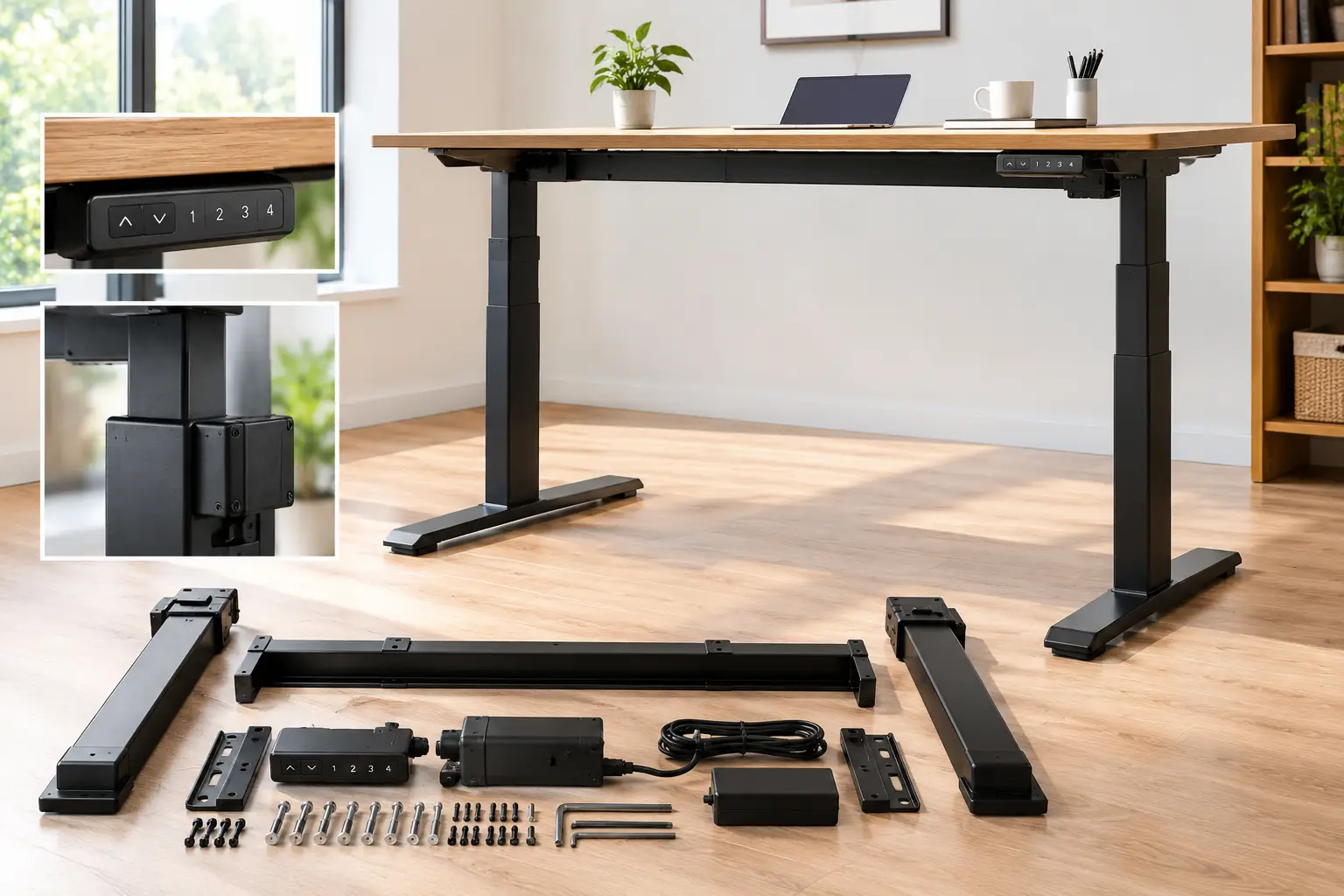
Standing desk hardware is the mechanical and electrical system that makes a desk height-adjustable: the telescoping legs (columns), the lifting motor(s), the crossbar and side brackets, the control box, the keypad, and the feet. Buying it “frame only” lets you pair a proven lift system with a tabletop of your choice.
That modular approach is exactly why the DIY route has exploded. You can reuse a butcher-block top you already own, choose an odd size that no complete desk offers, or simply spend your money where it counts. The idea of working on your feet isn’t new, either; the history of the standing desk stretches back centuries, but motorized frames are what made switching postures effortless enough to do several times a day.
In this guide, we compare seven real frames you can find on amazon.com, from bare-bones budget bases to contract-grade lifters. Everything here comes from manufacturer spec sheets, published third-party reviews, and aggregated buyer sentiment, so you get honest analysis, not marketing copy. You’ll also find a setup walkthrough, a troubleshooting section, and the numbers that actually predict whether a frame will last.
Quick Comparison: Standing Desk Hardware at a Glance
| Frame | Motors / Stages | Height Range (frame only) | Rated Load | Approx. Price Range | Best For |
|---|---|---|---|---|---|
| FlexiSpot E7 | Dual / 3-stage | 22.8″–48.4″ | 355 lb | ~$280–$350 | FlexiSpot E7: best all-rounder |
| FlexiSpot E7 Pro | Dual / 3-stage | 25″–50.6″ | 440 lb (static) | ~$400–$500 | FlexiSpot E7 Pro: tall users, heavy rigs |
| UPLIFT V3 Frame | Dual / 3-stage | 21.6″–47.7″ | 355 lb | ~$450–$500 | UPLIFT V3 Frame: long-term buyers |
| VIVO DESK-V122EB | Dual / 2-stage | 28.5″–47.2″ | 176 lb | ~$180–$250 | VIVO DESK-V122EB: big tops on a budget |
| VIVO DESK-V102E | Single / 3-stage | 23.8″–49.4″ | 220 lb | ~$180–$230 | VIVO DESK-V102E: widest cheap range |
| FlexiSpot EN1 Frame | Single / 2-stage | 27.9″–47.6″ | 154 lb | ~$200–$270 | FlexiSpot EN1 Frame: light laptop setups |
| TOPSKY Dual Motor Frame | Dual / 2-stage | 27.6″–47.3″ | 225 lb | ~$110–$200 | TOPSKY Dual Motor Frame: lowest-cost dual motor |
Prices are approximate at the time of writing; check the current price on Amazon, as prices may vary.
Looking at the table, the split is obvious: the three 3-stage dual-motor frames (FlexiSpot E7, FlexiSpot E7 Pro, UPLIFT V3 Frame) are the only ones that comfortably serve both a 5’2″ and a 6’3″ user from one base. The budget group saves you $100–$300, but notice the minimum heights: anything that bottoms out around 28″ will feel too tall for seated typing if you’re under about 5’8″.
💬 One click helps other shoppers make an informed choice too! Tap a highlighted frame above to compare current pricing. 😊
Top 7 Standing Desk Hardware Picks for 2026: Expert Analysis
1. FlexiSpot E7 — the benchmark for balanced value
The FlexiSpot E7 is the frame other frames get compared to, because it gives you premium-tier mechanics at a mid-tier price.
Its dual motors drive three-stage legs from 22.8″ to 48.4″ (frame only), with a 355 lb lifting capacity and a listed lift speed of about 1.5″ per second. In practice, that 22.8″ floor is what matters: add a 1″ top and you sit at roughly 23.8″, low enough for most shorter users to type with relaxed shoulders. The 355 lb rating means dual monitors on arms, a desktop tower, and a speaker setup won’t make the motors strain. The frame width adjusts from roughly 43″ to 75″, so it accepts tops from about 48″ to 80″ wide.
Who is it for? Pretty much anyone building a first DIY desk who wants to buy once. Based on comparing the specs, it delivers 90% of what the pricier frames offer for noticeably less money. Its one real compromise is its centered T-shaped legs, which can meet your knees if you sit close or slide in a drawer unit.
Published reviews consistently praise its stability at standing height and its quiet operation (FlexiSpot lists under 50 dB), while the most common critique is the T-leg knee clearance.
Pros:
- ✅ Very low minimum height suits shorter users
- ✅ 355 lb capacity handles multi-monitor rigs easily
- ✅ 15-year frame warranty from the manufacturer
Cons:
- ❌ Centered T-legs can bump knees and drawers
- ❌ Basic keypad lacks a USB charging port
Expect to pay around $280–$350 for the frame alone, which is strong value for a 3-stage dual-motor base.
2. FlexiSpot E7 Pro — most legroom and the highest lift rating
The FlexiSpot E7 Pro fixes the one thing people complain about on the E7 by moving the legs to the back, freeing up space underneath.
Its C-shaped frame pushes the legs rearward, so your knees, a rolling cabinet, or an under-desk treadmill have room to breathe. FlexiSpot lists a 440 lb maximum static load (note: static, meaning the weight it can hold, not necessarily lift) and a frame height of 25″ to 50.6″. That 50.6″ ceiling is the reason tall users choose it: someone around 6’4″ can type at elbow height without hunching.
The trade-off sits at the bottom of the range. A 25″ minimum (about 26″ with a top) is fine for average and tall people but can feel high for users under roughly 5’5″. So, here’s what to weigh: if you’re tall or run a heavy gaming or audio setup, this is the frame to beat; if you’re petite, the standard FlexiSpot E7 fits you better.
It also includes a magnetic cable cover and tray, which saves you a separate cable-management purchase. Reviews from outlets like TechRadar highlight its stability and height range, while buyers most often mention its higher price compared with the regular E7.
Pros:
- ✅ C-frame frees legroom for knees and cabinets
- ✅ 50.6″ max height works for very tall users
- ✅ Cable management hardware included out of the box
Cons:
- ❌ 25″ minimum is high for petite users
- ❌ Costs roughly $100–$150 more than the E7
In the $400–$500 range, it’s worth the premium only if you need the legroom or the extra height.
3. UPLIFT V3 Frame — built for the decade-long buyer
The UPLIFT V3 Frame is the choice for people who would rather pay once for certified, documented durability than gamble on a cheaper base.
UPLIFT’s spec sheet for the C-frame version lists a 21.6″ to 47.7″ height range (23.8″ to 49.9″ with the included foot spacers), 355 lb lifting capacity, a fast 2″ per second travel speed, and a noise level under 48 dB. More important than any single number: the frame is UL listed for the US and Canada and is tested to ANSI/BIFMA X5.5-2021, the industry standard for desk safety, durability, and structural performance. Those certifications are what corporate buyers and careful home-office owners look for.
The V3 replaced UPLIFT’s V2 and V2 Commercial frames and adds a stiffer crossbar design, a FlexMount cable manager, and dozens of threaded accessory mounting points. On paper, the foot-spacer trick is clever: short users run it low, tall users add spacers and gain about two inches.
Reviewers broadly describe it as one of the most stable frames at standing height, and the 15-year warranty covering the frame, motors, and electronics is a recurring point of praise. The main objection is price. Note that UPLIFT sells primarily direct, so check whether the frame-only V3 is currently listed on Amazon before you plan around it.
Pros:
- ✅ UL listed and tested to ANSI/BIFMA X5.5
- ✅ Fast 2″ per second lift speed
- ✅ Foot spacers extend the range for tall users
Cons:
- ❌ Priciest frame in this lineup
- ❌ Amazon availability can vary by configuration
At around $450–$500, it’s a premium price that pays off mainly over a long ownership horizon.
4. VIVO DESK-V122EB — dual motors for big tops on a budget
The VIVO DESK-V122EB gives you a dual-motor base for big tabletops without a dual-motor price tag.
VIVO’s own spec page lists a 28.5″ to 47.2″ height range, a 40.6″ to 60.8″ adjustable frame length, and compatibility with tops from 41″ to 81″ long and 23″ to 43″ deep (at least 3/4″ thick). It uses two-stage legs, three memory presets, a lift speed of about 1″ per second, and thermal overload protection on the motors.
Here’s the detail most buyers overlook: VIVO’s own product page rates this frame at 176 lb, while some retail listings advertise a higher number. When figures conflict, plan around the lower, manufacturer-published one. In practice, 176 lb comfortably covers a solid-wood top, two monitors, and a laptop, but it’s not the frame for a massive butcher block plus a full audio rig.
The bigger limitation is that 28.5″ minimum. Add a 1″ top and you’re near 29.5″, above OSHA’s recommended seated keyboard range for many people, so shorter users may need a keyboard tray. For taller users who mostly stand and want a long 72″+ surface, though, it’s a sensible budget play.
Aggregated buyer sentiment generally describes it as easy to assemble and reasonably sturdy for the price, with some noting wobble at full extension, which is typical of two-stage legs.
Pros:
- ✅ Dual motors at a budget price point
- ✅ Accepts tabletops up to about 81 inches long
- ✅ Thermal overload protection on both motors
Cons:
- ❌ High 28.5″ minimum for shorter users
- ❌ Two-stage legs wobble more at full height
Typically in the $180–$250 range, it’s solid value for tall users with large tops.
5. VIVO DESK-V102E — the widest height range for the money
The VIVO DESK-V102E proves that one good motor plus three leg stages can beat two motors with two stages, at least on reach.
Its three-stage telescopic legs run from 23.8″ to 49.4″ (frame only), a span close to the premium frames. The frame length adjusts from 37.3″ to 59″, accepting tops from 38″ to 79″ long and 23″ to 43″ deep. It’s rated for 220 lb and includes a touch-style controller with memory settings and a sit-stand timer reminder.
Based on comparing the specs, this is the budget frame for households where a short and a tall person share one desk: the low floor and high ceiling cover both. The catch is the single motor. One motor drives both legs through a connecting shaft, which typically means a slightly slower, somewhat louder lift and more strain near the weight limit.
So who should buy it? Anyone with a moderate setup (laptop, one or two monitors, light accessories) who values height range more than lift speed. If you plan to load it near 200 lb, step up to a dual-motor frame instead.
We couldn’t verify a large, consistent body of review text for this exact listing, so treat sentiment cautiously; available buyer feedback generally focuses on its height range and value, with occasional mentions of motor noise.
Pros:
- ✅ Wide 23.8″–49.4″ range fits most heights
- ✅ Timer reminder nudges you to change posture
- ✅ 220 lb rating is generous for single motor
Cons:
- ❌ Single motor lifts slower than dual designs
- ❌ Louder operation when loaded near capacity
Around $180–$230, it’s among the best value-per-inch-of-range frames you can buy.
6. FlexiSpot EN1 Frame — a simple, light-duty entry point
The FlexiSpot EN1 Frame is a straightforward, single-motor base for people whose desk holds little more than a laptop and a monitor.
FlexiSpot lists its EN1 frame at 27.9″ to 47.6″ with a 154 lb lifting capacity (not counting the top), two-stage steel legs, and three programmable presets. Note that newer EN1 listings on Amazon (including one-piece desk bundles) sometimes show different figures, such as 176 lb or a slightly different height range, so check the specific listing before you buy. FlexiSpot’s EN1 page lists a 5-year warranty on the frame and motor and 2 years on the electronics.
What does this mean in practice? The 154 lb limit is enough for a 1″ laminate top, a 27″ monitor, and a laptop, but it leaves little headroom for heavy monitor arms or a solid-wood top. And like the VIVO DESK-V122EB, its high minimum height means shorter users may sit a bit too high.
Who’s it for? Students, part-time remote workers, or anyone adding a secondary desk who wants a known brand at a lower price. Third-party reviews from LaptopMag and Tom’s Guide-style outlets have historically described the EN1 as stable for its class, with the low capacity as the main drawback.
Pros:
- ✅ Simple assembly with a pre-mounted motor
- ✅ Known brand with established customer support
- ✅ Three presets cover sitting and standing heights
Cons:
- ❌ 154 lb capacity limits heavier setups
- ❌ Shorter warranty than FlexiSpot’s E7 series
At around $200–$270, it’s fair value, though the VIVO DESK-V102E offers more range for similar money.
7. TOPSKY Dual Motor Frame — the lowest-cost route to two motors
The TOPSKY Dual Motor Frame is the frame for buyers who want dual-motor smoothness at a price that often undercuts single-motor bases.
The listing specifies a 27.6″ to 47.3″ height range, a frame width of 43″ to 59″, compatibility with tops up to about 70.8″ x 31.5″, and a capacity of up to 225 lb. Two motors mean each leg lifts independently under synchronized control, which generally translates to steadier movement and less strain on uneven loads, such as a heavy monitor arm clamped on one side.
Based on the specs, it’s essentially a “good enough” frame for average-height users who mostly need a reliable up-and-down on a standard 55″ to 63″ top. Its minimum height is in the same high band as the other two-stage frames, so shorter users face the same seated-height compromise. Warranty and long-term support from a smaller brand are also less proven than from FlexiSpot, UPLIFT, or VIVO.
Real buyer feedback we could verify is limited and mostly comes from deal-community discussions, where several commenters described it as solid and not wobbly for the money; we didn’t find a large independent review base, so weigh that accordingly.
Pros:
- ✅ Dual motors at an entry-level price
- ✅ 225 lb rating beats most budget frames
- ✅ Fits common 60″ x 30″ tabletops easily
Cons:
- ❌ Less proven long-term support and warranty
- ❌ High minimum height for shorter users
Usually in the $110–$200 range depending on listing, it’s the value pick if your budget is tight.
✨ Don’t miss the right frame for your build!
🔍 Take your home office to the next level with this carefully curated lineup of standing desk hardware. Click a highlighted frame to check current pricing and availability, and pick the base that will keep your setup steady, quiet, and comfortable for years. 🖥️⚡
How to Assemble and Set Up Your Standing Desk Frame
Most frames go together in 30 to 60 minutes, but a few habits separate a rock-solid desk from a wobbly one.
Before You Start
- ✅ Unbox on a rug or cardboard so you don’t scratch the top.
- ✅ Check the top’s thickness: most frames require at least 3/4″, and 1″ is safer for wood screws.
- ✅ Use a drill with a clutch set low, never full torque, so you don’t strip the particleboard.
Step-by-Step Setup
- Assemble the frame upside down on the tabletop. Extend the crossbar to match your top’s width, leaving 1″–3″ of overhang on each side.
- Center the frame front to back. For C-frames like the FlexiSpot E7 Pro or UPLIFT V3 Frame, shift slightly forward if your top is shallow so the desk doesn’t tip back.
- Pre-drill pilot holes about 1/2″ deep. This is the single biggest step most people skip, and it’s why screws strip.
- Mount the control box and keypad, then route cables along the crossbar before flipping the desk.
- Flip with a helper. A loaded frame can weigh 70–100 lb; lifting alone twists the columns.
- Run the reset/initialization routine (usually holding the down button until the desk bottoms out and beeps).
Common Mistakes in the First 30 Days
Over-tightening screws is mistake number one. Second: skipping leveling, so twist the adjustable feet until a bubble level reads flat at standing height, not just seated. Third: saving presets before you’ve tested them. Spend a week adjusting to find your true elbow height, then lock the memory buttons. Finally, re-check every screw after two weeks; wood settles and frames loosen slightly.
Which Frame Fits You? Three Real-World Buyer Scenarios
Specs only become useful when you map them to an actual person. Here are three common profiles.
Scenario 1: The Petite Remote Worker (5’2″, full-time, ~$350 budget)
She works eight hours a day at a 60″ x 30″ laminate top with two 24″ monitors. Her seated keyboard height needs to sit around 24″–25″, which rules out every frame with a 27.5″+ minimum. The best match is the FlexiSpot E7: its 22.8″ floor plus a 1″ top lands near her ideal, and the 355 lb rating means she’ll never think about load. If budget tightens, the VIVO DESK-V102E is the runner-up thanks to its 23.8″ minimum.
Scenario 2: The Tall Gamer and Streamer (6’4″, heavy rig, ~$500 budget)
He runs a 72″ solid-wood top, a 49″ ultrawide on a heavy arm, a full tower, and audio gear, easily 150–200 lb before the top. His standing elbow height is near 48″. The FlexiSpot E7 Pro wins here: 50.6″ max height, 440 lb static rating, and C-frame legroom for his foot pedals. The UPLIFT V3 Frame with foot spacers is a strong alternative if he values certification and warranty depth.
Scenario 3: The Student Upgrading an Old Desk (5’10”, part-time, under $200)
He wants to reuse a 55″ x 28″ top from a hand-me-down desk and mostly stands to read or take calls a few hours a week. The TOPSKY Dual Motor Frame or VIVO DESK-V122EB gives him dual-motor smoothness at the lowest cost, and at 5’10” their higher minimum height isn’t a problem. The lesson across all three: start from your body and your load, then pick the frame.
Troubleshooting: Fixing Wobble, Error Codes, and Uneven Legs
Even the best standing desk hardware can act up. Here are the most common problems and how to solve them.
Problem 1: The desk wobbles at standing height. Solution: first tighten every frame-to-top and leg-to-crossbar bolt. Then level the feet with a bubble level. If wobble persists, it’s often the leg design itself: two-stage legs on frames like the VIVO DESK-V122EB or FlexiSpot EN1 Frame flex more at full extension. Pushing the desk against a wall or adding a modesty panel adds real stiffness.
Problem 2: An error code flashes (often “E01,” “RST,” or “ASR”). Solution: this usually means the motors lost sync or hit an obstruction. Unplug for 30 seconds, then perform the reset routine from the manual (typically holding the down button until the desk reaches its lowest point and beeps).
Problem 3: One leg sits lower than the other. Solution: on dual-motor frames, a full reset re-syncs both legs. On single-motor frames like the VIVO DESK-V102E, check that the connecting hex shaft is fully seated in both gearboxes.
Problem 4: The desk stops or reverses when nothing is in the way. Solution: anti-collision sensitivity may be set too high, or a heavy load is shifting. Many keypads let you lower sensitivity; consult your manual.
Problem 5: The motor sounds strained. Solution: you’re likely near the weight limit. Remove the heaviest item and retest; if strain disappears, your setup has outgrown the frame.
How to Choose Standing Desk Hardware
Choosing the right frame is less about features and more about matching three numbers to your body and your gear. OSHA’s computer workstation purchasing guide recommends keyboard heights roughly between 22″ and 30″ for seated work and 36″ to 46.5″ for standing work, which is a great sanity check for any spec sheet.
- Measure your seated and standing elbow heights. Have someone measure from the floor to the underside of your forearm with your elbows at about 90 degrees. Those are your target desk heights.
- Subtract your tabletop thickness. A 1″ top raises every number on the spec sheet by an inch, so compare “frame only” figures carefully.
- Check the minimum height first. This is the spec that trips up shorter users; maximum height only matters if you’re tall.
- Total your load honestly. Add the top’s weight plus monitors, arms, computer, and accessories, then keep a 25%–30% buffer below the rating.
- Decide between dual and single motors. Dual motors lift more smoothly and handle off-center loads better; single motors save money for light setups.
- Prefer three-stage legs if you share the desk. They offer a wider range and more overlap in the columns, which typically means better stability.
- Check top-size compatibility and warranty. Confirm the frame’s width range fits your top, and favor longer coverage on motors and electronics, not just the steel.
Electric Standing Desk Frame vs. Desk Converter vs. Fixed Desk
Before you commit to a full frame, it’s worth comparing it to the two alternatives most people consider.
| Option | Height Adjustability | Typical Cost | Stability | Best For |
|---|---|---|---|---|
| Electric standing desk frame (e.g., FlexiSpot E7) | Whole surface, push-button | ~$110–$500 + top | High (3-stage dual motor) | Daily sit-stand switching |
| Desktop converter | Monitor and keyboard only | ~$100–$350 | Moderate | Renters, shared office desks |
| Manual crank frame | Whole surface, slow | ~$150–$300 | Moderate to high | Rare adjustments |
| Fixed desk + keyboard tray | Keyboard only | ~$50–$200 | High | Tight budgets, seated-only work |
The data makes the case clearly: only a motorized frame changes the entire work surface in seconds, and that convenience is the main reason people actually switch postures through the day. Converters are cheaper but raise your monitor and keyboard as a unit, which often compromises the ergonomics of one or the other, while crank frames are so slow that most owners stop adjusting them within weeks.
A converter still makes sense if you rent, can’t modify the desk, or work in a shared office. For everyone else, a dual-motor frame like the FlexiSpot E7 or even a budget TOPSKY Dual Motor Frame delivers more for a similar total cost once you factor in the top you already own.
Features That Actually Matter (and Ones That Don’t)
Marketing pages love long feature lists. Here’s how to separate the hardware that changes your daily experience from the fluff.
Features That Matter
- ⚡ Dual motors. They keep both legs synchronized under uneven loads and typically run quieter at the same speed.
- 📏 Three-stage legs. More overlap between column sections means a wider range and less flex at standing height.
- 🛡️ Anti-collision detection. It stops the desk when it hits a chair arm or windowsill, protecting the motors and your furniture.
- 💾 Memory presets. Two presets (sit and stand) are the minimum; three or four help households with multiple users.
- 🔧 Real warranty coverage on electronics. Steel rarely fails; control boxes and keypads do. A long frame warranty with short electronics coverage is less impressive than it sounds.
Features That Don’t Matter Much
- ❌ Lift speed above about 1.5″ per second. The difference between 1.5″ and 2″ per second is a couple of seconds per transition. Nice, not decisive.
- ❌ App or Bluetooth control. Most people tap a preset button and move on.
- ❌ Decorative finishes on the crossbar. Nobody sees it under a top.
Based on comparing the seven frames above, the features that most reliably separate the premium tier from the budget tier are leg stages and motor count, not app connectivity or flashy keypads.
Long-Term Cost and Standing Desk Replacement Parts
Sticker price is only part of the story. A frame you replace in three years costs more than one that lasts twelve.
| Frame | Approx. Price Range | Warranty (per manufacturer/listing) | Est. Cost per Year Over 10 Years* | Best For |
|---|---|---|---|---|
| UPLIFT V3 Frame | ~$450–$500 | 15 years (frame, motors, electronics) | ~$45–$50 | UPLIFT V3 Frame: lowest long-term risk |
| FlexiSpot E7 | ~$280–$350 | 15 years (frame) | ~$28–$35 | FlexiSpot E7: best value per year |
| FlexiSpot EN1 Frame | ~$200–$270 | 5 years frame/motor, 2 years electronics | ~$20–$27 (if it lasts) | FlexiSpot EN1 Frame: short-term needs |
| TOPSKY Dual Motor Frame | ~$110–$200 | Check listing | ~$11–$20 (if it lasts) | TOPSKY Dual Motor Frame: tight budgets |
*Assumes the frame survives 10 years; this is an illustration, not a guarantee.
The table shows why the FlexiSpot E7 keeps landing in the “best value” slot: its per-year cost is low and its warranty is long. Budget frames look cheapest on paper, but their shorter or less-documented coverage means a single failed control box can erase the savings. The UPLIFT V3 Frame costs more upfront but carries the least financial risk over a decade.
What Breaks, and What Replacement Parts Cost
The parts that fail most often are electronic: the control box, the keypad, and occasionally one motor. The good news is that major brands generally sell standing desk replacement parts, so a failure outside warranty usually means a part swap rather than a new desk. Before buying any frame, search for its replacement keypad and control box; if you can’t find them, factor that into your decision. Keep your receipt, model number, and serial label photo in one place to speed up any warranty claim.
Safety, Regulations, and Standards
A standing desk is a motorized piece of furniture that lifts heavy electronics, so certifications are worth more attention than most buyers give them.
Certifications to Look For
- UL or ETL listing. These marks indicate the electrical system has been tested by a recognized lab. The UPLIFT V3 Frame spec sheet, for example, states it’s UL listed for the US and Canada.
- ANSI/BIFMA X5.5. This is the North American standard for desk and table safety, durability, and structural performance. Frames tested to it have been evaluated for stability and cycle life.
- ANSI/BIFMA G1. This ergonomic guideline helps define height ranges that fit most of the population; frames referencing it are designed around real anthropometric data.
- FCC compliance. Relevant for keypads with Bluetooth or wireless features.
Practical Safety Habits
Keep the desk’s travel path clear: windowsills, chair arms, and filing cabinets are the most common collision points. Leave enough slack in every cable to reach full standing height, because a cable pulled taut can yank a monitor off the desk. Use a surge protector for the control box, and never exceed the rated load. If you have kids or pets, enable the keypad’s child lock if it has one, since a desk lowering onto a curious toddler or pet is a real hazard.
Finally, remember that standing all day isn’t the goal. The Mayo Clinic’s office ergonomics guide emphasizes neutral posture and regular movement, which is exactly what a well-adjusted frame makes easy.
Standing Desk Hardware for Tall and Short Users
Height range is where most frame purchases succeed or fail, and it’s almost always the extremes of the population who get burned.
If You’re Under About 5’5″
Your critical number is the minimum height. You’ll likely want a seated desk height near 23″–26″ including the top. That points directly to three-stage frames with low floors: the UPLIFT V3 Frame (21.6″), the FlexiSpot E7 (22.8″), or the budget VIVO DESK-V102E (23.8″). Avoid two-stage frames with 27.5″+ minimums unless you’re willing to add a keyboard tray and footrest.
If You’re Over About 6’2″
Your critical number is the maximum height, plus stability at that height. The FlexiSpot E7 Pro (50.6″) and the UPLIFT V3 Frame with foot spacers (49.9″) are your strongest options. Also consider top thickness and casters: each adds height, but casters can reduce stability, so add them only if you truly need mobility.
If Two People Share One Desk
Prioritize the widest range and at least four memory presets. Three-stage dual-motor frames like the FlexiSpot E7 handle shared use best because each person’s preset lands precisely and the motors handle frequent cycling. A shared desk also gets adjusted more often, so the warranty on motors and electronics matters even more here.
Common Mistakes to Avoid When Buying Standing Desk Hardware
Even careful shoppers fall into a handful of predictable traps.
Mistake 1: Reading the height range with the top included. Some listings measure from the floor to the top surface; others measure frame only. Always confirm which, or you could be off by over an inch.
Mistake 2: Trusting the biggest load number. “Static load” (what it can hold) and “lifting capacity” (what it can move) are not the same. The FlexiSpot E7 Pro‘s 440 lb figure is static; plan your setup around lifting capacity whenever a brand publishes it.
Mistake 3: Ignoring conflicting specs. As we saw with the VIVO DESK-V122EB, retailers sometimes list higher capacities than the manufacturer. Use the lower number.
Mistake 4: Buying a top that’s too thin or too shallow. Tops under 3/4″ strip screws, and tops shallower than about 24″ can make C-frames feel tippy.
Mistake 5: Forgetting cable slack. A desk that rises 20+ inches needs cables that can travel with it. Budget for a cable tray if your frame doesn’t include one.
Mistake 6: Choosing on speed or app features. As covered above, leg stages, motor count, and warranty coverage predict satisfaction far better.
FAQ About Standing Desk Hardware
❓ Can I use an IKEA or butcher-block tabletop on a standing desk frame?
❓ Do standing desk frames come with screws for the tabletop?
❓ Can you buy replacement legs or a control box for a standing desk?
❓ How long does an electric standing desk frame usually last?
❓ Is a cheap standing desk frame from Amazon worth buying?
Conclusion: Pick the Frame That Fits Your Body, Your Gear, and Your Timeline
The right standing desk hardware isn’t the one with the longest feature list. It’s the one whose height range fits your body, whose capacity fits your gear, and whose warranty fits how long you plan to keep it.
For most people, the FlexiSpot E7 remains the smartest buy: a low 22.8″ floor, a 355 lb rating, and long frame coverage at a mid-range price. If you’re tall or run a heavy rig, the FlexiSpot E7 Pro earns its premium with C-frame legroom and a 50.6″ ceiling. If you want certified, documented durability for the next decade, the UPLIFT V3 Frame is the safest long-term bet.
On a tighter budget, the VIVO DESK-V102E gives you a surprisingly wide range from a single motor, while the VIVO DESK-V122EB and TOPSKY Dual Motor Frame bring dual motors to large tops for less money, best for average and tall users. And the FlexiSpot EN1 Frame remains a simple, light-duty starter.
Whatever you choose, measure your elbow heights first, total your load honestly, pre-drill your pilot holes, and spend a week dialing in your presets. Do that, and your desk will feel like it was built for you, because it was.
🚀 Ready to build the desk you’ll actually use every day?
💡 Click any highlighted frame above to check current pricing and availability on Amazon. Your back, your focus, and your future self will thank you for choosing hardware that’s built to last! 🖥️✨
Recommended for You
- Corner Standing Desk with Storage: 7 Brilliant Picks for 2026
- Desk with Electrical Outlets: 7 Smartest Picks for 2026
- Desk with Pull Out Keyboard Tray: 7 Products for Comfortable Home Offices
Disclaimer: This post contains affiliate links. As an Amazon Associate, I earn from qualifying purchases made through these links, at no additional cost to you.
✨ Found this article helpful? Share it with someone who needs it! 💬🤗