
In This Article
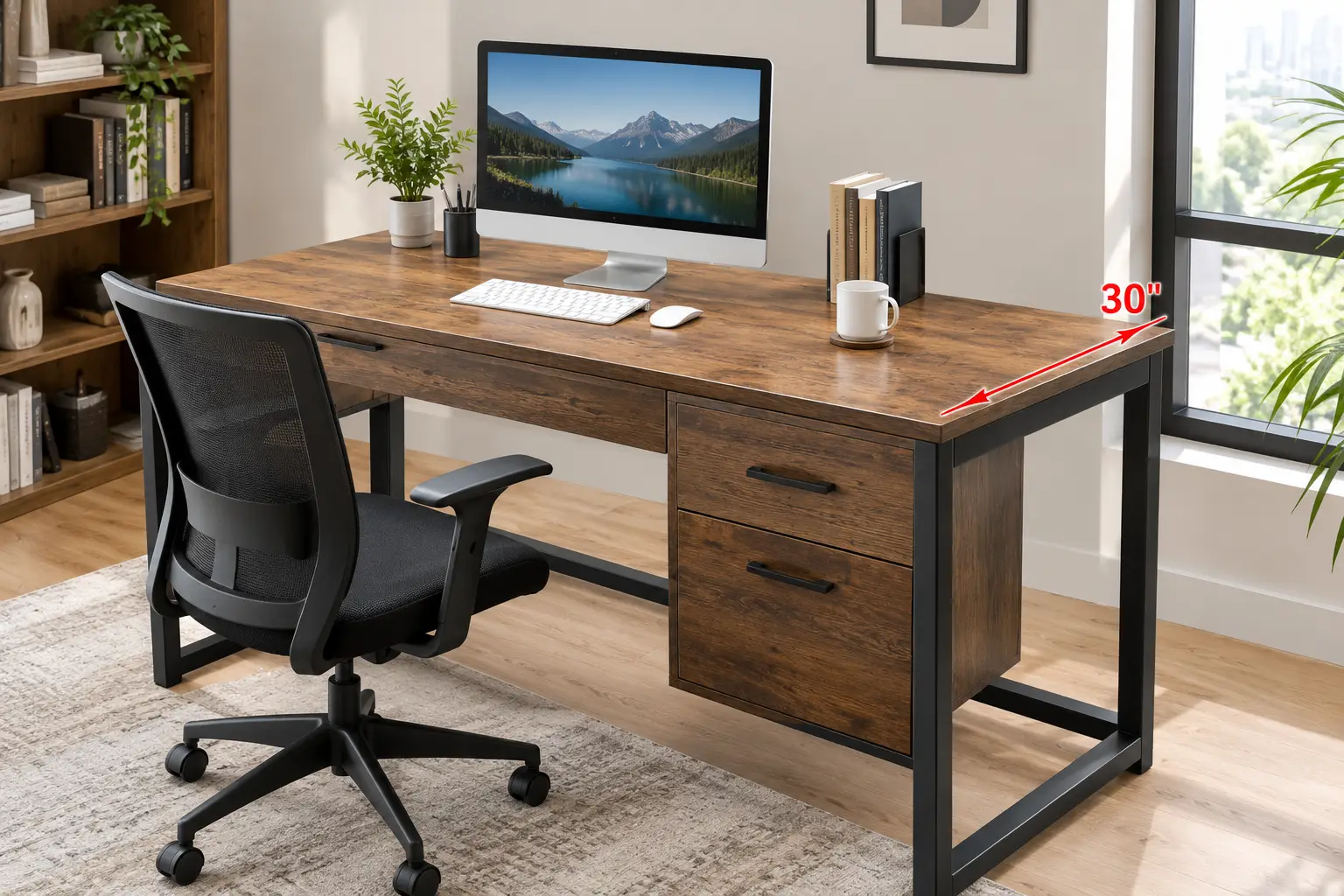
Why a 30 deep desk Is the Upgrade Your Neck Has Been Begging For
Here’s a quiet truth about home offices: most of us didn’t pick our desk — we inherited a width. We measured the wall, bought something 48 or 55 inches long, and never once thought about depth. Then the second monitor arrived. Then the 27-inch upgrade. Suddenly your screen is 16 inches from your nose, your keyboard hangs off the edge, and your forearms have nowhere to rest.
That’s exactly the problem a 30 deep desk solves. Six extra inches front-to-back sounds trivial on a spec sheet, but in practice it’s the difference between a cramped cockpit and a real workspace. The OSHA computer workstation guidelines put the preferred eye-to-screen distance at roughly 20 to 40 inches — and on a shallow 24-inch desk with a monitor on its stock stand, you’ll often struggle to hit even the low end of that range.
In this guide, we compare seven real desks you can find on amazon.com, from premium electric standing desks to a budget fixed-height option. We analyzed manufacturer spec sheets, independent reviews, and aggregated customer sentiment — no invented test stories, just honest comparison. You’ll also get a setup guide, buyer scenarios, and a troubleshooting section Amazon listings won’t give you.
What Is a 30 deep desk?
A 30 deep desk is a desk whose work surface measures 30 inches from the front edge to the back edge — about 6 inches deeper than the 24-inch standard common on budget computer desks. That extra depth lets you push monitors back to a comfortable viewing distance while leaving room for a keyboard, notebook, and resting forearms.
Quick Comparison: The Best 30 deep desk Picks at a Glance
| Desk | Type | Top Size | Rated Capacity | Best for |
|---|---|---|---|---|
| FlexiSpot E7 Pro | Electric sit-stand | 60″ x 30″ | Up to 350 lbs (retail listings) | FlexiSpot E7 Pro: heavy multi-monitor setups |
| Uplift V2 | Electric sit-stand | 72″ x 30″ | 355 lbs | Uplift V2: buyers who want to customize everything |
| Vari Electric Standing Desk | Electric sit-stand | 60″ x 30″ | ~200 lbs class | Vari Electric Standing Desk: fastest, easiest setup |
| Desktronic HomePro 72×30 | Electric sit-stand | 72″ x 30″ | 352.7 lbs | Desktronic HomePro 72×30: quick lifts, modern controls |
| FlexiSpot E6 Pro 72×30 | Electric sit-stand | 72″ x 30″ | 330 lbs | FlexiSpot E6 Pro 72×30: big bamboo top on a mid budget |
| Bush Series C 72W x 30D | Fixed-height | 72″ x 30″ | 200 lbs | Bush Series C 72W x 30D: traditional office, expandability |
| BEST BOARD 60 x 30 Computer Desk | Fixed-height | 60″ x 30″ | Not clearly verified | BEST BOARD 60 x 30 Computer Desk: tight budgets |
Looking at the table, the split is clear: five electric standing desks and two fixed-height desks, all sharing the same 30-inch depth. If you plan to load up monitor arms, speakers, and a desktop tower, the capacity column matters most — the FlexiSpot E7 Pro, Uplift V2, and Desktronic HomePro 72×30 all sit in the 350-pound class, which gives you real headroom. The Bush Series C 72W x 30D is the pick if you never plan to stand and want a desk that can grow into an L or U shape later.
💬 One click helps other shoppers make an informed choice too! 😊
Top 7 30 deep desk Picks for 2026: Expert Analysis
1. FlexiSpot E7 Pro — stability built into the leg design
The FlexiSpot E7 Pro earns its top spot by attacking the most common standing-desk complaint — wobble — at the frame level rather than with marketing adjectives.
⚡ The key upgrade over the regular E7 is longer overlap between the stages of each lifting column. In plain English, the telescoping legs grip each other over more length, so the desk sways less at standing height. The legs are also set toward the back of the frame (FlexiSpot calls it a semi-C design), which frees up knee and storage room — a real bonus on a 30-inch-deep top, where you want your chair to roll in fully. Retail listings for the 60″ x 30″ version show a height range of about 26″ to 51.6″, four programmable presets, a USB charging port, a child lock, and a cable tray with a magnetic fabric cover.
Based on comparing the specs, this is the desk for people running two or three monitors on arms, plus a tower on a shelf. One honest caveat: capacity figures vary by source — retail listings say 350 lbs while FlexiSpot’s own page advertises more — so plan around the lower number. Reviews consistently praise the rigidity and quiet dual motors, while the most common complaint is the weight of the boxes during delivery and assembly.
Pros:
- ✅ Extended column overlap noticeably reduces sway
- ✅ Rear-set legs free up knee and storage space
- ✅ Solid wood and bamboo top options available
Cons:
- ❌ Heavy boxes make solo assembly tough
- ❌ Published capacity figures differ between sources
💲 Typically in the $500–$700 range at the time of writing — strong value for the stability you get; check the current price.
2. Uplift V2 — the most customizable frame in its class
The Uplift V2 is less a single desk and more a build-your-own kit, which is exactly why it appeals to people who know precisely what they want.
🛠️ Uplift lets you choose top material, size (including 72″ x 30″), grommets, keypad style, and a long list of accessories. Independent testing by BTOD measured a height range of roughly 25.5″ to 51.1″ and a rated capacity of 355 lbs, with an adjustable-width base that fits large tops. Uplift backs the frame with a 15-year warranty, which translates into genuinely low long-term risk for a motorized product.
Here’s what to weigh: if you enjoy configuring, the Uplift V2 rewards you with a desk that fits your exact workflow — keyboard tray, monitor arms, power grommets, all planned from day one. But not every tester agrees on the numbers. One independent lab review argued the real-world lift capacity sits well below the rated figure, and noted the motors slowed as load increased. Treat 355 lbs as a ceiling, not a target. Also note that Uplift launched the V3 in 2026, so V2 inventory may shift on Amazon.
📝 Aggregated reviews generally praise the smooth, quiet motors and the huge accessory ecosystem; complaints center on premium pricing once add-ons stack up.
Pros:
- ✅ Enormous range of sizes, tops, and accessories
- ✅ Long 15-year frame warranty
- ✅ Wide height range suits very tall users
Cons:
- ❌ Add-ons push the total cost up fast
- ❌ Some independent tests dispute the rated capacity
💲 Usually $700–$900+ for a 72″ x 30″ build at the time of writing — best value if you’ll use the customization; check current pricing.
3. Vari Electric Standing Desk — ready to work in minutes
The Vari Electric Standing Desk is the pick for anyone who dreads an afternoon of Allen keys and instruction booklets.
🧰 Vari ships its desk largely pre-built, and reviewers repeatedly describe the setup as refreshingly quick. The 60″ x 30″ version uses T-style legs for stability, offers four programmable height settings, and has a durable laminate finish. Vari also includes small extras like cable wraps and desk hooks. In practice, T-legs spread the load across a wide foot, which helps keep the desk planted when you lean on it while standing.
Based on comparing the specs, this desk suits remote workers who want a dependable, good-looking setup today — not next weekend. It’s not the capacity champion; Vari’s related Curve model lists 200 lbs, and the standard desk sits in a similar class, so it’s comfortable for two monitors and a laptop but not a heavy workstation packed with gear. Vari’s warranty on its Curve model is five years — shorter than FlexiSpot or Uplift.
📝 Customer feedback on Vari’s site highlights easy assembly, smooth height adjustment, and helpful customer service; the recurring trade-off buyers mention is paying a premium for convenience.
Pros:
- ✅ Minimal assembly gets you working fast
- ✅ Stable T-style legs and clean design
- ✅ Four programmable height presets
Cons:
- ❌ Lower weight capacity than rivals here
- ❌ Shorter warranty than FlexiSpot or Uplift
💲 Generally $600–$750 for the 60″ x 30″ at the time of writing — fair value if your time matters; check the current price.
4. Desktronic HomePro 72×30 — fastest lift with modern controls
The Desktronic HomePro 72×30 stands out for speed and a slick, touchscreen-driven experience that feels more 2026 than 2016.
⚡ Desktronic lists a lift speed of about 2 inches per second, a 352.7-lb capacity, a three-stage column, and a height range of roughly 25.4″ to 51.2″ with the tabletop installed. The Amazon listing highlights USB-A and USB-C charging, a touchscreen controller, and three memory presets, and notes the desk is made in Europe. On paper, 2 in/s means a sit-to-stand transition takes just a handful of seconds — which matters, because a desk you switch quickly is a desk you actually switch.
Here’s what to weigh: three presets instead of four is a small limitation if two people share the desk. Warranty terms also appear differently across Desktronic’s own pages (five years in one place, 15 years in another), so confirm coverage before buying. Its 72-inch width and 30-inch depth make it ideal for ultrawide monitors or a dual-screen setup with speakers.
📝 Desktronic’s product page reports buyers praising the sturdy frame, dual motors, and wide height range. Amazon review volume for this newer listing is still limited, so we can’t summarize broad Amazon sentiment with confidence yet.
Pros:
- ✅ Quick 2 in/s lift encourages frequent switching
- ✅ USB-A and USB-C charging built in
- ✅ High capacity for large setups
Cons:
- ❌ Only three memory presets
- ❌ Warranty terms need confirming before purchase
💲 Typically in the $600–$800 range at the time of writing — competitive for its speed and capacity; check current pricing.
5. FlexiSpot E6 Pro 72×30 — big bamboo surface on a mid budget
The FlexiSpot E6 Pro 72×30 gives you a full-size 72″ x 30″ bamboo workspace without jumping to premium pricing.
🎋 According to its Amazon listing, this model pairs a bamboo desktop with a dual-motor, three-stage frame, oval legs, and a 330-lb capacity. Why does that combination matter? A three-stage column gives a wider height range than two-stage designs, which helps both shorter and taller users. Bamboo is harder than many common engineered-wood tops, so it resists dents from a heavy mug or a dropped phone better than a basic laminate.
Based on comparing the specs, this is the sweet spot for someone who wants a big, natural-looking desk for a dual-monitor home office but doesn’t need the extra frame refinements of the FlexiSpot E7 Pro. The 330-lb rating still leaves plenty of headroom for two monitors on arms, a laptop dock, and speakers. The oval-leg styling is a design choice some people love and others find less sturdy-looking than square columns.
📝 Detailed, verified Amazon review data for this specific 72×30 configuration was limited during our research, so we recommend reading the most recent reviews on the listing before you buy — focus on comments about wobble at full height and bamboo finish quality.
Pros:
- ✅ Large 72″ x 30″ bamboo work surface
- ✅ Three-stage frame with wide height range
- ✅ Strong 330-lb rated capacity
Cons:
- ❌ Fewer premium frame upgrades than the E7 Pro
- ❌ Limited verified review data for this size
💲 Often in the $450–$600 range at the time of writing — excellent size-per-dollar value; check the current price.
6. Bush Series C 72W x 30D — commercial durability, fixed height
The Bush Series C 72W x 30D is for people who want a classic office desk that feels like it came out of a law firm, not a dorm room.
🏢 Bush rates the surface for 200 lbs and uses a thermally fused laminate that resists scratches and stains. Two wire management grommets tame cables, and a finished back panel means the desk looks good floating in the middle of a room. Bush says the collection is built for a 40-plus-hour work week, tested to ANSI/BIFMA standards, and backed by a 10-year warranty. The real superpower is modularity: you can add a return, hutch, or mobile file cabinet later to form an L or U shape.
Here’s what to weigh: this desk doesn’t move. If you want to alternate sitting and standing, look elsewhere. But if you do mostly seated paperwork, client calls, and a two-monitor setup, a fixed desk has fewer failure points — no motors, no control boxes, no firmware quirks. Bush notes the line is American-made with U.S. and imported parts.
📝 Aggregated feedback on Series C listings tends to highlight sturdiness and professional appearance once assembled; the common complaint is a lengthy, heavy assembly process.
Pros:
- ✅ Commercial-grade build with a 10-year warranty
- ✅ Expands into L or U configurations
- ✅ No motors means fewer long-term failure points
Cons:
- ❌ Fixed height — no sit-stand option
- ❌ Heavy, time-consuming assembly
💲 Usually $350–$550 depending on finish at the time of writing — strong long-term value for traditional offices; check the current price.
7. BEST BOARD 60 x 30 Computer Desk — the budget way to get depth
The BEST BOARD 60 x 30 Computer Desk exists for one reason: it gets you a full 30 inches of depth for a fraction of what a motorized desk costs.
💵 Its Amazon listing describes a 60″ x 30″ walnut wood-grain top on a metal frame, marketed for easy assembly. That’s the entire spec story — and honestly, that’s the point. A simple four-leg metal frame has nothing to break, and the 30-inch depth delivers the same ergonomic benefit for monitor distance as desks costing five times more.
Here’s what to weigh: budget fixed desks typically use engineered-wood tops that can sag over time under heavy monitors, and frames may lack cross-bracing, which can allow side-to-side sway when typing hard. We could not verify a clear weight capacity or warranty term from the information available, so check the current listing for both before ordering. If you plan to clamp monitor arms, confirm the top thickness can handle clamp pressure.
📝 We couldn’t verify enough consistent review data to summarize customer sentiment responsibly, so read the most recent reviews and look specifically for comments on wobble, top flatness, and packaging damage.
This desk makes the most sense for students, first apartments, or anyone testing whether a deeper desk suits them before investing in a standing model.
Pros:
- ✅ Full 30-inch depth at a budget price
- ✅ Simple metal frame with few failure points
- ✅ Good starter desk for dual monitors
Cons:
- ❌ Capacity and warranty not clearly verified
- ❌ Engineered tops may sag under heavy loads
💲 Generally under $200 at the time of writing — unbeatable depth-per-dollar; check the current price.
Detailed Spec Comparison of the Top 7
| Desk | Height Range | Presets | Warranty (as listed) | Price Range | Best for |
|---|---|---|---|---|---|
| FlexiSpot E7 Pro | ~26″–51.6″ | 4 | Up to 15 yrs (retailer listing) | $500–$700 | FlexiSpot E7 Pro: stability-first buyers |
| Uplift V2 | ~25.5″–51.1″ | Up to 4 (keypad-dependent) | 15 yrs | $700–$900+ | Uplift V2: custom builds |
| Vari Electric Standing Desk | Sit-to-stand (varies by model) | 4 | 5 yrs (Curve model) | $600–$750 | Vari Electric Standing Desk: quick setup |
| Desktronic HomePro 72×30 | ~25.4″–51.2″ | 3 | 5–15 yrs (confirm) | $600–$800 | Desktronic HomePro 72×30: speed lovers |
| FlexiSpot E6 Pro 72×30 | Three-stage (wide) | Check listing | Check listing | $450–$600 | FlexiSpot E6 Pro 72×30: value size |
| Bush Series C 72W x 30D | Fixed | — | 10 yrs | $350–$550 | Bush Series C 72W x 30D: pro offices |
| BEST BOARD 60 x 30 Computer Desk | Fixed | — | Not verified | Under $200 | BEST BOARD 60 x 30 Computer Desk: budget |
The spec table reveals a pattern worth noticing: warranty length tracks closely with price, and the Uplift V2 and FlexiSpot E7 Pro lead on long coverage. If you’re tall (over about 6’2″), prioritize desks that reach at least 50 inches — the FlexiSpot E7 Pro, Uplift V2, and Desktronic HomePro 72×30 all clear that bar. Budget buyers should notice that the Bush Series C 72W x 30D offers a longer verified warranty than several motorized desks, simply because there’s less that can go wrong.
✨ Don’t miss the right desk for your space!
🔍 Take your home office to the next level with this carefully curated lineup. Click a highlighted desk to check current pricing and availability — these picks will help you build a workspace that finally gives your monitors, arms, and focus the room they deserve!
How to Choose a 30 deep desk
Choosing well comes down to seven decisions, in this order:
- Measure your room depth, not just your wall. A 30-inch desk plus about 36 inches of chair clearance needs roughly 66 inches from the wall. Skip this and your chair hits the bed.
- Decide sit-stand or fixed. If you’ll realistically stand for at least an hour a day, go electric; otherwise a fixed desk like the Bush Series C 72W x 30D saves money and adds durability.
- Pick your width based on screens. Two 27-inch monitors side by side need about 48–50 inches; add speakers or a laptop and 60 inches becomes comfortable.
- Check weight capacity with a 30% buffer. Add up monitors, arms, tower, and accessories, then add 30%. Motors working near their limit wear out faster.
- Verify the height range fits your body. Your seated elbow height and standing elbow height both need to fall inside the range.
- Look at the top material. Bamboo and solid wood resist dents; laminate is easy to clean; thin engineered wood may sag.
- Read the warranty fine print. Frame, motor, and electronics are often covered for different periods.
The OSHA guidance on desks is a helpful reference here: it stresses that your desk should let you place the monitor directly in front of you at least 20 inches away and leave adequate leg clearance — both of which a deeper top makes far easier.
30 Inch Deep Desk vs 24-Inch Desk: Is the Extra Depth Worth It?
This is the question most shoppers actually have, and the answer is “yes, for most screen-heavy work” — but with caveats.
A standard 24-inch desk made sense in the era of laptops and 21-inch monitors. Today, a typical setup includes at least one 27-inch display. On a 24-inch-deep surface with a monitor on its stock stand, the stand’s base alone eats 8–10 inches, the keyboard takes 5–6 more, and there’s almost nothing left for your wrists. The result is a screen that’s too close and forearms that dangle.
A 30 inch deep desk flips that equation. Those six extra inches let you push the monitor back into a comfortable viewing distance, keep the keyboard a few inches from the edge so your forearms rest on the surface, and still leave room for a notebook or drawing tablet in front of the screen.
| Factor | 24-Inch-Deep Desk | 30-Inch-Deep Desk | Best for |
|---|---|---|---|
| Monitor distance (stock stand) | Often cramped | Comfortable range easier | 30″: anyone with 27″+ screens |
| Forearm support | Limited | Full forearm rest possible | 30″: long typing sessions |
| Room footprint | Smaller | 6″ more floor needed | 24″: small bedrooms |
| Multi-monitor setups | Tight | Room for arms and speakers | 30″: creators, traders |
| Price | Lower | Slightly higher | 24″: tight budgets |
Reading the table, the only real advantages of the shallow desk are footprint and price. If you have the floor space, depth wins on nearly every comfort metric. The exception: if you already use monitor arms, a 24-inch desk can work surprisingly well, because arms free up the stand’s footprint — but you lose the forearm-rest space either way.
Setting Up Your 30 Inch Deep Standing Desk: The First 30 Days
Buying a 30 inch deep standing desk is the easy part. Setting it up well — and building the habit of actually using it — is where most people fall short. Here’s a practical plan.
🗓️ Day 1: Assemble on a soft surface. Lay the top face-down on the shipping cardboard or a rug to avoid scratches. Recruit a second person for flipping the finished desk; a 72″ x 30″ top with an electric frame can be heavier than it looks.
⚙️ Day 1–2: Set your presets. Sit with your shoulders relaxed and elbows at roughly 90 degrees, then raise the desk until the surface is just below your elbows. Save it. Repeat standing, in the shoes you usually wear. If your desk offers a third or fourth preset, save a “lean” height a few inches below standing.
🖥️ Day 2–3: Place your monitor last. With the extra depth, start with the screen near the back edge, then pull it forward until text is comfortable to read. Most people end up closer to arm’s length than they expect.
🔌 Week 1: Manage cables with slack. Every cable must survive the full travel from sitting to standing height. Leave a gentle loop, use the cable tray, and plug everything into one power strip mounted under the desk.
🚶 Weeks 2–4: Build the habit. Start with 15–20 minutes of standing per hour-long block and increase gradually. Tie standing to a trigger, like every video call.
❌ Common first-month mistakes: standing all day on a hard floor (get an anti-fatigue mat), forgetting to re-level the feet after moving the desk, and overloading one side with a heavy tower.
Real-World Scenarios: Matching a Desk 30 Inches Deep to Your Life
Specs only become meaningful when you picture them in a real day. Here are three buyer profiles and the desk 30 inches deep that fits each best.
👩💻 Profile 1: The remote software engineer (budget ~$700, 8–10 hours daily). Two 27-inch monitors on arms, a laptop dock, a mechanical keyboard, and a desktop tower. This person stands for meetings and code reviews. The FlexiSpot E7 Pro is the match: its capacity gives headroom for arms and the tower shelf, and the rear-set legs leave room for a CPU holder without bumping knees. If they want a bigger surface, the Uplift V2 in 72″ x 30″ is the upgrade path.
🎨 Profile 2: The freelance designer in a one-bedroom (budget ~$500, 6 hours daily). One ultrawide monitor, a drawing tablet in front of the screen, and a desire for something warm-looking. The FlexiSpot E6 Pro 72×30 makes sense: the deep bamboo top holds the tablet and monitor at comfortable distances, and the price stays reasonable. If the room is narrow, a 60-inch model is the fallback.
📚 Profile 3: The grad student (budget under $200, 4–5 hours daily). A laptop, one external monitor, and piles of books. Standing is nice-to-have, not essential. The BEST BOARD 60 x 30 Computer Desk gives the full depth for books and notes without draining the budget. Pair it with an inexpensive monitor riser, and upgrade to a sit-stand frame later if the habit sticks.
Notice the thread: each choice starts from use and budget, not features. That’s the smartest way to shop.
Problem → Solution: Fixing Common Deep Office Desk Headaches
Even the best deep office desk comes with quirks. Here are five common problems and precise fixes.
1. 😖 “My desk wobbles at standing height.” Wobble is usually worst at full extension. First, tighten every frame bolt after the first week — wood compresses slightly after assembly. Second, level the feet with the adjustable glides. If it persists, a desk like the FlexiSpot E7 Pro with longer column overlap, or a crossbar accessory, reduces sway.
2. 🔌 “Cables yank when the desk rises.” Measure the total travel range (about 25 inches on many electric desks) and make sure every cable has that much slack. Route everything through a single under-desk tray.
3. 🖥️ “My monitor still feels too close.” You may be sitting too far forward. Push the chair back so your forearms rest on the surface, then move the monitor toward the back edge. A deeper top is useless if you’re perched at the front.
4. 🪵 “The top is sagging in the middle.” Common on budget engineered-wood surfaces spanning 60 inches or more. Move heavy items closer to the legs, or add a center support. This is why the BEST BOARD 60 x 30 Computer Desk works best with lighter setups.
5. 🔇 “The motor sounds strained.” You’re likely near capacity. Weigh your gear and remove the heaviest item (often a tower) to a floor stand. Consistent overloading shortens motor life and may affect warranty coverage.
60 x 30 Desk or 72 x 30 Desk? Choosing the Right Width
Once you’ve committed to 30 inches of depth, width becomes the main decision. The two most common sizes are the 60 x 30 desk and the 72 x 30 desk, and the right choice depends on your screens and your room.
A 60 x 30 desk is the practical default for most home offices. It fits two 27-inch monitors comfortably, or one ultrawide plus a laptop. It also fits into more bedrooms and spare rooms, and electric frames tend to be slightly cheaper at this size. The FlexiSpot E7 Pro, Vari Electric Standing Desk, and BEST BOARD 60 x 30 Computer Desk all come in this footprint.
A 72 x 30 desk suits people who spread out: three monitors, a mixing board, a printer, or paper documents alongside the screens. It’s also a great choice for couples sharing a workspace. The Uplift V2, Desktronic HomePro 72×30, FlexiSpot E6 Pro 72×30, and Bush Series C 72W x 30D cover this size.
| Width | Typical Screens | Room Fit | Price Range Trend | Best for |
|---|---|---|---|---|
| 60″ | 2 x 27″ or 1 ultrawide | Most rooms | Lower | FlexiSpot E7 Pro or Vari Electric Standing Desk users |
| 72″ | 3 screens or gear-heavy | Larger rooms | Higher | Uplift V2 or Desktronic HomePro 72×30 users |
The table makes the trade-off concrete: 12 extra inches of width typically add cost and require more wall space, but they dramatically improve how much you can keep within reach. If you’re torn, measure your current desk clutter — if it already overflows a 60-inch surface, go 72.
Features That Actually Matter (and Ones That Don’t)
Marketing copy for desks is full of buzzwords. Here’s how to separate the useful from the fluff.
✅ Matters: dual motors. On a 30-inch-deep top, the load is spread over a bigger surface, and dual motors lift more evenly than a single motor with a driveshaft. All five electric desks in our list use dual motors.
✅ Matters: three-stage columns. They extend the height range, which matters if you’re shorter than 5’4″ or taller than 6’2″. The Desktronic HomePro 72×30 and FlexiSpot E6 Pro 72×30 both use three-stage designs.
✅ Matters: memory presets. Without presets, you’ll stop switching positions within a month. Four presets beat three if two people share the desk.
✅ Matters: anti-collision. A sensor that stops the desk if it hits a chair arm or windowsill prevents costly damage.
🤷 Doesn’t matter much: app control. Bluetooth apps sound futuristic, but a keypad with presets is faster in daily use.
🤷 Doesn’t matter much: extreme lift speeds. Going from 1.5 to 2 inches per second saves only a few seconds per switch — nice, but not decisive.
🤷 Doesn’t matter much: built-in RGB lighting. Fun for gaming setups, irrelevant for ergonomics.
The bottom line: spend on stability, capacity, and height range — the things you feel every day.
Common Mistakes to Avoid When Buying a 30 deep desk
Even informed shoppers slip up. Here are the mistakes we see come up again and again in customer reviews.
Mistake 1: Ignoring chair clearance. A 30 deep desk pushes your chair six inches further into the room. Measure before you order, including the swing of doors and closets.
Mistake 2: Assuming “30 inches” means exactly 30. Some listings round up. The Eureka Ergonomic 70-inch model, for example, lists a 70×30 top in its title but describes dimensions closer to 29 inches deep in the details. Always check the full spec line.
Mistake 3: Buying for today’s setup only. If you might add a second monitor, arms, or a tower, buy capacity for that future — upgrading a frame later costs more than buying right the first time.
Mistake 4: Skipping the doorway check. A 72″ x 30″ top usually ships in one flat box that won’t bend around tight stairwells. Measure your path.
Mistake 5: Overlooking the warranty split. “15-year warranty” might cover only the frame while motors and electronics get less. Read the details.
Mistake 6: Choosing looks over flatness. Beautiful live-edge or glass tops can complicate monitor-arm clamps. Confirm clamp compatibility and thickness first.
Avoiding these six errors will save you the most common returns — and the frustration of a desk that almost fits.
Long-Term Cost and Maintenance
The sticker price is only part of the story. Let’s look at what a 30 deep desk really costs over five to ten years.
💰 Cost per year. A $650 electric desk used for 10 years costs about $65 a year — less than many people spend on coffee in a month. A $180 budget desk that sags and gets replaced after three years costs $60 a year and delivers a worse experience in the meantime. Warranty length is a good proxy for expected lifespan: the Uplift V2 and FlexiSpot E7 Pro advertise long frame coverage, while the Bush Series C 72W x 30D offers 10 years with no motors to wear out.
🔧 Maintenance schedule.
- Monthly: wipe the top with a damp cloth; avoid harsh cleaners on laminate and bamboo.
- Every 3 months: check and tighten frame bolts, especially after moving the desk.
- Every 6 months: run the desk through its full range once to keep columns moving smoothly, and inspect cables for wear.
- Yearly: re-level the feet and check the control box connections.
⚡ Energy use. Electric desks draw power mainly while moving and a small amount on standby. The cost is minimal, but unplugging during long vacations is sensible.
🔁 Resale value. Well-known brands hold value on local marketplaces far better than unbranded desks, which lowers the true cost of ownership if you move.
Safety, Regulations, and Standards
Desks don’t get as much safety attention as cribs or car seats, but a few standards are worth knowing.
🏷️ ANSI/BIFMA testing. BIFMA standards cover office furniture safety and durability, including stability and load testing. Bush states its Series C fixed desks are tested to ANSI/BIFMA standards, and one independent reviewer describes the Uplift V2 frame’s capacity as BIFMA verified. When a listing mentions BIFMA, it’s a meaningful signal of commercial-grade testing.
🔌 Electrical safety. For electric standing desks, look for a recognized safety certification on the control box and power supply. UL 962 is the U.S. standard that covers powered furniture like height-adjustable desks. If a listing doesn’t mention certification, ask the seller before buying.
⚠️ Tip-over risk. The federal STURDY Act targets clothing storage units, such as dressers, not desks. That means desk stability is largely on you: keep heavy items centered, never let children climb on a raised desk, and use the child lock that many electric desks include.
🧒 Pinch points. Anti-collision sensors help, but keep hands, pets, and chair arms clear during movement.
🧠 Ergonomics as safety. OSHA’s workstation evaluation checklist is a free, practical tool to audit your new setup — a “no” answer points to a problem worth fixing.
FAQ About 30 deep desk Shopping
❓ Is a 30 inch deep desk too deep for a small bedroom?
❓ Can I put a 30-inch-deep top on my existing standing desk frame?
❓ Which 30 deep desk is best for three monitors?
❓ Are fixed 30-inch-deep desks cheaper than standing desks?
❓ Do I need monitor arms with a deep desk?
Conclusion: Find Your Ideal 30 deep desk
The right desk isn’t the one with the flashiest features — it’s the one that fits your body, your room, and the way you actually work. Six extra inches of depth sound modest, yet they reshape your whole day: monitors at a sensible distance, forearms supported, and room for the notebook you keep reaching for.
To recap: the FlexiSpot E7 Pro is our all-around favorite for stability and capacity. The Uplift V2 is for buyers who love to customize. The Vari Electric Standing Desk is the shortcut to a working setup in minutes. The Desktronic HomePro 72×30 brings speed and modern charging ports. The FlexiSpot E6 Pro 72×30 delivers the most surface for the money. The Bush Series C 72W x 30D wins for traditional, expandable offices. And the BEST BOARD 60 x 30 Computer Desk proves depth doesn’t have to be expensive.
Before you click “buy,” measure your room, add up your gear’s weight, and decide honestly whether you’ll stand. Get those three answers right, and your next desk will likely be your last for a very long time.
🚀 Ready to finally give your workspace room to breathe?
👉 Pick the desk that matches your setup above and click its highlighted name to check today’s price and availability. Your neck, wrists, and focus will thank you for years!
Recommended for You
- desktop monitor stand wood: 7 Best Picks That Actually Hold Up (2026)
- White Folding Desk: 7 Best Space-Saving Picks for 2026 (Honest Guide)
- Sliding Keyboard Tray: 7 Best Picks for Pain-Free Typing (2026)
Disclaimer: This post contains affiliate links. As an Amazon Associate, I earn from qualifying purchases made through these links, at no additional cost to you.
✨ Found this article helpful? Share it with someone who needs it! 💬🤗