
In This Article
Why a Sliding Keyboard Tray Might Be Your Smartest Desk Upgrade in 2026
Here’s an uncomfortable truth about most home-office setups: the desk was built for writing with a pen, not for typing eight hours a day. A standard US desk sits around 29 to 30 inches tall, which puts the keyboard a few inches above where your elbows naturally rest. The result? Shoulders creep toward your ears, wrists bend backward, and by 3 p.m. your forearms feel like you’ve been carrying groceries all day.
A sliding keyboard tray fixes that mismatch without replacing your whole desk. It drops your keyboard and mouse a couple of inches (or more) below the desktop, then glides out of sight when you’re done. That sounds simple, but the details matter a lot. Cornell University’s ergonomics researchers describe the ideal typing posture as a keyboard below seated elbow height, gently sloped away from you — and they also note that studies haven’t shown conventional flat trays substantially improve wrist posture on their own. In other words, which sliding keyboard tray you pick changes the outcome.
What Is a Sliding Keyboard Tray?
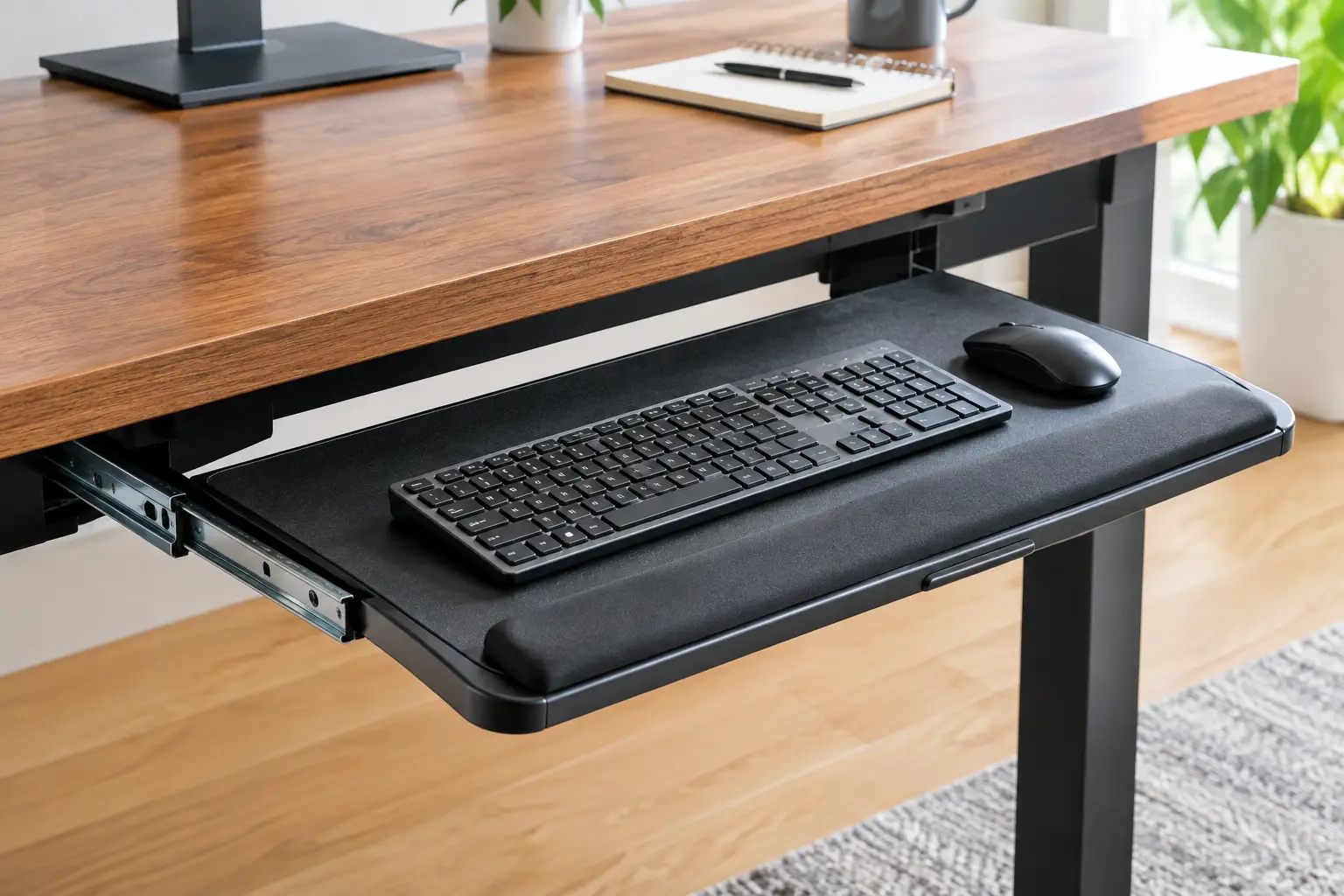
A sliding keyboard tray is a platform that mounts under a desk on rails or an arm, letting you pull your keyboard and mouse out to type and push them back underneath when you’re done. Better models add height adjustment and negative tilt, so your hands stay flat and your elbows stay relaxed.
This guide compares seven real models available on amazon.com, from $35 clamp-ons to lifetime-warranty articulating arms. Every recommendation is based on manufacturer spec sheets, retailer listings, and aggregated customer review sentiment — not invented hands-on tests. You’ll also get installation tips, buyer profiles, and the mistakes that send most trays back in the box.
Sliding Keyboard Tray Quick Comparison: 7 Picks at a Glance
| Product | Type | Mounting | Negative Tilt | Price Range | Best For |
|---|---|---|---|---|---|
| VIVO MOUNT-KB05E | Flat slide-out tray | C-clamp (no drill) | No | $30–$45 | Renters, budget setups |
| Fellowes Office Suites Underdesk Keyboard Drawer | Compact drawer | Screws | No | $35–$60 | Small desks, tight legroom |
| Kensington SmartFit K60004US | Wide drawer | Screws | No | $45–$65 | Oversized/ergonomic keyboards |
| HUANUO HNKB19B | Articulating tray | Screws (flat or cross-beam) | Yes, to −22° | $60–$90 | Standing desks on a budget |
| Fellowes 8031301 Adjustable Keyboard Tray | Articulating arm | Screws, 17.5″ track | Yes, to −10° | $80–$130 | Mid-range ergonomic upgrade |
| Ergotron Neo-Flex 97-582-009 | Articulating arm | Clamp + screw | Yes (knob) | $100–$170 | Commercial-grade durability |
| 3M AKT90LE | Premium articulating arm | Screws, 23″ track | Yes, to −15° | $200–$350 | Full-time typists, deep desks |
Reading the table top to bottom is basically reading a price-versus-posture curve. The first three picks lower your keyboard but keep it flat, which is a genuine improvement over typing on the desktop but not the full ergonomic fix. From the HUANUO HNKB19B onward, you’re paying for negative tilt and continuous height adjustment — the two features ergonomists actually care about.
👉 Tap any highlighted product name to check current pricing and availability on Amazon — one click helps other shoppers make an informed choice too! 😊
Top 7 Sliding Keyboard Tray Picks for 2026: Expert Analysis
Prices below are ranges at the time of writing and change often, so always check the current price before you buy.
1. VIVO MOUNT-KB05E — best no-drill value pick
If you want a sliding keyboard tray without touching a drill, the VIVO MOUNT-KB05E is the default starting point for good reason. Its 27 x 11-inch platform clamps onto the front edge of your desk with steel C-clamps and glides out up to about 8.5 inches on steel tracks. That width matters in practice: a full-size keyboard and a mouse fit side by side, so your mouse hand isn’t stranded on the desktop above.
Here’s what the spec sheet quietly tells you, though. The tray sits roughly 1.5 to 2.75 inches below the desk surface and stays flat — no tilt at all. For an average-height person at a 29-inch desk, a two-inch drop is often enough to let the shoulders relax, but it won’t correct wrists that bend upward. It’s ideal for renters, students, and anyone with a flat-edged desk up to 1.25 inches thick and at least 32.5 inches of clear edge.
It’s one of the most-reviewed trays in Amazon’s keyboard-drawer category, and reviews consistently praise the 15-minute install and smooth glide. The recurring complaint is fit: beveled desk edges aren’t compatible, and tall mice or thick mechanical keyboards may not slide fully under the desk.
Pros:
- ✅ No drilling, so it’s safe for rented or nice desks
- ✅ Wide platform fits keyboard and mouse together
- ✅ Steel track feels solid for the price
Cons:
- ❌ Flat platform offers no negative tilt
- ❌ Won’t fit beveled edges or desks over 1.25 inches
At roughly $30–$45, the VIVO MOUNT-KB05E is the best dollar-for-comfort entry point in this list.
2. Fellowes Office Suites Underdesk Keyboard Drawer — best for tight legroom
The Fellowes Office Suites Underdesk Keyboard Drawer (models 9140301/9140305) is the classic office drawer, shrunk down for small workstations. Overall, it measures about 22 inches wide, 11.6 inches deep, and just 2.3 inches tall, which means it steals very little knee space.
Its ball-bearing tracks translate into a quieter, smoother pull than cheap friction slides, and the three installation heights let you choose how far below the desktop the keyboard sits before you screw it in. There’s also a mouse tray that mounts on either the left or right side — a genuinely useful detail for left-handed users, who get overlooked by many fixed-layout trays.
Based on comparing the specs, this is the drawer for a small writing desk, a dorm setup, or a corner nook where a 27-inch tray simply won’t fit. The trade-off is that height is chosen once during installation, not adjusted daily, and the platform stays flat. A full-size keyboard with a number pad will use most of the width.
Detailed verified review data is thinner for this model than for the VIVO. What’s consistent across retailer listings and reviewer roundups is that its compact footprint needs less under-desk clearance than bigger trays, and it carries a three-year limited warranty.
Pros:
- ✅ Low-profile design protects precious knee clearance
- ✅ Ball-bearing tracks glide smoothly and quietly
- ✅ Mouse tray mounts on either side
Cons:
- ❌ Height is locked in at installation
- ❌ Narrow platform feels cramped with full-size keyboards
At about $35–$60, it’s fair value if your desk is small and legroom is precious.
3. Kensington SmartFit K60004US — widest drawer for big keyboards
The Kensington SmartFit K60004US exists for people whose keyboards don’t fit anywhere else. Its inner drawer measures 24.5 inches, and the outer body runs about 26 inches, which is enough room for split, curved, and oversized ergonomic keyboards alongside a wrist rest and mouse pad.
The SmartFit system is the clever part. Instead of guessing a height, you match your hand size against a color chart and mount the drawer at the corresponding setting (retailer listings cite 2, 2.5, and 4 inches). In practice, this helps shared workstations and offices where someone other than the user installs the tray. Built-in cable grommets keep cords from snagging when the drawer slides.
Here’s what to weigh: the body is high-impact polystyrene rather than steel, the tray stays flat, and total installation width runs 31 to 33 inches, so measure between your desk’s legs or supports first. It’s best for ergonomic-keyboard owners who need width more than tilt.
Reviews are mixed-to-positive: retailer pages show average ratings a bit under four stars, and one reviewer noted needing the lowest setting so a keyboard with its feet extended didn’t hit the desk underside.
Pros:
- ✅ Extra-wide drawer swallows oversized ergonomic keyboards
- ✅ Color-coded SmartFit makes height selection easy
- ✅ Gel wrist rest and mouse pad included
Cons:
- ❌ Plastic body feels less premium than steel
- ❌ Needs 31–33 inches of clear mounting width
At roughly $45–$65, it’s a smart buy mainly if keyboard width is your constraint.
4. HUANUO HNKB19B — best budget articulating tray
The HUANUO HNKB19B is where the category shifts from “lower the keyboard” to “position the keyboard.” For well under the price of the big-name arms, you get 6.3 inches of height adjustment, a tilt range from +6° to −22°, and swivel of 180° to each side.
That −22° figure deserves translation. Most ergonomic guidance favors a modest negative tilt, roughly 5 to 15 degrees, so the far edge of the keyboard sits lower than the near edge and your wrists stay flat. The HUANUO covers that range with room to spare. Its 6.3-inch height span also lets it reach usable positions whether you’re sitting or standing, which is why it’s designed to mount on both flat-bottom desks and cross-beam frames common on electric standing desks.
It’s the right pick for standing-desk owners who want real ergonomics under $100. Keep the fit rules in mind: the desktop must be thicker than 0.6 inches and made of wood, plywood, or particleboard, and full 360° swivel needs at least 35 inches of under-desk width.
Reviewer roundups consistently single it out as the practical middle ground, with stability during sit-stand transitions a frequently praised trait.
Pros:
- ✅ Generous negative tilt for neutral wrists
- ✅ Fits standing desks with cross beams
- ✅ Tested for 20,000 slide cycles
Cons:
- ❌ Requires screws into a wood-based desktop
- ❌ Shallow 9.84-inch depth limits wrist-rest space
At roughly $60–$90, the HUANUO HNKB19B offers the best ergonomics per dollar here.
5. Fellowes 8031301 Adjustable Keyboard Tray — simplest one-knob adjustment
The Fellowes 8031301 Adjustable Keyboard Tray brings a traditional articulating arm to the mid-range. A single knob controls both height and tilt: loosen it, position the platform, and tighten it again. Tilt runs from 0° to −10°, the platform swivels 360°, and a sliding arm on a 17.5-inch track lets you pull the keyboard closer.
What that means in practice: a 17.5-inch track fits shallower desks than the 23-inch tracks on premium arms, and the 2mm steel construction gives it a sturdier feel than drawer-style trays. The separate mouse platform mounts left or right and comes with padded wrist support, while a cord-management feature keeps cables from tangling as the arm swings.
Based on comparing the specs, this is a solid choice for someone moving up from a flat drawer who wants tilt without paying premium prices. The single-knob design is quick, but because height and tilt release together, fine-tuning one without disturbing the other takes a steady hand.
Verified consumer review volume is limited for this specific model, so rather than guess, lean on what’s documented: Fellowes’ long presence in office ergonomics and a spec sheet that checks the key boxes — tilt, swivel, and a slide-out arm.
Pros:
- ✅ True negative tilt up to −10°
- ✅ Shorter track suits shallower desks
- ✅ Mouse platform mounts on either side
Cons:
- ❌ Height and tilt release together, complicating adjustment
- ❌ Keyboard platform is narrower than premium options
At about $80–$130, it’s a fair mid-range entry into articulating trays.
6. Ergotron Neo-Flex 97-582-009 — most commercial-grade build
The Ergotron Neo-Flex 97-582-009 comes from a company that has made ergonomic mounts since 1982, and it shows in the paperwork. The arm is designed to meet ANSI/BIFMA X5.5-2008 requirements, the arm and slide are steel, and the tray uses durable phenolic material rather than particleboard.
The 26.9 x 8.9-inch one-piece tray is wide enough for full-size and ergonomic keyboards, and the arm extends and retracts about 10.75 inches on ball-bearing slides. Mounting is flexible: use the front clamp plus one screw, or skip the clamp and use four screws, on desktops from 0.75 to 1.5 inches thick. A single knob handles height and tilt.
This is the tray for someone who treats their desk like a workplace — a small business, a home office used 40+ hours a week, or anyone who has already broken a cheap tray. The shallow 8.9-inch depth is the main compromise; there’s no room to add a large palm rest in front of the keyboard.
Reviews on business-focused retailers are largely positive, praising sturdiness and smooth drawer-like motion. A recurring criticism mirrors the Fellowes: height and tilt unlock at the same time, so the tray can dip toward you if you’re not holding it, and no swivel is listed in its specs.
Pros:
- ✅ Built to ANSI/BIFMA commercial standards
- ✅ Steel arm with smooth ball-bearing slides
- ✅ Flexible clamp or screw mounting
Cons:
- ❌ Shallow tray leaves little palm-rest room
- ❌ Tray can dip when the knob is loosened
At roughly $100–$170, it’s worth it if durability outranks bells and whistles.
7. 3M AKT90LE — most adjustable for full-time typists
The 3M AKT90LE is the tray ergonomists tend to picture when they say “adjustable keyboard tray.” Just lift the platform to unlock height, set it, and release; tilt is set separately with a dial that has height and tilt readouts. Per 3M’s product page, height runs from about 4.5 inches above to 6 inches below the mounting surface, and tilt spans +10° to −15°.
That separation of height and tilt is the big deal. Unlike the single-knob designs above, you can raise the tray without losing your tilt setting — which matters when you switch chairs, share a desk, or fine-tune posture across a long day. The wood platform minimizes bounce while typing, the leatherette gel wrist rest has antimicrobial protection, and the Precise mouse pad attaches on either side. The whole assembly swivels 360° and stows completely under the desk.
It’s built for full-time typists, writers, coders, and anyone managing wrist discomfort. The warranty backs that up: lifetime on the arm, five years on the platform, and one year on the wrist rests. However, it needs 26 inches of width and 23.25 inches of depth under the desk surface, so shallow desks are out.
Consumer review volume on Amazon is modest compared with budget trays, so there’s limited aggregated sentiment to report; its reputation rests mainly on the spec sheet and warranty.
Pros:
- ✅ Independent height and tilt settings with readouts
- ✅ Lifetime warranty on the keyboard arm
- ✅ Wood platform minimizes typing bounce
Cons:
- ❌ Requires about 23.25 inches of under-desk depth
- ❌ Highest price in this roundup
At roughly $200–$350, the 3M AKT90LE is a long-term investment for heavy daily typists.
Spec Showdown: How the 7 Trays Compare Side by Side
| Product | Platform | Height Adjustment | Tilt Range | Key Fit Requirement | Best For |
|---|---|---|---|---|---|
| VIVO MOUNT-KB05E | 27″ x 11″ | Fixed, ~1.5–2.75″ below top | Flat | Desk ≤1.25″ thick | Renters |
| Fellowes Office Suites Underdesk Keyboard Drawer | ~22″ x 11.6″ overall | 3 install heights | Flat | Compact footprint | Small desks |
| Kensington SmartFit K60004US | 24.5″ inner drawer | 3 install heights | Flat | 31–33″ install width | Big keyboards |
| HUANUO HNKB19B | 25″ x 9.84″ | 6.3″ continuous | +6° / −22° | Desktop >0.6″, wood-based | Standing desks |
| Fellowes 8031301 Adjustable Keyboard Tray | ~21″ x 10″ + mouse tray | Continuous (knob) | 0° / −10° | 17.5″ track | Mid-range upgrade |
| Ergotron Neo-Flex 97-582-009 | 26.9″ x 8.9″ | Continuous (knob) | Knob-adjusted | Desk 0.75–1.5″ thick | Heavy daily use |
| 3M AKT90LE | ~25.5″ x 12″ | +4.5″ / −6″ | +10° / −15° | 26″ W x 23.25″ D | Full-time typists |
The pattern is clear: fixed-height drawers win on simplicity and footprint, while articulating arms win on posture. If you only fix one thing, the jump from the Kensington SmartFit K60004US to the HUANUO HNKB19B delivers the biggest ergonomic gain per extra dollar, because that’s where negative tilt enters the picture. The 3M AKT90LE earns its price mainly through independent adjustments and warranty length, not raw range.
✨ Don’t settle for sore wrists!
🔍 Take your workstation to the next level with this carefully curated lineup. Click a highlighted tray to check current pricing and availability — the right pick can make your whole workday feel lighter. 💪
How to Install and Dial In Your Sliding Keyboard Tray (First 30 Days)
Most “this tray is uncomfortable” complaints are really setup problems. Here’s a practical routine that works for almost any model.
Before You Install
Measure four things: desk thickness, clear width between legs or frame rails, usable depth under the desk, and the distance from the floor to the underside of the desk. Compare them against the spec table above. If you have a cross-beam standing desk, check whether the tray needs to mount in front of or behind the beam.
Day 1: Set Your Chair First, Then the Tray
Adjust your chair so your feet rest flat and your thighs are roughly parallel to the floor. Let your arms hang, then bend your elbows to about 90 degrees. The home row of your keyboard should sit at or slightly below that elbow height. On articulating trays, start with a small negative tilt (around −5°) and adjust from there.
Week 1: Place the Mouse Correctly
A great keyboard position is wasted if you reach for the mouse. OSHA’s workstation guidance recommends keyboard trays large enough to hold both the keyboard and mouse, so your arm isn’t pulled away from your body. If your tray is narrow, a compact tenkeyless keyboard frees up several inches for the mouse.
Weeks 2–4: Fine-Tune and Maintain
Expect small tweaks as your body adapts. Every few weeks, check that clamps and screws are still snug, wipe the tracks with a dry cloth, and re-tighten any tilt knob that has loosened. A tray that slowly droops is almost always a knob problem, not a broken arm.
Real-World Scenarios: Matching the Right Tray to Your Setup
Specs are abstract, so let’s put them into real lives.
Profile 1: The Renter With a Laminate Desk (Budget: Under $50)
Maya works remotely three days a week from a rented apartment on a 30-inch laminate desk she can’t drill into. She types six hours on those days and mostly needs her shoulders to drop. The VIVO MOUNT-KB05E is the fit: its C-clamps leave no marks, and even a two-inch drop relieves shoulder shrugging. If she later notices wrist extension, a thin palm support under the front of the keyboard is a cheap follow-up fix.
Profile 2: The Standing-Desk Developer (Budget: Under $100)
Jordan codes eight to ten hours daily and alternates sitting and standing on an electric desk with a crossbar underneath. He needs height adjustment that can follow him and genuine negative tilt. The HUANUO HNKB19B covers both, and its cross-beam compatibility avoids the most common standing-desk fit problem. Its 6.3-inch range means he can keep the tray at elbow height through small desk-height changes.
Profile 3: The Writer With Wrist Discomfort (Budget: $200+)
Denise writes full time and has started noticing tingling after long sessions. She has a deep executive desk and values fine control. The 3M AKT90LE gives her independent height and tilt with readouts, so she can return to the exact same position after adjusting. Its lifetime arm warranty also makes the upfront cost easier to justify over years of daily use. (If symptoms persist, a clinician should evaluate them — a tray supports good posture but doesn’t treat an injury.)
Problem → Solution: Fixing Common Sliding Keyboard Tray Headaches
Problem 1: The tray won’t slide all the way in. ✅ Solution: Tall mice and thick mechanical keyboards are the usual culprits. Remove the keyboard backstop if your model allows it (VIVO’s manual notes this adds about 0.75 inches of clearance), or park the mouse on the desktop when stowing.
Problem 2: The tray bounces while you type. ✅ Solution: Re-tighten clamps evenly and check that the desk itself doesn’t wobble. On arm-style trays, lock the knob fully. If bounce persists, a wood or steel platform like the 3M AKT90LE or Ergotron Neo-Flex 97-582-009 is the structural fix.
Problem 3: Your knees hit the tray. ✅ Solution: Lower your chair slightly and add a footrest, or choose a low-profile model like the Fellowes Office Suites Underdesk Keyboard Drawer.
Problem 4: The tray slowly tilts or drops during the day. ✅ Solution: This is common with single-knob designs. Tighten the knob firmly after every adjustment, and avoid leaning your forearms heavily on the front edge.
Problem 5: The mouse keeps falling off the edge. ✅ Solution: Switch to a wider tray, add a mouse extension, or use a tenkeyless keyboard to free up platform space.
How to Choose a Sliding Keyboard Tray
Use these seven steps in order — each one eliminates options before you compare features.
- Measure your desk first. Thickness, width, and under-desk depth rule out more trays than any feature does.
- Decide on flat versus tilting. Flat trays lower your hands; tilting trays also straighten your wrists. Heavy typists should prioritize negative tilt.
- Check the height range. Look for a range that gets the home row to elbow height. OSHA’s keyboard guidance notes that keyboards that are too high or too low lead to awkward wrist, arm, and shoulder postures.
- Size the platform for keyboard plus mouse. Around 25 inches or wider keeps your mouse beside the keyboard instead of up on the desk.
- Pick a mounting method you can live with. Clamps protect the desk; screws usually feel more rigid.
- Confirm legroom. Measure the space from your thighs to the desk underside, including the tray’s thickness.
- Weigh warranty against price. A lifetime arm warranty can make an expensive tray cheaper over a decade.
Clamp-On Keyboard Tray vs Track-Mounted Tray: Which Mount Fits Your Desk?
The mounting method is the most overlooked decision in this category, and it determines whether a tray fits at all.
When a Clamp-On Keyboard Tray Makes Sense
A clamp-on keyboard tray grips the front edge of your desk like a vise, so there’s nothing to drill. That’s a big win for renters, office workers who can’t modify company furniture, and anyone with a desk they want to keep pristine. The VIVO MOUNT-KB05E is the flagship example, and the Ergotron Neo-Flex 97-582-009 offers a hybrid: a front clamp plus a single screw for stability.
The limits are physical. A clamp-on keyboard tray needs a flat, square edge; beveled, rounded, or glass edges usually won’t hold. Maximum thickness matters too — around 1.25 inches for the VIVO. And because clamps sit at the edge, the tray typically sits closer to the desktop, offering less drop.
When a Screw-Mounted Track Wins
Track-mounted designs like the 3M AKT90LE and Fellowes 8031301 Adjustable Keyboard Tray bolt a rail to the underside of the desk. This spreads the load across a longer surface, which reduces bounce and allows articulating arms with bigger height and tilt ranges. The trade-off is permanence: you’re putting screw holes in the desk, and the desktop must be solid enough to hold them.
The Bottom Line
If your desk is rented, glass, or precious, go clamp-on and accept a flat tray. If you own a solid-wood or particleboard desk and type heavily, a track mount unlocks the ergonomic features that justify buying a tray in the first place.
Sliding Keyboard Tray vs Typing on the Desktop
It’s fair to ask whether any tray beats simply pushing your keyboard back and typing on the desk. Here’s how the main options stack up.
| Setup | Keyboard Height vs Elbow | Wrist Angle | Desk Space | Typical Cost | Best For |
|---|---|---|---|---|---|
| Typing on the desktop | Usually too high | Often bent upward | Uses desktop | $0 | Occasional typing |
| Flat sliding tray | Lower, closer to elbow | Neutral-ish, depends on keyboard feet | Frees desktop | $30–$65 | Light-to-moderate typists (VIVO MOUNT-KB05E) |
| Articulating tray with negative tilt | Adjustable to elbow | Flat, neutral | Frees desktop | $60–$350 | Heavy typists (HUANUO HNKB19B, 3M AKT90LE) |
| Height-adjustable desk alone | Adjustable | Often still bent | Uses desktop | $250+ | Sit-stand users with separate monitor arms |
The table highlights a point many buyers miss: a standing desk alone lowers the whole surface, including your monitor, so your screen can end up too low. A sliding keyboard tray adjusts the keyboard independently of the monitor, which is why ergonomists pair the two. For heavy typists, the articulating row is the only one that addresses both height and wrist angle at the same time.
Adjustable Keyboard Tray Features That Actually Matter (and Ones That Don’t)
Marketing copy loves long feature lists. Here’s how to separate what changes your comfort from what just looks good on a box.
Features That Actually Matter
Negative tilt. An adjustable keyboard tray that tilts the back edge down keeps your wrists flat, which is the central recommendation in Cornell’s ergonomics research. The HUANUO HNKB19B, Fellowes 8031301 Adjustable Keyboard Tray, and 3M AKT90LE all offer it.
Continuous height adjustment. Three preset heights are fine for one person at one chair. If you share a desk or switch between sitting and standing, continuous adjustment saves you from reinstalling.
Independent height and tilt controls. This is the premium feature that’s easy to underrate. On the 3M AKT90LE, changing height doesn’t reset your tilt; on single-knob designs, both move together.
Platform width. A platform wide enough for keyboard and mouse together keeps your elbow close to your body.
Features That Don’t Matter Much
360° swivel. Useful for corner desks or showing a colleague your screen, but most people rarely use it.
Built-in phone holders and storage bins. Convenient, but they add bulk and can block the tray from sliding fully underneath.
Extreme tilt ranges. Going from −15° to −22° rarely matters; most users settle in the −5° to −15° zone.
Pull Out Keyboard Tray for Standing Desks and Small Spaces
A pull out keyboard tray solves two very different problems — standing desks and cramped rooms — and each needs a different approach.
Standing Desks
Electric standing desks often have a crossbar or motor housing under the top, which can block conventional tracks. Look for a pull out keyboard tray that explicitly supports cross-beam mounting, like the HUANUO HNKB19B. Also consider height range: when you stand, your keyboard still needs to be at elbow height, and a tray with several inches of range gives you room to fine-tune without raising the entire desk and screen.
One more practical tip: a sliding tray adds weight at the front edge. Most electric desks handle it easily, but check your desk’s weight capacity if it’s already loaded with monitors.
Small Spaces and Shallow Desks
In a small apartment or a 20-inch-deep writing desk, a pull out keyboard tray is often what makes a real computer setup possible. It adds a second tier of workspace that disappears when you’re done. However, long-track arms like the 3M AKT90LE need about 23 inches of under-desk depth, which rules them out. Better options here are the compact Fellowes Office Suites Underdesk Keyboard Drawer or the clamp-on VIVO MOUNT-KB05E, which don’t require deep mounting space.
Under Desk Keyboard Tray Long-Term Cost and Maintenance
Sticker price is only half the story. An under desk keyboard tray lives through thousands of slides, so durability and warranty shape the real cost.
| Product | Price Range | What You’re Paying For | Hidden Costs | Value Verdict |
|---|---|---|---|---|
| VIVO MOUNT-KB05E | $30–$45 | Wide platform, no drilling | Palm support to fix wrist angle | Excellent for light use |
| Kensington SmartFit K60004US | $45–$65 | Width for big keyboards | Limited to fixed heights | Good if width matters |
| HUANUO HNKB19B | $60–$90 | Tilt and height range | Screws into desk | Best ergonomics per dollar |
| Ergotron Neo-Flex 97-582-009 | $100–$170 | Commercial durability | Shallow tray | Strong for heavy daily use |
| 3M AKT90LE | $200–$350 | Independent adjustments, lifetime arm warranty | Needs deep desk | Best long-term investment |
Spread over years of daily use, the gap between budget and premium narrows fast. A $40 tray replaced twice in five years costs about the same as a mid-range articulating tray that lasts the whole period — without the ergonomic upgrade. If you type full time, the 3M AKT90LE‘s lifetime arm warranty is arguably the most important spec on its sheet.
Simple Maintenance Schedule
Monthly, wipe the tracks and check that screws and clamps are snug. Every few months, inspect the wrist rest for cracks and the platform for sag. Avoid spraying lubricants into ball-bearing tracks unless the manufacturer recommends it; dust sticks to oily rails and makes sliding worse.
Common Mistakes to Avoid When Buying a Sliding Keyboard Tray
Buying before measuring. This is the number-one reason trays get returned. Desk thickness, beveled edges, frame rails, and under-desk depth all need checking against the spec sheet.
Assuming “under the desk” means “ergonomic.” A flat sliding keyboard tray lowers your keyboard, but if the keyboard’s feet are extended, your wrists may still bend upward. Fold the feet in, or choose a tray with negative tilt.
Ignoring the mouse. A narrow tray that forces your mouse onto the desktop above just trades wrist strain for shoulder strain.
Forgetting legroom. Every tray takes some space between your thighs and the desk. If you’re tall or your desk is low, a thick drawer can pin your knees. The Fellowes Office Suites Underdesk Keyboard Drawer is a good low-profile workaround.
Overpaying for features you won’t use. If you type an hour a day, a $300 arm is overkill. Match the tray to your hours at the keyboard, not to the most impressive spec sheet.
Skipping the chair adjustment. A keyboard tray works as a system with your chair and monitor. Setting the tray first and the chair second almost always produces a worse position.
Safety, Standards, and Ergonomics Guidance
Unlike electrical products, keyboard trays don’t need UL or FCC certification, since there’s nothing electrical inside. The relevant standards are about furniture strength and ergonomics.
Furniture Standards
The most useful benchmark is ANSI/BIFMA X5.5, a US standard for desk products. The Ergotron Neo-Flex 97-582-009 states it’s designed to meet ANSI/BIFMA X5.5-2008 requirements, which offers some assurance that the arm has been designed around strength and durability testing. Most budget trays don’t advertise BIFMA compliance, which doesn’t mean they’re unsafe — just that you’re relying on the maker’s own testing, such as HUANUO’s stated 20,000-cycle slide test.
Weight Limits and Safe Use
Respect weight ratings. Trays like the VIVO MOUNT-KB05E and HUANUO HNKB19B are rated around 11 pounds, which comfortably covers a keyboard and mouse but not a laptop plus a coffee mug plus your leaning forearms. Don’t use a tray as a step, a seat, or a support to push yourself up from your chair. Children should be kept from hanging on extended trays.
Ergonomics Guidance
For posture, the best free resource is Cornell University’s computer workstation ergonomics guidelines, which describe a height-adjustable negative-tilt tray as an ideal keyboard arrangement. OSHA’s workstation eTool offers similar, practical guidance. If you experience persistent numbness, tingling, or pain, see a healthcare professional — equipment helps posture but can’t diagnose or treat an injury.
FAQ: Sliding Keyboard Tray Buying Questions
❓ What size sliding keyboard tray do I need for a keyboard and mouse?
❓ Can I install a clamp-on keyboard tray on a glass or beveled desk?
❓ Do sliding keyboard trays work with IKEA desks?
❓ Is an adjustable keyboard tray worth it for gaming?
❓ How much weight can an under desk keyboard tray hold?
Conclusion: Finding the Right Sliding Keyboard Tray for You
The best sliding keyboard tray isn’t the one with the longest feature list — it’s the one that fits your desk and gets your keyboard to elbow height with your wrists flat. Start with a tape measure, then match the tray to how many hours you actually type.
If you’re on a tight budget or can’t drill, the VIVO MOUNT-KB05E is the easiest win. For small desks and limited legroom, the Fellowes Office Suites Underdesk Keyboard Drawer keeps things compact, while the Kensington SmartFit K60004US is the answer for oversized ergonomic keyboards. Standing-desk owners get the most ergonomic value from the HUANUO HNKB19B, and the Fellowes 8031301 Adjustable Keyboard Tray is a straightforward step into articulating arms. For heavy, daily business use, the Ergotron Neo-Flex 97-582-009 delivers commercial-grade construction. And if you type for a living, the 3M AKT90LE remains the gold standard for independent height and tilt control.
Whichever you choose, set your chair first, keep the mouse beside the keyboard, and give your body a couple of weeks to adapt. Small adjustments add up to a noticeably more comfortable workday.
🚀 Ready to upgrade your workspace?
🔍 Take your typing comfort to the next level with this carefully curated lineup. Click a highlighted tray to check current pricing and availability — your wrists, shoulders, and future self will thank you! ✨
Recommended for You
- Rotating Monitor Stand Guide 2026: 7 Brilliant Picks That Pivot
- Adjustable Desk With Keyboard Tray: 7 Best Picks for 2026
- Uplift V2 Commercial 2026: 7 Proven Picks + Honest Buyer’s Guide
Disclaimer: This post contains affiliate links. As an Amazon Associate, I earn from qualifying purchases made through these links, at no additional cost to you.
✨ Found this article helpful? Share it with someone who needs it! 💬🤗