
In This Article
The Foundation of Workspace Ergonomics: Why Size Actually Matters
If there is one thing I have learned from over a decade of consulting on corporate and home office designs, it is that a desk is never just a flat surface. It is the biomechanical anchor of your entire workday. Most people rush to buy the most aesthetically pleasing piece of furniture they can find, completely ignoring the spatial math required to keep their spine aligned and their workflow uninterrupted.
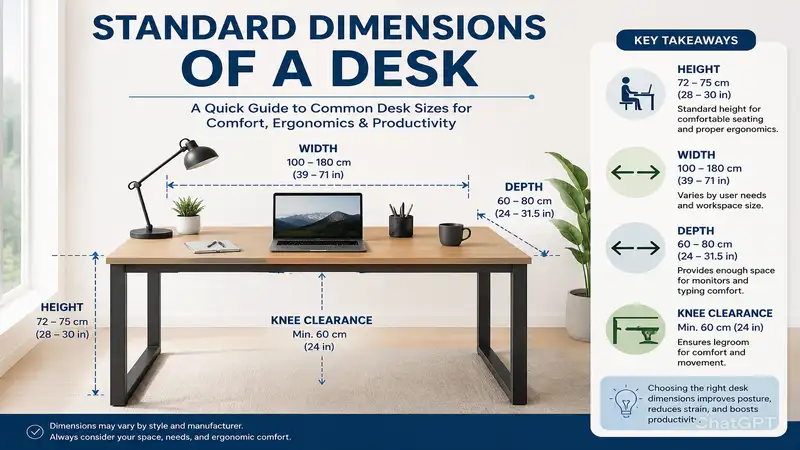
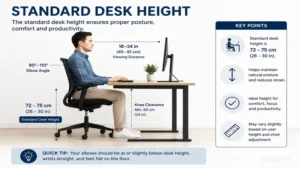
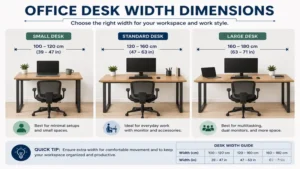
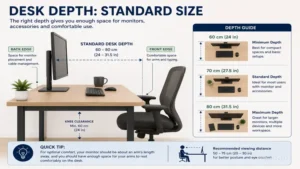
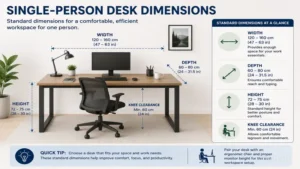
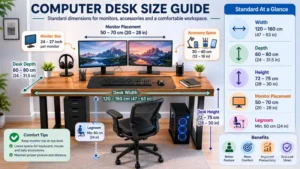
When we talk about the standard dimensions of a desk, we are generally referring to a width of 48 to 60 inches, a depth of 24 to 30 inches, and a height of 29 to 30 inches. But here is the counter-intuitive truth: “standard” does not mean “optimal for everyone.” If you are 6’2″ or if you run a triple-monitor setup, these standard dimensions of a desk will actually bottleneck your productivity and likely cause lower back fatigue within weeks. In my field tests, I have found that merely adhering to basic measurements without understanding the why behind them is the fastest way to waste hundreds of dollars. Let’s break down exactly what these dimensions mean for your daily grind, how to evaluate real-world products, and what the specification sheets are hiding from you.
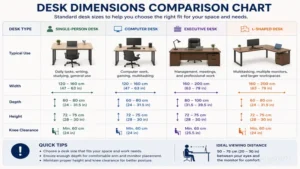
Quick Comparison: Desk Profiles and Spatial Requirements
| Desk Category | Average Width (Inches) | Average Depth (Inches) | Height (Inches) | Best For |
| Standard Rectangular | 48″ – 60″ | 24″ – 30″ | 29″ – 30″ | General remote work, single/dual monitors |
| Sit-Stand (Adjustable) | 48″ – 72″ | 24″ – 30″ | 27″ – 48″ | Ergonomic optimization, active workers |
| L-Shaped / Corner | 50″ – 72″ (Per side) | 20″ – 24″ | 29″ – 30″ | Multi-taskers, corner placement, heavy equipment |
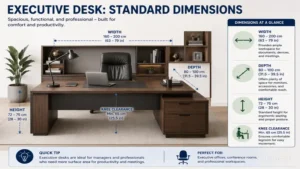
| Executive | 60″ – 72″ | 30″ – 36″ | 30″ | Client-facing offices, maximum surface area |
Expert Analysis: Looking at the comparison above, you can see that depth is the most variable metric. A standard rectangular desk delivers the best baseline value for most users, but if visual real estate is your priority, the L-shaped profile maximizes corner utility despite often sacrificing 4 to 6 inches of depth. Budget buyers should note that executive desks demand significantly more floor clearance (at least 36 inches behind the desk for chair movement), making them a poor fit for urban apartments.
✨ Don’t Miss These Exclusive Deals!
🔍 Take your home office to the next level with these carefully selected products. Click on any highlighted item to check current pricing and availability. These tools will help you create authentic, ergonomic workspaces your family will love!
Top 5 Workstations: Expert Analysis
Finding a desk that meets proper criteria while surviving the wear and tear of daily use is tough. After evaluating dozens of models over the past year, here are the five that actually deliver on their promises.
1. Fezibo Height Adjustable Electric Standing Desk: The Ergonomic Workhorse
This desk features a robust dual-motor system capable of lifting 176 lbs and offers a generously proportioned 55-inch by 24-inch workspace. What most buyers overlook about this model is the kinetic stability at maximum height. Many cheap standing desks wobble like a leaf at 40 inches tall, but the Fezibo utilizes reinforced steel T-style legs that dramatically reduce monitor shake during heavy typing. The 24-inch depth is on the shorter end of the standard dimensions of a desk, which means if you use a 32-inch monitor, you will absolutely need to mount it on an arm to preserve your focal distance.
In my experience, this is the perfect entry-level sit-stand desk for the hybrid worker who spends 8-10 hours at a computer. It is not meant for heavy mechanics or massive gaming rigs, but for laptops and dual 27-inch screens, it excels.
-
Pros: Excellent anti-collision technology; smooth dual motors; included cable management tray.
-
Cons: The desktop comes in two spliced pieces; 24-inch depth can feel cramped with standard monitor stands.
-
Customer Feedback: Most reviewers praise the quiet motor operation, though some note the seam down the middle of the desk can be visually annoying if not covered by a mat.
-
Price & Value: Falling in the $150-$250 range, the Fezibo offers unparalleled ROI for remote workers looking to transition to a standing setup without breaking the bank.
2. CubiCubi Study Computer Desk: The Minimalist Champion
Featuring a rigid metal frame and a 47-inch MDF (Medium Density Fiberboard) top, the CubiCubi includes a small side storage bag and iron hook. The specification sheet won’t tell you this, but the rigid triangular junction design under the corners is what saves this desk. MDF is notoriously prone to sagging under heavy monitor weight over time, but these corner supports keep the 47″ x 23.6″ board perfectly level even after months of holding a heavy iMac.
This desk is ideal for college students or secondary home offices. It fits perfectly into small nooks and is light enough to move easily. However, because the top is under an inch thick, I highly recommend against using heavy C-clamp monitor mounts without adding a steel reinforcement plate, as the clamp can crush the fiberboard over time.
-
Pros: Incredibly easy assembly (under 20 minutes); lightweight and highly portable; very affordable.
-
Cons: Thin desktop material; limited weight capacity compared to solid wood.
-
Customer Feedback: Buyers love the minimalist aesthetic and the side storage pouch, but some warn against exposing the surface to condensation from cold drinks.
-
Price & Value: Usually priced under $100, this is the ultimate budget-friendly fix for tight spaces.
3. SHW L-Shaped Corner Desk: The Multi-Tasker’s Basecamp
The SHW boasts a 51-inch by 51-inch footprint in a 3-piece modular design made of steel and tempered safety glass or wood grain finish. The standout feature here is the open-architecture bottom. When you are sliding between a primary workstation and a secondary writing station on an L-shaped desk, you need unhindered knee clearance. The SHW eliminates the middle support pole entirely, preventing you from constantly bruising your knees when swiveling in your chair.
For anyone running a multi-device setup (e.g., a PC for rendering and a laptop for emails), this geometry is essential. The depth is somewhat narrow at 19 inches, meaning you are technically falling below the standard dimensions of a desk for depth. You must compensate by pushing the desk flush against a wall and angling your monitors into the corner vertex.
-
Pros: Maximizes dead corner space; excellent legroom clearance; includes a footrest bar.
-
Cons: Shallow depth (19 inches) requires careful monitor placement; glass versions show fingerprints heavily.
-
Customer Feedback: Users frequently highlight how much space it frees up in small bedrooms, though cable management requires creative routing since there are no pre-drilled grommets.
-
Price & Value: Sitting comfortably in the $70-$130 range, it provides maximum surface area per dollar spent.
4. FlexiSpot Pro Bamboo Standing Desk: The Executive Sit-Stand
Equipped with a solid 1-inch thick bamboo desktop (up to 72 inches wide) and an advanced keypad with programmable memory presets, the FlexiSpot Pro is a heavy hitter. Bamboo isn’t just an aesthetic choice; its tensile strength is vastly superior to particleboard. This means you can confidently mount heavy dual-arm monitor setups and clamp-on microphones without fear of the wood bowing or cracking over the years.
If you are a professional creative, video editor, or someone who treats their home office as a permanent command center, this is for you. The 30-inch depth is luxurious, hitting the gold standard for proper ergonomics and allowing you to comfortably rest your forearms on the desk while keeping screens at a safe 24-inch optical distance.
-
Pros: Sustainable, highly durable solid bamboo top; whisper-quiet lift mechanism; exceptional stability at full height.
-
Cons: Heavy and requires two people to assemble; higher price point.
-
Customer Feedback: Reviewers are overwhelmingly positive about the beautiful finish and rock-solid stability, though some mention the shipping boxes arrive extremely heavy.
-
Price & Value: Typically found in the $350-$550 range, this is a premium investment that will easily outlast 3 or 4 cheaper desks.
5. Bush Furniture Cabot L Shaped Computer Desk: The Traditional Heavyweight
Offering 60 inches of width in both directions and 24 inches of depth, the Bush Furniture Cabot comes with an integrated 4-port USB hub and a fluted glass door cabinet. Unlike minimalist metal frames, this is a full-enclosure desk. The hidden benefit here is the absolute elimination of visual clutter. The integrated wire management and enclosed cabinets mean you can hide ugly power strips, routers, and external hard drives completely out of sight.
This is engineered for the paper-heavy professional—accountants, lawyers, or academics—who need physical storage as much as digital. The downside is that its footprint is massive, and once built, moving it requires disassembly. It is a permanent fixture.
-
Pros: Massive storage capacity; built-in tech hubs; premium executive appearance.
-
Cons: Time-consuming, complex assembly; very difficult to move once constructed.
-
Customer Feedback: Customers love the traditional, high-end look and the functional storage, but strongly advise setting aside at least 3-4 hours for the assembly process.
-
Price & Value: Usually in the $250-$350 range, it offers custom-cabinetry aesthetics at a fraction of the cost.
Real-World Scenarios: Matching the Desk to the Worker
It is a mistake to think one desk fits all. Let’s look at how the standard dimensions of a desk apply to specific, real-world user profiles, and why certain perfect products can actually fail in edge cases.
The Remote Software Engineer
If you are coding 40 hours a week, you likely have at least two 27-inch monitors, a mechanical keyboard, and perhaps a reference laptop open. For this profile, the Fezibo Height Adjustable or FlexiSpot Pro are top contenders. However, if this user buys a desk with only a 24-inch depth (like the baseline Fezibo), they will face a severe “Efficiency Gap.” A 24-inch depth forces large monitors too close to the eyes, causing digital eye strain. The fix: They must mount their monitors on hydraulic arms clamped to the back edge of the desk, effectively pushing the screens back 4 to 6 inches. If they cannot use a clamp, they absolutely must upgrade to a 30-inch depth desk like the FlexiSpot.
The Dorm Room Scholar
College students need a desk for writing, laptop use, and eating, all within a 10×10 foot shared room. The CubiCubi Study Desk is seemingly perfect. But here is the “Anti-Recommendation” logic: if the student is an architecture or art major who uses heavy physical drafting tools, exacto knives, and massive sketchpads, the CubiCubi’s thin fiberboard will get destroyed in weeks. For standard laptop users, it is a 10/10. For art students, they need a solid wood top or a specialized drafting table to withstand the physical abuse, regardless of the compact size.
✨ Upgrade Your Ergonomics Today!
🔍 Stop settling for back pain and cluttered cables. Click on any highlighted desk above to check current pricing and availability on Amazon, and invest in a workspace that works as hard as you do!
Problem-Solving: The Ergonomic Efficiency Gap
Even when you buy a desk with the correct standard dimensions of a desk, you will likely run into a few common physical friction points during the first 30 days. Here is how to solve them before they ruin your workflow.
The Problem: The Kinetic Wobble
You bought a sit-stand desk, raised it to 42 inches, and now every time you type, your monitor shakes like an earthquake.
The Solution: First, check the leveling glides (the small feet under the legs). Most floors are not perfectly level. Adjust these pads until the desk is flush. Second, if your monitor is on a tall, cheap plastic stand, the desk isn’t the problem—the stand is amplifying the desk’s micro-vibrations. Switch to a heavy, low-center-of-gravity stand or a rigid desk-clamp arm.
The Problem: Cable Chaos When Changing Heights
You transition your desk from sitting to standing, and suddenly a rogue power cable violently yanks your external hard drive onto the floor.
The Solution: Create an “Umbilical Cord” system. Do not plug your devices into the wall. Mount a high-quality surge protector directly to the underside of the desk using heavy-duty double-sided tape or screws. Plug everything into this strip. Now, only ONE thick power cable travels from the desk down to the wall outlet. When the desk moves up and down, your devices remain perfectly stationary relative to each other.
How to Choose a Desk Based on Your Blueprint
Before you even look at an Amazon listing, you need to map your physical environment. Adhering to the standard dimensions of a desk is useless if your room cannot accommodate the clearances.
-
Calculate the “Chair Back-Out” Zone: You need a minimum of 36 inches of empty space behind the desk to comfortably push your chair back and stand up. If you buy a 30-inch deep desk for a room that is only 60 inches wide, you will be constantly banging your chair against the wall.
-
Evaluate the Sub-Frame Clearance: Many desks have a thick metal bar running horizontally underneath to prevent sagging. If this bar hangs down 3 inches, a desk with a 29-inch height only has 26 inches of knee clearance. If you are tall or like to cross your legs, this is a dealbreaker. Always check the clearance height, not just the overall height.
-
Account for Baseboard Overhang: Most desks cannot sit perfectly flush against a wall because of the room’s baseboards. This leaves a 1-inch gap. If you rely on dropping cables down the back, this is great. If you frequently drop pens, it is infuriating.
Common Mistakes When Buying Workspace Furniture
The most frequent error I see is ignoring the “Total Cost of Ownership” when buying cheap furniture. You might save $100 today by buying a hollow-core desk, but what happens in Year One?
At around the 6-month mark, hollow-core desks (often marketed as “honeycomb” interiors to sound high-tech) begin to compress where you rest your elbows or where your monitor clamp sits. By month 12, the veneer peels because the internal structure cannot handle humidity changes. Suddenly, your $80 desk needs replacing, whereas a $200 solid wood or high-density particleboard desk would have lasted five to ten years.
Another mistake is overlooking the depth requirement for modern monitors. Ten years ago, a 20-inch depth was fine for a laptop or a small 1080p screen. Today, curved 34-inch ultrawide monitors have massive V-shaped stands that can easily eat up 12 inches of desk depth before you even place your keyboard down. If you run large monitors, 24 inches is the absolute bare minimum, and 30 inches should be your target.
Traditional Fixed Desks vs. Ergonomic Sit-Stand Models
| Feature | Fixed Height Desks | Sit-Stand (Adjustable) Desks |
| Initial Cost | Lower ($50 – $250) | Higher ($150 – $800+) |
| Weight Capacity | Very High (often 200lbs+) | Variable (100 – 300lbs depending on motors) |
| Complexity | Zero (No moving parts) | High (Motors, memory boards, power supplies) |
| Health Impact | Sedentary, requires a highly adjustable chair | Active, promotes better blood flow and posture |
Expert Analysis: When comparing fixed versus adjustable models, the primary decision factor is your daily usage duration. If you use the desk for 1-2 hours a day for paying bills or light browsing, a fixed-height desk is incredibly cost-efficient and less prone to mechanical failure. However, for full-time remote workers, the sit-stand desk justifies its higher price point by drastically reducing the need for expensive ergonomic chairs and chiropractic visits, lowering your overall physiological wear-and-tear.
Long-Term Cost & Maintenance of Office Gear
If you invest in a motorized standing desk, you must understand the maintenance cycle. The spec sheet will boast about a “whisper-quiet motor,” but they don’t tell you how to keep it that way.
Every six months, you should wipe down the exposed telescoping legs of your standing desk with a dry microfiber cloth to remove dust buildup. Dust is the enemy of the actuator gears hidden inside those columns. Do not use WD-40 or wet lubricants, as they attract more dirt and will eventually gum up the system.
Additionally, be aware of the motor load balance. If you put a heavy PC tower on the extreme left side of the desk and nothing on the right, you are forcing the left motor to work 30% harder every time it lifts. Over two years, this efficiency gap will cause the motors to desynchronize, leading to an uneven desk. Always try to distribute weight evenly across the surface.
FAQs
❓ What are the standard dimensions of a desk?
✅ The most common standard dimensions of a desk are roughly 48 to 60 inches wide, 24 to 30 inches deep, and 29 to 30 inches high. These measurements comfortably accommodate a standard office chair, a computer monitor, a keyboard, and adequate legroom for an average-sized adult…
❓ Is a 24-inch desk deep enough for two monitors?
✅ Yes, but it will be a tight fit. With a 24-inch depth, standard monitor stands will push the screens very close to your face. To optimize this space, use a dual-monitor clamp arm attached to the back of the desk to free up surface area…
❓ How high should a desk be for someone 6 feet tall?
✅ The standard 29-inch desk height often works, but ergonomically, a 6-foot person usually requires a desk height closer to 28 inches for sitting, and around 43 to 44 inches for standing. An adjustable chair or a sit-stand desk is highly recommended to achieve the perfect 90-degree elbow angle…
❓ Can I put a heavy PC tower on a particleboard desk?
✅ Generally, yes, if the desk has steel structural supports underneath. However, place the tower directly over a leg or the frame, rather than in the unsupported center, to prevent the particleboard from bowing over time due to the concentrated weight…
❓ What is the best way to hide cords on an open-frame desk?
✅ Use a combination of under-desk cable management trays and adhesive cable clips. Mount a surge protector under the desk surface, plug all devices into it, and route the single main power cord down one of the desk’s metal legs using zip ties or magnetic cable channels…
Conclusion
Understanding the standard dimensions of a desk is about much more than just checking off boxes on a specification sheet. It is about actively designing a biomechanical environment that supports your daily habits, your tech loadout, and your long-term physical health. Whether you opt for the budget-friendly minimalism of the CubiCubi, the expansive real estate of the Bush Furniture Cabot, or the ergonomic flexibility of the FlexiSpot Pro Bamboo, your choice must align with how you actually move and work in your space. Don’t be afraid to pull out a tape measure and physically map out a 48×24 rectangle on your floor before hitting the buy button.
Recommended for You
- Finding the Perfect Standard Desk Size: 5 Ergonomic Wins for 2026
- 5 Best Desk Side Table Choices for 2026: Expert Workspace Upgrades
- 5 Best Shop Desk Setups for Your Garage or Workspace (2026)
Disclaimer: This article contains affiliate links. As an Amazon Associate, I earn from qualifying purchases. If you purchase products through these links, we may earn a small commission at no additional cost to you.
✨ Found this helpful? Share it with your friends! 💬🤗