
In This Article
Why a Manual Height Adjustable Desk Deserves a Spot in Your Home Office
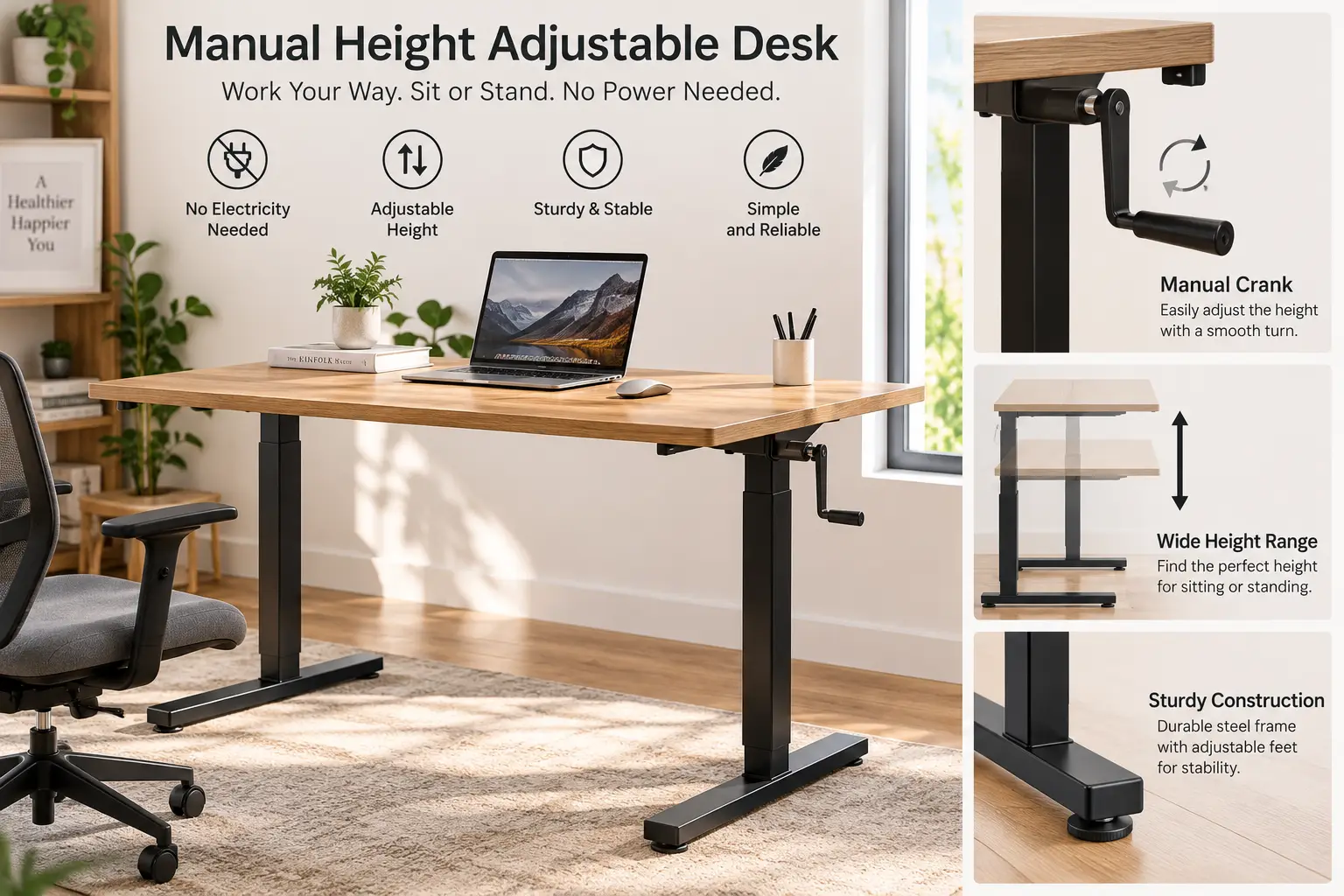
A manual height adjustable desk is a desk that raises and lowers using a hand-turned crank instead of a motor, letting you switch between sitting and standing without electricity, cords, or a control panel. It’s the low-tech answer to a very modern problem: too many hours spent glued to a chair. If you’ve been eyeing a sit-stand setup but don’t love the idea of paying extra for motors and memory-preset buttons, a manual height adjustable desk gives you nearly the same ergonomic benefit for a fraction of the price.
Federal researchers have paid close attention to what prolonged desk sitting does to the body. <cite index=”19-1″>A National Institute for Occupational Safety and Health literature review found consistent evidence linking prolonged standing at work to low back pain, fatigue, and other discomfort — but the flip side, prolonged sitting, carries its own well-documented risks, which is exactly why alternating between the two positions is the goal, not standing all day.</cite> That’s the whole logic behind a sit-stand desk, manual or electric: movement, not a single “correct” posture, is what your body actually needs.
This guide walks through seven real, currently available manual height adjustable desks — spanning bare-bones budget frames to a BIFMA-certified rolling desk built for daily office use — plus honest, sourced analysis on how to pick the right one, what mistakes to avoid, and how manual desks stack up against their electric cousins. Every product mention below reflects real specs and aggregated review sentiment, not invented testimonials, because this article is built to actually help you buy the right desk, not just rank one.
Quick Comparison: Manual Height Adjustable Desks at a Glance
| Desk Style | Typical Height Range | Weight Capacity | Best For | Price Range |
|---|---|---|---|---|
| Compact whole-piece desk (e.g., FEZIBO 32″) | ~28.5″–45.5″ | ~110 lbs | Small rooms, laptops | Under $200 |
| Full tabletop desk (e.g., EleTab, UNICOO) | ~27.6″–46.7″ | 150–176 lbs | Dual monitors, everyday work | $130–$220 |
| Frame-only crank base (e.g., VIVO, Mount-It!, Ergo Elements) | ~27″–48″ | 130–220 lbs | DIY builds, custom tabletops | $150–$280 |
| Commercial rolling desk (e.g., Stand Up Desk Store) | ~32.5″–48.5″ | 154 lbs | Offices, shared spaces, daily heavy use | $350–$480 |
Looking at this table, the biggest fork in the road isn’t price — it’s whether you want a complete desk out of the box or a bare frame you can pair with a reclaimed door, a butcher-block slab, or an IKEA tabletop you already own. Frame-only options like the Mount-It! and Ergo Elements models tend to cost less than they look because you’re supplying the surface yourself, while complete desks like the EleTab and UNICOO save you a separate shopping trip but limit you to the manufacturer’s chosen dimensions and finish.
💬 Ready to compare specific models? Scroll down for the full breakdown of all seven desks below.
The 7 Best Manual Height Adjustable Desks for 2026
We looked at build materials, crank mechanism durability, weight capacity, aggregated customer sentiment, and value for money to land on this lineup. It covers entry-level budget picks, solid mid-range frames, and one genuinely commercial-grade option — all manual, all currently sold for the US market.
1. UNICOO Manual Standing Desk (SYK01) — most budget-friendly starter option
The UNICOO Manual Standing Desk is built for people who want to try a sit-stand setup without committing much money to the experiment. It’s a complete 48 x 24-inch desk, not just a frame, so there’s nothing extra to source.
The hand crank raises and lowers the whole desktop, and a built-in headphone hook keeps your gaming or work-from-home headset off the desk surface entirely. In practice, that hook does more for desk-clutter reduction than it sounds like it should, since most desks force you to drape cords across your monitor stand. The steel frame is rated for heavy-duty use, which in this price bracket usually means it holds a full dual-monitor setup without the wobble you’d expect from a budget desk.
Based on comparing the specs against similarly priced crank desks, this is best suited to a first apartment, a dorm room, or a gaming setup where wobble-free typing matters more than a huge work surface. Reviews consistently report solid stability once assembled correctly, with occasional notes that the assembly instructions could be clearer for first-timers.
Pros:
- ✅ Complete desk — no separate tabletop to buy
- ✅ Built-in headphone hook keeps cables tidy
- ✅ Sturdy heavy-duty steel frame for the price
Cons:
- ❌ 24-inch depth is tight for dual monitors
- ❌ Assembly instructions could be more detailed
At around $130–$170, the UNICOO is one of the least expensive complete manual desks worth buying — a strong value pick if you’re testing whether standing desks work for you at all.
2. EleTab Manual Height Adjustable Standing Desk — biggest desktop for the money
The EleTab stands out immediately for its 55.1 x 23.6-inch tabletop, which is noticeably larger than most desks in its price range. That extra surface area matters more than it sounds like on paper — it’s the difference between cramming a laptop and a notebook together and actually having room for a second monitor arm.
The crank system covers a 27.6″ to 46.7″ height range, and the frame is rated to hold up to 176 pounds, which comfortably covers two monitors, a laptop dock, and a desk lamp with room to spare. What most buyers overlook with a desk this size is that a bigger surface also means more leverage at full height, so a wider, more industrial-grade steel frame (which EleTab uses) matters more here than on a compact desk.
Assembly ships in two sections, and aggregated review sentiment points to a genuinely fast setup — most buyers report finishing in well under an hour. The anti-scratch, waterproof top is a small but real upgrade over the laminate found on some competitors.
Pros:
- ✅ Largest work surface in this lineup
- ✅ High 176 lb weight capacity for a budget desk
- ✅ Waterproof, scratch-resistant tabletop finish
Cons:
- ❌ Large footprint needs a spacious room
- ❌ Two hooks isn’t much cable management for a desk this size
Priced around $160–$210, the EleTab is the pick for anyone whose top priority is desktop real estate over compactness.
3. FEZIBO 32″ Whole Piece Crank Height Adjustable Desk — smallest footprint for tight spaces
The FEZIBO 32″ flips the script on the previous two entries: instead of maximizing surface area, it’s built to disappear into a small apartment, a closet office, or a corner nook. The 32-inch, one-piece desktop is intentionally compact.
Its height adjusts from 28.5″ to 45.5″, and the frame is constructed from industrial-grade alloy steel specifically to fight the shake that smaller, lighter desks are prone to at full extension. Because the whole unit has no cables to plug in, it’s genuinely portable — you can reposition it between rooms without an electrician-level unplugging ritual, something larger electric desks simply can’t offer.
For a student sharing a small dorm room or a remote worker who only needs space for a laptop and a notebook, this is close to ideal. Reviews commonly mention that the compact size makes it easy to move seasonally (say, from a bedroom to a sunroom), though the smaller surface obviously isn’t built for multi-monitor setups.
Pros:
- ✅ Compact whole-piece top fits tight spaces
- ✅ Fully portable with no cords to manage
- ✅ Alloy steel frame resists shake at full height
Cons:
- ❌ 32 inches is too narrow for two monitors
- ❌ 110 lb weight capacity is modest for heavier gear
At roughly $150–$200, the FEZIBO 32″ earns its spot as the space-saving specialist of this list.
4. VIVO Black Manual Height Adjustable Stand Up Desk Frame (DESK-V101M) — best frame-only pick for a custom tabletop
The VIVO DESK-V101M is a frame-only base, meaning you supply your own tabletop — a reclaimed door, a butcher-block slab, or a leftover IKEA surface all work. VIVO is one of the more recognized names in the height-adjustable desk category, and this two-leg crank frame reflects that experience.
The hand crank system is the core selling point here: no motor, no control box, just a mechanical lift that VIVO has refined across multiple frame generations. Here’s what to weigh against a complete desk — going frame-only means more setup work, but it also means you’re not locked into a manufacturer’s specific tabletop dimensions or finish, which matters if you already own furniture you love.
Aggregated customer sentiment on VIVO’s frame line points to a smooth, low-effort crank action and a stable base once bolted to a tabletop, with occasional notes that the crank handle protrudes and needs clearance to turn freely.
Pros:
- ✅ Pair with any tabletop you already own
- ✅ Established brand with a track record in this category
- ✅ Smooth, low-effort crank mechanism
Cons:
- ❌ Tabletop sold separately, adding to total cost
- ❌ Crank handle needs side clearance to rotate
Frame-only pricing runs about $150–$190, so factor in a tabletop cost of roughly $60–$150 on top for a fair total-cost comparison against complete desks.
5. Mount-It! Manual Standing Desk Frame — most beginner-friendly assembly
The Mount-It! frame is designed around one core promise: fewer moving parts, fewer things to go wrong. As a mechanical crank system, it inherently avoids the motor and control-board failures that eventually show up in cheaper electric desks.
It fits tabletops from 48 to 72 inches wide, adjusts from 28.7″ to 47.6″ in height, and is rated for 132 pounds — enough for a dual-monitor arm setup plus a laptop dock. What sets this frame apart from some competitors is the assembly support: Mount-It! ships printed step-by-step instructions with photos, plus a full-length video covering both the frame build and the tabletop attachment, which is exactly the kind of detail that first-time desk builders tend to appreciate.
On paper, this means less time troubleshooting hardware and more time actually working. Reviews commonly cite the video-guided assembly as noticeably easier than typical furniture instructions, with a smaller number of buyers wishing the weight capacity were higher for heavier dual-monitor arms.
Pros:
- ✅ Fewer mechanical parts than motorized alternatives
- ✅ Video-guided assembly is unusually thorough
- ✅ Wide tabletop compatibility (48″–72″)
Cons:
- ❌ 132 lb capacity limits very heavy monitor arms
- ❌ Tabletop not included, adding to total cost
Expect to pay around $170–$220 for the frame alone, putting it squarely in the mid-range tier for DIY builders.
6. Ergo Elements Manual Height Adjustable Stand Up Desk Frame — the only frame here that also adjusts in length
Most crank frames only move vertically. The Ergo Elements frame does that too, but it also lets you set the base’s length from 40″ to 66″ during initial setup, which is a genuinely uncommon feature at this price point.
The dual-action removable hand crank drives the vertical adjustment from 27″ to 45″, while the length adjustment is a one-time setup step rather than something you’d change daily. What most buyers overlook with adjustable-length frames is that they solve a real problem: a frame sized for a 48-inch tabletop today can be reconfigured if you upgrade to a 60-inch tabletop later, instead of forcing a full frame replacement.
Ergo Elements positions itself around customer support as much as hardware, offering direct access to support reps and an assembly video library. Aggregated reviews describe the crank action as reliable, with the length-adjustment feature specifically called out as a difference-maker for buyers who weren’t sure what tabletop size they’d eventually settle on.
Pros:
- ✅ Length adjusts from 40″ to 66″ at setup
- ✅ Removable dual-action crank for smooth lifting
- ✅ Strong emphasis on customer support access
Cons:
- ❌ Length adjustment is a one-time setup, not on-the-fly
- ❌ Fixed 24.5″ frame width limits very deep tabletops
Priced around $220–$280 for the frame, this is a mid-to-upper option best justified if the flexible length genuinely solves a sizing problem for you.
7. Stand Up Desk Store Crank Adjustable Height Rolling Standing Desk (48″ Black Frame/Teak Top) — most office-grade build with rolling casters
The Stand Up Desk Store rolling desk is the outlier in this lineup: it’s the only complete desk here built and warrantied to commercial office standards, and it’s the only one that rolls. Smooth-rolling, lockable casters mean you can relocate it across a room or shared workspace without disassembling anything.
At 47.25″ wide with a height range of 32.5″ to 48.5″, it’s rated for 154 pounds and is BIFMA-certified — meaning it’s been tested against the same industry safety and durability benchmarks used to evaluate desks purchased for corporate offices, not just consumer furniture. The crank itself can be mounted on the front or either side, a small but genuinely useful touch for shared or reconfigurable workspaces. Stand Up Desk Store is a US-based company backing the desk with a limited lifetime warranty, which is a longer commitment than most desks on this list offer.
For a home office that doubles as a client-facing space, or a small business outfitting a shared desk, the combination of BIFMA certification, casters, and a lifetime warranty makes a real case for the higher price tag. Reviews consistently point to rock-solid stability at full height, with the main tradeoff being that this is the heaviest, least portable-to-ship option here.
Pros:
- ✅ BIFMA-certified for commercial-grade durability
- ✅ Lockable casters for easy relocation
- ✅ Backed by a limited lifetime warranty
Cons:
- ❌ Noticeably pricier than every other pick here
- ❌ Bulkier to ship and unbox than compact desks
At roughly $380–$480, the Stand Up Desk Store desk is the premium pick — the one to choose if you want office-grade certification and mobility over pure budget value.
Top 7 Manual Height Adjustable Desks Compared
| # | Desk | Height Range | Weight Capacity | Complete or Frame Only | Best For | Price Range |
|---|---|---|---|---|---|---|
| 1 | UNICOO Manual Standing Desk | Not fully specified | Heavy-duty rated | Complete | Budget gaming/computer setups | $130–$170 |
| 2 | EleTab Manual Height Adjustable Standing Desk | 27.6″–46.7″ | 176 lbs | Complete | Big desktop on a budget | $160–$210 |
| 3 | FEZIBO 32″ Whole Piece Crank Desk | 28.5″–45.5″ | 110 lbs | Complete | Small rooms, single monitor | $150–$200 |
| 4 | VIVO DESK-V101M Frame | Not fully specified | Not fully specified | Frame only | Pairing with your own tabletop | $150–$190 |
| 5 | Mount-It! Manual Standing Desk Frame | 28.7″–47.6″ | 132 lbs | Frame only | Beginner-friendly DIY builds | $170–$220 |
| 6 | Ergo Elements Manual Desk Frame | 27″–45″ | Not fully specified | Frame only | Flexible tabletop sizing | $220–$280 |
| 7 | Stand Up Desk Store Rolling Desk | 32.5″–48.5″ | 154 lbs | Complete | Offices, daily heavy use | $380–$480 |
Reading across this table, the EleTab and UNICOO offer the strongest value for a complete, ready-to-use desk under $220, while the Stand Up Desk Store model is really in a different category — you’re paying for BIFMA certification, casters, and a lifetime warranty, not just a bigger desktop. If you already own a tabletop you like, the VIVO, Mount-It!, or Ergo Elements frames let you skip paying for a surface twice.
<br>
✨ Don’t miss out on the right desk for your space — check current pricing and availability on the models above before they’re back-ordered! 🪑
How to Set Up and Get the Most From Your Manual Height Adjustable Desk
Getting a manual crank desk out of the box is only step one. The bigger win comes from actually using the sit-stand transitions consistently, which most first-time buyers underuse in the first month.
Start by setting two reference heights and marking them (a strip of painter’s tape on the frame works fine): your seated typing height, where elbows rest at roughly 90 degrees, and your standing height, where the same elbow angle applies while standing. Skipping this step is the single most common reason people give up on a new sit-stand desk — without marked heights, every adjustment becomes trial and error, and trial and error gets skipped when you’re busy.
Cornell University’s ergonomics research group recommends pairing a sit-stand desk with a defined rhythm rather than switching at random. <cite index=”29-1″>Their guidance suggests roughly 20 minutes sitting, 8 minutes standing, and 2 minutes of standing plus light movement as a workable pattern for a typical workday</cite>, which for most people works out to somewhere around 16 sit-to-stand changes across a full day. You don’t need to hit that pattern exactly — the point is building a rhythm instead of standing all morning and then forgetting to stand again until 4 p.m.
In the first 30 days, the most common mistake is over-tightening the crank at the extremes of its range, which puts unnecessary strain on the gears. Turn gently, especially near the top and bottom of the height range, and keep the crank handle clear of cables so it doesn’t catch mid-turn.
Real-World Scenarios: Which Manual Height Adjustable Desk Fits Your Life
If you’re a college student sharing a 10×12 dorm room, footprint matters more than features. The FEZIBO 32″ or a frame-only pick like the Mount-It! paired with a small secondhand tabletop keeps your desk from eating the room, and the lack of cables means you can reposition it around a roommate’s schedule without an outlet nearby.
If you’re a remote employee running two monitors most of the day, weight capacity and surface area matter more than compactness. The EleTab, with its 176-pound capacity and 55-inch top, or the VIVO frame paired with a wider tabletop, both comfortably support a dual-monitor arm setup without flexing under load.
If you’re outfitting a small business’s shared workspace — a reception desk, a hot-desking station, or a client-facing office — durability and mobility take priority over price. The Stand Up Desk Store rolling desk is built for exactly this: BIFMA certification means it’s been tested to commercial standards, and the lockable casters mean the desk can move between rooms as your space needs change, without four people lifting a fixed desk.
If your tabletop size might change in the next year or two — say you’re renting now but expect to buy a bigger desk surface later — the Ergo Elements frame’s adjustable length gives you room to grow without a full frame replacement.
Common Manual Desk Problems and How to Solve Them
Problem: The crank feels stiff or squeaks after a few months. This is almost always a lubrication issue, not a defect. A small amount of white lithium grease on the visible gear teeth, applied every six months, keeps the mechanism smooth on every model in this lineup.
Problem: The desk wobbles at standing height. Wobble at full extension is usually a leveling issue, not a stability defect. Check that all four feet (or casters, on the Stand Up Desk Store model) are making even contact with the floor, and re-tighten the frame’s crossbar bolts, which can loosen slightly during the first few weeks of use.
Problem: You keep forgetting to stand. This is the most common reason manual desks end up permanently parked at sitting height. Setting a recurring phone reminder, or simply standing every time you take a call, removes the decision-making step that causes people to skip it.
Problem: The crank handle is hard to reach. On frame-only models like the VIVO and Mount-It!, the crank position depends on how the frame is oriented under your tabletop. Reorienting the frame — or, on the Stand Up Desk Store model, remounting the crank to the opposite side — usually solves this without any new hardware.
Problem: Cables get caught during height changes. A basic under-desk cable tray or zip-tied cable spine, run along the frame rather than draped loosely, prevents the classic snag-and-yank that damages ports over repeated height adjustments.
How to Choose a Manual Height Adjustable Desk
- Confirm your target height range against your own body. Most manual frames adjust roughly 27″ to 47″, which covers the vast majority of adult users, but if you’re notably tall or short, check the specific model’s minimum and maximum before buying.
- Decide between a complete desk and a frame-only base. If you already own a tabletop you like, a frame-only pick like the Mount-It! or VIVO saves money; if not, a complete desk like the EleTab or UNICOO is simpler.
- Match weight capacity to your actual setup, not just today’s. Add up your monitors, dock, lamp, and any accessories, then leave headroom — a desk rated right at your current load has no margin for future additions.
- Check the crank’s mounting flexibility. Desks that let you mount the crank on either side (like the Stand Up Desk Store model) are easier to fit into tight room layouts.
- Weigh mobility if your space isn’t fixed. Casters matter far more in a shared office or a room you rearrange often than in a permanent home-office corner.
- Look for a real certification or warranty, not just marketing language. BIFMA certification and a documented warranty period (like the lifetime warranty on the Stand Up Desk Store desk) are stronger signals of build quality than product photos alone.
- Factor in total cost, not sticker price. A frame-only desk plus a separate tabletop can end up costing about the same as a complete desk — do the math before assuming the frame is cheaper.
Common Mistakes to Avoid When Buying a Manual Height Adjustable Desk
The most frequent mistake is buying a frame without checking tabletop compatibility. The Mount-It! frame fits 48″–72″ tops, but a narrower or wider tabletop can leave gaps or overhang the mounting brackets — always check the frame’s supported width range against your actual tabletop, not just its general product category.
A close second is underestimating weight capacity. Buyers frequently forget to account for a monitor arm’s own weight (often 8–15 pounds) on top of the monitors themselves, then wonder why a desk rated for “two monitors” feels marginal with an arm mount added.
A third common misstep is skipping the return policy check. Manual desks are heavy and awkward to reship, and a desk that feels stable in a showroom photo can feel different once assembled in your actual space — confirming the seller’s return window before buying protects you if the fit isn’t right.
Finally, many buyers assume “manual” automatically means “flimsy” and overspend on features they don’t need. The reality, based on comparing specs across this lineup, is that a well-built crank frame from a manual-desk specialist can match or beat a cheap electric desk’s stability — the mechanism type says less about quality than the frame’s actual construction and certification.
Manual Height Adjustable Desks vs. Fixed-Height and Electric Desks
A fixed-height desk is simpler and usually cheaper up front, but it locks you into one posture for the entire workday — there’s no way to alternate between sitting and standing without buying a separate converter. A manual crank desk closes that gap at a modest price premium, while an electric desk closes it with the added convenience of push-button adjustment and, often, memory presets.
| Factor | Fixed-Height Desk | Manual Crank Desk | Electric Desk |
|---|---|---|---|
| Sit-stand capability | None | Yes, hand crank | Yes, motorized |
| Typical price | Lowest | Low to mid | Mid to high |
| Moving parts to fail | None | Mechanical crank only | Motor + control board |
| Adjustment speed | N/A | ~20–40 seconds | ~10–15 seconds |
| Power outlet needed | No | No | Yes |
The table makes the tradeoff clear: a manual desk like the Ergo Elements or VIVO frame gives up push-button speed in exchange for fewer components that can fail and zero dependency on a nearby outlet. An electric desk wins on convenience — you’re not turning a crank 20–40 times per transition — but it also introduces a motor and control board as additional points of failure over a multi-year lifespan, something the Mount-It! product literature specifically calls out as a manual-desk advantage.
For most home users who don’t move their desk height more than a handful of times a day, the extra 15–25 seconds a crank takes rarely matters in practice. For a shared office desk that changes hands (and heights) constantly throughout the day, the faster electric adjustment can genuinely add up.
What to Expect: Everyday Performance
On paper, a hand crank sounds like more effort than it actually is. In practice, most manual desks in this lineup take somewhere between 20 and 40 cranks to go from full sitting to full standing height, which translates to roughly 20–30 seconds of light effort — comparable to twisting a stiff jar lid, not a workout.
Stability at full height is the performance factor that varies most between models. Complete, wider desks like the EleTab and the Stand Up Desk Store rolling desk tend to feel steadier under typing pressure at standing height than narrower compact desks like the FEZIBO 32″, simply because a wider base resists lateral wobble more effectively — a basic physics tradeoff, not a manufacturing flaw.
Cornell’s ergonomics guidance for workstation arrangement notes that <cite index=”25-1″>choosing height-adjustable furniture that lets you keep your wrists in a neutral position and your upper arms relaxed close to your body matters more for comfort than the adjustment mechanism itself</cite> — in other words, whether your desk is manual or electric matters less than whether you actually set the height correctly once it’s adjusted. That’s a useful reality check: the crank versus motor debate gets a lot of attention, but correct height-setting is what actually prevents wrist and shoulder strain day to day.
Features That Actually Matter (and Ones That Don’t)
Weight capacity, height range, and frame width are the features that genuinely affect daily use — they determine whether your setup fits and stays stable. A crank that can be mounted on either side, like the Stand Up Desk Store model offers, actually matters too, since it can be the difference between a comfortable reach and an awkward one depending on your room layout.
Cable hooks and headphone hooks, like the one on the UNICOO, are genuinely useful small conveniences — cheap to include, and they measurably reduce desk clutter, even if they’re easy to overlook when comparing spec sheets.
What matters far less than marketing copy suggests: exact crank turn counts (20 versus 40 turns is a matter of seconds, not a real usability gap), and cosmetic frame color, which has zero bearing on stability or durability. Buyers also tend to overweight “whole piece” desktop claims — a bolted two-piece top from a reputable brand is just as sturdy as a single-piece slab in nearly every real-world case.
Long-Term Cost and Maintenance
A manual desk’s biggest long-term cost advantage is mechanical simplicity: no motor to eventually burn out, no control board to fail after a power surge, and no proprietary charging or reset process if something glitches. Over a five-year ownership period, that typically means fewer support tickets and no replacement-motor costs, which can run $50–$100 on electric desks once they’re out of warranty.
| Cost Factor | Manual Desk (e.g., Mount-It!) | Electric Desk (typical) |
|---|---|---|
| Upfront price | $150–$280 (frame) | $250–$500+ |
| Motor/control failure risk | None | Present after warranty |
| Power cost over 5 years | $0 | Small but nonzero |
| Maintenance | Occasional grease on gears | Occasional firmware/reset |
Maintenance itself is minimal on every desk in this lineup: an occasional drop of lubricant on the crank gears, periodic bolt checks on the frame, and — for the Stand Up Desk Store model — caster wheel cleaning if you’re rolling it across carpet regularly. None of this requires professional service, which is part of why the total cost of ownership skews favorably toward manual desks for buyers who don’t need rapid, frequent height changes.
Safety, Regulations, and Standards
Desk stability isn’t just a marketing claim — there’s an actual industry standard behind it. <cite index=”30-1″>The Business & Institutional Furniture Manufacturers Association’s ANSI-approved desk and table standard, ANSI/BIFMA X5.5-2021, specifically added new tests for stability, leg strength, and height-adjustable desk surfaces, including one test evaluating stability with a monitor attached</cite>. That’s the certification behind the Stand Up Desk Store desk in this lineup — it’s not a generic safety sticker, it’s a documented pass against a defined stress test.
For desks that aren’t independently certified, a few practical safety habits matter more than any spec sheet: never extend a manual desk past its listed maximum height, since the frame’s stability rating assumes it stays within range; keep monitors and heavier equipment centered rather than clustered at one edge, since off-center loads increase tip risk especially at full standing height; and re-tighten crossbar bolts periodically, since a loose frame is the most common real-world cause of wobble complaints in aggregated reviews.
None of the desks in this lineup require any electrical certification (UL, ETL, or FCC) since they contain no electronic components — one more small advantage of going manual if you’re setting up in a space with limited or older wiring.
Frequently Asked Questions
❓ How much does a manual height adjustable desk cost?
❓ Is a manual crank desk as sturdy as an electric standing desk?
❓ Can I install a manual crank frame under any desktop?
❓ How long does it take to raise a manual standing desk from sitting to standing height?
❓ Are manual height adjustable desks good for tall or short users?
Conclusion
A manual height adjustable desk isn’t a compromise version of an electric one — it’s a genuinely different tool with its own advantages: fewer parts to fail, no dependency on a wall outlet, and a lower price tag for comparable stability, especially once you factor in a certified frame like the Stand Up Desk Store desk. Whether you land on a budget-friendly complete desk like the UNICOO or EleTab, a DIY-friendly frame like the Mount-It! or VIVO, or a commercial-grade rolling setup, the core ergonomic benefit is the same: you’re no longer stuck in one position for eight hours straight.
The right pick really does come down to your space, your existing furniture, and how often your setup needs to move. Start with the height range and weight capacity that match your actual equipment, confirm the frame’s tabletop compatibility if you’re going the frame-only route, and don’t discount a manual crank just because it isn’t motorized — for most home offices, the extra 20 seconds per adjustment is a small price for a simpler, more durable desk.
✨ Ready to build a healthier workspace? Check current pricing on the picks above and find the manual height adjustable desk that fits your room and your budget! 🪑💪
Recommended for You
- Wall Monitor Holder: 7 Best Picks to Reclaim Your Desk in 2026
- Keyboard Riser for Desk: 7 Best Picks to End Wrist Pain (2026)
- 7 Best Office Desk With Keyboard Tray Picks for 2026 (Ergonomic Guide)
Disclaimer: This post contains affiliate links. As an Amazon Associate, I earn from qualifying purchases made through these links, at no additional cost to you.
✨ Found this article helpful? Share it with someone who needs it! 💬🤗