
In This Article
If you’ve ever ended a workday hunched three inches from your screen with a knot between your shoulder blades, the culprit is probably sitting right in front of you: a monitor that can’t move. A swivel monitor stand fixes that in about fifteen minutes, and it’s one of the few desk upgrades that pays you back every single hour you’re sitting at your computer. Instead of shifting your whole body to see a shared screen or squinting at glare from a window, you just push the display where you need it.
This guide is built for anyone shopping for a swivel monitor stand in 2026 — remote workers cobbling together a home office, gamers who want a competitive viewing angle, and anyone tired of a wobbly stock monitor foot eating up desk space. We researched real, currently available products on Amazon, compared their specs and aggregated customer feedback, and broke down which one actually fits your setup, your monitor, and your budget.
You’ll find seven vetted picks spanning budget clamp mounts to premium gas-spring arms, plus practical guidance most product listings skip entirely: how to actually install one, which mistakes cost people the most money, and how a swivel monitor stand stacks up against a traditional fixed stand. We’ll also flag the ergonomics research behind why this upgrade matters, not just the marketing behind it.
Disclosure: this post contains affiliate links, and if you buy through one, we may earn a small commission at no extra cost to you — full disclaimer is at the bottom of this guide.
What Is a Swivel Monitor Stand?
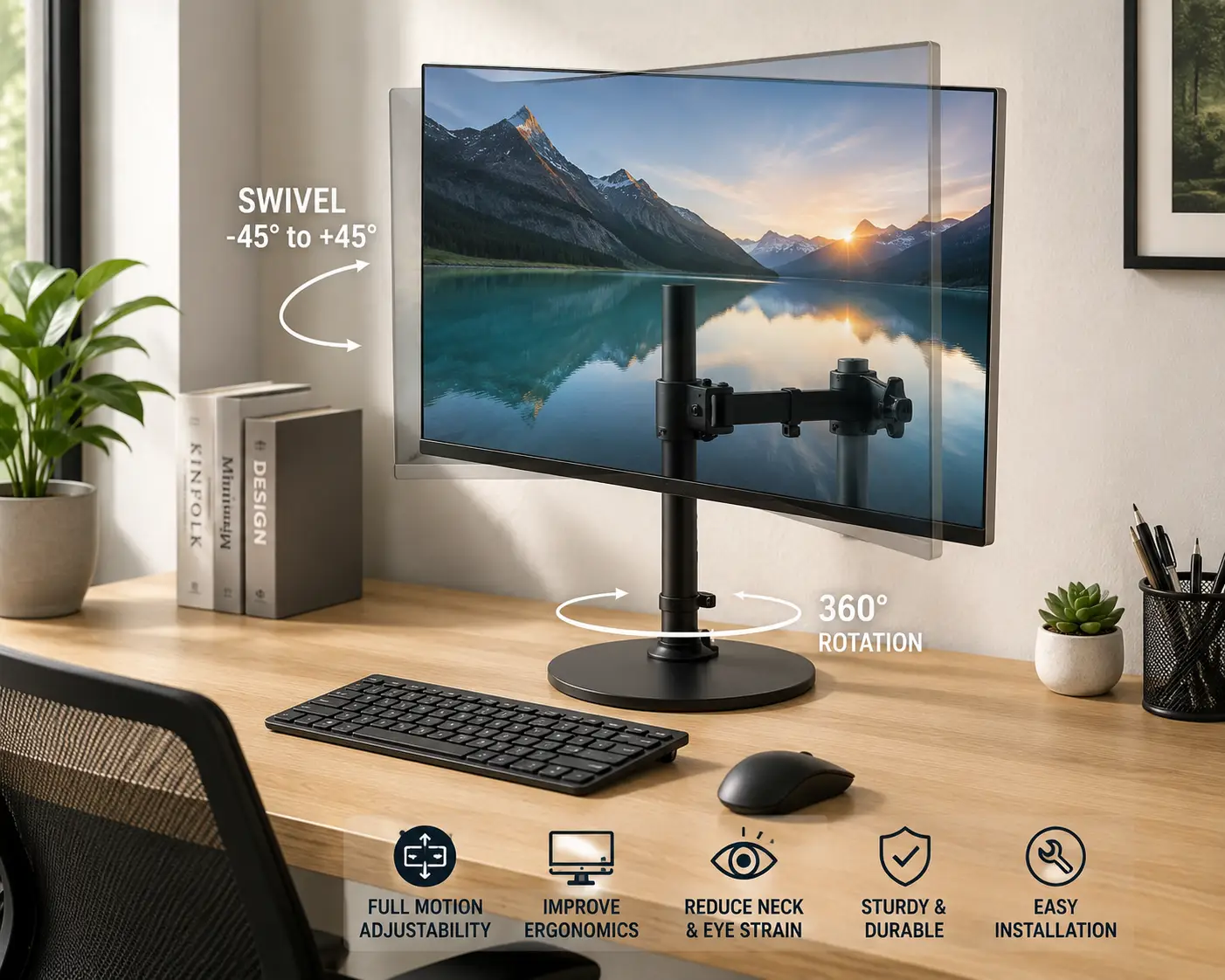
A swivel monitor stand is a desk-mounted arm or base that attaches to a monitor’s VESA mounting holes and lets you rotate, tilt, raise, lower, and pivot the screen instead of leaving it locked in one fixed position on its factory foot.
Unlike the small plastic stand your monitor ships with, a proper swivel monitor stand typically clamps to the edge of your desk (or drops through a grommet hole) and uses either a mechanical spring, a gas cylinder, or a simple ball joint to hold the screen exactly where you left it. According to OSHA’s Computer Workstations eTool, monitor positioning directly affects neck strain, eye fatigue, and posture — which is exactly the problem this kind of mount is designed to solve.
Quick Comparison: 7 Swivel Monitor Stands at a Glance
| Product | Best For | Price Range | Weight Capacity |
|---|---|---|---|
| VIVO STAND-V001 | Tightest budget | around $25–$35 | up to 22 lbs |
| Amazon Basics Gas Spring Arm | First-time buyers | around $30–$45 | 4.4–15.4 lbs |
| NB North Bayou F80 | Best value gas spring | around $25–$40 | 4.4–19.8 lbs |
| Mount-It! Gas Spring Arm | Sit-stand desks | around $40–$60 | up to 20 lbs |
| WALI GSDM001-P | Heavy ultrawide screens | around $50–$70 | up to 26.4 lbs |
| HUANUO 13-49″ Arm | Built-in USB ports | around $55–$75 | up to 26.48 lbs |
| Ergotron LX Desk Arm | Long-term, premium build | around $160–$220 | 7–25 lbs |
Looking at the table, the split is pretty clean: anything under $45 is a fine starter mount for a single, lighter monitor, the $50–$75 range is where you get real gas-spring smoothness and higher weight limits, and the Ergotron LX Desk Arm is the one to buy if you want a stand that will outlast three or four monitor upgrades. If you’re mounting a 32-inch or ultrawide display, skip anything rated under 20 lbs no matter how good the price looks.
💬 Bookmark this comparison — you’ll want to reference it again once you’ve read the full breakdown below! 😊
The 7 Best Swivel Monitor Stands in 2026
We looked at real products currently listed on Amazon, covering entry-level clamp mounts, mid-range gas-spring arms, and premium options built for daily, all-day use. Here’s how they break down.
1. VIVO STAND-V001 — cheapest way to get a real VESA mount
The VIVO STAND-V001 is the stand most people buy when they just want their monitor off its wobbly plastic foot without spending real money. It supports regular screens up to 32 inches and ultrawide displays up to 38 inches, and it ships with both a C-clamp and a grommet base, so it works whether your desk has an exposed edge or a pre-drilled cable hole. The tension knob lets you dial in resistance for lighter or heavier panels, which matters because out of the box it’s set for a mid-weight screen and can feel loose under a 27-inch monitor until you adjust it.
For a buyer setting up a first home office or a second monitor at a shared desk, this is a sensible starting point — it won’t compete with a gas-spring arm on smoothness, but the tilt, swivel, and height adjustment cover the basics well. Reviews consistently mention that the clamp is sturdy on standard desks but can struggle with very thick tabletops, so measure your desk edge before ordering.
Pros:
- ✅ Handles ultrawide screens up to 38 inches
- ✅ Includes both clamp and grommet mounting options
- ✅ Tool-free tension adjustment knob
Cons:
- ❌ Feels stiff until the tension is manually recalibrated
- ❌ Clamp doesn’t fit desks thicker than roughly 3.5 inches
Expect to pay around $25–$35, and for that price, it’s hard to beat as an entry point into VESA-mounted setups.
2. Amazon Basics Gas Spring Single Monitor Arm — simplest gas-spring upgrade
The Amazon Basics Gas Spring Single Monitor Arm is built for the person who wants gas-spring smoothness — that satisfying, weightless glide instead of a stiff mechanical hinge — without researching ten different brands first. It’s rated for monitors between 15 and 27 inches weighing 4.4 to 15.4 lbs, with VESA 75x75mm and 100x100mm compatibility covering the vast majority of consumer monitors on the market.
What the spec sheet doesn’t say plainly is how much that gas cylinder changes daily use: once it’s tensioned correctly, you can push a 24-inch monitor up, down, or sideways with one finger and it stays put, which a spring-tension arm like the VIVO can’t quite match. It’s a strong pick for anyone who adjusts their screen position throughout the day — switching between sitting and standing, or rotating the display to show a coworker something.
Aggregated feedback on gas-spring arms in this category tends to note that the arm holds tension well initially but can loosen slightly after a year or more of daily readjustment, which is typical for the mechanism type rather than a defect unique to this model.
Pros:
- ✅ True gas-spring, one-finger height adjustment
- ✅ Backed by the Amazon brand’s standard return policy
- ✅ Clean cable routing channel built into the arm
Cons:
- ❌ Weight range tops out at 15.4 lbs, too light for larger panels
- ❌ Gas cylinder tension can soften gradually over years of use
At around $30–$45, it’s a strong value if your monitor falls within its weight range.
3. NB North Bayou F80 — best value for gas-spring performance
The NB North Bayou F80 is one of the most widely adopted monitor arms in its price tier, and it earns that reputation by delivering full-motion tilt, swivel, and rotation for screens between 17 and 30 inches, weighing 4.4 to 19.8 lbs, at a price that undercuts most gas-spring competitors. The gas spring mechanism means height changes take almost no effort, and the 90-degree rotation lets you flip the display to portrait mode for reading long documents or code.
For a budget-conscious buyer who still wants gas-spring convenience rather than a manual tension knob, the NB North Bayou F80 hits a sweet spot competitors in the same price range rarely reach. The catch is quality consistency: because it’s manufactured at high volume, the tolerances on the swivel joint can vary slightly unit to unit.
Reviews commonly describe smooth, reliable performance out of the box, with an occasional but recurring complaint about squeaking at the pivot joint after several months, which most buyers resolve with a small amount of silicone lubricant.
Pros:
- ✅ Full tilt, swivel, and 90-degree portrait rotation
- ✅ Genuine gas-spring height adjustment at a budget price
- ✅ Works with both C-clamp and grommet desk mounting
Cons:
- ❌ Build quality can vary slightly between units
- ❌ Some owners report joint squeaking after months of use
Priced around $25–$40, it’s arguably the best value-for-money gas-spring arm on this list.
4. Mount-It! Single Monitor Arm with Gas Spring — best all-rounder for sit-stand desks
The Mount-It! Single Monitor Arm with Gas Spring is built specifically with sit-stand desk owners in mind, supporting 13 to 32-inch screens up to 20 lbs with a height-adjustable gas spring that’s rated to move smoothly through a wide vertical range as your desk itself goes from sitting to standing height. That distinction matters more than it sounds: a stand that’s fine at a fixed desk can feel undersized once you’re raising and lowering a whole desk surface daily.
Its VESA 75x75mm and 100x100mm compatibility, combined with both C-clamp and grommet mounting, makes it flexible enough for glass desks, standard wood desks, and desks with pre-drilled cable ports alike. Buyers who split their day between sitting and standing consistently mention how the arm keeps the monitor at eye level through the transition without needing to re-tighten anything.
Real customer feedback trends positive on stability and ease of assembly, with the most common critique being that the included Allen wrench feels flimsy for the initial tension calibration — a $5 upgrade to a proper hex driver solves it.
Pros:
- ✅ Designed to perform well through sit-stand transitions
- ✅ Fits both C-clamp and grommet desk setups
- ✅ Tool-free height adjustment once initially calibrated
Cons:
- ❌ Included Allen wrench is underbuilt for initial setup
- ❌ 20 lb capacity caps out before the heaviest ultrawide panels
At around $40–$60, it’s a smart middle-tier pick, especially for anyone with a height-adjustable desk.
5. WALI Single Monitor Mount GSDM001-P — best for heavy or ultrawide displays
The WALI GSDM001-P stretches into ultrawide territory, supporting screens from 17 to 35 inches and weighing up to 26.4 lbs — a meaningfully higher ceiling than most arms in the same price bracket, which matters if you’re running a 34-inch curved ultrawide or a heavier 4K panel. The gas spring arm is rated specifically for that upper weight range rather than struggling at the edge of its spec sheet, which is a common failure point for cheaper arms pushed past their limits.
For buyers upgrading from a dual-monitor setup to a single large ultrawide, this is one of the more honest weight ratings on the market — the arm doesn’t sag or drift downward under a heavy panel the way underrated competitors sometimes do. It’s a deliberate trade-off: you’re paying a bit more for headroom you might not need on a lighter 24-inch screen.
Aggregated review sentiment highlights confidence in the weight capacity specifically, with buyers of curved ultrawide monitors noting the arm holds position without drift — a detail that’s frequently flagged as a pain point on cheaper alternatives.
Pros:
- ✅ Genuinely rated for ultrawide and heavy 4K panels
- ✅ Minimal drift or sag under maximum-rated weight
- ✅ Wide 17–35 inch screen size compatibility
Cons:
- ❌ Overkill (and overpriced) for a single lightweight monitor
- ❌ Larger footprint takes up more desk clamp space
Expect to pay around $50–$70, which is reasonable given the higher weight ceiling.
6. HUANUO Single Monitor Arm (13–49″) — most versatile with built-in USB
The HUANUO Single Monitor Arm covers an unusually wide 13 to 49-inch screen range and a 26.48 lb weight capacity, plus something almost no competitor in this list offers: a built-in USB port on the arm itself for quick access to a flash drive or charging cable without reaching behind the monitor. VESA 75x75mm and 100x100mm compatibility and both C-clamp and grommet bases round out the flexibility.
The practical upside of that USB port is bigger than it sounds if your desk setup routes cables behind the monitor — you get one accessible port at arm height instead of fumbling behind the screen every time you need to plug something in. Combined with the wide size range, it’s a strong pick for anyone who upgrades monitors periodically and doesn’t want to also replace the mount.
Customer feedback frequently praises the size flexibility and the USB convenience, while a recurring theme in reviews is that the VESA adapter plate hardware included in the box can be fiddly to align on the first attempt.
Pros:
- ✅ Covers an exceptionally wide 13–49 inch screen range
- ✅ Built-in USB port for easy cable access
- ✅ Holds up to 26.48 lbs, covering most ultrawide panels
Cons:
- ❌ VESA adapter plate alignment can be fiddly on first install
- ❌ Bulkier arm profile than minimalist competitors
At around $55–$75, the added USB port and size range make it a strong mid-to-high tier value.
7. Ergotron LX Desk Monitor Arm — best premium build and warranty
The Ergotron LX Desk Monitor Arm is the name that comes up constantly in professional ergonomics circles, and the spec sheet explains why: it supports flat, curved, and ultrawide monitors up to 34 inches, weighing 7 to 25 lbs, with a polished aluminum construction rated for years of daily repositioning rather than occasional adjustment. Ergotron backs it with one of the longest warranties in the category, which signals real confidence in the mechanism’s long-term durability.
What separates this from the cheaper arms on this list isn’t a single headline feature — it’s the cumulative feel of the pivot points, the smoothness of the height adjustment, and the fact that after two years of daily use, it still moves the way it did on day one. For anyone who repositions their screen constantly (streamers, multi-monitor professionals, or anyone sharing a desk across shifts), that durability difference compounds daily.
Aggregated reviews are remarkably consistent for a product at this price point: buyers repeatedly cite the smooth motion and sturdy build as the reason they’d choose it again, with the extended warranty coming up frequently as a deciding factor over cheaper alternatives.
Pros:
- ✅ Long-standing reputation for pivot-point durability
- ✅ Industry-leading warranty length versus budget competitors
- ✅ Handles flat, curved, and ultrawide screens up to 34 inches
Cons:
- ❌ Meaningfully more expensive than every other pick here
- ❌ 25 lb weight cap excludes the very heaviest 4K panels
Priced around $160–$220, it’s the pick for anyone who wants to buy a monitor arm exactly once.
Top 7 Swivel Monitor Stands Compared Side by Side
| Product | Screen Size Range | Weight Capacity | Mechanism | Best For |
|---|---|---|---|---|
| VIVO STAND-V001 | 13″–38″ | up to 22 lbs | Spring tension | Absolute budget |
| Amazon Basics Gas Spring Arm | 15″–27″ | 4.4–15.4 lbs | Gas spring | First-time buyers |
| NB North Bayou F80 | 17″–30″ | 4.4–19.8 lbs | Gas spring | Best value |
| Mount-It! Gas Spring Arm | 13″–32″ | up to 20 lbs | Gas spring | Sit-stand desks |
| WALI GSDM001-P | 17″–35″ | up to 26.4 lbs | Gas spring | Ultrawide/heavy panels |
| HUANUO 13-49″ Arm | 13″–49″ | up to 26.48 lbs | Gas spring | Widest size range + USB |
| Ergotron LX Desk Arm | up to 34″ | 7–25 lbs | Gas spring | Long-term durability |
Read side by side, the pattern is clear: weight capacity and mechanism quality track price almost perfectly, while screen size range is where the real differentiation happens — the HUANUO 13-49″ Arm stretches furthest for buyers who might upgrade to a bigger panel later. If you already know you’re staying on a single 24 to 27-inch monitor for years, the NB North Bayou F80 or Mount-It! Gas Spring Arm cover that use case without paying for capacity you’ll never use.
✨ Ready to stop hunching over a fixed monitor?
🔍 Compare the seven picks above against your desk depth, monitor weight, and budget, then click through to check current pricing and availability. The right swivel monitor stand turns a cramped, static desk into a setup you can actually adjust — for your neck’s sake and your workflow’s.
How to Set Up Your Swivel Monitor Stand the Right Way
Installing a swivel monitor stand takes most people under 15 minutes, but a handful of first-time mistakes account for nearly every bad review these products get. Start by measuring your desk’s edge thickness — most C-clamps top out around 3.5 inches, and forcing a clamp onto a thicker desk strips the threads. If your desk has a built-in cable grommet hole, use that mounting option instead; it’s often sturdier than a clamp on thin desktop materials.
Next, attach the VESA plate to your monitor before mounting the arm to the desk, not the other way around — trying to align four small screws while holding a monitor against a wall-mounted arm is how most people drop a screen. Once the arm is clamped and the monitor is attached, set the tension (spring-tension models) or let the gas cylinder self-balance, then adjust height so the top third of your screen sits at eye level, per Cornell University’s ergonomics guidelines.
Finally, route your cables through the arm’s built-in channel before your final height adjustment — doing it after means redoing the routing every time you reposition the screen, which is the single most common maintenance annoyance owners report in the first 30 days.
Real-World Scenarios: Matching a Swivel Monitor Stand to Your Workspace
Consider three common buyers. A college student working from a dorm desk that’s shared with roommates needs something cheap, fast to remove, and forgiving of a thin desktop — the VIVO STAND-V001 or NB North Bayou F80 fit that budget and footprint without demanding a permanent setup.
A remote professional on a sit-stand desk who spends eight-plus hours daily at their screen has different priorities entirely: durability under constant repositioning and a mechanism that won’t loosen after a year of daily use. That’s exactly the case for the Mount-It! Gas Spring Arm or, if budget allows, the Ergotron LX Desk Arm — the extra upfront cost amortizes to almost nothing across years of daily use.
A content creator or data analyst running a 34-inch curved ultrawide monitor needs raw weight capacity above almost everything else; an underrated arm will visibly sag within weeks under a heavy ultrawide panel. The WALI GSDM001-P or HUANUO 13-49″ Arm, both rated comfortably above 26 lbs, are built for exactly that load, while the more compact stands on this list simply aren’t rated for it.
How to Choose a Swivel Monitor Stand: 7 Things That Actually Matter
- Check your monitor’s actual weight, not just its size. A 27-inch monitor can weigh anywhere from 10 to 20 lbs depending on the panel type, so check the manufacturer spec sheet rather than guessing from screen size alone.
- Measure your desk edge before ordering a clamp mount. Most C-clamps max out around 3–3.5 inches of desktop thickness; glass and thick executive desks often need a grommet-mount model instead.
- Decide between spring tension and gas spring. Gas spring arms adjust with one finger and cost more; spring-tension arms are cheaper but need manual calibration and feel stiffer.
- Confirm VESA compatibility. Nearly all consumer monitors use the 75x75mm or 100x100mm VESA mounting pattern, but ultra-thin or curved displays occasionally use nonstandard plates — check before buying.
- Factor in your desk workflow, not just your monitor. Sit-stand desk owners need an arm rated for frequent height changes; a stationary desk owner can prioritize stability over range of motion.
- Weigh screen size headroom against your upgrade plans. If you’re likely to buy a bigger monitor within a couple of years, a wider-range arm like the HUANUO 13-49″ Arm avoids a second purchase.
- Read the warranty length as a durability signal. A longer warranty, like the one on the Ergotron LX Desk Arm, typically reflects genuine confidence in the pivot mechanism’s long-term wear.
Common Mistakes to Avoid When Buying a Swivel Monitor Stand
The most expensive mistake buyers make is guessing their monitor’s weight instead of checking it, then ordering an arm rated below what the screen actually weighs — this causes visible drift within days, not months, and it’s the single most common return reason across this entire product category.
A close second is ignoring desk material entirely. A C-clamp mount that’s perfectly rated for a standard wood desk can crack a glass desktop or fail to grip a rounded edge, so checking desk compatibility before checkout — not after unboxing — saves a return shipment. Buyers also frequently underestimate how much clearance a fully extended arm needs; measure how far the arm reaches at maximum extension against your actual desk depth, especially if you sit close to a wall-mounted monitor setup.
Finally, skipping the tension calibration on spring-tension arms (as opposed to gas-spring models) is a common early complaint that’s actually a five-minute fix — most negative reviews citing “wobbly” or “won’t stay up” describe an out-of-the-box tension setting, not a defective unit.
Swivel Monitor Stand vs. Fixed Monitor Stand: What’s the Real Difference
| Factor | Swivel Monitor Stand | Fixed/Stock Stand |
|---|---|---|
| Height adjustment | Full range, tool-free on most models | Little to none, often none at all |
| Desk footprint | Frees desk space (clamp-mounted) | Takes up a fixed base area |
| Ergonomic fit | Adjustable to eye level for any user | One-size-fits-most, often too low |
| Multi-monitor flexibility | Easy to reposition or add a second arm | Limited or impossible |
| Upfront cost | $25–$220 depending on model | Included with monitor |
The table makes the trade-off obvious: a fixed stand costs nothing extra because it ships in the box, but it locks you into whatever height the manufacturer guessed would suit an “average” user — which frequently isn’t you. A swivel monitor stand costs more upfront, but the ability to match screen height to your actual eye level, rotate the display, and reclaim desk space underneath it delivers ongoing ergonomic value a fixed stand structurally can’t match.
What to Expect: Everyday Performance and Ergonomic Payoff
On paper, the difference between a $30 arm and a $200 arm is weight capacity and mechanism smoothness. In daily use, that translates into something more concrete: how often you actually bother adjusting your screen. A stiff, poorly tensioned arm gets set once and never touched again, which defeats the point of buying one — while a smooth gas-spring arm gets nudged throughout the day, tilted for a video call, raised when you stand up, and rotated when you’re sharing your screen.
Most buyers notice the ergonomic payoff within the first week: less forward head lean, less mid-afternoon neck stiffness, and — for anyone who previously had their monitor too low — noticeably less eye strain by end of day. Federal workplace ergonomics guidance specifically calls out monitor height and distance as primary posture factors, which lines up with what most swivel monitor stand owners report anecdotally once they’ve dialed in the right position.
The one performance factor that’s easy to overlook: desk depth. Even the smoothest arm feels cramped on a shallow desk, because the extension and pivot range needs a few extra inches of clearance to actually swing the monitor where you want it.
Long-Term Cost and Maintenance
| Price Tier | Typical Lifespan | Maintenance Needs | Warranty Range |
|---|---|---|---|
| Budget ($25–$45) | 2–4 years | Occasional retensioning | 1 year typical |
| Mid-range ($45–$80) | 4–6 years | Rare lubrication of pivot joint | 1–3 years typical |
| Premium ($150+) | 8+ years | Minimal to none | Multi-year, extended |
A swivel monitor stand is a rare desk accessory where the cheapest option genuinely costs more over time if you keep your desk setup for years. A budget arm that needs replacing every three years works out to roughly the same total spend as one premium arm bought once — minus the hassle of reinstalling and rerouting cables twice more. Maintenance itself is minimal across the board: an occasional drop of lubricant on a squeaky pivot joint and periodic retensioning on spring-based (not gas-spring) models covers nearly everything owners report needing to do.
Safety, Regulations, and Standards for Monitor Mounts
Monitor arms sold in the US aren’t subject to a dedicated federal safety standard the way furniture tip-over hazards are, but reputable manufacturers voluntarily engineer to the VESA Flat Display Mounting Interface (FDMI) standard, which governs the hole spacing and load-bearing hardware that keeps a monitor securely attached to its arm. Buying a stand that advertises VESA 75x75mm or 100x100mm compatibility means it’s been engineered against that recognized interface spec, rather than a generic knockoff pattern.
The practical safety takeaway for buyers: never mount a monitor above an arm’s stated weight capacity, even by a pound or two, since the failure mode isn’t a gradual sag — it’s usually a sudden drop once the mechanism’s rated tolerance is exceeded. According to industry benchmarking summarized in outlets like PCWorld’s ongoing monitor arm testing coverage, tested weight ratings from established brands tend to hold up closer to their advertised capacity than unbranded budget alternatives, which is one more reason brand reputation matters more here than on lower-stakes desk accessories.
If you’re mounting a monitor arm on a shared or rented desk, also double-check that a C-clamp mount is acceptable under your lease or office policy — grommet mounts that pass through an existing cable hole are typically the safer choice when you can’t modify desk edges.
Frequently Asked Questions
❓ What is the best swivel monitor stand for a home office?
❓ Can a swivel monitor stand hold an ultrawide monitor?
❓ Is a gas spring swivel monitor stand better than a spring-tension one?
❓ How much does a good swivel monitor stand cost?
❓ Do swivel monitor stands fit all desks?
Conclusion
A swivel monitor stand is one of the few upgrades where the ergonomic payoff is immediate and the cost is genuinely proportional to what you get. Budget picks like the VIVO STAND-V001 and NB North Bayou F80 solve the basic problem — getting your screen off a fixed foot and onto something adjustable — for less than the cost of a nice dinner out. Mid-range gas-spring arms like the Mount-It! Gas Spring Arm, WALI GSDM001-P, and HUANUO 13-49″ Arm add smoother adjustment, higher weight capacity, and better fit for sit-stand desks or ultrawide monitors. And for anyone who wants to buy a monitor arm exactly once, the Ergotron LX Desk Arm remains the category’s benchmark for build quality and warranty confidence.
Whichever tier fits your budget, the decision framework stays the same: check your actual monitor weight, measure your desk edge, and match the mechanism type to how often you’ll actually be adjusting your screen day to day. Get those three things right and any of the seven picks above will genuinely improve how your desk feels to work at.
Recommended for You
- 7 Best Sit Stand Desk Frames of 2026 (Budget to Premium)
- Standing Desk Height Chart: 7 Best Adjustable Desks (2026)
- Mid Century Modern Office Chairs: 7 Best Picks for 2026
Disclaimer: This post contains affiliate links. As an Amazon Associate, I earn from qualifying purchases made through these links, at no additional cost to you.
✨ Found this article helpful? Share it with someone who needs it! 💬🤗