
In This Article
If you’ve ever stood at a desk that hit you mid-forearm instead of at your elbow, you already know why a standing desk height chart matters more than most shoppers assume. Buying an adjustable desk based on price or looks alone is how people end up hunching, reaching, or quietly giving up on standing altogether after two weeks. Your ideal height isn’t a guess — it’s a range tied directly to your body, and getting it wrong undoes most of the ergonomic benefit you bought the desk for in the first place.
This guide walks through exactly how to read a standing desk height chart by your own height in inches, what the research behind that number actually means, and which real, currently available desks give you enough adjustment range to hit it — whether you’re 5’2″ or 6’5″. This post contains affiliate links; as an Amazon Associate, I earn from qualifying purchases at no extra cost to you. We’ve pulled real specs, aggregated customer sentiment, and safety standards from manufacturers and independent reviewers rather than recycling a generic product listing, so you’re getting an honest side-by-side rather than a sales pitch. According to the CDC’s ergonomics program, workstation height is one of the most consistently cited risk factors in musculoskeletal complaints tied to desk work — which is exactly why this chart exists.
By the end of this article, you’ll know your target height range down to the inch, understand which of the seven featured desks actually reaches that range (several popular models don’t, and we’ll flag that honestly), and have a decision framework for picking between them based on your budget, your workspace, and your body — not just star ratings.
What Is a Standing Desk Height Chart?
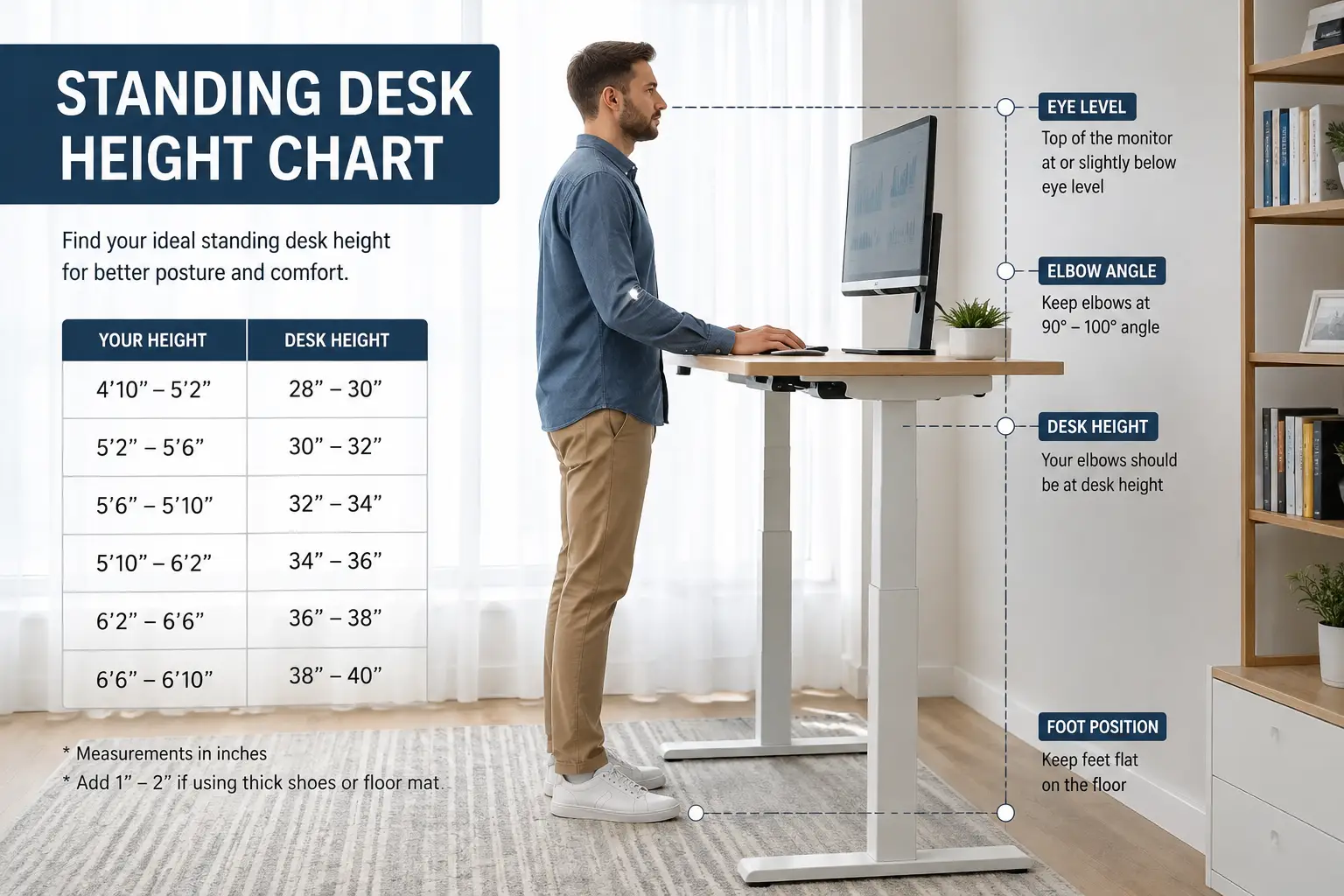
A standing desk height chart is a reference table that maps a person’s height to the recommended desktop height for standing work, typically measured so the elbows bend at roughly 90 degrees with forearms parallel to the floor. It’s a starting point based on average elbow-height proportions, not a rigid rule — arm length, footwear, and posture all shift the ideal number slightly from person to person.
The chart matters because “standing” isn’t inherently ergonomic. A desk set two inches too high forces your shoulders up toward your ears; set too low, it rounds your spine forward. Both defeat the purpose of switching from a seated desk in the first place. A quality height-adjustable desk is what makes hitting that number possible — the chart just tells you where to aim.
Quick Comparison: 7 Best Standing Desks at a Glance
| Desk | Height Range | Weight Capacity | Best For | Price Range |
|---|---|---|---|---|
| UPLIFT V2 | 25.3″–48.7″ | Up to 355 lbs | Best overall / widest fit | Around $600–$1,100+ |
| FlexiSpot E7 | 22.8″–48.4″ | Up to 355 lbs | Shorter users / best value | Around $400–$550 |
| Fully Jarvis | 25.5″–50.7″ | Around 300–350 lbs | Sustainable materials | Around $500–$700 |
| SmartDesk Core | 29.4″–48″ | Up to 265 lbs | Tightest budget | Around $400–$450 |
| Vari Electric Standing Desk | 25″–50.5″ | Up to 200 lbs | Polished home office | Around $750–$850 |
| Branch Duo | 28″–47.3″ | Up to 275 lbs | Small spaces | Around $500–$600 |
| IKEA IDÅSEN | 24.75″–50″ | Up to 154 lbs | IKEA ecosystem/returns | Around $700–$800 |
Looking at the table above, the UPLIFT V2 and Fully Jarvis cover the widest usable height bands, which matters more than price for anyone near the tall or short end of the standard chart. The FlexiSpot E7‘s 22.8-inch minimum stands out as the only desk here genuinely built for petite users, while the SmartDesk Core‘s 29.4-inch floor is worth flagging before you buy if you’re under about 5’4″. Weight capacity is the other quiet differentiator — if you run dual monitors on arms plus a laptop dock, the Vari Electric Standing Desk and IKEA IDÅSEN carry noticeably less than the dual-motor competition.
💬 Bookmark this comparison — it makes checking today’s availability and current pricing a lot faster later. 😊
Standing Desk Height Chart: Find Your Ideal Height by Inches
Here’s the core reference. These ranges assume flat, thin-soled shoes and average arm proportions for a given height; adjust up half an inch for thicker footwear, and down slightly if you have proportionally shorter arms relative to your height.
| Your Height | Recommended Standing Desk Height |
|---|---|
| Under 5’4″ (up to 64″) | 38″–40″ |
| 5’4″–5’7″ (64″–67″) | 40″–42″ |
| 5’8″–5’11″ (68″–71″) | 42″–44″ |
| 6’0″–6’3″ (72″–75″) | 44″–46″ |
| Over 6’3″ (75″+) | 46″–50″ |
The fastest way to sanity-check this chart against your own body: stand naturally, let your arms hang, then bend your elbows to 90 degrees as if typing. Wherever your forearms sit is your target desktop height — Colorado State University’s ergonomics program recommends this exact self-test as a supplement to any printed chart, since no table accounts for your specific torso-to-leg ratio. Notice that only three of the seven desks compared above (the UPLIFT V2, Fully Jarvis, and Vari Electric Standing Desk) comfortably reach the 46″+ ceiling that taller users in the last row need — a detail generic “best standing desk” roundups routinely skip.
📏 Ready to match your number to a desk? Compare today’s stock and current price on any pick below before it changes.
How to Choose the Right Standing Desk
Matching a desk to the height chart above is step one; these criteria determine whether it actually holds up day to day.
- Confirm the height range covers your target with margin. Don’t buy a desk whose maximum height is your exact number — you want at least an inch of headroom for adjustment as your posture, chair, or footwear changes.
- Check weight capacity against your real setup, not just the desktop. Dual monitor arms, a laptop dock, and a monitor light easily add 30–50 lbs beyond what most people estimate.
- Prioritize dual motors over single motors if your budget allows. Reviews consistently report that single-motor desks lift slower and struggle more under uneven loading (a monitor arm on one side, for instance).
- Look at desktop depth, not just width. A 30-inch depth accommodates a monitor arm and keyboard tray without crowding; anything under 24 inches gets cramped fast with dual monitors.
- Verify memory presets and collision sensors are included, not optional add-ons. These features are what actually make hitting your exact chart number effortless every single day instead of a one-time setup chore.
- Factor in assembly complexity and warranty length together. A longer warranty (7–15 years is common among the desks below) is a reasonable proxy for how confident the manufacturer is in the motor and frame long-term.
- Read aggregated reviews for stability at full height, not just at sitting height. Wobble at maximum extension is one of the most common complaints across budget frames and rarely shows up in marketing photos.
Top 7 Standing Desks — Expert Analysis
1. UPLIFT V2 — widest height range for most bodies
The UPLIFT V2 is built around a genuinely wide 25.3″–48.7″ range, which is why it’s the desk we’d point most people toward first when matching against the height chart above. Its dual motors are rated to lift up to 355 lbs and are widely reported as some of the quietest in the category, which matters if you’re on video calls while adjusting height mid-day. The frame also carries a long warranty by industry standards, a detail that tends to correlate with how confident a manufacturer is in long-term motor reliability.
Based on comparing the specs against its closest rivals, the UPLIFT V2 earns its reputation less from any single standout feature and more from consistency — nothing about it is a compromise, which is rare at this price tier. It’s best suited to buyers who want to set a desk once at their chart-recommended height and never think about stability again, including taller users the chart puts near the 46-48″ range. Reviews consistently report smooth, near-silent height transitions and praise the accessory ecosystem (monitor arms, keyboard trays), while a recurring critique is that the base configuration’s included desktop feels less premium than the frame it sits on, pushing some buyers toward pricier upgraded tops.
Pros:
- ✅ Widest height range of any desk in this lineup
- ✅ 355 lb capacity handles heavy multi-monitor setups
- ✅ Quiet dual motors with reliable memory presets
Cons:
- ❌ Price climbs quickly with premium desktop options
- ❌ Base desktop finish underwhelms compared to the frame
Typically in the $600–$1,100+ range depending on desktop size and finish, the UPLIFT V2 delivers strong value if you stick close to the base configuration and skip the pricier add-ons.
2. FlexiSpot E7 — lowest minimum height, best value
The FlexiSpot E7‘s standout spec is its 22.8-inch minimum height — nearly two and a half inches lower than the UPLIFT V2 — which makes it the only desk here genuinely engineered for users under 5’2″ or households where a shorter person shares the desk. Its dual motors match the UPLIFT V2‘s 355 lb capacity at a noticeably lower price point, and the frame accommodates desktops from 47.2″ to 80″ wide.
What most buyers overlook with this model is how much that low floor matters beyond just short adults — it’s also what makes the E7 workable for teens, wheelchair users, or anyone who prefers a lower seated-typing posture even at “standing” height. Based on aggregated review themes, this is consistently framed as the value pick of the mid-tier standing desk category, competing on features with desks costing considerably more. A common thread in customer feedback is praise for the lifting speed and stability, alongside occasional complaints about inconsistent customer service response times when parts need replacement under warranty.
Pros:
- ✅ Lowest minimum height in this lineup at 22.8″
- ✅ Matches premium 355 lb weight capacity at a lower price
- ✅ Strong value relative to dual-motor competitors
Cons:
- ❌ Customer service response reported as inconsistent in reviews
- ❌ Control panel feels basic next to premium rivals
Generally priced in the $400–$550 range, the FlexiSpot E7 offers the best dollar-for-dollar value of any desk on this list, especially for shorter users the height chart underserves elsewhere.
3. Fully Jarvis — most sustainable bamboo build
The Fully Jarvis bamboo model runs a 25.5″–50.7″ range, giving it the highest usable ceiling in this comparison — a genuine advantage for anyone near or above 6’3″ on the chart above. Fully has built a reputation around ergonomic accessory compatibility (chairs, monitor arms, anti-fatigue mats), and the bamboo desktop is a real sustainability differentiator rather than a marketing label, since bamboo regenerates far faster than hardwood.
Here’s what the spec sheet doesn’t say plainly: that top-of-range 50.7″ height is genuinely rare in this price bracket, and it’s the reason ergonomics-focused reviewers repeatedly recommend the Fully Jarvis for tall users who’ve been frustrated by desks maxing out around 46-47 inches. Aggregated customer sentiment is strongly positive on build quality and the bamboo finish’s durability over time, while a recurring critique in reviews is that assembly takes noticeably longer than competitors — budget 45-60 minutes with two people rather than the 20-30 minutes some rivals advertise.
Pros:
- ✅ Tallest maximum height in this lineup at 50.7″
- ✅ Genuinely sustainable bamboo desktop material
- ✅ Broad ergonomic accessory ecosystem
Cons:
- ❌ Assembly reported as longer and more involved
- ❌ Price rises meaningfully with premium desktop finishes
Typically in the $500–$700 range, the Fully Jarvis is the strongest pick specifically for tall users the standard height chart puts in its top bracket.
4. SmartDesk Core — cheapest true electric lift
The SmartDesk Core is the budget entry point here, and it earns that spot honestly — a genuine dual-motor electric lift for around $400 is still relatively rare. Its 29.4″–48″ range covers the middle bands of the height chart comfortably but is worth flagging clearly: at a 29.4-inch floor, it’s the highest minimum height of any desk in this comparison, meaning it’s a poor match for anyone under roughly 5’4″ who needs that lower 38-40″ zone.
Based on comparing specs against pricier rivals, the trade-offs are exactly what you’d expect at this price: a 265 lb weight capacity (lower than the premium dual-motor desks above), and an MDF desktop that reviewers describe as solid for typical use but less resilient to heat and moisture than bamboo or laminate alternatives. What most buyers overlook is that the motor and lift mechanism — the part most likely to fail over time — gets consistently positive marks even from reviewers otherwise critical of the desktop material, suggesting Autonomous prioritized the right component to keep durable.
Pros:
- ✅ Lowest price point for a true dual-motor electric desk
- ✅ Reliable motor performance per aggregated reviews
- ✅ Fast 2.3 in/sec lift speed
Cons:
- ❌ Highest minimum height in this lineup (29.4″) — poor fit under 5’4″
- ❌ Lower 265 lb weight capacity than premium rivals
At around $400–$450, the SmartDesk Core is the best entry point for anyone in the mid-height range on a tight budget — just not for shorter users.
5. Vari Electric Standing Desk — most polished home-office look
The Vari Electric Standing Desk (60″x30″) leans into aesthetics and finish quality more than any other desk on this list, with a 1.25-inch laminate desktop and a curved waterfall edge that reads more like furniture than office equipment. Its 25″–50.5″ range is broad enough to cover nearly the entire height chart, and four memory presets make dialing in your exact chart number a one-time task.
Based on comparing the spec sheet to its price, the trade-off here is capacity: a 200 lb weight limit is meaningfully lower than the 265-355 lb range of the dual-motor desks above, which matters if you’re running a heavier multi-monitor arm setup. What the finish quality buys you, according to aggregated reviews, is a desk that looks intentional in a home office on video calls — a real consideration for remote workers whose desk is visible on-screen daily. Reviews consistently highlight the quiet lift and stable T-style legs, with a recurring note that the price feels high relative to the lower weight capacity compared to rivals.
Pros:
- ✅ Broad 25″–50.5″ range covers nearly the full chart
- ✅ Premium desktop finish and waterfall edge design
- ✅ Four programmable memory presets
Cons:
- ❌ Lower 200 lb weight capacity than dual-motor competitors
- ❌ Higher price relative to its load rating
Generally in the $750–$850 range, the Vari Electric Standing Desk suits buyers prioritizing appearance and finish over maximum load capacity.
6. Branch Duo — smallest footprint, frameless design
The Branch Duo takes a different structural approach with a frameless, compact design built for tighter spaces — apartments, shared offices, or anyone who doesn’t want visible crossbars. Its 28″–47.3″ range (a 19.3-inch adjustment span) covers the mid-to-upper height chart bands well, and the dual motor is commercial-grade rated with a 10-year warranty, unusually long for a desk in its price bracket.
What most roundups miss about the Branch Duo is that its compact footprint isn’t just cosmetic — a smaller desk surface area genuinely changes how a small room feels, and reviewers in apartment settings consistently note this as the deciding factor over larger rivals. Aggregated customer sentiment praises the quiet motor and the 10-year commercial warranty as reassuring for a relatively young furniture brand; a common critique is that the 275 lb weight capacity and narrower size options make it less suited to buyers wanting a large dual-monitor command-center setup.
Pros:
- ✅ Frameless compact design ideal for small spaces
- ✅ 10-year commercial-grade warranty
- ✅ Quiet, fast dual-motor lift
Cons:
- ❌ Smaller size options limit large multi-monitor setups
- ❌ 28″ minimum height is too high for some petite users
Priced around $500–$600, the Branch Duo is the strongest pick for small rooms where a bulky four-leg frame doesn’t fit the space.
7. IKEA IDÅSEN — easiest nationwide returns and support
The IKEA IDÅSEN brings something the other six desks can’t match: a nationwide brick-and-mortar return and support network through IKEA stores, which matters more than most buyers expect when a motor issue arises two years in. Its 24.75″–50″ range is genuinely wide, covering nearly the entire height chart from petite to tall users in a single frame.
Based on comparing this desk honestly against its dual-motor rivals, the trade-off is weight capacity: at 154 lbs, it’s the lowest in this entire lineup, roughly half what the UPLIFT V2 or FlexiSpot E7 support. That’s a real constraint if you’re running heavy monitor arms, but for a single monitor, laptop, and basic peripherals, reviewers consistently report it holds up fine. What the IKEA ecosystem buys you beyond the desk itself is compatibility with IKEA’s broader desk accessory line (cable trays, monitor stands, drawer units) at accessible prices, plus the peace of mind of walk-in service.
Pros:
- ✅ Wide 24.75″–50″ range fits nearly the full height chart
- ✅ Nationwide IKEA store returns and support
- ✅ Compatible with IKEA’s broader desk accessory ecosystem
Cons:
- ❌ Lowest weight capacity in this lineup at 154 lbs
- ❌ Desktop feels thinner than premium rivals per reviews
Typically around $700–$800 for the underframe-and-desktop bundle, the IKEA IDÅSEN is the easiest option to service long-term, if you keep your desk load light.
How to Measure and Set Your Standing Desk Height Correctly
Once your desk arrives, matching it to the chart takes about five minutes if you do it methodically. Start by standing in your normal work shoes at your usual posture — don’t force an unnaturally straight spine, since that’s not how you’ll actually stand for hours. Let your arms hang naturally, then raise your forearms to a 90-degree bend as if resting on a keyboard.
Use a tape measure or a smartphone level app to record the height from the floor to your elbow at that bend — this is your true target, and it should land within the range your row on the chart predicts. Set the desk to that exact height, then adjust down by a quarter to half inch if your shoulders feel like they’re creeping upward after a few minutes, a common sign the desk is slightly too high. Save the number as a memory preset immediately; every desk in this comparison includes presets, and skipping this step is the single most common reason people drift back to guessing at height every time they stand. If you’d rather skip manual measuring, several manufacturer sites (including the desks above) offer a free standing desk height calculator that converts your height in inches directly into a recommended range — a useful cross-check against the printed chart.
Real-World Scenarios: Matching Desk Height to Your Body and Workspace
A 5’2″ graphic designer working from a small apartment has different priorities than a 6’4″ software engineer running three monitors — here’s how the height chart and product picks above apply differently across common situations.
The petite home-office worker (under 5’4″): The chart puts you in the 38-40″ range, which rules out the SmartDesk Core‘s 29.4″ floor immediately if you also need lower sitting heights. The FlexiSpot E7‘s 22.8″ minimum is the clear fit here, especially paired with an anti-fatigue mat since standing desks generally feel less forgiving underfoot for shorter frames working closer to the surface.
The tall remote worker (6’2″ and up): You need real ceiling headroom, not just a desk that technically “adjusts.” The Fully Jarvis at 50.7″ or the UPLIFT V2 at 48.7″ are the safer bets; several budget desks that max out around 46″ will leave you hunching slightly even at full extension.
The shared or multi-user household desk: If two people with a 10+ inch height difference use the same desk, prioritize total range over any single feature — the IKEA IDÅSEN (24.75″–50″) or Vari Electric Standing Desk (25″–50.5″) both span nearly the full chart in one frame, minimizing daily readjustment friction.
The heavy multi-monitor setup (any height): Weight capacity outranks height range here. The UPLIFT V2 or FlexiSpot E7, both rated to 355 lbs, comfortably support dual monitor arms plus a laptop dock — a load that would strain the Vari Electric Standing Desk‘s 200 lb rating or the IKEA IDÅSEN‘s 154 lbs.
Common Mistakes to Avoid When Buying or Setting a Standing Desk
Even with a chart in hand, a few recurring errors undercut the whole point of buying a height-adjustable desk.
Buying based on the desk’s maximum height alone is the most common mistake — a desk that “goes up to 50 inches” is irrelevant if its minimum sitting height doesn’t drop low enough for your seated posture too. Reviewers who skip checking the minimum are the ones most likely to end up disappointed months later. A second frequent error is ignoring monitor height entirely; a desk set correctly for your elbows still leaves your neck craning downward if the monitor top isn’t roughly at eye level, which typically means adding a monitor arm or stand rather than relying on desk height alone to fix screen position.
Skipping the memory-preset setup is a subtler mistake — without a saved number, most people eyeball the height differently every time, drifting away from their chart-recommended range within a couple of weeks. Finally, underestimating weight capacity by forgetting monitor arms, docking stations, and desk organizers in the total load is a common and avoidable oversight; add roughly 30-50 lbs to whatever you think your setup weighs before checking a desk’s rated capacity against it.
Standing Desk vs Sitting Desk: What the Height Difference Really Means
| Factor | Standing Desk (Adjustable) | Fixed Sitting Desk |
|---|---|---|
| Typical desktop height | 38″–50″ (adjustable) | Fixed at 28″–30″ |
| Posture flexibility | Alternates sitting/standing | Sitting only |
| Musculoskeletal load | Distributed across positions | Concentrated, static |
| Typical price range | $400–$1,100+ | $150–$400 |
Looking at the comparison above, the core difference isn’t just the number on the tape measure — it’s that an adjustable desk lets you move through a range of heights across the day rather than locking your body into one static posture for eight hours straight. Mayo Clinic research on active workstations has linked regular position changes during desk work to measurable benefits beyond just comfort, including improvements in sustained attention during cognitively demanding tasks. That said, a standing desk set to the wrong height on the chart above can reproduce the same static-posture problem in a different position — the adjustability is the advantage, not standing itself.
Standing Desks for Petite and Tall Users: When Average Charts Fall Short
Most published height charts, including the one in this article, are built around average adult proportions — which means they work reasonably well for the middle of the distribution and progressively less well at either extreme. If you’re under 5’2″ or over 6’4″, treat the chart as a starting estimate rather than a precise answer.
For petite users, the real constraint usually isn’t the standing range at all — it’s the sitting range. Many desks advertise an impressively low standing minimum but still bottom out around 24-25 inches for sitting height, which is too high for someone with a shorter torso paired with a properly fitted chair. The FlexiSpot E7‘s 22.8″ floor is the standout exception in this comparison specifically because it accommodates true low-seated postures, not just low standing ones.
For tall users, the opposite problem shows up: desks that market themselves as “height adjustable” without specifying that their maximum tops out around 46 inches, which is genuinely too low for anyone in the chart’s 46-50″ row. This is where checking the exact spec sheet — as we’ve done for all seven desks above — matters more than trusting a general “great for tall people” claim in marketing copy. The Fully Jarvis and UPLIFT V2 are the two picks in this lineup with genuine headroom to spare for taller frames.
Problem → Solution: Fixing Common Standing Desk Height Issues
Problem: Shoulders creep up after standing for 20+ minutes. This almost always means the desk is set slightly too high. Lower it a quarter to half inch and recheck the 90-degree elbow test; even experienced standing-desk users need occasional recalibration as fatigue sets in.
Problem: Wrist pain or awkward keyboard angle. The desk height might be correct but the keyboard is sitting on top of a thick desktop, effectively raising your typing surface above your measured elbow height. A slim keyboard tray or simply choosing a desk with a thinner desktop (most of the seven above run 1-1.25 inches) resolves this.
Problem: Monitor feels too low even though the desk height is right. This is a monitor problem, not a desk problem — add a monitor riser or arm so the top third of the screen sits at eye level, independent of desk height.
Problem: Two household members need very different heights on one desk. Prioritize total adjustment range over every other spec; the IKEA IDÅSEN and Vari Electric Standing Desk both span nearly the full chart, minimizing how far each person has to readjust.
Problem: Desk feels wobbly at full standing height. This is typically a stability issue tied to frame quality, not user error — dual-motor desks with wider leg spacing (like the UPLIFT V2 or Branch Duo) are consistently rated more stable at full extension in aggregated reviews than single-motor budget frames.
Long-Term Cost, Maintenance, and Ergonomic ROI
| Tier | Upfront Price Range | Typical Warranty | Best Long-Term Fit |
|---|---|---|---|
| Budget | $400–$450 | 5–7 years | Single user, mid-height range |
| Mid-range | $500–$700 | 7–10 years | Most households |
| Premium | $750–$1,100+ | 10–15 years | Heavy daily use, extreme heights |
The math on standing desks favors buying once rather than replacing a budget frame after a couple of years of motor strain. A mid-range desk like the FlexiSpot E7 or Branch Duo, priced a few hundred dollars above entry-level, typically carries a warranty two to three times longer than the cheapest options — a reasonable proxy for how long the motor is actually expected to last under daily use. Maintenance itself is minimal across every desk in this comparison: an occasional check of cable management and a yearly inspection of the leg-frame bolts for looseness is generally all that’s needed, since none of these seven desks use exposed grease-dependent mechanisms.
Safety, Regulations, and Standards for Height-Adjustable Desks
Height-adjustable desks sold in the US are generally expected to meet ANSI/BIFMA G1 stability and safety guidelines, an industry standard covering structural safety, tip resistance, and cycle testing for office furniture — several manufacturers, including UPLIFT, publish their compliance documentation directly. Electric models should also carry UL or ETL certification on the motor and control components, confirming the electrical system has been independently tested against US safety standards.
Anti-collision sensors, standard on every desk in this comparison, matter for a genuine safety reason beyond convenience: they stop the desk if it meets resistance while lowering, preventing pinch injuries — a feature the Consumer Product Safety Commission has cited in past height-adjustable furniture safety actions involving models that lacked adequate collision protection. Before buying any electric desk outside this list, it’s worth confirming the listing explicitly states UL/ETL certification and anti-collision sensing rather than assuming every adjustable desk includes them by default.
FAQs
❓ What is the standard height for a standing desk?
❓ How do I use a standing desk height chart to find my size?
❓ What is the best standing desk height for someone who is 5'6'?
❓ Do standing desk height charts work for tall or short people?
❓ How much does a good height-adjustable standing desk cost?
Conclusion
The right standing desk height isn’t a matter of taste — it’s a measurable range tied to your body, and every desk in this comparison earns its spot for a different reason tied back to that chart. If you want the widest safety margin across nearly any height, the UPLIFT V2 and Fully Jarvis both offer genuine headroom most budget desks lack. If you’re on the shorter end of the chart, the FlexiSpot E7‘s 22.8-inch floor solves a problem most other desks simply don’t address. And if budget is the deciding factor, the SmartDesk Core delivers a real dual-motor lift at the lowest price here — provided your height comfortably clears its 29.4-inch minimum.
Whichever desk you choose, the chart only does half the job. Measure your own elbow height, set a memory preset the day it arrives, and revisit that number if your chair, shoes, or posture habits change. A height-adjustable desk set to the wrong height still leaves you exactly where you started — the adjustment range is only valuable if you actually use it to hit your number.
🔍 Ready to find your fit? Check today’s availability and current pricing on any desk above, and get set up at the right height for your body.
Recommended for You
- Mid Century Modern Office Chairs: 7 Best Picks for 2026
- Manual Treadmill Under Desk: 7 Best Picks to Try in 2026
- Rolling Adjustable Height Desk: 7 Best Picks for 2026 (Reviewed)
Disclaimer: This post contains affiliate links. As an Amazon Associate, I earn from qualifying purchases made through these links, at no additional cost to you.
✨ Found this article helpful? Share it with someone who needs it! 💬🤗