
In This Article
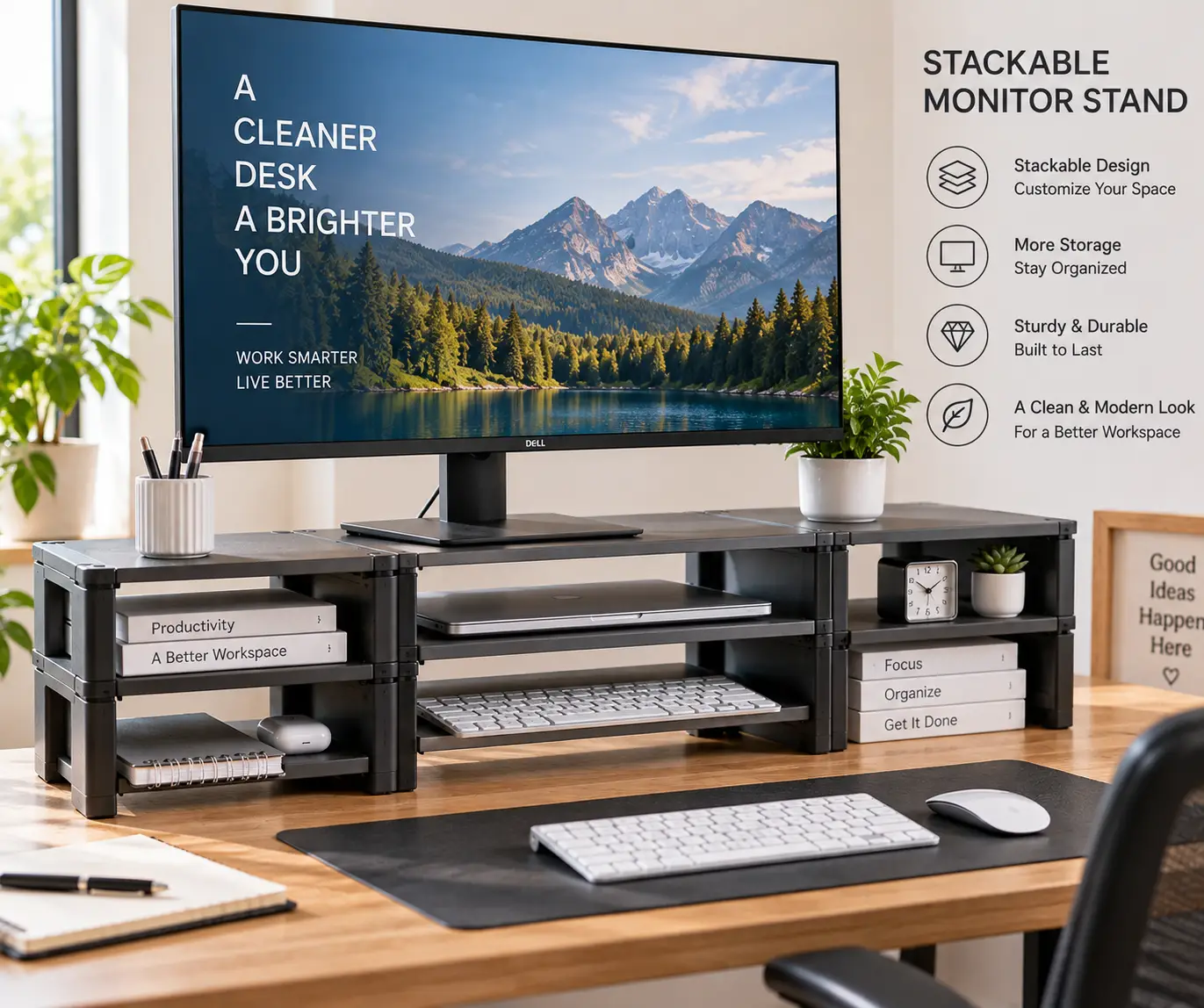
If your neck aches by 3 p.m. and your desk looks like a filing cabinet exploded on it, a stackable monitor stand is one of the cheapest fixes in the entire home-office world. A stackable monitor stand is a modular riser, usually made of steel, wood, or ABS plastic, whose legs or platforms can be added, removed, or combined to change height and create extra storage underneath your screen. Unlike a fixed monitor riser, the stackable design lets you dial in the exact eye-level height OSHA recommends for reducing awkward neck and back postures, then reconfigure it later if you switch monitors, add a laptop, or move to a new desk.
This guide breaks down seven real, currently available options — from a $15 plastic riser to a premium tempered-glass dual-pack — so you can match a monitor stand riser to your desk, your monitor size, and your budget. We researched specs, aggregated customer reviews, and manufacturer data rather than relying on marketing copy, and we’ll walk through exactly how each one performs in practice, not just what’s printed on the box. Whether you want a basic monitor stand riser for a single laptop or a heavy-duty dual monitor stand riser for a two-screen battle station, there’s a configuration below that fits.
As an Amazon Associate, this article contains affiliate links, and we may earn a commission from qualifying purchases at no extra cost to you. Every product below is presented with honest analysis grounded in real specs and real aggregated review sentiment — never fabricated experience.
Quick Comparison: The Top Stackable Monitor Stands at a Glance
| Product | Material | Max Weight | Height Range | Best For |
|---|---|---|---|---|
| Amazon Basics Height Adjustable Monitor Stand Riser | ABS Plastic | 22 lbs | 2.87″–4.9″ | Tightest budget |
| WALI Computer Monitor Stand (PTT001-B) | Steel | 44 lbs | 4.5″–6.1″ | Best overall value |
| HUANUO Monitor Stand Riser (HNMS04) | ABS Plastic | ~33 lbs | 3.1″–7.1″ | Double-deck storage |
| HUANUO Monitor Riser with Airflow Vents | Steel | 44 lbs | 3.94″–5.51″ | Cooling & airflow |
| BONTEC 2-Tier Wood Monitor Stand Riser | Engineered Wood | 66 lbs | ~5.6″ | Full keyboard storage |
| FITUEYES 3-Shelf Dual Monitor Stand Riser | Engineered Wood | 55 lbs | ~4″ | Dual-monitor desks |
| Hemudu 2-Pack Tempered Glass Monitor Riser | Tempered Glass | 88 lbs | Fixed, tiltable | Premium build |
Looking at the table above, the WALI Computer Monitor Stand is the easiest all-around recommendation because it balances weight capacity, adjustability, and price better than almost anything else on this list. If you’re working with a tight budget and a light laptop, the Amazon Basics Height Adjustable Monitor Stand Riser gets the job done for less, but it trades away steel construction and higher weight capacity. Buyers running two monitors or a monitor-plus-keyboard setup should skip straight to the FITUEYES 3-Shelf Dual Monitor Stand Riser or the BONTEC 2-Tier Wood Monitor Stand Riser, since neither the Amazon Basics nor the entry HUANUO model was designed with that much surface area in mind.
💬 Found the comparison helpful? A quick click on any pick below helps you (and other readers) shop smarter — at no extra cost to you! 😊
Top 7 Stackable Monitor Stands: Expert Analysis
1. Amazon Basics Height Adjustable Monitor Stand Riser — best price for light-duty use
The Amazon Basics Height Adjustable Monitor Stand Riser is the cheapest legitimate entry point into the stackable monitor stand category, and it earns that spot by keeping things simple. Its stackable ABS plastic legs snap into three preset heights — 2.87″, 4.25″, and 4.9″ — so you can raise a laptop or a small monitor without tools or a manual.
In practice, that stackable-leg system means you’re choosing between three fixed stops rather than a continuously adjustable arm, which is a real trade-off: you can’t fine-tune to, say, 3.5 inches, you pick the closest preset. The 22-pound weight rating is plenty for a 24-inch monitor or a laptop, but it rules out heavier 32-inch displays or dual-monitor use.
This stand is best for students, light home-office setups, and anyone who mainly needs a laptop riser rather than a permanent monitor perch. Budget-conscious buyers upgrading from “stack of textbooks” to an actual ergonomic solution will feel the difference immediately, while power users running dual 27-inch displays should look further down this list.
Reviews consistently report that the non-skid feet hold well on laminate desks and that assembly takes under five minutes, though a handful of buyers note the ABS plastic feels noticeably lighter-duty than the metal options nearby on this list — an honest trade-off for the price.
Pros:
- ✅ Lowest price point in this roundup
- ✅ Tool-free, snap-together assembly
- ✅ Built-in storage space for a keyboard or supplies
Cons:
- ❌ 22 lb capacity limits it to smaller screens
- ❌ Plastic legs feel less sturdy than steel alternatives
The Amazon Basics Height Adjustable Monitor Stand Riser typically runs under $20, and at that price it’s hard to beat for a first monitor riser — just don’t expect it to handle a heavy ultrawide.
2. WALI Computer Monitor Stand (PTT001-B) — best overall value
The WALI Computer Monitor Stand hits a sweet spot few competitors manage: a full steel shelf, a 44-pound weight capacity, and three real height settings (4.5″, 5.3″, 6.1″) for around the same price as flimsier plastic risers.
What most buyers overlook with this model is the ventilated platform — the perforated steel shelf isn’t just aesthetic, it lets heat escape from a laptop or a games console sitting underneath your monitor, which matters more than people expect during long work sessions. Combined with the 44-lb capacity, that means the WALI Computer Monitor Stand comfortably handles a 27-inch or even a light 32-inch monitor, something the plastic Amazon Basics riser can’t promise.
Based on comparing the specs against the rest of this list, this is the model we’d point most home-office buyers toward first: it doesn’t specialize the way the wood or dual-monitor options do, but it also doesn’t compromise on build quality to hit a low price.
Aggregated customer reviews are strongly positive, with tens of thousands of ratings averaging in the high 4-star range; the recurring praise centers on stability and how quickly the legs click into a new height, while occasional complaints mention the anti-slip pads wearing down after a year or two of daily adjustment.
Pros:
- ✅ Steel construction rated for 44 lbs
- ✅ Three real height adjustments, not just two
- ✅ Ventilated shelf improves heat dissipation
Cons:
- ❌ Single-tier only — no built-in drawer on the base model
- ❌ Anti-slip pads can wear with frequent height changes
Expect to pay somewhere in the $15–$25 range for the WALI Computer Monitor Stand, which is genuinely excellent value for a steel-bodied riser.
3. HUANUO Monitor Stand Riser (HNMS04) — best for double-deck storage
The HUANUO Monitor Stand Riser takes the stackable concept literally: its detachable legs use stackable holes on each platform, and you can combine two units into a genuine double-layer stand rather than just a single adjustable shelf.
The platform itself is unusually wide at 20.5″ x 7.8″, wide enough to fit a full-size keyboard underneath alongside your monitor, and the three height settings (3.1″, 4.3″, 7.1″) give a bigger top-end range than most competitors on this list. The trade-off is that combining two units into a stacked configuration means buying two separate stands, which changes the math on total cost.
This model is best for people who already know they want a two-tier setup — say, a monitor on top and a printer or laptop dock underneath — rather than buyers who just need a single height bump. Reviewers who bought two units to stack them report the connection points feel solid once assembled, though a few note the screwdriver-required assembly (unlike WALI’s tool-free clips) adds a few extra minutes to setup.
Real aggregated review sentiment for the HUANUO stackable line skews positive, with users repeatedly highlighting the recessed storage area for pens and small office supplies as a nice touch that competitors often skip.
Pros:
- ✅ Genuinely stacks into a two-tier setup
- ✅ Extra-wide platform fits a full keyboard
- ✅ Recessed tray keeps small supplies organized
Cons:
- ❌ Requires a screwdriver for assembly
- ❌ Reaching the tallest height means buying two units
A single HUANUO Monitor Stand Riser typically falls in the $20–$30 range, so budget roughly double that if you want the full stacked two-tier configuration.
4. HUANUO Monitor Riser with Airflow Vents — best for cooling and heat dissipation
Where the HNMS04 focuses on stacking, the HUANUO Monitor Riser with Airflow Vents focuses on a single, well-ventilated steel platform rated for 44 lbs with three height settings at 3.94″, 4.72″, and 5.51″.
The powder-coated steel body and vented platform aren’t just cosmetic choices — laptops and mini PCs that sit under a monitor riser generate real heat, and a solid plastic shelf traps it. This model’s ventilation channels air around whatever sits beneath your screen, which matters if you’re running a small form-factor PC or a laptop in clamshell mode for hours at a time. The 12.40″ x 7.09″ storage cubby underneath is compact but genuinely usable for a mouse, cables, or a small speaker.
This is the pick for anyone whose “under the monitor” space doubles as equipment storage rather than just paperwork — gamers with a mini PC, remote workers running a docked laptop, or anyone who’s had a device overheat on a solid-shelf stand before.
Aggregated reviews describe the button-adjust legs as faster to reposition than screw-in designs, and the steel build is repeatedly described as noticeably sturdier than the brand’s plastic-leg models, though the narrower storage footprint compared to the HNMS04 comes up as a minor complaint from buyers who wanted more room underneath.
Pros:
- ✅ 44 lb steel platform with real ventilation
- ✅ Button-press height adjustment is fast
- ✅ Rubber pads protect the desk surface
Cons:
- ❌ Storage area is smaller than dual-platform HUANUO models
- ❌ Only a single tier, unlike the stackable HNMS04
Pricing for the HUANUO Monitor Riser with Airflow Vents generally sits in the $20–$30 range, putting it right alongside the WALI as a mid-tier steel option.
5. BONTEC 2-Tier Wood Monitor Stand Riser — best for full keyboard and office storage
The BONTEC 2-Tier Wood Monitor Stand Riser swaps steel and plastic for 0.47-inch MDF wood, an extra-long 21.3-inch shelf, and a genuine two-tier design rated to hold up to 66 lbs.
That combination of length and weight rating is the headline here: at 21.3 inches wide, the top shelf comfortably fits a full-size keyboard next to a compact monitor base, something narrower steel risers can’t match. The lower tier and cable-management slot mean cords, a mouse, and daily supplies stay contained instead of sprawling across the desk, and the built-in cell-phone slot is a small but genuinely convenient touch most competitors skip.
What the spec sheet doesn’t say, but reviews reveal, is that the wood finish scratches more easily under a heavy or sharp-footed monitor base than steel does, so a felt pad under your display is a smart add-on. This model is best suited to buyers who want their desk to look more like furniture and less like an office-supply catalog, and who value the 66-lb capacity for a heavier monitor or a monitor-plus-printer combo.
Aggregated customer sentiment praises the MDF finish for looking noticeably more polished than plastic risers in photos and in person, with the most common critique being that assembly, while straightforward, takes longer than the tool-free steel options above.
Pros:
- ✅ 66 lb capacity, among the highest here
- ✅ Extra-long shelf fits a full keyboard
- ✅ Built-in phone slot and cable management
Cons:
- ❌ Wood finish can scratch under heavy bases
- ❌ Assembly takes longer than clip-together steel models
The BONTEC 2-Tier Wood Monitor Stand Riser typically lands in the $30–$40 range, a reasonable premium for the added storage and finished look.
6. FITUEYES 3-Shelf Dual Monitor Stand Riser — best for dual-monitor desks
If you’re running two displays, the FITUEYES 3-Shelf Dual Monitor Stand Riser is purpose-built for it: at roughly 42.5 inches wide, this dual monitor stand riser is long enough to seat two monitors side by side with room to spare, rated up to 55 lbs across its wood platform.
The three-shelf design means you get a raised surface for your screens plus two tiers of storage underneath — enough room for a keyboard, a small printer, or a stack of documents, which is exactly the kind of “desk real estate” problem dual-monitor users run into. Because it’s a single long platform rather than two separate risers, both monitors sit at a consistent height automatically, which single-stand shoppers often don’t realize is a real ergonomic advantage over mismatched risers.
This is the clear pick for anyone comparing a dual monitor stand riser against buying two single stands separately: it’s more stable, keeps both screens level, and costs less than two premium single-monitor risers combined. The trade-off is footprint — at over 42 inches wide, it needs a genuinely large desk to make sense.
Real reviews highlight the MDF construction as sturdy enough for two 24-inch monitors without sagging in the middle, with the main complaint being that smaller desks (under 48 inches wide) leave almost no extra room once the stand is in place.
Pros:
- ✅ Purpose-built width for two monitors
- ✅ Keeps both screens at matching height
- ✅ Multiple storage tiers underneath
Cons:
- ❌ Needs a large desk to fit comfortably
- ❌ Not height-adjustable in the way steel risers are
Expect the FITUEYES 3-Shelf Dual Monitor Stand Riser to run in the $40–$55 range, which still undercuts buying two separate premium stands.
7. Hemudu 2-Pack Tempered Glass Monitor Riser — best premium build
The Hemudu 2-Pack Tempered Glass Monitor Riser is the outlier on this list in both material and capacity: quarter-inch tempered glass rated to hold up to 88 lbs, sold as a two-pack so you can outfit two separate stations or stack them for extra height.
Tempered glass isn’t just a style choice — it’s noticeably more scratch- and heat-resistant than wood or plastic, and the 88-lb rating means it shrugs off even large 34-inch ultrawide monitors without a second thought. Because it ships as a two-pack, you get flexibility that single-unit stands don’t: run one riser per monitor across two separate desks, or set up two workstations at once, all for one purchase.
This is the pick for buyers who’ve already outgrown steel and wood options, or who simply want a stand that looks like it belongs next to a high-end monitor rather than a budget one. On paper, this means it’s overkill for a single laptop, but for a heavy 32-inch or ultrawide display it’s arguably the most capable stand in this entire roundup.
Aggregated review sentiment is the strongest of any product here, with buyers frequently mentioning the glass staying spotless and scratch-free even after months of daily monitor adjustments, though a few reviews flag that glass, unlike steel, will crack rather than dent if genuinely dropped or mishandled during setup.
Pros:
- ✅ Highest weight capacity in this roundup at 88 lbs
- ✅ Scratch- and heat-resistant tempered glass
- ✅ Two-pack covers two monitors or two desks
Cons:
- ❌ Fixed height, not adjustable like steel risers
- ❌ Glass can crack under serious mishandling
The Hemudu 2-Pack Tempered Glass Monitor Riser generally sells in the $35–$50 range for the pair, which is a strong deal per-unit given the premium materials.
Getting Started: How to Set Up Your Stackable Monitor Stand the Right Way
Unboxing a stackable monitor stand is the easy part — getting the height right is where most people cut corners. Start by sitting in your normal working posture, shoulders relaxed, and note where your eyes naturally land: that’s roughly where the top third of your screen should sit. From there, measure your monitor’s current height and subtract it from your target to find how much lift you actually need, rather than guessing at a preset.
For stackable legs like those on the WALI Computer Monitor Stand or HUANUO Monitor Riser with Airflow Vents, start at the lowest setting and go up one notch at a time, checking your posture after each change rather than jumping straight to the tallest option. In your first 30 days, expect to adjust the height at least once or twice as your body adapts — this is normal and doesn’t mean you picked the wrong stand. A common mistake is setting the monitor too high because “higher looks more ergonomic,” which actually forces your neck backward just as much as sitting too low does.
Once height is dialed in, route your cables through or around the platform before you load it with storage items, since retrofitting cable management after the fact is far more annoying than doing it during setup. Finally, check your stand’s rated capacity against your monitor’s actual weight (printed on most manufacturer spec sheets) rather than eyeballing it — this single step prevents the sagging or tipping issues that show up in negative reviews.
Real-World Scenarios: Matching a Stackable Monitor Stand to Your Setup
The budget-conscious student: working from a dorm desk with a single laptop and an external monitor, a light usage pattern, and a strict budget under $25. The Amazon Basics Height Adjustable Monitor Stand Riser fits this profile well — it’s inexpensive, light enough to move between rooms each semester, and its 22-lb capacity easily covers a laptop or small monitor.
The hybrid remote worker: splitting time between a home office and occasional travel, running one 27-inch monitor plus a docked laptop underneath that needs airflow. The HUANUO Monitor Riser with Airflow Vents or the WALI Computer Monitor Stand both suit this use case, since the ventilated steel platforms prevent heat buildup from the docked laptop while still leaving desk space for a keyboard.
The dual-monitor power user: running two 24- to 27-inch displays side by side for trading, design, or development work, with a large desk and a budget that allows for a dedicated solution. The FITUEYES 3-Shelf Dual Monitor Stand Riser is the obvious match here — its 42-inch platform keeps both monitors level, and the multiple storage tiers handle the extra peripherals that come with a two-screen setup.
Common Stackable Monitor Stand Problems (and How to Fix Them)
Problem: the stand wobbles at taller height settings. This usually means the legs weren’t fully clicked or screwed into place, or the stand is on an uneven desk surface. Re-check each leg individually and add a thin felt pad under any leg that sits on a seam or edge.
Problem: the monitor still feels too low even at max height. Stackable legs like those on the HUANUO Monitor Stand Riser are designed to combine two units for extra lift — buying a second unit to stack, rather than shopping for a taller (and pricier) alternative, often solves this for less money.
Problem: a laptop or mini PC overheats underneath the platform. Solid plastic shelves trap heat. Swapping to a vented steel option such as the WALI Computer Monitor Stand or the HUANUO Monitor Riser with Airflow Vents resolves this without changing anything else about your setup.
Problem: the platform scratches or marks over time. This is most common with wood finishes like the BONTEC 2-Tier Wood Monitor Stand Riser. A felt or silicone pad under the monitor base prevents most of this, and tempered-glass options like the Hemudu 2-Pack Tempered Glass Monitor Riser sidestep the issue entirely since glass resists scratching far better than MDF.
Problem: not enough width for a keyboard and monitor together. Standard single-monitor risers max out around 14–15 inches wide. If that’s cramped, the extra-wide HUANUO Monitor Stand Riser (20.5″) or the BONTEC 2-Tier Wood Monitor Stand Riser (21.3″) both solve this without needing a separate keyboard tray.
✨ See today’s stackable monitor stand deals → Whichever problem you’re solving, these picks help you get a desk setup the whole household — kids doing homework, partners on video calls, gamers running late — can actually use comfortably.
What Is a Stackable Monitor Stand?
A stackable monitor stand is a modular desk riser built from interlocking legs or platforms that can be added, removed, or combined to change its height and create storage space underneath a monitor or laptop. Unlike fixed risers, the stackable design lets you customize height without buying a new product, and in some cases lets two units combine into a taller, two-tier configuration.
How to Choose a Stackable Monitor Stand
- Match weight capacity to your actual monitor weight. A 24-inch monitor typically weighs 8–12 lbs, but a 32-inch or ultrawide display can exceed 20 lbs — check the manufacturer spec sheet, not just the screen size, before assuming any stand will hold it.
- Decide whether you need true height adjustability. Fixed-height stands like the Hemudu 2-Pack Tempered Glass Monitor Riser are simpler and often sturdier, but stackable-leg models like the WALI Computer Monitor Stand let you fine-tune the setting as your desk or chair changes.
- Consider platform width against your actual desk layout. If a keyboard needs to slide underneath, look for stands in the 18–22 inch range rather than the compact 14-inch options.
- Factor in material based on your priorities. Steel wins on durability and heat dissipation, wood wins on aesthetics and storage depth, and glass wins on scratch resistance and premium weight capacity.
- Check for ventilation if you’re stacking a laptop or mini PC underneath. A solid platform traps heat; a vented one doesn’t.
- Think about whether you’ll actually stack two units. If double-height is a real possibility down the line, choosing a genuinely stackable model like the HUANUO Monitor Stand Riser from the start saves money over buying a taller stand later.
- Read the aggregated review themes, not just the star rating. A 4.7-star average with recurring complaints about a specific issue (wobbling, scratching, slow shipping) tells you more than the number alone.
Stackable Monitor Stands vs. Monitor Arms
A stackable monitor stand and a VESA-compatible monitor arm solve the same core problem — getting your screen to eye level — but they do it very differently, and the right choice depends on your desk and your monitor.
A monitor stand sits entirely on the desk surface and requires no mounting hardware, which makes it dramatically easier to set up, move, or resell later; the trade-off is that it consumes desk footprint, whereas an arm clamps to the desk edge and frees up the surface underneath. Monitor arms typically offer far more range of motion (tilt, swivel, full height adjustment) but only work with monitors that have a VESA mounting pattern on the back, while a stackable stand works with literally anything you set on top of it, VESA-compatible or not — laptops, printers, older monitors, and gaming consoles included.
For most home-office buyers with a single monitor and a normal-sized desk, a stackable monitor stand like the WALI Computer Monitor Stand is the simpler, cheaper, and more flexible choice. Dual-monitor users chasing maximum desk space, or anyone with a VESA-compatible ultrawide they want to angle precisely, may still be better served by an arm — but for storage, budget, and non-VESA devices, the stand wins on practicality.
Common Mistakes to Avoid When Buying a Stackable Monitor Stand
The most common mistake is buying based on price alone and ignoring the weight rating, which leads directly to the sagging, tipping platforms that show up in one-star reviews. A close second is assuming “stackable” always means “height-adjustable” — some stackable designs, like the HUANUO models on this list, require you to physically add or remove leg segments rather than press a button, which is a different (and slightly slower) kind of adjustability worth knowing about before you buy.
Buyers also frequently underestimate how much desk width they’ll need once storage items go underneath the platform, ending up with a stand that technically fits their monitor but leaves no room for a keyboard. Finally, skipping the review-reading step for recurring complaints — rather than just checking the star average — means missing patterns like “scratches easily” or “wobbles above the middle height setting” that a five-minute read would have surfaced.
What to Expect: Everyday Performance and Comfort
Day to day, the difference a stackable monitor stand makes shows up less in dramatic before-and-after photos and more in small, cumulative relief: less reaching forward to read small text, less craning your neck downward by mid-afternoon, and a genuinely tidier desk once cables and clutter move underneath the platform instead of around it. Steel options like the WALI Computer Monitor Stand feel noticeably more planted when you bump the desk than plastic models, while wood options like the BONTEC 2-Tier Wood Monitor Stand Riser add a quieter, more finished aesthetic that plastic can’t match.
Height adjustment on the button-press steel models takes seconds and rarely requires re-leveling your monitor afterward, while the screw-together HUANUO stacking system is slower but yields a genuinely taller, sturdier two-tier result once assembled. Across nearly every product in this guide, the biggest everyday complaint isn’t stability or capacity — it’s underestimating how much desk depth the stand itself will eat into, so measure your desk before you buy, not after.
Long-Term Cost and Maintenance: Is a Stackable Monitor Stand Worth It?
A stackable monitor stand is one of the lowest-maintenance purchases in this entire product category — there are no batteries, no motors, and nothing to service beyond occasionally re-tightening a leg or wiping down the platform. Steel and glass options require essentially zero upkeep over years of daily use, while wood platforms benefit from an occasional wipe-down and a felt pad under heavy monitor bases to avoid scuffing.
On a pure cost basis, even the priciest option in this roundup, the FITUEYES 3-Shelf Dual Monitor Stand Riser, costs a fraction of what a comparable dual-monitor arm setup runs, and unlike an arm, it doesn’t require desk-clamp compatibility or VESA mounting hardware that can fail or loosen over time. The real long-term value comes from the ergonomic side: sources like Purdue University’s office ergonomics guidance point to correct monitor height as one of the simplest, lowest-cost interventions for reducing neck and back strain from prolonged screen time — a one-time $15–$50 purchase that keeps paying off every single workday.
Safety, Weight Capacity, and Desk Compatibility
Weight capacity is the single most important safety spec on any stackable monitor stand, and it’s worth checking against your actual monitor’s listed weight rather than assuming “monitor-sized” automatically means “safe.” Overloading a plastic-leg stand doesn’t usually cause a dramatic failure, but it does lead to slow sagging, warping, and eventually cracked legs — all of which show up months later, not on day one.
Desk compatibility matters just as much: a stand rated for 44 lbs still needs a flat, stable desk surface to perform as advertised, since an uneven or heavily textured desktop can undermine even a well-built riser’s stability. For anyone concerned about workplace ergonomics more broadly, the CDC’s workplace musculoskeletal disorder resources are a useful reference point for understanding why correct equipment setup, including monitor height, matters for long-term health, not just short-term comfort.
Stackable Monitor Stands for Small Desks, Dual Monitors, and Standing Desks
Small-desk users should prioritize footprint over features: the compact Amazon Basics Height Adjustable Monitor Stand Riser or a single WALI Computer Monitor Stand eat up the least surface area while still delivering a real height boost. Dual-monitor users, as covered above, are almost always better served by a single wide platform like the FITUEYES 3-Shelf Dual Monitor Stand Riser rather than two separate stands competing for the same desk space.
Standing-desk owners have a slightly different consideration: since the desk itself already adjusts for height, a monitor stand on a standing desk is mostly about storage and organization rather than ergonomics — in this case, a stackable model with real under-platform storage, like the BONTEC 2-Tier Wood Monitor Stand Riser or the HUANUO Monitor Stand Riser, adds more everyday value than a stand chosen purely for height adjustability.
Frequently Asked Questions
❓ Can a stackable monitor stand hold a 32-inch or ultrawide monitor?
❓ What's the difference between a monitor stand and a monitor riser?
❓ Do stackable monitor stands work with laptops as well as monitors?
❓ How much height do I actually need from a monitor stand riser?
❓ Are stackable monitor stands better than a standing desk converter?
Conclusion
A stackable monitor stand is a small purchase with an outsized payoff: better posture, a cleaner desk, and in several cases genuine flexibility to grow your setup later without starting over. If you only remember one recommendation from this guide, make it this — the WALI Computer Monitor Stand offers the best all-around mix of price, build quality, and adjustability for the average home office, while the Amazon Basics Height Adjustable Monitor Stand Riser remains the smartest entry point if your budget is genuinely tight.
For anyone with more specific needs, the picks above cover the real edge cases: the HUANUO Monitor Stand Riser for true double-deck stacking, the HUANUO Monitor Riser with Airflow Vents or BONTEC 2-Tier Wood Monitor Stand Riser for storage-heavy setups, the FITUEYES 3-Shelf Dual Monitor Stand Riser for two-screen desks, and the Hemudu 2-Pack Tempered Glass Monitor Riser for buyers who want premium capacity and a scratch-resistant finish. Whichever you choose, measure your desk, check the weight rating against your actual monitor, and set the height using your own seated eye level rather than a generic preset — that’s the difference between a stand that just sits on your desk and one that actually fixes the problem you bought it for.
✨ Ready to upgrade your desk setup? 🔍 Take your home office to the next level with this carefully researched lineup of stackable monitor stands. Click a highlighted pick above to check current pricing and availability on Amazon. These options will help you build a more comfortable, organized workspace the whole household can enjoy!
Recommended for You
- Curved Monitor Stand: 7 Best Picks for 2026 (Pros & Cons)
- Metal Monitor Stand: 7 Sturdy Picks That Won’t Wobble (2026)
- Height Adjustable Monitor Riser: 7 Best Picks for 2026 (Tested)
Disclaimer: This post contains affiliate links. As an Amazon Associate, I earn from qualifying purchases made through these links, at no additional cost to you.
✨ Found this article helpful? Share it with someone who needs it! 💬🤗