
In This Article
Why Your Keyboard Tray Needs a Better Mouse Spot
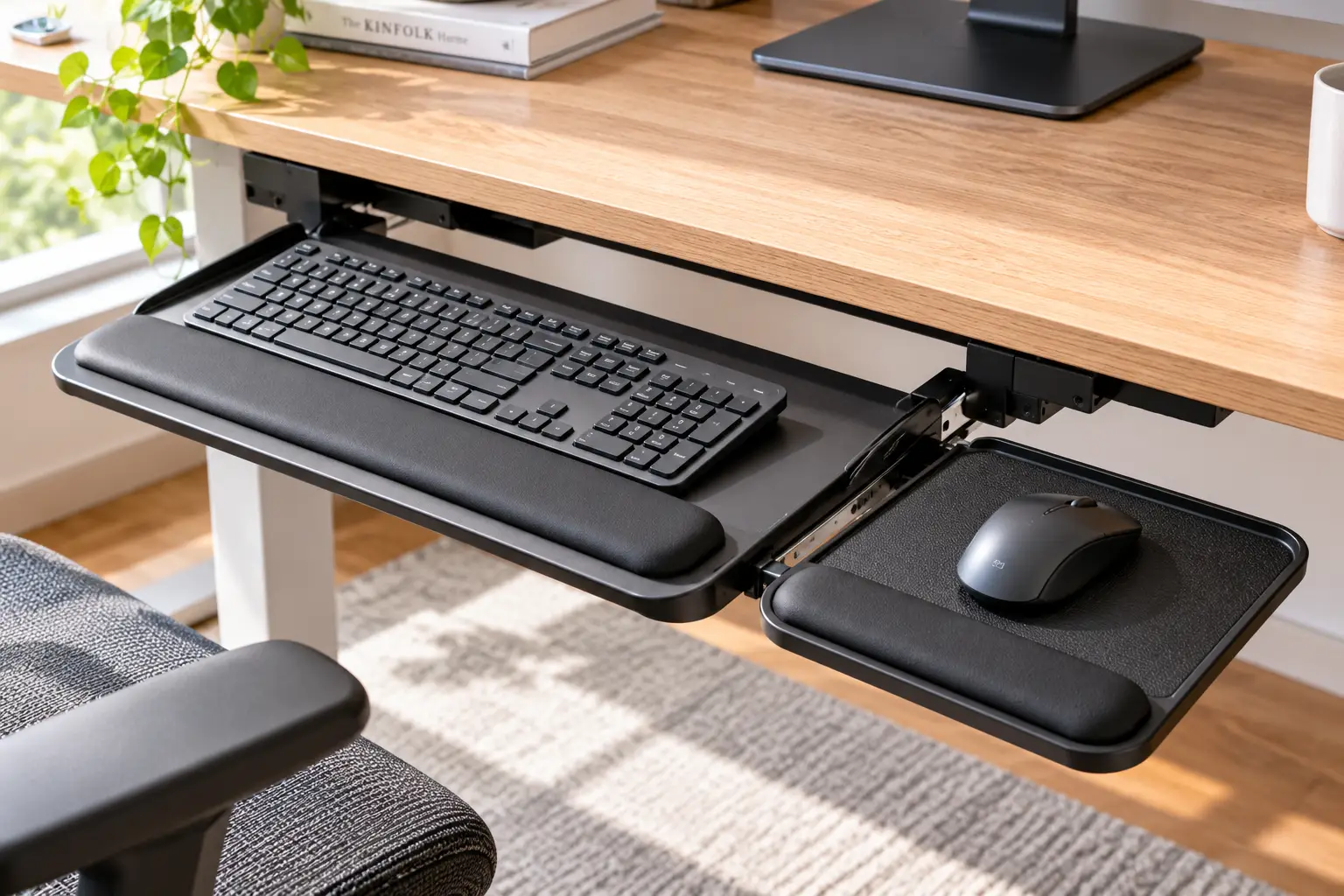
You finally installed a keyboard tray, your shoulders dropped an inch, and typing feels great. Then you reach for the mouse… and it’s still sitting up on the desk, a long stretch away from where your hands now live. Sound familiar? A mouse tray for keyboard tray setups fixes exactly that gap, and it’s one of the cheapest ergonomic upgrades you can make in 2026.
Here’s the problem in plain terms. Many budget keyboard trays are sized for the keyboard alone, so the mouse either crowds the keys or gets left behind on the desktop. Either way, your mousing arm drifts outward or upward — the classic “chicken wing” posture that ergonomists warn about. The OSHA computer workstations eTool makes the same point: your pointing device should sit close to the keyboard, at roughly the same height, so you aren’t reaching every few seconds.
The good news? You usually don’t need to rip out your tray. A small clamp on mouse tray or a dedicated keyboard tray mouse platform can bolt onto the edge you already have, swing out when you need it, and tuck away when you don’t. Some add-ons cost less than a nice lunch; others are part of pro-grade systems built for eight-hour days.
In this guide, we break down seven real options available to U.S. shoppers, from budget clamp-ons to a premium articulating system. You’ll get honest analysis based on spec sheets and aggregated customer feedback (no invented “we tested it” stories), plus fit checks, setup steps, and the mistakes that send these accessories back in the box.
What Is a Mouse Tray for Keyboard Tray?
A mouse tray for keyboard tray is a small platform — usually 7 to 11 inches wide — that attaches to the side or front edge of an existing keyboard tray, giving your mouse its own surface at keyboard height. Most use a screw-tightened C-clamp and a pivot, so the platform can rotate under the tray when it’s not in use.
Quick Comparison: The Best Mouse Tray for Keyboard Tray Options at a Glance
Short on time? This snapshot matches the strongest picks to the most common situations. Full specs and analysis for all seven come right after.
| Product | Max clamp thickness | Platform size | Price range | Best for |
|---|---|---|---|---|
| VIVO MOUNT-MS01A | Up to 2″ | 9.8″ x 7.7″ | $25–$40 | VIVO MOUNT-MS01A — best all-round budget add-on |
| Tripp Lite DMUDSC | Up to 2.2″ | Compact, with storage | $25–$35 | Tripp Lite DMUDSC — thicker edges and pen storage |
| Rmour Z1 | Up to 2.1″ | 9.3″ x 5.7″ | $45–$65 | Rmour Z1 — sit-stand and laptop-stand setups |
| Humanscale 6G High Clip Mouse | Track-mounted system | 8.5″ clip platform | $340–$400 (full system) | Humanscale 6G High Clip Mouse — all-day pro use |
Looking at the table, the VIVO MOUNT-MS01A gives most people the right blend of surface area and clamp range for very little money, which is why it’s our default suggestion. The Tripp Lite DMUDSC earns its spot because its 2.2-inch jaw handles chunkier tray edges and adds storage, while the Rmour Z1 costs more but trades plastic for aluminum. If you type and mouse for a living, though, the Humanscale 6G High Clip Mouse is in a different league: it isn’t an add-on so much as a full replacement built around the mouse.
💬 One click helps other shoppers make an informed choice too! Tap a highlighted product to check current pricing and availability. 😊
Top 7 Mouse Tray for Keyboard Tray Picks: Expert Analysis
Every pick below is a real product sold to U.S. buyers. A quick honesty note before we dive in: most of these platforms are marketed for desks, not trays, so we’ve judged each one on whether its clamp range, weight, and pivot design actually make sense on a keyboard tray edge. Review sentiment is summarized from public retailer feedback where we could verify it, and we say so plainly where we couldn’t.
1. VIVO MOUNT-MS01A — best all-round budget add-on
The VIVO MOUNT-MS01A is the closest thing this category has to a safe default. Its 9.8″ x 7.7″ platform is large enough for a full-size mouse with room to sweep, and the steel C-clamp accepts surfaces up to 2 inches thick, according to VIVO’s spec sheet. In practice, that range swallows nearly any keyboard tray edge, since most tray boards run well under an inch. The 360° pivot means you can swing the platform out beside the keys while you work, then rotate it underneath at the end of the day.
Based on comparing the specs, this model suits right- or left-handed users who want a quick, no-drill fix on a fixed or lightly articulating tray. What most buyers overlook is that the fabric-topped surface acts as the mouse pad, so you won’t need a separate one. VIVO backs it with a 3-year warranty, which is generous at this price.
Retailer feedback we found generally describes it as easy to install and stable for normal mousing, with occasional notes that the pivot needs a firm tighten to stop drifting.
Pros:
- ✅ Big enough surface for full-size mice
- ✅ Clamp fits edges up to 2 inches
- ✅ Covered by a 3-year warranty
Cons:
- ❌ Pivot can loosen if under-tightened
- ❌ No independent tilt adjustment
At roughly $25–$40 (check the current price), the VIVO MOUNT-MS01A delivers excellent value for most home offices.
2. VIVO MOUNT-MS01B — sturdiest surface for heavy hands
The VIVO MOUNT-MS01B is the wooden-platform sibling, and that one change matters more than you’d think. VIVO lists a 10.7″ x 8.6″ surface made from MDF on a steel arm, a 2-inch clamp range, and a 2.2 lb weight capacity. The larger, stiffer board means less flex when you lean on it, which is exactly what happens when you rest your palm between clicks.
Here’s what to weigh: the extra surface also makes it a better fit for gamers using wide, low-sensitivity swipes, or anyone who parks a phone or small trackpad next to the mouse. VIVO’s own product copy even pitches it for joysticks. On a keyboard tray, that slightly heavier board adds a bit of load to the tray arm, so it’s best on trays with solid track hardware rather than flimsy plastic sliders.
Public feedback on this model is thinner than for the MS01A, so we can’t point to a large pool of verified reviews; the listings we found show generally positive ratings without much detail.
Pros:
- ✅ Largest platform in this lineup
- ✅ Stiff MDF top resists flexing
- ✅ Works for joysticks and trackpads too
Cons:
- ❌ Heavier load on light-duty trays
- ❌ Limited verified review data
Priced around $30–$45, the VIVO MOUNT-MS01B is worth the small premium if your current mouse surface feels wobbly.
3. FUZADEL Clamp-On Mouse Platform — most height positions on a budget
The FUZADEL Clamp-On Mouse Platform shows up on Amazon as a best seller in the keyboard drawers and platforms category, and its standout spec is height. FUZADEL lists three height positions, a 2-inch clamp range, a 2.2 lb load rating, and a 360° horizontal swivel. Why does height matter so much here? Because the right mouse level relative to your keys changes depending on whether your tray sits flat or tilts away from you.
On paper, this means you can fine-tune the platform to sit level with your keyboard’s base or slightly above it, which is the zone ergonomists recommend. That makes it a sensible pick for people who share a workstation or haven’t settled on a final tray angle yet. The tool-free screw clamp also lets you move it from side to side when a left-handed coworker sits down.
We couldn’t verify a large set of U.S. reviews tied to this exact listing, so treat its best-seller status as a popularity signal rather than proof of durability.
Pros:
- ✅ Three height settings for fine tuning
- ✅ Tool-free clamp swaps sides easily
- ✅ Swings fully under the tray
Cons:
- ❌ Lesser-known brand with thinner support
- ❌ Durability evidence is limited
Usually in the $20–$40 band (prices vary), the FUZADEL Clamp-On Mouse Platform is a smart pick when adjustability beats brand name.
4. Tripp Lite DMUDSC — best for thick edges and desk clutter
The Tripp Lite DMUDSC (now sold under Eaton’s Tripp Lite series) takes a different approach: it’s a swiveling storage tray with a built-in mouse pad and wrist rest. Tripp Lite rates the clamp for flat surfaces up to 2.2 inches thick and the tray for up to 6.6 lbs, and installation needs no tools or extra hardware. That 6.6 lb rating is roughly triple what most mouse-only platforms list.
What the spec sheet doesn’t say outright is why that matters on a keyboard tray: some trays have thick padded fronts or bulky wrist-rest lips, and the 2.2-inch jaw gives you extra margin. The built-in pen compartment is genuinely handy if your tray already eats the desk space where you used to keep sticky notes. The trade-off is a smaller mousing area than the VIVO boards, so low-DPI swipers may feel cramped.
We didn’t find enough detailed U.S. reviews to summarize sentiment reliably; the strongest trust signal is the 5-year limited warranty Tripp Lite lists for it.
Pros:
- ✅ Widest clamp range in this roundup
- ✅ Built-in storage for pens and notes
- ✅ Backed by a 5-year limited warranty
Cons:
- ❌ Smaller mousing area than rivals
- ❌ Plastic build feels less premium
Typically $25–$35 at the time of writing, the Tripp Lite DMUDSC is excellent value for tidy, multitasking setups.
5. Aidata UM003 — cleanest cable management
The Aidata UM003 is a no-frills under desk mouse tray with one clever detail: a built-in cable clip that holds a wired mouse’s cord in place. Aidata’s listing specifies a metal clamp for surfaces up to 40 mm (about 1.57 inches), a 360° rotating platform, and overall dimensions around 8″ x 10″. For most keyboard trays, that clamp range is plenty.
Why does the cable clip matter? On a keyboard tray, the mouse cord has to travel farther and often drapes off the back edge, where the tray’s own slide motion tugs it every time you push the tray in. Anchoring the cord at the platform removes that drag, which means smoother, more predictable cursor control. If you’ve switched to wireless, the clip is irrelevant, and the platform becomes a simple, compact swivel surface.
Based on the specs, it suits office workers with a wired mouse and a modest tray, particularly in shared or corporate environments where a plain, low-profile look fits in. We couldn’t confirm a meaningful pool of recent U.S. reviews, so we’re recommending it on design logic rather than crowd sentiment.
Pros:
- ✅ Cable clip stops cord drag
- ✅ Low-profile, office-friendly design
- ✅ Rotates fully out of the way
Cons:
- ❌ Narrower clamp range than VIVO
- ❌ Few verifiable recent reviews
Usually around $25–$35, the Aidata UM003 is fair value, especially for wired-mouse users.
6. Rmour Z1 — premium aluminum for standing setups
The Rmour Z1 was designed first for laptop stands, and that heritage makes it surprisingly good on keyboard trays. Rmour lists an aluminum mouse pad measuring 9.3″ x 5.7″, a clamp for surfaces up to 2.1 inches thick, and a total weight of just 0.74 lb. That combination — metal stiffness at under a pound — is the key selling point.
What most buyers overlook is how much weight matters on a sliding or articulating tray. A heavy add-on can cause the tray to sag slowly or make height adjustments feel sticky. At 0.74 lb, the Rmour Z1 adds almost nothing to the tray’s load, yet the aluminum top won’t flex the way thin plastic can. That makes it a strong match for sit-stand desks, where you’re raising and lowering the whole setup several times a day.
The downside is the narrow 5.7-inch depth. Users with big hands or palm-grip habits may find their wrist hanging off the front edge. We didn’t find enough U.S. review volume to summarize sentiment, so weigh the build specs accordingly.
Pros:
- ✅ Aluminum top resists flexing
- ✅ Featherweight at 0.74 lb
- ✅ Handles edges up to 2.1 inches
Cons:
- ❌ Shallow platform for palm grippers
- ❌ Costs nearly double budget options
In the $45–$65 range (check current pricing), the Rmour Z1 is worth it for standing desks and light-duty trays.
7. Humanscale 6G High Clip Mouse — the all-day professional standard
The Humanscale 6G High Clip Mouse isn’t a clamp-on accessory; it’s a complete keyboard system (900 platform, 6G arm, track) built around Humanscale’s clip mouse platform. According to Humanscale dealer The Human Solution, the 8.5″ high clip mouse sits roughly 1.36″ to 2.15″ above the keyboard platform and adjusts in height, depth, and tilt. That’s notable, because Cornell University’s ergonomics guidelines describe the ideal mouse surface as flat, 1–2 inches above the keyboard, and able to move over the numeric keypad.
In other words, this platform is engineered to hit the exact zone researchers recommend, rather than approximating it. It also tilts independently from the keyboard platform, which budget swivel trays can’t do. Build quality backs it up: dealers list powder-coated steel construction and a 15-year warranty.
Aggregated dealer feedback is consistently positive, with buyers describing the high clip version as the configuration they’d choose again. The obvious catch is cost, and dealers note Humanscale items often can’t be returned.
Pros:
- ✅ Hits the recommended 1–2 inch mouse height
- ✅ Independent tilt, height, and depth
- ✅ Long 15-year warranty coverage
Cons:
- ❌ Requires replacing your whole tray
- ❌ Expensive, with strict return policies
At roughly $340–$400 for a full system, the Humanscale 6G High Clip Mouse is a long-term investment for heavy computer users.
Full Comparison of the Top 7
| Product | Clamp/mount | Platform | Load rating | Adjustability | Price range | Best for |
|---|---|---|---|---|---|---|
| VIVO MOUNT-MS01A | C-clamp, up to 2″ | 9.8″ x 7.7″ | Not listed | 360° swivel | $25–$40 | VIVO MOUNT-MS01A: most home offices |
| VIVO MOUNT-MS01B | C-clamp, up to 2″ | 10.7″ x 8.6″ MDF | 2.2 lb | 360° swivel | $30–$45 | VIVO MOUNT-MS01B: heavy hands, gamers |
| FUZADEL Clamp-On Mouse Platform | C-clamp, up to 2″ | Compact | 2.2 lb | 3 heights + swivel | $20–$40 | FUZADEL Clamp-On Mouse Platform: fine height tuning |
| Tripp Lite DMUDSC | C-clamp, up to 2.2″ | Pad + storage | 6.6 lb | 360° swivel | $25–$35 | Tripp Lite DMUDSC: thick edges, storage |
| Aidata UM003 | Clamp, up to 1.57″ | About 8″ x 10″ | Not listed | 360° swivel | $25–$35 | Aidata UM003: wired mice |
| Rmour Z1 | Clamp, up to 2.1″ | 9.3″ x 5.7″ aluminum | Not listed | Adjustable clamp | $45–$65 | Rmour Z1: sit-stand desks |
| Humanscale 6G High Clip Mouse | Under-desk track | 8.5″ clip | System-rated | Height, depth, tilt | $340–$400 | Humanscale 6G High Clip Mouse: all-day pros |
Reading across the rows, the budget clamp-ons cluster tightly on price and swivel design, so your decision really comes down to surface size, height control, and clamp range. The VIVO MOUNT-MS01B and Tripp Lite DMUDSC stand out for their stated load ratings, which matters on trays that flex. Only the Humanscale 6G High Clip Mouse offers true independent tilt, and that’s the feature you’re paying a 10x premium for.
✨ Ready to give your mouse a proper home? 🖱️ Click any highlighted pick above to check current pricing and availability on Amazon, and finally end the reach-and-stretch routine for good!
How to Install a Clamp On Mouse Tray on Your Keyboard Tray
Most clamp-on platforms are marketed for desks, so the instructions in the box assume a thick, stationary desktop. A keyboard tray is thinner, it moves, and it has an arm with a load limit. Here’s a setup routine that accounts for all three.
- Measure the edge first. Use a ruler to check your tray’s thickness at the exact spot you plan to clamp. Most trays fall between 0.5 and 1 inch, which every pick in this guide covers. If a tray is unusually thin, add a rubber shim so the clamp screw bites evenly.
- Check the tray’s load rating. Some budget clamp-on keyboard trays are rated for only around 4–11 lbs. Add your keyboard, the mouse platform, and the downward pressure of your resting hands, and you can get closer to that limit than you’d expect.
- Pick the side and position. Clamp on your dominant-hand side, as close to the keyboard as the tray’s edge allows. Every inch of gap pushes your elbow outward.
- Hand-tighten, then test. Snug the clamp screw firmly by hand, put your palm on the platform, and press. If it dips or rotates, tighten another quarter turn rather than reaching for pliers, which can crack plastic clamps.
- Set the height. Aim for the mouse surface to sit level with, or slightly above, your keyboard base. Platforms with height settings, like the FUZADEL Clamp-On Mouse Platform, make this step easy.
- Run the slide test. Push the tray in and out three or four times. The platform shouldn’t hit the desk frame, chair arms, or cable trays.
💡 First-30-days tip: re-check the clamp screw after one week. Daily vibration from mousing and sliding can loosen it slightly, and a quick retighten prevents a slow wobble from developing.
Real-World Setups: Which Mouse Platform Attachment Fits You?
Specs are easier to judge when you picture actual desks. Here are three common profiles and the platforms that fit them best.
🧑💻 The remote worker with a budget clamp-on tray
You spend about six hours a day in spreadsheets, using a clamp-on keyboard tray you bought for under $60. Your tray is narrow, so the mouse keeps bumping the arrow keys. The VIVO MOUNT-MS01A is the logical match: large surface, generous clamp range, and a low price that won’t exceed what you paid for the tray. If you also juggle pens and sticky notes, the Tripp Lite DMUDSC adds storage for about the same money.
🎮 The gamer who sweeps the mouse wide
You play two or three evenings a week at low sensitivity, so your mouse travels several inches per flick. A small platform will feel like a trap. The VIVO MOUNT-MS01B gives you the biggest, stiffest surface in this lineup, and its MDF top won’t bounce during fast swipes. Just confirm your tray’s track hardware is solid before adding the extra weight.
🏢 The professional on a sit-stand desk
You alternate between sitting and standing all day, and your keyboard tray rides up and down with the desk. Weight and stiffness both matter here. The Rmour Z1 is the clean upgrade at under a pound, while the Humanscale 6G High Clip Mouse makes sense if you’re ready to replace the tray entirely and want independent tilt for eight-hour days.
Problem → Solution: Fixing Common Keyboard Tray Mouse Platform Headaches
Even a good under desk mouse tray can misbehave. These are the issues buyers report most often with clamp-on platforms, along with practical fixes.
Problem 1: The platform slowly droops or rotates. ✅ Solution: The pivot or clamp isn’t tight enough, or the clamp jaw is sitting on a rounded edge. Re-seat it on the flattest section of the tray and add a thin rubber pad to increase grip.
Problem 2: The mouse sits lower than the keys. ✅ Solution: Switch to a model with height settings, such as the FUZADEL Clamp-On Mouse Platform, or place a firm, thin mouse pad on top to raise the surface a few millimeters.
Problem 3: The wired cord tugs when the tray slides. ✅ Solution: Anchor the cable at the platform. The Aidata UM003 has a built-in clip; on other models, a small adhesive cable clip does the same job.
Problem 4: The whole tray sags after adding the platform. ✅ Solution: You’re near the tray’s load limit. Choose a lighter platform like the Rmour Z1, or tighten the tray’s own height knob before blaming the mouse add-on.
Problem 5: Your wrist bends upward while mousing. ✅ Solution: Lower the platform or tilt the tray slightly away from you. Cornell’s 10 tips for using a computer mouse recommend keeping the wrist straight and the elbow close to your body.
How to Choose a Mouse Tray for Keyboard Tray
Choosing well comes down to seven quick checks. Work through them in order and you’ll avoid nearly every return-worthy mismatch.
- Measure your tray edge. Confirm the thickness falls within the clamp range. A clamp that’s too wide is fixable with a shim; one that’s too narrow simply won’t attach.
- Check the tray’s weight limit. Add your keyboard, the platform, and hand pressure. If you’re close to the limit, favor lightweight options.
- Match platform size to your grip. Palm grippers and low-sensitivity users need depth (8 inches or more); fingertip grippers can live with less.
- Prioritize height control. Ergonomists recommend a mouse surface level with or slightly above the keyboard, so adjustable height beats a fixed position.
- Confirm handedness. Most clamp-ons work on either side, but verify it if you’re left-handed or share the desk.
- Think about cables. Wired mouse users benefit from a cord clip; wireless users can skip it.
- Decide: add-on or replacement? If your tray is cramped, shallow, and doesn’t tilt, an add-on helps. If you need independent tilt, a full system is the honest answer.
Common Mistakes to Avoid When Buying a Keyboard Tray Mouse Platform
The most common mistake is assuming “fits desks up to 2 inches” means “fits anything.” Clamp-on platforms also need a flat, square edge with clearance underneath. Keyboard trays with rounded bull-nose fronts, integrated wrist-rest lips, or metal rails directly below the edge can block the lower jaw. Look under your tray before you click Buy.
The second mistake is ignoring the tray arm. A clamp-on platform loads the very edge of the tray, which acts as a lever against the arm’s mechanism. On cheap plastic sliders, that can create a slight tilt toward the mouse side over time. If your tray already wobbles, fix that first.
Third, buyers often choose the smallest platform to keep things tidy, then discover their mouse slides off the front during fast moves. Size the platform to your mousing style, not your sense of minimalism.
Finally, don’t treat an add-on as a cure-all for discomfort. If your chair is too low or your monitor sits off to the side, a perfect mouse platform won’t fix the posture problem upstream. Set your chair height first, then dial in the tray, then the mouse.
Add-On Mouse Platform vs. Full Keyboard Tray Replacement
This is the real decision most shoppers face, even if they don’t realize it. A clamp-on mouse platform attachment upgrades what you have; a full system like the Humanscale 6G High Clip Mouse replaces it with something engineered from the ground up.
| Factor | Clamp-on add-on | Full tray system | Best for |
|---|---|---|---|
| Typical cost | $20–$65 | $340–$400+ | Add-on for tight budgets |
| Install time | About 5 minutes, no drilling | 30–60 minutes, screws into desk | Add-on for renters |
| Independent mouse tilt | Rarely | Yes (e.g., clip mouse) | System for 6+ hours/day |
| Height above keyboard | Fixed or a few presets | Fine-tuned range | System for precise ergonomics |
| Portability | Moves between trays and desks | Stays put | Add-on for flexible setups |
The table makes the trade-off clear: add-ons win on cost, speed, and flexibility, while full systems win on precision. If you’re a renter or you work under four hours a day, a clamp-on like the VIVO MOUNT-MS01A delivers most of the benefit. If you’re at the keyboard full-time and already feel wrist or shoulder strain, the precision of a system like the Humanscale 6G High Clip Mouse becomes easier to justify.
Features That Actually Matter (and Ones That Don’t)
Marketing pages love long feature lists, but only a few specs change your daily comfort.
Features that matter:
- ✅ Clamp range and jaw depth — determines whether it attaches at all.
- ✅ Surface stiffness — metal or MDF tops, like on the Rmour Z1 and VIVO MOUNT-MS01B, flex less under your palm.
- ✅ Height adjustability — the single biggest factor for wrist angle.
- ✅ Pivot friction — a swivel that holds position matters more than a smooth one.
Features that matter less than you think:
- ❌ Built-in wrist cushions — Cornell’s guidance notes wrist rests haven’t shown substantial benefits and can add pressure under the wrist.
- ❌ Load ratings far above 3 lbs — your mouse weighs ounces; a huge rating mostly signals sturdiness, not a feature you’ll use.
- ❌ Fancy colors and RGB — nice, but irrelevant to fit.
Ergonomics, Safety, and Standards
A mouse platform isn’t a regulated safety device the way a power strip is, so you won’t find UL listings on most clamp-ons. That makes it important to know which standards apply to the systems they attach to. Higher-end keyboard trays, including several Fellowes and Humanscale models, are listed by dealers as meeting or exceeding ANSI/BIFMA standards, the voluntary U.S. benchmarks for office furniture strength and durability. Budget clamp-on platforms rarely claim BIFMA compliance, which is one more reason to stay well under your tray’s load limit.
The health side matters too. Long periods of awkward mousing are linked to discomfort that’s often grouped under repetitive strain injury, a broad term for pain in muscles, nerves, and tendons caused by repeated motion and sustained awkward postures. A well-placed platform reduces reaching and outward elbow drift, two of the postures ergonomists flag most often.
Practical safety tips: keep clamp screws snug but never overtightened on particleboard trays, check that the swiveling platform can’t pinch fingers against the tray arm, and route cords so they can’t snag when the tray slides. If you already have persistent pain, numbness, or tingling, talk to a healthcare provider — equipment alone isn’t a treatment.
Long-Term Cost and Value of an Under Desk Mouse Tray
The sticker price is only part of the story. A $30 platform that lasts five years costs about 50 cents a month, while a $370 system with a 15-year warranty works out to roughly $2 a month over its covered life.
| Product | Price range | Stated warranty | Rough cost per year (warranty period) | Best for |
|---|---|---|---|---|
| VIVO MOUNT-MS01A | $25–$40 | 3 years | About $8–$13 | VIVO MOUNT-MS01A: lowest risk entry |
| Tripp Lite DMUDSC | $25–$35 | 5 years (limited) | About $5–$7 | Tripp Lite DMUDSC: best warranty value |
| Humanscale 6G High Clip Mouse | $340–$400 | 15 years | About $23–$27 | Humanscale 6G High Clip Mouse: daily heavy use |
On a per-year basis, the Tripp Lite DMUDSC quietly wins thanks to its 5-year limited warranty. The Humanscale 6G High Clip Mouse costs more each year, but it replaces both your tray and your mouse platform, so compare it to buying two mid-range products. Maintenance is minimal across the board: retighten clamps every few months and wipe fabric tops with a barely damp cloth.
FAQ: Mouse Tray for Keyboard Tray
❓ Will a clamp on mouse tray work on a sliding keyboard drawer?
❓ Which mouse tray for keyboard tray is best for left-handed users?
❓ Is it cheaper to buy a mouse platform attachment or a wider keyboard tray?
❓ Can I use a vertical mouse or trackball on an under desk mouse tray?
❓ Do clamp-on keyboard tray mouse platforms damage the tray?
Conclusion: Give Your Mouse the Same Upgrade as Your Keyboard
A keyboard tray fixes half of your posture. The right mouse tray for keyboard tray setups fixes the other half by bringing your mouse down to where your hands actually work. Without it, your mousing arm keeps reaching up and out, quietly undoing the comfort you paid for.
For most people, the VIVO MOUNT-MS01A is the easiest win: big surface, wide clamp range, and a 3-year warranty at a budget price. If your hands are heavy or your swipes are wide, step up to the VIVO MOUNT-MS01B. Need storage or a thicker clamp? The Tripp Lite DMUDSC is the value standout. For wired mice, the Aidata UM003 keeps cords in check, while the FUZADEL Clamp-On Mouse Platform gives you height presets on a tight budget. Standing desk users should look hard at the featherweight Rmour Z1.
And if you spend your whole working day at the keyboard, the Humanscale 6G High Clip Mouse is the one option built specifically to put your mouse in the 1–2 inch zone ergonomists recommend, with independent tilt and a 15-year warranty.
Whichever you choose, measure your tray edge, respect its weight limit, and set the mouse at or just above keyboard height. Get those three details right, and even a modest add-on can make your workstation feel like it was designed for you.
🚀 Make your workstation complete today!
🔍 Take your ergonomic setup to the next level with this carefully curated lineup. Click a highlighted product to check current pricing and availability on Amazon. These picks will help you work longer, mouse smarter, and finish the day without that nagging shoulder ache!
Recommended for You
- Ergonomic Standing Chair: 7 Best Picks That Save Your Back (2026)
- Sit and Stand Desk Legs: 7 Best Frames Worth Buying in 2026
- Standing Desk for Tall People: 7 Best Picks That Fit in 2026
Disclaimer: This post contains affiliate links. As an Amazon Associate, I earn from qualifying purchases made through these links, at no additional cost to you.
✨ Found this article helpful? Share it with someone who needs it! 💬🤗