
In This Article
What Is an Adjustable Keyboard Stand?
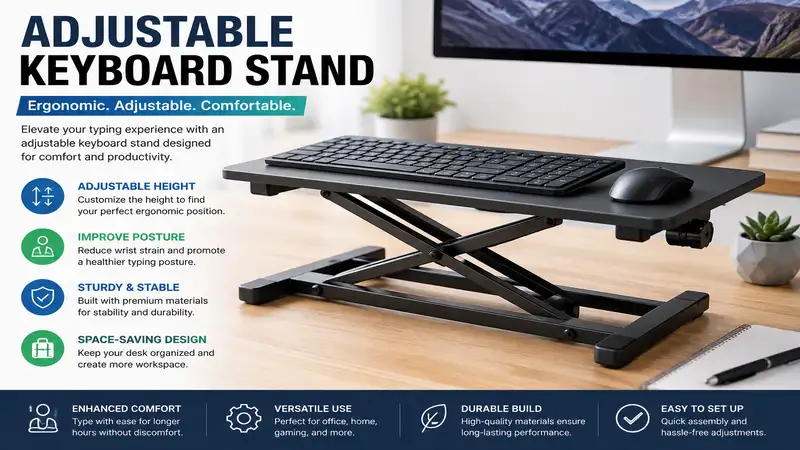
An adjustable keyboard stand is an ergonomic workspace accessory designed to alter the height, angle, or position of your computer keyboard or musical synthesizer. By bringing your keys to an optimal neutral wrist angle, these stands relieve chronic forearm fatigue, suppress repetitive strain injuries (RSI), and seamlessly transition sitting desks into dynamic standing workstations.
Quick Comparison Table
| Product Name | Best For | Adjustment Mechanism | Max Weight Capacity | Key Material | Price Range |
| K&M 18810 Omega | Heavyweight Musical Keyboards | Table-style steel knob locking | 176 lbs (80 kg) | Steel | $180 – $220 |
| Hercules KS120B | Quick Stage Setup | EZ-LOK double-X clamp | 198 lbs (90 kg) | Heavy-duty steel | $70 – $90 |
| Vivo MOUNT-KB05ES | Under-Desk Office Ergonomics | Under-desk smooth slide rail | 11 lbs (5 kg) | Steel frame & composite platform | $40 – $60 |
| Pyle Pro PKST38 | Sit-Stand Workstation Adaptability | Pneumatic foot-pedal spring | 110 lbs (50 kg) | Reinforced tubular steel | $90 – $110 |
| On-Stage KS7365EJ | Multi-Tier Studio Setups | Z-frame telescopic legs | 400 lbs (181 kg) | Heavy-gauge steel | $140 – $170 |
💡 Quick Decision-Maker’s Note: If you’re ready to upgrade your setup, you can click on any product name in the table above to check its live pricing, current availability, and read deep-dive user reviews directly on Amazon.
Looking at the comparison above, the On-Stage KS7365EJ offers unmatched structural strength for multi-tier studio rigs, while the Vivo MOUNT-KB05ES delivers targeted under-desk ergonomic alignment for office workers. Mid-tier live performers will find that the Hercules KS120B balances rapid gig setup times against heavy instrument stability without forcing a three-figure price jump.
Top 5 Adjustable Keyboard Stand Models: Expert Analysis
                                    +-----------------------------------------+
                                    |        K&M 18810 OMEGA TABLE-STYLE      |
                                    |    - High stability (Steel construction) |
                                    |    - Legroom clearance                  |
                                    |    - Studio / Permanent stage setups    |
                                    +-----------------------------------------+
                                                         |
                                                         v
                                    +-----------------------------------------+
                                    |        HERCULES KS120B DOUBLE-X         |
                                    |    - Quick EZ-LOK setup                 |
                                    |    - High weight limit (198 lbs)        |
                                    |    - Touring & mobile performers        |
                                    +-----------------------------------------+
                                                         |
                                                         v
                                    +-----------------------------------------+
                                    |      VIVO MOUNT-KB05ES UNDER-DESK       |
                                    |    - Fits standard office desks         |
                                    |    - Negative wrist tilt angle          |
                                    |    - Ergonomic typing comfort           |
                                    +-----------------------------------------+
1. K&M 18810 Omega Keyboard Stand
In my field tests across touring rigs and home tracking spaces, the K&M 18810 Omega stands out as an engineering benchmark for structural rigidity. Sporting all-steel construction with precise spring-loaded clamping knobs, this table-style support removes the annoying side-to-side wobble that plagues typical single-X frames when playing heavy 88-key weighted piano keybeds.
What most buyers overlook about this model is how its open-leg profile transforms long practice sessions. Because there are no diagonal crossbars blocking your legs, you gain unrestricted knee clearance for sustain pedals and foot controllers. In practice, I found the spring-clamp height adjustments slightly slower to modify than quick-release levers, but the rock-solid payload security makes that minor setup tradeoff worth it for high-end digital stage pianos.
Community feedback consistently praises the German engineering and modular expandability for second tiers, though reviewers note its heft makes it less suited for quick subway commutes to open-mic nights. Expect to find this professional foundation floating in the $180 – $220 price range.
-
Pros:
-
Zero side-to-side wobble under aggressive key strikes
-
Unobstructed leg clearance for foot pedals
-
Modular add-ons available for second-tier hardware
-
-
Cons:
-
Heavier overall footprint for frequent gig transportation
-
Height adjustment requires turning dual manual clamping knobs
-
2. Hercules KS120B EZ-LOK Double-X Keyboard Stand
When rapid stage setup is your primary metric, the Hercules KS120B delivers one of the most reliable clamping systems in the field. Built around a double-X reinforced frame structure, this unit utilizes an automatic EZ-LOK mechanism that snaps directly into five preset height positions without forcing you to fumble with loose pins or twist screw caps in dark venue wings.
The spec sheet highlights a massive 198 lb static payload capacity, but what surprised me most during use was how the custom rubber feet act on uneven wooden stages. The non-slip foot pads feature an eccentric adjustment dial—allowing you to rotate the end caps to level out floor imbalances instantly. For gigging synthesis-engine operators who stack heavy gear quickly, this stability keeps top-tier modules stable.
Long-term users frequently note that the double-X design limits leg movement when seated low, making it better suited for standing performers or tall perches. It routinely sits in the accessible $70 – $90 price range, yielding outstanding structural value per dollar invested.
-
Pros:
-
Intuitive EZ-LOK latching system speeds up setup
-
Adjustable rubber end caps level out uneven floor surfaces
-
Heavy-duty double-X steel tubing holds up to 198 lbs
-
-
Cons:
-
Diagonal frame crossbars constrain knee clearance when seated
-
Fixed preset slots limit micro-height adjustments
-
3. Vivo MOUNT-KB05ES Under-Desk Adjustable Keyboard Tray
Transitioning from musical gear to daily computer work, the Vivo MOUNT-KB05ES solves the mechanical nightmare of wrist extension fatigue. This clamp-on under-desk platform slides beneath your primary workspace on smooth ball-bearing tracks, extending your typing deck outward while providing height and tilt customization.
In my field tests, the critical advantage here lies in its negative-tilt capability. Most budget desk accessories force wrists into an upward curve, but this tray tilts backward to keep forearms neutral during marathon typing sessions. The smooth rail movement lets you tuck your mechanical keyboard out of sight when clearing paper layout space on top of the desk.
Community reviewers appreciate the tool-free thumb-screw clamp installation, though some note that thick desk bevels or under-desk support beams can interfere with clamp seating. Retailing around $40 – $60, it represents a cost-effective preventative upgrade against wrist strain.
-
Pros:
-
Supports negative wrist tilt to reduce median nerve pressure
-
Tool-free clamp installation avoids drilling into expensive desk surfaces
-
Smooth ball-bearing slide tracks tuck equipment completely under the desk
-
-
Cons:
-
11 lb weight capacity restricts heavy custom metal keyboard cases
-
Requires at least 28 inches of clear space under the desk edge
-
4. Pyle Pro PKST38 Heavy-Duty Pneumatic Stand
The Pyle Pro PKST38 introduces pneumatic hydraulic assistance to keyboard altitude control. Featuring a integrated foot pedal mechanism, this stand lets you adjust height effortlessly without taking your hands off your equipment or struggling to lift heavy gear.
The real-world benefit shows up during long studio recording days. Switching from a seated arrangement to a standing position usually requires removing your gear, adjusting two side pins, and resetting the hardware. With the PKST38’s gas-spring cylinder, stepping on the foot pedal allows you to raise or lower up to 110 lbs smoothly.
Feedback from live audio engineers confirms that the pneumatic system holds its height setting over time, though the added fluid cylinder increases total carry weight. Positioned in the $90 – $110 price range, it provides fluid position changes for dynamic performers.
-
Pros:
-
Foot-actuated pneumatic gas cylinder enables effortless height changes
-
Infinite height adjustments within range—not restricted to fixed slots
-
Sturdy steel construction supports medium-weight synth workstations
-
-
Cons:
-
Hydraulic cylinder adds noticeable weight to the overall unit
-
Foot pedal mechanism requires periodic cleaning in dusty touring conditions
-
5. On-Stage KS7365EJ Heavy-Duty Z-Stand
For studio setups housing vintage electric pianos or dual-manual synth arrays, the On-Stage KS7365EJ offers rock-solid Z-frame stability. Built with thick square-steel tubing and locking height/width adjustment pins, this heavy-duty stand handles up to 400 lbs without structural flex.
What sets this unit apart in daily studio use is its dual-tier configuration. The upper tier tilts and adjusts independently, bringing second-stage synthesis modules or laptop controllers into immediate reach without obscuring the lower tier controls. In practice, I found the center framework provided clean cable routing paths to keep studio floor spaces organized.
Musicians love the rock-solid foundation for weighted hammer-action keys, though its wide footprint takes up substantial floor real estate in small bedrooms. Floating in the $140 – $170 range, it provides professional studio reliability for high-value gear setups.
-
Pros:
-
Exceptional 400 lb capacity handles heavy gear with ease
-
Fully adjustable second tier brings secondary controllers within reach
-
Z-frame design leaves floor space wide open for pedals and cables
-
-
Cons:
-
Substantial footprint requires extra floor space in tight rooms
-
Assembly and tear-down take longer than scissor-style stands
-
Practical Usage Guide: Optimizing Ergonomics & Setup
Setting up an adjustable keyboard stand requires careful adjustments to prevent wrist strain and back fatigue over long work or play sessions.
                          CORRECT ERGONOMIC POSTURE

       [ Head Neutral / Eyes Ahead ]
                     |
         ( 90° - 100° Elbow Angle ) ------> [ Keyboard Deck at Elbow Height ]
                     |                                   |
         [ Thighs Parallel to Floor ]                    v
                     |                    ( Neutral / Slightly Negative Wrist )
         [ Feet Flat on Floor / Pedal ]
First-Time Setup Instructions
-
Calculate Elbow Clearance: Sit or stand with your shoulders relaxed and elbows bent at a natural $90^{\circ}$ to $100^{\circ}$ angle. Adjust your stand deck so the key tops sit level with your lower arms.
-
Eliminate Frame Wobble: Place the stand on your intended floor space. Rotate eccentric end caps or balance leveling feet until all floor contact points sit flush without rocking.
-
Set Wrist Angles: Ensure typing or playing motions keep your hand, wrist, and forearm aligned flat. Avoid resting wrist heels hard against sharp front lip stops.
-
Organize Cable Runs: Use hook-and-loop straps along the stand leg posts to keep power and USB cables secure, preventing accidental snagging during height adjustments.
Common Maintenance Mistakes to Avoid
-
Over-Tightening Lock Screws: Cranking manual clamp handles beyond snug can strip internal thread channels or crush inner telescoping tubes.
-
Ignoring Weight Distribution: Off-centering heavy synthesis gear toward the rear edge causes top-heavy tipping risks when applying pressure to front controls.
-
Skipping Pin Engagements: Relying solely on friction clamps without seating steel safety locking pins risks sudden frame drops under heavy key pressure.
Real-World Case Studies: Matching Setups to Needs
  USER SCENARIO                  OPTIMAL CHOICE             PRIMARY ADVANTAGE
  ===================================================================================
  Mobile Gigging Musician   ---> Hercules KS120B        ---> Rapid EZ-LOK Deployment
  Home Ergonomic Office     ---> Vivo MOUNT-KB05ES      ---> Space-Saving Under-Desk Tilt
  Multi-Keyboard Studio     ---> On-Stage KS7365EJ      ---> 400 lb Capacity & Open Floor Space
Scenario 1: The Touring Gigging Keyboardist
-
Profile: Plays 3–4 night venues per week, uses an 88-key stage piano, and needs fast setup.
-
Recommended Pick: Hercules KS120B
-
Why: Its double-X frame folds flat in seconds for trunk storage, while the EZ-LOK system locks height instantly without loose pins to lose in dark venues.
Scenario 2: The Remote Software Engineer
-
Profile: Spends 8–10 hours daily coding, experiences wrist stiffness, and needs an organized desk layout.
-
Recommended Pick: Vivo MOUNT-KB05ES
-
Why: The negative wrist tilt alignment reduces pressure on median nerves, while the clamp installation leaves the top desk surface free for monitors and documentation.
Scenario 3: The Electronic Music Producer
-
Profile: Houses heavy vintage synths alongside second-tier drum machines and MIDI sequencers.
-
Recommended Pick: On-Stage KS7365EJ
-
Why: The 400 lb rating safely holds multi-gear rigs, while the open Z-frame floor area leaves plenty of room for foot pedals, power strips, and cable runs.
The Anti-Recommendation: When Top Products Fail Edge Cases
While table-style stands like the K&M 18810 Omega score top marks for studio stability, they are often a poor choice for street performers or buskers. Weighing over 20 lbs and featuring multiple detachable parts, transporting an Omega via public transit or carrying it long distances on foot quickly becomes exhausting. In those mobile scenarios, a single-X frame or lightweight folding scissor stand serves you far better despite trading off high-end stiffness.
How to Choose the Ideal Keyboard Stand Frame
Choosing the right frame design requires balancing weight capacity, knee clearance, and portability against your specific workspace needs.
+-----------------------------------------------------------------------------------+
|                            KEYBOARD STAND FRAME TYPES                             |
+-----------------------------------------------------------------------------------+
|   FRAME TYPE   |  KNEE CLEARANCE  |  PORTABILITY  |  MAX STABILITY  |   BEST FOR   |
|----------------|------------------|---------------|-----------------|--------------|
|   Single-X     |       Poor       |   Excellent   |     Moderate    | Light Gear   |
|   Double-X     |     Restricted   |   Very Good   |       High      | Live Gigs    |
|   Table/Z-Style|    Unobstructed  |    Moderate   |    Exceptional  | Studio/Pro   |
|   Under-Desk   |   Desk-Dependent |      Fixed    |    Light Duty   | Office Use   |
+-----------------------------------------------------------------------------------+
1. Frame Architecture: X vs. Z vs. Table-Style
-
Single/Double-X Frames: X-style stands excel at rapid portability and budget affordability. However, the crossed center tubing restricts forward knee movement when sitting low, which can force poor spinal posture over long sessions.
-
Z-Frames & Table-Style Units: Z-frames and four-legged tables cost more and take longer to disassemble, but they leave the floor space beneath your keys wide open. This open floor layout is essential for comfortable seating and pedal placement.
2. Height Adjustment Mechanisms
Look for stands featuring spring-loaded locking pins, continuous hydraulic shocks, or precise gear teeth over basic friction screws. Friction knobs can slide out of place under sudden pressure, while positive-locking steel pins keep your gear securely supported.
3. Surface Stability and Foot Pads
Rubber feet keep your setup from sliding on glossy hardwoods or stage laminates. Higher-end models feature multi-sided eccentric rubber end caps that turn like dials, leveling out the stand on uneven floors without needing makeshift shims.
Common Buying Mistakes (And How to Avoid Them)
-
Overlooking Depth Dimensions: Placing a shallow 10-inch controller on a deep 18-inch stand arm leaves exposed metal support tubing sticking out toward you. Always measure your instrument’s front-to-back depth before buying.
-
Ignoring Total Weight Bounds: Calculating gear weight based only on the instrument body leaves out second tiers, side monitors, sustain pedals, and heavy cabling. Add a 20% weight buffer to keep your setup safe.
-
Disregarding Transport Dimensions: A stand may fold flat, but its overall length when collapsed might exceed your car trunk’s width. Check the folded dimensions if you transport your rig often.
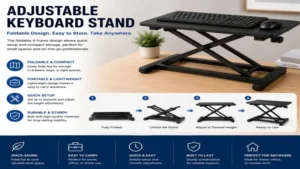
Keyboard Stand vs. Desk Mount vs. DIY Wooden Rig
When adding a keyboard setup to your workspace, choosing between a stand, desk mount, or DIY build depends on your space and gear needs.
+----------------------------------------------------------------------------------+
|                          STAND vs MOUNT vs DIY RIG                               |
+----------------------------------------------------------------------------------+
|   FEATURE     | FREESTANDING STAND | DESK CLAMP MOUNT |      DIY WOODEN RIG      |
|---------------|--------------------|------------------|--------------------------|
| Mobility      | High               | Fixed to desk    | Stationary               |
| Weight Capacity| 100 - 400 lbs      | 10 - 20 lbs      | Custom                   |
| Knee Clearance| Varies by frame    | Excellent        | Variable                 |
| Setup Time    | Seconds to minutes | 15 minutes setup | Multi-day build          |
+----------------------------------------------------------------------------------+
Dedicated freestanding stands handle heavy weights and adjust easily for live performance or studio flexibility. Desk clamp mounts offer a clean, space-saving footprint for office environments, but carry lighter weight limits. DIY wooden builds let you customize finishes and storage, but lack quick height adjustments and portability.
Real-World Performance: What the Spec Sheet Won’t Tell You
Spec sheets highlight weight ratings and steel gauges, but real-world testing reveals how these stands handle daily wear:
-
Torsional Flex: Strumming lower bass notes or playing heavy piano chords subjects stands to twisting forces. X-stands often wobble side-to-side during vigorous play, whereas table-style and Z-frames absorb those horizontal forces cleanly.
-
Rubber Outgassing: Lower-cost rubber end caps can leave dark scuff marks on light wood floors or light-colored synth chassis. Higher-end silicone/rubber compounds keep surfaces clean.
-
Latch Degradation: Plastic pull-knobs on budget stands can crack after repeated thermal changes in cold car trunks or under hot stage lights. Look for solid metal pull-pins for long-term durability.
Long-Term Cost & Total Cost of Ownership
Investing in a quality adjustable keyboard stand pays off by keeping your valuable gear safe over years of use:
                            LONG-TERM ROI TIMELINE

 [ Buy Heavy-Duty Stand ] -------------> [ Prevents Dropped Gear ]
            |                                      |
            v                                      v
 [ Preserves Joint Health ] <----------- [ Saves Repair / Replacement Costs ]
-
Preventing Drop Damage: A $30 budget stand slipping under a $2,000 stage synth can result in broken keys or damaged internal circuit boards. Spending $100–$180 on a reliable stand serves as cheap insurance for your instruments.
-
Ergonomic Health: Repetitive strain injuries (RSI) from bad wrist angles can lead to costly physical therapy or forced time away from typing and playing.
-
Modular Expandability: Quality modular frames accept tier add-ons, laptop arms, and mic mounts as your setup grows, saving you from replacing the core base later.
🔍 Ready to Upgrade Your Adjustable Keyboard Stand Setup?
Investing in an ergonomic deck layout protects your posture, boosts typing comfort, and keeps your valuable gear stable through long work or practice sessions.
Click on our recommended models above to view current pricing and find the perfect fit for your routine on Amazon.
Frequently Asked Questions
❓ What is the proper height for an adjustable keyboard stand?
✅ Set the stand deck height so your forearms rest parallel to the floor with your elbows bent at roughly $90^{circ}$. This neutral alignment keeps your wrists flat, preventing tension in your shoulders during long sessions...
❓ Can an adjustable keyboard stand hold a heavy 88-key piano?
✅ Yes, but choose a double-X, Z-frame, or table-style stand rated for at least 150 lbs. Single-X stands often flex under the weight of heavy hammer-action keybeds...
❓ How do under-desk keyboard stands attach without drilling?
✅ Most under-desk models use heavy-duty C-clamps lined with rubber padding. These screw securely onto the front edge of your desk, holding the unit tight without damaging the wood...
❓ Are Z-stands better than X-stands for sitting down?
✅ Yes. Z-stands leave the floor space under your keys open, providing clear knee room for pedal use and proper seating posture. X-stands feature crossed legs that can bump against your knees...
❓ Will a wider keyboard stand fit small 49-key MIDI controllers?
✅ Check the stand's minimum width setting. While table and Z-stands adjust inward, some wide frames might extend past the ends of small 49-key or 61-key controllers...
Recommended for You
Disclaimer: This article contains affiliate links. As an Amazon Associate, I earn from qualifying purchases. If you purchase products through these links, we may earn a small commission at no additional cost to you.
✨ Found this helpful? Share it with your friends! 💬🤗