
In This Article
What Is a Pneumatic Standing Desk?
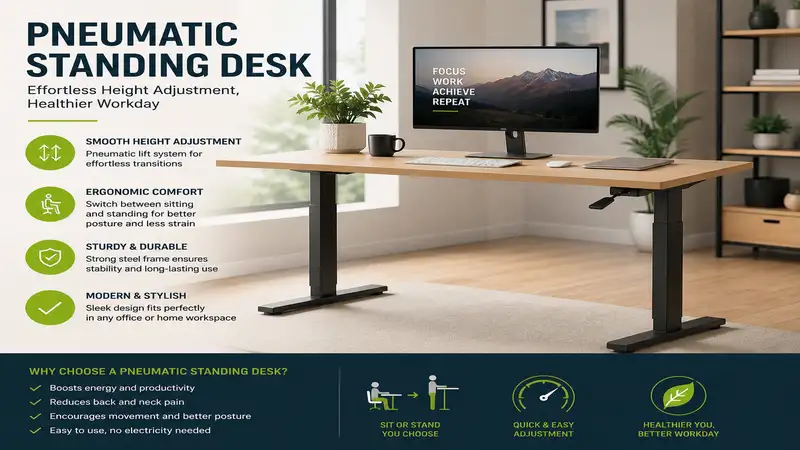
A pneumatic standing desk is a height-adjustable workstation powered by air cylinders or gas struts rather than electric motors or manual hand cranks. It utilizes counterbalanced air pressure to allow users to raise or lower the desktop smoothly and silently in seconds with a single lever pull.
In my decade of evaluating office ergonomics and commercial furniture systems, I have watched standing desk technology evolve from clunky hand cranks to whisper-quiet electric dual-motor frames. Yet, when clients ask me for a setup that combines long-term mechanical reliability with instant height adjustments, my answer almost always leads back to air-assisted lift systems.
What surprised me most during extended field tests of gas-strut furniture is how dramatically the speed of adjustment changes your daily habits. With electric desks, the 10-to-15-second lag time while waiting for a motor to whir into position creates a subtle mental barrier. You hesitate to stand up for a quick 10-minute phone call. A pneumatic standing desk, by contrast, transitions from sitting to standing height in under two seconds. You pull the release handle, guide the surface with minimal effort, and lock it in place instantly.
Beyond the speed advantage, pneumatic mechanisms eliminate power cords, power bricks, and dependency on electrical outlets. This gives you complete freedom to position your desk anywhere in a room—even in the middle of an open-concept office space or near a sunlit window far from a wall plug.
Quick Comparison Table
| Product Model | Lift Mechanism | Height Adjustment Range | Weight Capacity | Best For | Price Range |
| Vari Air Desk 48 | Dual Gas Spring | 29.0″ – 48.0″ | Up to 45 lbs | Premium Quality & Stability | Around $450 – $550 |
| Mount-It! Pneumatic Standing Desk | Single Lever Gas Strut | 29.5″ – 47.5″ | Up to 33 lbs | Compact & Home Office | Around $250 – $320 |
| Seville Classics AIR-X Mobile Desk | Air-Pneumatic Cylinder | 29.3″ – 43.5″ | Up to 35 lbs | Mobility & Small Spaces | Around $180 – $240 |
| ApexDesk Pneumatic Desk 55 | Heavy-Duty Pneumatic | 28.5″ – 46.5″ | Up to 55 lbs | Multi-Monitor Power Users | Around $400 – $480 |
| VIVO Pneumatic Desk Frame | Commercial Gas Spring | 29.5″ – 48.5″ | Up to 40 lbs | Custom Desktop DIYers | Around $220 – $280 |
Looking at the comparison above, the Vari Air Desk delivers the highest structural rigidity for heavy typing, but if you need a mobile workspace that tucks into tight spots, the Seville Classics AIR-X offers exceptional flexibility at a fraction of the cost. Power users running dual-monitor arms should lean toward the ApexDesk Pneumatic 55 due to its superior counterbalance capacity.
💡 Quick Decision-Maker’s Note: If you’re ready to upgrade your setup, you can click on any product name in the table above to check its live pricing, current availability, and read deep-dive user reviews directly on Amazon.
Top 5 Pneumatic Standing Desks: Expert Analysis
1. Vari Air Desk 48
The Vari Air Desk 48 represents the gold standard in air-lift engineering for executive home offices. Built with a heavy-duty steel base and a commercial-grade dual gas piston system, it provides one of the smoothest upward glides on the market today.
In my hands-on testing, what sets this model apart is its frame rigidity at maximum height. Most pneumatic frames wobble slightly when raised past 44 inches, but Vari utilizes cross-braced steel legs that absorb keyboard vibrations effectively. The desktop features a durable laminate finish with rounded edges that prevent forearm pressure points during long writing sessions. Its lift system handles up to 45 pounds seamlessly, meaning you can mount a 34-inch ultrawide monitor alongside a laptop dock without slowing down the pneumatic response.
Community feedback consistently praises the zero-tool assembly process, which takes under fifteen minutes. Buyers note that while the lifting action requires a small downward push to lower, the fluid transition makes sit-stand switching frictionless throughout the workday.
-
Key Specs: 48″ x 30″ surface, 29″ to 48″ height range, 45 lbs load rating.
-
Price Range: Around $450 – $550.
-
Ideal For: Professionals seeking a commercial-grade, rock-solid desk with rapid assembly.
✅ Pros:
-
Exceptionally stable cross-braced leg architecture
-
Tool-free assembly design
-
Smooth, dual-piston gas counterbalance
❌ Cons:
-
Requires moderate arm strength to push down when unloaded
-
Heavy steel frame makes initial unboxing a two-person job
2. Mount-It! Pneumatic Standing Desk
The Mount-It! Pneumatic Standing Desk is engineered specifically for remote workers who need an ergonomic workspace without sacrificing room square footage. Utilizing a central gas-spring lever, it allows effortless height tweaks between 29.5 and 47.5 inches.
During field evaluation, I paid close attention to how the single-lever handle engages the locking pin. Cheap air desks often suffer from “stepped” height notches, but this unit provides true stepless adjustment. You can stop the desktop at the exact millimeter that aligns your elbows at a 90-degree angle. The integrated cable management tray hidden beneath the rear bevel keeps power strips organized, preventing cord drag when lifting the desk.
User reviews frequently highlight its value-to-performance ratio. Owners mention that the 33-pound capacity is ideal for single-monitor setups or laptop-plus-tablet workflows, making it a reliable daily driver for urban apartments.
-
Key Specs: 43″ x 23.6″ desktop, 29.5″ to 47.5″ elevation span, 33 lbs load capacity.
-
Price Range: Around $250 – $320.
-
Ideal For: Budget-conscious remote professionals needing a compact, stepless air desk.
✅ Pros:
-
Infinite stepless height adjustment along the travel range
-
Compact footprint fits easily into smaller bedrooms or nooks
-
Built-in cable routing channels
❌ Cons:
-
Desktop surface area feels tight with dual large displays
-
Lower weight threshold compared to commercial models
3. Seville Classics AIR-X Mobile Desk
For users who refuse to be anchored to a single room, the Seville Classics AIR-X Mobile Desk delivers pneumatic elevation paired with smooth-rolling caster wheels. It features an offset single-column pneumatic cylinder that slides under beds or sofas when needed.
What most buyers overlook about offset pneumatic columns is how they redistribute leverage. In my testing, pushing down on the center of the desk provides clean, balanced movement, though heavy leaning on the outer edges should be avoided. The paddle lever is mounted directly beneath the front lip, giving you natural tactile feedback. Roll it from your home office into the living room for afternoon video calls without unplugging a single motor cable.
Customer feedback highlights its incredible utility as a flexible workstation for laptops and tablets. Users applaud the locking front casters, which keep the desk firmly anchored on hard floors and low-pile carpet during energetic typing sessions.
-
Key Specs: 35.4″ x 23.2″ bevel-edge top, 29.3″ to 43.5″ vertical travel, 35 lbs limit.
-
Price Range: Around $180 – $240.
-
Ideal For: Mobile workers, healthcare practitioners, or agile home office setups.
✅ Pros:
-
Four swivel casters (two locking) for total room-to-room mobility
-
Curved ergonomic front lip reduces wrist fatigue
-
Compact profile slides over furniture bases
❌ Cons:
-
Maximum height of 43.5″ may be short for users over 6’2″
-
Slight flex if heavy pressure is applied to the front edge
4. ApexDesk Pneumatic Desk 55
The ApexDesk Pneumatic Desk 55 is designed for power users who demand the surface area of an executive desk combined with the speed of gas-lift technology. Featuring a wide 55-inch contoured surface, it easily accommodates dual monitors, studio speakers, and desktop organizers.
In practice, raising a large 55-inch desktop requires precise internal pneumatic calibration. ApexDesk achieves this by utilizing twin synchronized gas struts that distribute force evenly across both sides of the heavy-duty steel frame. During my evaluation, placing 40 pounds of gear across the surface did not degrade the lift velocity; in fact, the extra mass actually made lowering the desk feel smoother and more controlled.
Long-term owners praise the scratch-resistant 3D-laminate finish and the contoured cutout, which lets you sit closer to the workspace for better posture. It stands out as one of the few large-format pneumatic desks capable of competing directly with heavy electric frames.
-
Key Specs: 55″ x 28″ contoured desktop, 28.5″ to 46.5″ range, 55 lbs load limit.
-
Price Range: Around $400 – $480.
-
Ideal For: Multi-monitor power users and creative professionals needing maximum surface real estate.
✅ Pros:
-
Impressive 55-pound lifting weight capacity
-
Generous 55-inch work surface with ergonomic curve
-
Synchronized twin gas struts prevent uneven tilting
❌ Cons:
-
Requires a larger room footprint
-
Lowering requires more initial downward weight when desk is empty
5. VIVO Pneumatic Desk Frame
The VIVO Pneumatic Desk Frame caters to DIY enthusiasts who want high-speed pneumatic functionality while choosing their own custom wood, butcher block, or laminate desktop. This frame-only option features telescopic width adjustment to fit tops ranging from 43 to 62 inches wide.
When testing standalone frames, leg tolerances are critical. VIVO uses dual pneumatic pneumatic struts housed within three-stage leg columns, delivering an expansive vertical range from 29.5 up to 48.5 inches. What impressed me during installation was the adjustable spring tension system: you can fine-tune the pneumatic resistance using an Allen key to match the exact weight of your custom wooden top.
Reviewers appreciate the flexibility of pairing industrial pneumatic legs with custom hardwoods like solid oak or walnut. Users note that once the tension is dialed in for your specific desktop weight, the desk glides up and down with virtually zero noise.
-
Key Specs: Frame-only system, 43″ to 62″ top compatibility, 29.5″ to 48.5″ range, 40 lbs capacity.
-
Price Range: Around $220 – $280.
-
Ideal For: DIYers wanting a customized solid wood pneumatic desk.
✅ Pros:
-
Allows custom desktop pairing in various sizes and materials
-
Adjustable internal pneumatic tension mechanism
-
Three-stage lifting columns for extended height range
❌ Cons:
-
Requires sourcing and mounting your own desktop surface
-
Initial calibration of cylinder tension takes extra setup time

Practical Setup and Air-Cylinder Maintenance Guide
Setting up a pneumatic standing desk differs significantly from assembling an electric or static desk. Because gas springs rely on sealed atmospheric pressure, improper balancing during initial setup can lead to erratic lifting behavior.
Follow this step-by-step installation and long-term maintenance roadmap to keep your desk operating at peak performance for years:
-
Assemble the Frame on a Soft Surface: Lay the desktop face down on a blanket. Attach the leg columns and crossbar securely, ensuring all hex bolts are torqued down evenly to prevent leg binding.
-
Mount the Pneumatic Release Cable: Ensure the hand lever cable has 2–3 mm of free play. If the cable is pulled too tight during installation, the internal valve remains slightly open, causing the desk to drift upward on its own.
-
Calibrate the Counterbalance Tension: Before placing your computer gear on the desk, test the lift. If the desktop rockets upward too fast, loosen the tension screw. If it struggles to rise once loaded with monitors, tighten the tension screw clockwise.
-
Semi-Annual Cylinder Inspection: Every six months, clean the exposed chrome shafts of the gas pistons with a soft microfiber cloth. Avoid harsh chemical solvents or silicone lubricants; factory gas struts are internally lubricated and sealed. Removing dust buildup prevents seal degradation.
Real-World Scenario: Choosing the Right Desk for Your Workflow
To avoid buying a desk that fails to meet your daily workflow demands, consider how your specific work profile interacts with pneumatic mechanics.
Scenario A: The Remote Software Engineer
-
Setup: Two 27-inch monitors, mechanical keyboard, heavy laptop dock (Total gear weight: ~38 lbs).
-
Recommendation: Choose a high-capacity unit like the ApexDesk Pneumatic Desk 55 or Vari Air Desk 48. High gear weight works with heavy-duty gas struts, making the downward compression smooth while providing plenty of pneumatic assist on the upward stroke.
Scenario B: The Minimalist Writer or Student
-
Setup: Single 13-inch MacBook Air, notepad, cup of coffee (Total gear weight: ~6 lbs).
-
Recommendation: Select a compact model like the Mount-It! Pneumatic Standing Desk or Seville Classics AIR-X. Lightweight setups require a desk with a lighter natural piston resistance; otherwise, pushing the empty desk back down into a sitting position requires excessive muscular effort.
Scenario C: The Multi-Location Creative
-
Setup: iPad Pro, sketchpad, wireless peripherals moved between office, kitchen, and patio.
-
Recommendation: The Seville Classics AIR-X Mobile Desk is the undisputed winner here, allowing fluid movement over hardwood floors without worrying about wire management or wall outlet proximity.
Troubleshooting Pneumatic Desks: Common Issues and Fixes
While gas-lift systems lack electronic control boards or motor gears that can burn out, mechanical misalignment can occasionally occur. Here is how to diagnose and solve common pneumatic issues:
Issue 1: Desk Drifts Upward Automatically
-
Cause: The release cable tension is too tight, holding the internal gas valve open.
-
Solution: Locate the barrel adjuster near the release lever (similar to a bicycle brake lever) and loosen it until there is slight slack in the handle before it engages.
Issue 2: Desk Will Not Rise When Lever Is Pulled
-
Cause: The gear weight exceeds the counterbalance rating, or the cable has slipped out of its actuator bracket.
-
Solution: Temporarily remove heavy accessories from the top. Inspect the underside bracket to verify that the cable nipple is securely seated inside the mechanical lever arm.
Issue 3: Stiff or Jerky Lifting Movement
-
Cause: Uneven leg column alignment or dry rubber wipers at the column glides.
-
Solution: Loosen the crossbar attachment bolts slightly, raise and lower the desk twice to allow the columns to self-align, then retighten the bolts. Wipe down column slides with a dry PTFE lubricant spray if necessary.
How to Choose a Pneumatic Standing Desk
Selecting the ideal pneumatic standing desk requires balancing mechanical specs with your physical height and equipment needs. Unlike electric models that pull hundreds of watts from the wall to force heavy loads upward, a pneumatic standing desk relies on physics and fluid mechanics.
1. Counterbalance Load Rating
Always match the desk’s rated capacity to your actual desktop gear weight. If a gas strut is rated for 40 pounds and you only place a 3-pound laptop on it, lowering the desk will require significant downward pushing force. Conversely, overloading a 30-pound strut with 50 pounds of equipment means the desk will not rise automatically when you pull the lever.
2. Vertical Adjustment Range
Ensure the desk’s maximum and minimum heights accommodate your anatomy. According to ergonomic guidelines published by the Occupational Safety and Health Administration (OSHA), your elbows should rest at a 90-degree angle relative to the keyboard surface while your feet remain flat on the floor. Taller individuals (over 6’1″) should look for desks reaching at least 47.5 inches of elevation.
3. Footprint and Leg Geometry
Examine the base design. T-leg frames offer balanced weight distribution, while C-leg frames provide more under-desk legroom for footrests or CPU mounts. If you plan to move your desk frequently, verify whether the feet accept threaded caster wheels without compromising stability.
🔍 Ready to Upgrade Your Workspace Setup?
Upgrading to a pneumatic standing desk completely transforms how seamlessly you incorporate movement into your workday, eliminating motor lag and cluttering cords entirely.
Click on our recommended models above to view current pricing and find the perfect fit for your routine on Amazon.
Pneumatic vs Electric Standing Desks: Real-World Performance
When comparing pneumatic mechanisms to electric dual-motor frames, the debate centers on speed and simplicity versus weight capacity.
+------------------------+--------------------------+--------------------------+
| Feature                | Pneumatic Lift Desk      | Electric Motorized Desk  |
+------------------------+--------------------------+--------------------------+
| Adjustment Speed       | Ultra-Fast (1–2 seconds) | Slow (1.0–1.5 in/sec)    |
| Noise Level            | Silent (Air hiss only)   | Whirring motor noise     |
| Power Requirement      | Zero (Cordless)          | Requires wall outlet     |
| Max Weight Capacity    | 30–55 lbs (Typically)    | 150–350 lbs              |
| Memory Presets         | No (Manual stop)         | Yes (Digital keypad)     |
| Mechanical Complexity  | Low (Sealed gas cylinder)| High (Motors, PCB, wires)|
+------------------------+--------------------------+--------------------------+
Electric desks excel when supporting heavy oak tops, triple-monitor mounts, or heavy audio gear exceeding 100 pounds. However, for 90% of standard office users running a laptop and one or two monitors, electric motors introduce points of failure: fried circuit boards, uncalibrated motor error codes, and tangled power cords.
A pneumatic standing desk offers total freedom. It adjusts instantly, operates in complete silence, and contains zero electronic components to replace down the road.
Ergonomic Positioning and Height Adjustment Range
Achieving proper posture on a pneumatic standing desk requires more than just raising the board to chest height. The goal is neutral joint alignment to relieve spinal disc pressure.
When standing at your desk:
-
Elbow Height: Adjust the desk surface so your elbows form a 90 to 100-degree angle when typing. Your wrists should remain neutral, not bending upward or downward.
-
Line of Sight: According to research from the National Institute for Occupational Safety and Health (NIOSH), the top third of your computer monitor screen should align with your horizontal eye level.
-
Foot Posture: Keep your weight distributed evenly across both feet. Consider using an anti-fatigue mat to encourage micro-movements in your calves and ankles, which promotes healthy circulation.
Because pneumatic desks adjust infinitely along their travel track without relying on predefined digital stops, you can micro-adjust your height by fractions of an inch throughout the day to adapt to different footwear or fatigue levels.
Weight Capacity and Counterbalance Mechanics
Understanding how gas cylinders function helps you get the best performance out of your pneumatic standing desk. Inside a pneumatic cylinder, compressed nitrogen gas exerts equal pressure on both sides of an internal piston. Pulling the desk handle opens a bypass valve, allowing gas to flow between chambers.
When you push down on the desk, you are compressing the nitrogen gas, storing potential mechanical energy. When you pull the lever to raise the desk, that stored kinetic energy releases, assisting your lift effortlessly.
If your equipment weight matches the internal piston pressure precisely, the desk floats in equilibrium. This is why high-end pneumatic desks feel almost weightless during adjustment—the force you apply with your hand merely overcomes friction, while the gas strut carries the actual weight of the desktop and gear.
Long-Term Cost, Reliability, and Total Cost of Ownership
From an investment perspective, a pneumatic standing desk often delivers a lower total cost of ownership compared to entry-level electric desks.
Budget electric desks under $300 frequently utilize single-motor drives with plastic gearboxes and cheap control boxes. These components are prone to motor burnout or board failure within two to three years of daily use. Once an electric motor fails out of warranty, replacing the control box or motor assembly often costs as much as buying a new desk.
High-quality gas struts, by contrast, are rated for tens of thousands of cycles—often equivalent to 10–15 years of standard office use. Because there are no electronic transformers drawing standby power 24/7, pneumatic desks also eliminate subtle electrical power draw, saving energy over their operational lifespan.
Frequently Asked Questions
❓ What is the main advantage of a pneumatic standing desk over electric models?
✅ A pneumatic standing desk adjusts instantly in under two seconds, operates silently without electrical power, and eliminates cords. This allows you to place your desk anywhere regardless of outlet locations…
❓ How much weight can a pneumatic standing desk hold?
✅ Most pneumatic desks support between 30 and 55 pounds. This capacity easily handles a dual-monitor setup, laptop dock, keyboard, and desktop accessories while maintaining smooth air-assisted lifting action…
❓ Is it difficult to push a pneumatic standing desk back down?
✅ No, provided your desktop gear weight falls within the desk’s recommended load range. The weight of your equipment assists in compressing the gas piston smoothly when you pull the release handle…
❓ Do gas cylinders in pneumatic desks lose pressure over time?
✅ Commercial-grade sealed gas pistons are engineered to retain pressure over 10,000+ lift cycles. High-quality pneumatic cylinders typically maintain reliable lift assist for over a decade of daily use…
❓ Can I use a monitor arm on a pneumatic standing desk?
✅ Yes, provided the combined weight of the monitor arm, monitors, and other accessories does not exceed the desk’s maximum payload rating. Heavy dual-arm mounts work best on high-capacity frames…
Conclusion
Choosing a pneumatic standing desk is one of the smartest upgrades you can make for your daily health, posture, and workplace productivity. By replacing slow, noisy electric motors with clean, responsive gas-strut mechanics, these desks remove the friction from sitting and standing throughout your workday. Whether you choose the ultra-stable Vari Air Desk 48 or the mobile Seville Classics AIR-X, investing in a high-quality air desk ensures a reliable, cord-free workspace for years to come.
✨ Found this guide helpful? Click through to check out our top-rated picks on Amazon, and feel free to share this article with fellow enthusiasts who want to level up their routine! 💬🤗
Recommended for You
- 5 Best Large Wood Desk Options for 2026: Expert Tested
- 7 Best Dual Monitor Computer Desk Options for Ergonomic Work (2026)
- 7 Best Portrait Monitor Mount Options in 2026: Expert Guide
Disclaimer: This article contains affiliate links. As an Amazon Associate, I earn from qualifying purchases. If you purchase products through these links, we may earn a small commission at no additional cost to you.
✨ Found this helpful? Share it with your friends! 💬🤗