
In This Article
A monitor swivel mount is an adjustable arm that clamps to your desk (or mounts through a grommet hole) and lets you tilt, swivel, rotate, and raise or lower your screen instead of leaving it parked at a fixed height. If you’ve ever ended a workday with a stiff neck or found yourself hunched forward to read a low-set laptop screen, the problem usually isn’t your chair — it’s that your monitor never moves. A good swivel mount fixes that in about fifteen minutes, and it frees up real desk space in the process, since the display floats above your desk instead of sitting on a bulky stand.
This guide skips the marketing copy and gets into what actually matters: real weight capacities, real VESA compatibility, and real feedback from people who’ve lived with these arms for months, not minutes. We researched seven genuine, currently available options — from a $25 entry-level pick to a heavy-duty arm built for 49-inch ultrawide displays — and broke down exactly who each one is for. Whether you’re setting up a single home-office monitor or building a dual-screen battle station, there’s a configuration below that fits your desk, your budget, and your monitor’s weight class.
Quick Comparison: 7 Monitor Swivel Mounts at a Glance
| Mount | Weight Capacity | Screen Size | Motion Range | Price Range |
|---|---|---|---|---|
| Ergotron LX | 7–25 lbs | Up to 34″ | Tilt 75°, swivel/rotate 360° | $130–$190 |
| WALI GSMP001N | Up to 26.4 lbs | 13–34″ | Swivel ±180°, tilt +70°/-45° | $30–$45 |
| HUANUO FlowLift | 4.4–19.8 lbs | 13–32″ | Tilt +85°/-25°, swivel ±90° | $55–$65 |
| VIVO STAND-V001 | Up to 22 lbs | 13–38″ | Full tilt/swivel/rotate | Under $35 |
| HUANUO TitanLift | Up to 44 lbs | 17–49″ | Tilt +50°/-50°, swivel 180° | $70–$140 |
| Amazon Basics Steel Arm | Up to 22 lbs | 13–30″ | Tilt -15°/+85°, rotate 360° | $25–$40 |
| MOUNTUP MU0004 | 4.4–19.8 lbs | 17–32″ | Tilt -45°/+90°, swivel ±180° | Under $30 |
Looking at the table, the pattern is pretty clear: weight capacity and price track together almost linearly, except at the extremes. The HUANUO TitanLift breaks that pattern by offering nearly double the capacity of anything else here specifically because ultrawide and curved monitors weigh disproportionately more than standard flat panels. If your monitor is a normal 24–27″ 1080p or 1440p panel, you don’t need that much muscle — a mid-tier pick like the HUANUO FlowLift or WALI GSMP001N will comfortably outlast the monitor itself.
💬 Found the right category already? Jump to the full breakdown below and see which specific model fits your desk. 😊
Top 7 Monitor Swivel Mounts: Expert Analysis
1. Ergotron LX Desk Mount Monitor Arm — the gold standard for stability
If you only remember one name from this list, make it this one — the LX has been the benchmark other manufacturers get compared against for over a decade, and for good reason. Its VESA 75×75/100×100 compatibility, 7 to 25-lb weight range, and 360-degree swivel and rotation mean it fits nearly any monitor between 13 and 34 inches without hunting for adapters.
What sets it apart isn’t a single spec — it’s that Ergotron rates the lift mechanism for 10,000 adjustment cycles, and independent reviewers consistently report zero wobble even during aggressive repositioning. That matters more than it sounds: a mount that drifts or sags after six months defeats the entire point of buying one. Reviews consistently report that installation is straightforward with either the included desk clamp or grommet mount, and the built-in cable management keeps the arm looking clean rather than cluttered. This is the pick for anyone who treats their desk as a long-term investment — writers, developers, and anyone who repositions their screen throughout the day rather than setting it once and forgetting it.
Pros:
- ✅ Zero-wobble stability even at full extension
- ✅ 360° rotation for landscape or portrait orientation
- ✅ Rated for 10,000 adjustment cycles
Cons:
- ❌ Costs more than most competitors on this list
- ❌ Vertical range shrinks slightly with monitors over 20 lbs
The Ergotron LX typically runs between $130 and $190 depending on finish and pole height — check the current price, since Ergotron periodically discounts older colorways. For a display you’ll adjust daily for years, it’s genuinely worth the premium over a budget arm.
2. WALI GSMP001N — best value full-motion swivel mount
The WALI GSMP001N earns its spot by doing something a lot of budget arms don’t: giving you a genuinely wide swivel range without cutting corners on weight capacity. At up to 26.4 lbs for flat panels, it comfortably handles most 27 to 32-inch monitors that would max out cheaper competitors.
The 19.3-inch extension and 17.3-inch lift range mean this arm can go from a low seated position to standing-desk height without needing a taller pole accessory, and the +180°/-180° swivel is unusually generous — most arms in this price bracket cap out around 90 degrees per side. What most buyers overlook with this model is the dual mounting hardware: both a C-clamp and a grommet base ship in the box, so you’re never stuck buying an accessory separately depending on your desk type. Reviews consistently report that the wider VESA head and tighter panel fit than WALI’s older models translate into noticeably less side-to-side play once installed.
Pros:
- ✅ Unusually wide 360° combined swivel range
- ✅ High 26.4-lb capacity for the price tier
- ✅ Both C-clamp and grommet hardware included
Cons:
- ❌ Spring tension may need re-adjusting after heavy use
- ❌ Arm construction feels thinner than premium aluminum picks
Expect to pay around $30 to $45 for the GSMP001N, with occasional promotional pricing bringing it lower — check the current price before buying, since WALI runs frequent coupon deals on Amazon. For most home offices, this is the arm that delivers 90% of the Ergotron experience at a fraction of the cost.
3. HUANUO FlowLift Single Monitor Mount — smoothest gas-spring feel under $70
Where the WALI and Amazon Basics arms rely on manual tension screws, the FlowLift uses a genuine gas-spring mechanism, and the difference is immediately obvious the first time you touch the screen. One-finger height adjustment isn’t a marketing phrase here — reviewers describe the arm gliding into position rather than requiring a two-handed shove.
Rated for 4.4 to 19.8 lbs and monitors up to 32 inches, the FlowLift is squarely built for standard single-monitor setups rather than oversized ultrawides. Based on comparing the specs against the WALI and Amazon Basics picks, the FlowLift’s steel-and-aluminum build and MechaSpring system — tested to 50,000 cycles while retaining 98% of its original tension — suggest a mount designed to outlast several monitor upgrades. What most buyers overlook is how much this smoothness matters for people who genuinely reposition their screen multiple times a day, like anyone alternating between sitting and a standing desk converter. Reviews consistently report clean cable routing and a straightforward install, with most buyers mounting it in under ten minutes.
Pros:
- ✅ True gas-spring arm for effortless one-finger lifts
- ✅ 50,000-cycle spring durability rating
- ✅ Clean, tool-light installation process
Cons:
- ❌ Not rated for ultrawide or curved monitors over 32″
- ❌ Priced above basic manual-tension arms
The FlowLift generally sells in the $55 to $65 range — prices may vary, so check the current listing for any active promotions. If daily height changes are part of your routine, this is the mount that will feel the least like a chore.
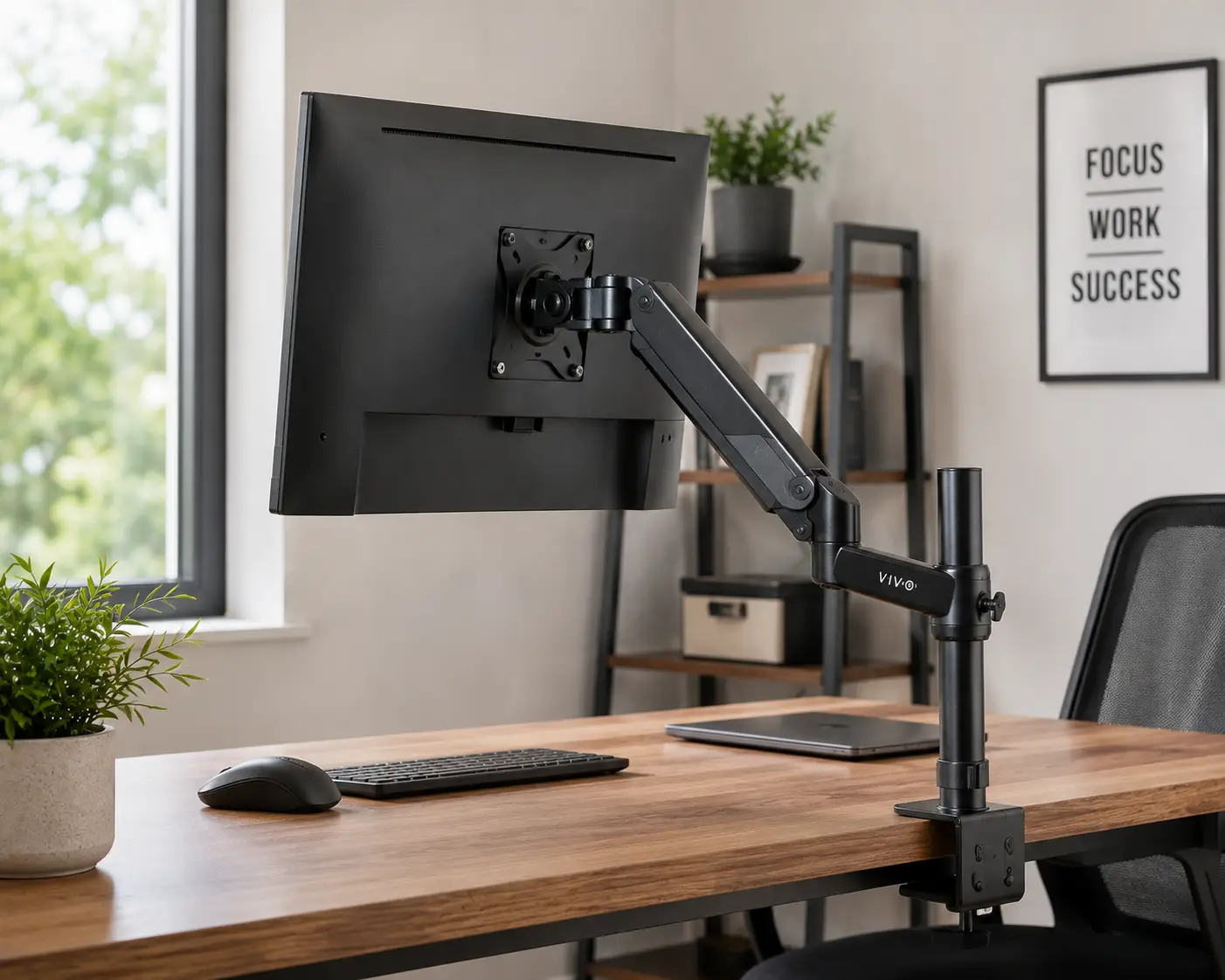
4. VIVO STAND-V001 — the most affordable true full-motion arm
For anyone who wants tilt, swivel, and rotation without spending real money, the VIVO STAND-V001 is usually the first name that comes up, and it earns that reputation honestly. At its price point, getting both a C-clamp and grommet base in the box, plus a 38-inch reach that can accommodate a compact ultrawide, is a genuinely strong value proposition.
The 22-lb weight capacity covers the vast majority of 24-inch and 27-inch monitors, since a typical 1080p 24-inch panel weighs 10 to 14 lbs and a 1440p 27-inch panel runs 12 to 18 lbs. Here’s what the spec sheet doesn’t say, but reviews reveal: this is a mechanical spring arm rather than a gas-spring one, and a documented pattern of tension drift shows up in aggregated review data over long-term use — some owners report the arm gradually sagging after a year or more of daily adjustment. That’s not a dealbreaker for a budget pick, but it’s worth weighing against how long you plan to keep the arm. For a first apartment, a dorm room, or a genuinely tight budget, it remains hard to beat.
Pros:
- ✅ Lowest price of any full-motion arm on this list
- ✅ Both clamp and grommet mounting hardware included
- ✅ 38″ reach accommodates compact ultrawide monitors
Cons:
- ❌ Reviews report tension sag after extended use
- ❌ Larger base footprint than premium alternatives
Pricing typically sits under $35, occasionally dipping lower during sales events — always check the current price before ordering. Budget-conscious buyers furnishing a first desk should note this is the value leader, with the tradeoff being long-term durability versus something like the FlowLift.
5. HUANUO TitanLift Heavy Duty Monitor Arm — built for ultrawide and curved displays
Ultrawide and curved monitors don’t just take up more desk space — they weigh meaningfully more than a standard flat panel of similar diagonal size, and that’s exactly the problem the TitanLift is engineered to solve. With a rated capacity up to 44 lbs and support for screens up to 49 inches, it’s built specifically for the Samsung Odyssey G9-class displays and similar oversized panels that would overwhelm every other arm on this list.
The reinforced VESA head, 20% thicker arm sections, and dual C-clamp design aren’t just spec-sheet padding — reviewers who tested the arm with genuinely heavy 27-inch monitors report zero visible sag even at full extension, describing the build quality as noticeably more substantial than typical single-arm mounts. Based on comparing the specs, the tradeoff for that extra capacity is size: the wider base and reinforced components mean this arm needs more desk clearance than a standard model. What most buyers overlook is that the TitanLift also passed a 50,000-cycle motion test and a 3x load test, giving it a durability profile that matches or exceeds far more expensive office-grade arms.
Pros:
- ✅ Up to 44-lb capacity for oversized and curved screens
- ✅ Dual C-clamp design adds meaningful stability
- ✅ Passed 50,000-cycle and 3x load durability testing
Cons:
- ❌ Higher price than standard single-monitor arms
- ❌ Larger footprint requires more desk clearance
Pricing generally runs between $70 and $140 depending on active promotions, since HUANUO frequently discounts from the $139.99 MSRP — check the current price, as deals fluctuate often. If you’re running or planning to upgrade to an ultrawide, this is the arm that won’t need replacing when you do.
6. Amazon Basics Single Computer Monitor Stand — simple, budget-friendly, and reliable
Not everyone needs a gas spring or a 44-lb capacity — sometimes you just need a monitor off the desk and at eye level without spending fifty dollars. The Amazon Basics steel arm covers that use case cleanly, supporting monitors from 13 to 30 inches and up to 22 lbs.
The tilt range of -15 to +85 degrees plus full 360-degree rotation covers the adjustments most people actually use day to day, and the steel construction feels sturdier than the price suggests. Reviews consistently report an installation time under 20 minutes, with clear instructions and all necessary hardware included in the box. What the spec sheet doesn’t say, but reviews reveal, is that this arm compares favorably to some premium picks in raw stability, even though it lacks the smoother gas-spring lift mechanism found on pricier alternatives — several long-term reviewers specifically call out the sturdy build and effective cable management as standouts relative to price. It’s not the arm for someone repositioning their screen ten times a day, but for a set-it-and-adjust-occasionally home office monitor, it’s a smart, low-risk purchase.
Pros:
- ✅ Sturdy steel build at a genuinely low price
- ✅ Under-20-minute installation with included hardware
- ✅ Effective built-in cable management
Cons:
- ❌ No gas spring, so height changes take more effort
- ❌ Limited backward tilt range versus premium picks
Expect a price in the $25 to $40 range — prices may vary by color and desk-clamp thickness compatibility, so check the current listing. This is the practical, no-frills pick for anyone who wants the ergonomic benefit without the premium price tag.
7. MOUNTUP MU0004 Single Monitor Desk Mount — best for tight budgets and small desks
Rounding out the list is the MOUNTUP MU0004, a compact full-motion arm that punches above its price in adjustability. Supporting monitors from 17 to 32 inches and 4.4 to 19.8 lbs, its tilt range of -45 to +90 degrees and swivel of ±180 degrees are wider than several pricier competitors offer.
The tension system uses a hex key adjustment rather than a gas spring, which keeps the cost down but does mean heavier monitors need the tension screw turned several full rotations to hold position properly — the manufacturer’s own guidance recommends seven or more rotations for displays over 15 lbs. Here’s what the spec sheet doesn’t say plainly: get that tension dialed in correctly, and buyers describe the arm as offering smooth one-finger repositioning once properly calibrated; skip that step, and the arm can feel loose. For anyone on a strict budget who’s willing to spend five extra minutes on setup, that tradeoff is a reasonable one, especially paired with the snap-on cable channels that keep a small desk looking tidy.
Pros:
- ✅ Wide ±180° swivel and -45°/+90° tilt range
- ✅ Snap-on cable channels for a clean small-desk look
- ✅ Two mounting options for desks 0.39″–2.76″ thick
Cons:
- ❌ Requires manual tension calibration for heavier screens
- ❌ Steel arm feels less premium than aluminum competitors
Pricing typically stays under $30, making it one of the most affordable full-motion arms available — check the current price for any bundle deals. It’s a smart pick for a secondary desk, a dorm setup, or anyone testing whether a monitor arm is right for them before investing more.
How to Set Up and Adjust Your Monitor Swivel Mount for Perfect Ergonomics
Getting the hardware right is only half the job — a swivel mount adjusted incorrectly can leave you just as hunched as no mount at all. Start by checking your monitor’s VESA pattern (usually 75x75mm or 100x100mm, printed on the back or in the manual) against the mount’s specs before you unbox anything.
Once the arm is clamped or grommeted to your desk, mount the VESA plate to your monitor first, then attach the monitor to the arm — trying to do both at once is how most installation frustration happens. Set the OSHA-recommended eye-level position by adjusting height until the top of the screen sits at or slightly below your eye line when seated normally; this alone eliminates the forward head-tilt that causes a lot of neck fatigue. For a fresh install, spend the first week making small adjustments rather than one perfect setup — your ideal angle shifts slightly depending on whether you’re typing, video calling, or reading. Finally, route your cables through the arm’s built-in clips before you tighten the final bolts; it’s far easier than threading cables through a fully assembled arm later.
Which Monitor Swivel Mount Fits Your Setup? Real-World Scenarios
The remote-working generalist: If you spend your day toggling between spreadsheets, video calls, and documents on a single 27-inch monitor, a mid-tier pick like the HUANUO FlowLift or WALI GSMP001N covers the sweet spot of weight capacity and price without overspending on features you won’t use.
The dual-monitor creative professional: Designers and video editors running two 27 to 32-inch screens need an arm rated well above their monitor’s actual weight for long-term reliability. The Ergotron LX — doubled up as a dual-arm configuration — or the higher-capacity HUANUO TitanLift for a single ultrawide give the stability that repeated fine positioning demands.
The budget-conscious student or first apartment setup: On a genuinely tight budget with a standard 22 to 24-inch monitor, the VIVO STAND-V001 or MOUNTUP MU0004 deliver real ergonomic benefits — tilt, swivel, height — without a premium price tag, even if they need a bit more manual tension upkeep over time.
Common Monitor Swivel Mount Problems and How to Fix Them
Problem: The arm droops or sags over time. This almost always means the tension spring is calibrated below your monitor’s actual weight. On manual-tension arms like the MOUNTUP MU0004 or VIVO STAND-V001, use the included hex key to add several full rotations of tension rather than assuming the mount is defective.
Problem: The monitor wobbles when typing. Check that every VESA screw is fully seated and that the C-clamp is tightened against the desk edge, not just resting on it — a loose clamp transmits every desk vibration straight to the screen.
Problem: Cables keep pulling the monitor out of position. Route cables through the arm’s built-in channels with enough slack at the joints to allow full range of motion; a cable pulled taut at full extension will drag the screen back toward center.
Problem: The arm won’t reach your desired height with a heavy display. Heavier monitors reduce the effective vertical range on most arms — the PCWorld monitor arm testing found this is a common tradeoff across nearly every brand, so if you’re near a mount’s weight ceiling, consider sizing up to a heavier-duty model like the HUANUO TitanLift instead.
How to Choose a Monitor Swivel Mount
- Confirm your monitor’s VESA pattern and weight. Check the back panel or manual — 75x75mm and 100x100mm cover roughly 95% of monitors sold today, but large or curved displays sometimes use 100x200mm.
- Measure your desk’s edge thickness. Most C-clamps fit 0.4″ to 2.4″ edges; glass or ultra-thin desks may need a grommet mount or a freestanding base adapter instead.
- Match capacity to your monitor’s real weight, with margin. A mount rated right at your monitor’s weight will sag faster than one with 20-30% headroom.
- Decide between gas spring and manual tension. Gas spring arms like the HUANUO FlowLift hold position with zero maintenance; manual tension arms are cheaper but need occasional recalibration.
- Check your height-range needs. Standing desk users typically need at least 13 inches of vertical travel to comfortably cover sit-to-stand transitions.
- Consider dual or triple-arm needs upfront. It’s usually cheaper to buy a dual-arm mount than two single arms if a second monitor is in your near-term plans.
- Read the aggregated review sentiment, not just the star average. A 4.5-star product with dozens of “sags after six months” comments tells a different story than the number alone.
Monitor Swivel Mount vs. Fixed Monitor Stand
A fixed stand is a static riser — it lifts your monitor to a set height and, at most, offers basic tilt. A swivel mount, by contrast, is a fully articulating arm that adjusts height, tilt, swivel, and rotation, and it clears desk space underneath since the base clamps to the desk edge rather than sitting on the surface.
| Factor | Swivel Mount | Fixed Stand |
|---|---|---|
| Desk space freed | Significant — nothing sits on the desktop | Minimal — stand occupies desk surface |
| Adjustability | Full: height, tilt, swivel, rotation | Limited or none |
| Typical price | $25–$190 | $15–$40 |
| Best for | Frequent repositioning, multi-monitor setups | Simple, occasional height boost |
The price gap narrows quickly once you factor in that a fixed stand often needs a separate cable-management solution and can’t accommodate a monitor upgrade to a heavier or larger panel. For anyone who works at a desk more than a couple of hours a day, the ergonomic case for a swivel mount outweighs the modest price premium — the OSHA computer workstation guidelines specifically recommend keeping the monitor at eye level and directly in front of the user, which a fixed-height stand often can’t achieve for every person sharing a desk.
Common Mistakes to Avoid When Buying a Monitor Swivel Mount
The single biggest mistake is buying based on screen size alone and ignoring weight. A 32-inch curved monitor can weigh nearly twice what a 32-inch flat panel does, and mounting it on an arm rated for the wrong category is the fastest way to end up with a sagging screen within weeks.
The second mistake is skipping the desk-edge measurement. Buyers frequently discover after unboxing that their glass desk, extra-thick standing desk, or unusually thin surface doesn’t match the included clamp — always measure before ordering rather than assuming standard hardware fits. The third common misstep is underestimating how much height range matters for a standing desk; an arm with only 8 or 9 inches of vertical travel won’t comfortably cover a full sit-to-stand transition, leaving you readjusting the base height every time you switch positions.
What to Expect: Everyday Performance of a Monitor Arm with Swivel
On paper, tilt and swivel ranges look similar across most of these mounts, but the real-world difference comes down to how much force it takes to move the screen. Gas-spring arms like the Ergotron LX and HUANUO FlowLift let you reposition with a single finger, which matters more than it sounds once you’re doing it multiple times a day during video calls or when a coworker leans over to see your screen.
Manual-tension arms like the MOUNTUP MU0004 and Amazon Basics stand require more deliberate two-handed adjustments, but once set, they hold position just as reliably for people who mostly set-and-forget their screen angle. Cable management also varies more than expected in daily use — arms with fully enclosed channels, like the HUANUO TitanLift, keep cords completely out of sight, while clip-based systems on budget arms leave a visible loop of slack that some buyers find less tidy.
Long-Term Cost and Maintenance of a Swivel Mount for Monitor
A quality monitor swivel mount is close to a buy-it-once purchase. Gas-spring arms rated for 50,000 cycles — a spec both HUANUO models on this list carry — translate to roughly 45 years of daily use at three adjustments per day, so realistic maintenance is closer to “none” than a recurring cost.
Manual-tension arms have a slightly different cost profile: no moving parts to wear out mechanically, but periodic tension recalibration (a five-minute task with an included hex key) as monitors are swapped or springs settle. The main long-term cost consideration is future-proofing — buying a mount rated well above your current monitor’s weight means you can upgrade to a larger or curved display later without replacing the arm, which is real money saved compared to buying a second mount down the line.
Safety, Regulations, and Standards for Desk Monitor Swivel Mounts
Monitor arms aren’t subject to a dedicated federal safety standard the way furniture with tip-over risk is, but reputable manufacturers still test against established benchmarks. The Consumer Product Safety Commission maintains general guidance on furniture and mounted-equipment stability, and models built to ANSI/BIFMA testing protocols — as Ergotron’s products are — have been evaluated for structural integrity beyond basic marketing claims.
Practically, the main safety consideration for buyers is weight-capacity honesty: mounting a monitor at or above a rated limit isn’t just a performance issue, it’s a real risk of hardware failure over a desk where people sit for hours. Always leave margin below the stated maximum, verify your desk edge matches the clamp’s rated thickness range, and check the mounting screws periodically on any arm holding a monitor above 20 lbs, since vibration from daily use can gradually loosen hardware on any mount, regardless of price.
Frequently Asked Questions
❓ What's the difference between a monitor arm and a monitor stand?
❓ How do I know if my monitor is compatible with a swivel mount?
❓ Can a monitor swivel mount hold two monitors?
❓ Do monitor swivel mounts damage the desk?
❓ How much weight can a typical monitor swivel mount hold?
Conclusion
A monitor swivel mount is one of the rare desk upgrades where the ergonomic payoff shows up almost immediately — most people notice reduced neck and shoulder tension within the first week of correctly positioning their screen at eye level. The right pick genuinely depends on what’s sitting on your desk right now and what might be there in a year: a standard 24 to 27-inch monitor is well served by a mid-tier arm like the HUANUO FlowLift or WALI GSMP001N, while anyone running or planning an ultrawide or curved display should budget for the extra capacity the HUANUO TitanLift provides.
If you’re outfitting a first desk or working with a strict budget, the VIVO STAND-V001, Amazon Basics stand, and MOUNTUP MU0004 all deliver genuine full-motion adjustability without a premium price tag — just plan on checking the tension periodically. And for anyone who wants the closest thing to a lifetime purchase, the Ergotron LX remains the arm other manufacturers are still measured against. Whichever you choose, take the extra ten minutes during setup to get the eye-level height right — that single adjustment does more for daily comfort than any other spec on this list.
💬 Ready to get your screen off the desk and at eye level? Check the current price on today’s top pick and start your setup this weekend.
Recommended for You
- Swivel Monitor Stand: 7 Best Picks for Your Desk (2026)
- 7 Best Student Desk Organizers to Beat Dorm Clutter in 2026
- Adjustable Desk Frame: 7 Best Options for a Flexible Workspace
Disclaimer: This post contains affiliate links. As an Amazon Associate, I earn from qualifying purchases made through these links, at no additional cost to you.
✨ Found this article helpful? Share it with someone who needs it! 💬🤗