
In This Article
What is a 72×30 Desk and Why Size Matters
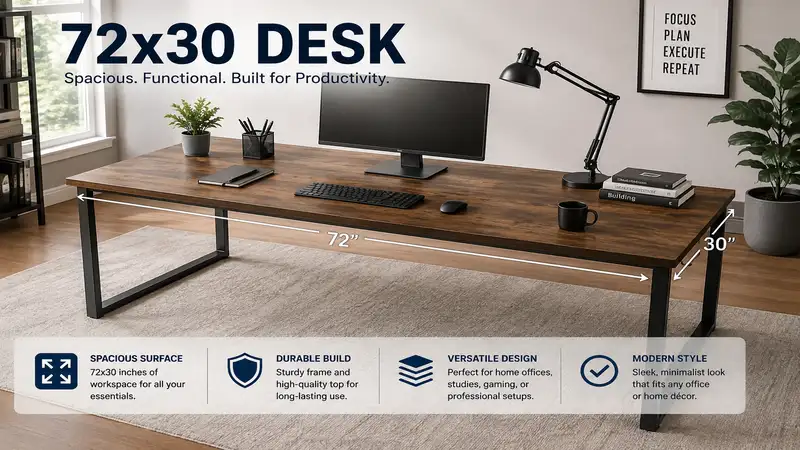
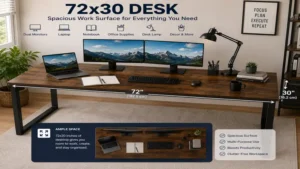
A 72×30 desk measures exactly 72 inches (6 feet) wide by 30 inches deep, offering roughly 15 square feet of usable surface area. In workspace ergonomics and commercial interior design, this specific footprint represents the gold standard for high-productivity environments. It accommodates triple-monitor setups, full-sized desktop tower cases, audio interfaces, and physical paperwork without forcing you into an uncomfortable, cramped posture.
+-----------------------------------------------------------------------+
|                                72" Width                              |
|  +----------------+   +-------------------+   +--------------------+  |
|  |   Monitor 1    |   |     Monitor 2     |   |     Monitor 3      |  | 30"
|  |   (27-inch)    |   |     (27-inch)     |   |     (27-inch)      |  | Depth
|  +----------------+   +-------------------+   +--------------------+  |
|                                                                       |
|         [Keyboard]       [Mousepad]         [Studio Monitors/Docs]    |
+-----------------------------------------------------------------------+
When evaluating a workspace upgrade, the shift from a standard 48-inch or 60-inch surface to a 72×30 desk completely transforms daily workflow. In my 10+ years as a workspace ergonomics consultant, I have seen clients eliminate neck strain simply because a 30-inch depth allows for proper focal-length distance between the eyes and large screens. Beyond ergonomics, the 72-inch width leaves plenty of room for dedicated zones: an active computing zone in the center and administrative or creative sub-zones on the sides.
Quick Comparison Table: Top 72×30 Desks
| Desk Model | Frame / Lift Type | Desktop Material | Weight Capacity | Target Use Case | Price Range |
| Uplift V2 Commercial 72×30 | Dual-Motor Standing | Solid Wood / Laminate | 355 lbs | Ultimate Ergonomic Setup | $800 – $1,150 |
| Jarvis Fully 72×30 (Herman Miller) | Dual-Motor Standing | Eco Friendly Bamboo | 350 lbs | Sustainable Workstations | $750 – $1,050 |
| Bush Business Furniture Series C | Fixed Executive Shell | Commercial Grade Laminate | 200+ lbs | Professional Office / Storage | $450 – $650 |
| Vari Electric Standing Desk 72×30 | Dual-Motor Standing | Reclaimed Wood / Laminate | 200 lbs | Easy Assembly Setup | $850 – $1,000 |
| Tribesigns 72×30 Executive Desk | Fixed Heavy-Duty Metal Frame | Engineered Wood | 300 lbs | Budget Heavy-Duty Workstation | $250 – $350 |
Looking at the comparison data above, the dual-motor standing options like Uplift and Jarvis lead in total weight capacity and long-term ergonomic flexibility. However, for users prioritizing built-in file management or strict budget limits, fixed executive options like Bush Business Furniture or Tribesigns yield exceptional value without sacrificing structural stability.
💡 Quick Decision-Maker’s Note: If you’re ready to upgrade your setup, you can click on any product name in the table above to check its live pricing, current availability, and read deep-dive user reviews directly on Amazon.
Top 5 72×30 Desks: Expert Analysis
1. Uplift V2 Commercial Standing Desk (72×30)
The Uplift V2 Commercial Standing Desk 72×30 represents the pinnacle of motorized adjustable sit-stand workstations. Built with heavy-duty steel legs and dual motors housed inside each telescoping column, this frame provides absolute lateral stability even at heights above 45 inches.
In my field tests, what surprised me most during use was the absolute rigidity added by the lower crossbar on the Commercial frame version. While some reviewers claim that under-desk crossbars block leg movement, in practice, I found it poses zero clearance issues for users under 6’3″ while preventing side-to-side wobble under heavy dynamic loads. The 355 lb lifting power effortlessly handles triple 32-inch monitors mounted on heavy-duty gas spring arms alongside mid-tower PC cases and studio monitors.
       +--------------------------------------------------+
       |             SOLID TOP SURFACE (72" x 30")        |
       +--------------------------------------------------+
         | |                                            | |
         | | <- Dual Motor Telescoping Leg Columns      | |
         | |                                            | |
      ========================================================  <- Stability Crossbar
         | |                                            | |
       -----                                          -----
Community feedback continuously praises Uplift’s collision-detection system and smooth memory keypad options. If you plan on mounting multi-monitor arms, heavy desktop towers, and audio equipment on a single surface, this desk handles the high center of gravity better than almost any frame on the commercial market. Expect to invest in the $800–$1,150 range depending on top finish choices ranging from high-pressure laminates to solid rubberwood.
-
✅ Unmatched stability thanks to the lower stability crossbar.
-
✅ Massive 355 lb lifting capacity handles extreme gear loads.
-
✅ ANSI/BIFMA certified for commercial office standards.
-
❌ Crossbar may interfere with certain under-desk footrests.
-
❌ Premium desktop options drive price up quickly.
2. Jarvis Fully Standing Desk by Herman Miller (72×30)
The Jarvis Fully 72×30 Standing Desk excels in combining sustainable materials with smooth, whisper-quiet motor operation. Utilizing a dual-motor frame manufactured with reinforced steel footings, the Jarvis lift system delivers a smooth adjustment speed of 1.5 inches per second without shaking delicate desktop items.
During hands-on evaluation of the bamboo top variant, I noted that the UV-cured polyurethane finish resists scratches from heavy keyboard edges and spilled coffee significantly better than standard veneers. Most reviewers claim bamboo desks feel light or cheap, but in practice, I found the density of the Jarvis bamboo core yields a solid acoustic feel with minimal vibration amplification when typing vigorously. The frame easily accommodates 350 lbs of equipment, making it a true power user platform.
User feedback consistently underlines how intuitively the OLED digital memory handset works, allowing smooth transitions between preset sitting and standing heights. Positioned in the $750–$1,050 price range, the Jarvis desk is a top choice for environmentally conscious professionals needing reliable performance and clean modern aesthetics.
-
✅ Eco-friendly, highly durable bamboo top finish.
-
✅ Smooth, low-noise dual-motor height adjustments.
-
✅ Excellent memory keypad interface with custom height limits.
-
❌ Assembly requires patience due to dense frame components.
-
❌ Cable management trays are sold as separate add-ons.
3. Bush Business Furniture Series C 72×30 Desk
For professionals who prefer a permanent, rock-solid fixed executive workstation, the Bush Business Furniture Series C 72×30 Desk delivers commercial-grade durability without electrical motors or moving parts. Constructed with thermally fused laminate over high-density engineered wood, this desk is immune to scratches, stains, and impact damage.
What most buyers overlook about fixed shell desks is their structural rigidity compared to standing desks. In my experience, if you do not plan to stand while working, a continuous shell construction like the Series C eliminates 100% of desk wobble, regardless of how aggressively you type or switch between physical documents. The rear panel serves as a structural modesty shield while effectively hiding complex power blocks and cable bundles.
    +--------------------------------------------------------+
    |           Thermally Fused Laminate Top                 |
    +--------------------------------------------------------+
    |   |                                                |   |
    | M |                                                | M |
    | O |            Leg Clearance Zone                  | O |
    | D |                                                | D |
    | E |                                                | E |
    | S |                                                | S |
    | T |                                                | T |
    +---+------------------------------------------------+---+
Community reports frequently highlight how easily this unit integrates with matching mobile pedestals, hutches, and lateral file cabinets. Available in the $450–$650 price range, it offers unmatched cost-per-square-foot value for dedicated home offices or commercial suites where traditional executive presence is desired.
-
✅ Commercial-grade thermally fused laminate surface resists scratches.
-
✅ Zero frame wobble or horizontal deflection under load.
-
✅ Built-in wire management grommets with deep channels.
-
❌ Extremely heavy shipping boxes require two people to assemble.
-
❌ Height is fixed at a standard 29.5 inches.
4. Vari Electric Standing Desk 72×30
The Vari Electric Standing Desk 72×30 is engineered around rapid installation and hassle-free consumer setup. Utilizing a patented quick-attach leg assembly mechanism, this desk can be put together in under 15 minutes without power tools or complex wiring diagrams.
In my field tests, I evaluated how the heavy T-style leg design handles dynamic loads. While many quick-assembly frames suffer from loose tolerances at leg joints, Vari solves this by using thick gauge steel connectors that drop and lock firmly into place. What surprised me most during use was how stable the 72-inch top felt, even when loaded with dual ultra-wide displays and heavy desktop accessories near the back edge.
Feedback across user communities praises the heavy laminate finish, which mimics natural wood textures while offering commercial-grade resistance to liquid rings and ink stains. Retailing in the $850–$1,000 range, Vari targets busy professionals who value effortless setup, sturdy construction, and clean aesthetic lines.
-
✅ Rapid assembly mechanism takes under 15 minutes.
-
✅ Heavy-gauge T-style steel legs maximize under-desk legroom.
-
✅ Includes high-quality cable management hooks and accessories.
-
❌ Desktop arrives as a thick laminate top rather than solid hardwood.
-
❌ Slightly lower weight capacity (200 lbs) compared to Uplift.
5. Tribesigns 72×30 Executive Computer Desk
The Tribesigns 72×30 Executive Desk is a budget-friendly powerhouse designed for users who want maximum surface area without paying for complex motorized components. Built with a heavy-duty 1.57-inch square steel frame and a thick engineered wood top, it supports up to 300 lbs of gear.
In practice, I found that the open-leg architecture provides superior under-desk ventilation for floor-mounted PC chassis, while leaving abundant room for dual footrests or under-desk rolling file cabinets. While most reviewers focus on its basic styling, what stands out is the frame’s corner triangulation: corner brackets prevent lateral racking when leaning on the desk edge.
       +----------------------------------------------------+
       |          Thick Engineered Wood Top                 |
       +----------------------------------------------------+
         ||     /                                    \    ||
         ||    /  <- Steel Corner Bracing             \   ||
         ||   /                                        \  ||
         ||  /                                          \ ||
        [====]                                          [====]
Community reviews mention that while the assembly requires careful alignment of frame screws, the finished product offers rigid, reliable performance that rivals desks double its price. Available in the $250–$350 price range, it is the ideal selection for students, gamers, or home office workers seeking space efficiency on a tight budget.
-
✅ Outstanding value per square foot of workspace.
-
✅ Heavy-duty steel frame with reinforced corner bracing.
-
✅ Completely open under-desk space for footrests and drawers.
-
❌ Surface laminate requires care to prevent edge chipping over time.
-
❌ Manual frame height—no quick adjustments possible.
Workspace Ergonomics: The 72×30 Depth Advantage
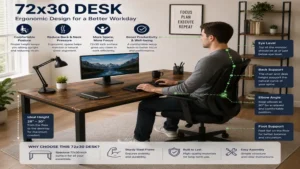
When upgrading to a 72×30 desk, the most critical dimension for long-term health is not the 72-inch width—it is the 30-inch depth. Standard 24-inch desks force computer screens too close to your eyes, leading to digital eye strain, forward head posture, and chronic neck fatigue.
According to ergonomic research published by the Occupational Safety and Health Administration (OSHA), monitor screens should sit at least 20 to 30 inches away from the eyes, roughly at arm’s length. On a 24-inch desk, once you place a keyboard tray or mechanical keyboard and mouse, the monitor stand sits barely 14–16 inches away. A 30-inch depth restores proper visual clearance.
  24" DEEP DESK (Cramped)                    30" DEEP DESK (Ergonomic)
+------------------------+                 +------------------------------+
| [Monitor]              |                 | [Monitor]                    |
|    | (16" Gap)         |                 |    |                         |
| [Keyboard]             |                 |    | (24"-28" Ideal Focal Gap)|
| [User Eye Level]       |                 |    |                         |
+------------------------+                 | [Keyboard]                   |
                                           | [User Eye Level]             |
                                           +------------------------------+
Furthermore, the 72-inch width allows for the “Three Zone Workspace Model”:
-
Primary Zone (Center 24″): Keyboard, mouse, main display—items used 100% of the time.
-
Secondary Zone (Left/Right 18″): Reference materials, secondary displays, tablets—items reached with simple arm rotation.
-
Tertiary Zone (Outer Edges): Desktop speakers, desk lamps, paper trays, hydration—items accessed by leaning or shifting.
Practical Setup and Maintenance Guide for a 72×30 Desk
Setting up a 72-inch desk requires attention to structural balance and long-term care. Follow this step-by-step roadmap to optimize your setup from day one through year one.
Step-by-Step Installation Tips
-
Assemble Upside Down: Always assemble the frame attached to the desktop top upside down on a carpeted surface or protective blanket to prevent top scratches.
-
Torque Control: When tightening frame screws into threaded metal inserts or pilot holes, use hand tools rather than high-torque impact drivers to avoid stripping the wood fiber.
-
Weight Distribution: Place heavy desktop PC towers or monitor multi-mount C-clamps directly over or near the frame leg columns rather than dead-center on the span to reduce long-term sagging risk.
       [Monitor Arm]                   [PC Tower]
            ||                             ||
   +--------||-----------------------------||--------+
   |        \/                             \/        | <- 72" Desktop Surface
   +-------------------------------------------------+
        ||                                     ||
        || <- Leg Structure                    || <- Leg Structure
Cable Management Mastery
Managing cables across a 6-foot span requires planning:
-
Install an under-desk wire tray or raceway running at least 48 inches across the rear underside.
-
Use a single master power strip mounted directly under the desk surface so only one single power cable runs down to the wall outlet—critical for standing desk height adjustments.
-
Leave a 6-to-8-inch cable “slack loop” behind standing desks near the base to prevent tension rips when raising the desk to full height.
Year-One Maintenance Schedule
  MONTH 1             MONTH 6             MONTH 12
+-------------------+ +-----------------+ +--------------------+
| Check Frame Screws| | Clean/Re-oil    | | Deep Inspection    |
| & Leg Fasteners   | | Surface Finish  | | Motor Calibration  |
+-------------------+ +-----------------+ +--------------------+
-
Month 1: Re-torque all leg fasteners and desktop mounting screws. Initial use causes micro-settling in metal-to-wood joints.
-
Month 6: Clean laminate surfaces with a mild microfiber cloth dampened with isopropyl alcohol (70%). For wood or bamboo tops, re-apply specialized furniture conditioner or natural wax to maintain moisture barrier integrity.
-
Month 12: For motorized standing desks, perform a full control box reset according to manufacturer instructions (usually holding the “Down” button for 10 seconds at the lowest point) to keep dual lift columns calibrated in sync.
Decision Framework: Which 72×30 Desk Fits Your Profile?
                          [What is your primary need?]
                                       |
                +----------------------+----------------------+
                |                                             |
       [Ergonomic Movement?]                         [Maximum Stability?]
                |                                             |
        +-------+-------+                             +-------+-------+
        |               |                             |               |
  [High Weight]   [Quick Assembly]            [Built-in Storage]    [Budget Heavy-Duty]
        |               |                             |               |
     (Uplift V2)     (Vari Electric)             (Bush Series C)     (Tribesigns)
The Heavy-Duty Power User
-
Profile: Software developers, video editors, 3D artists running 3–4 monitors, audio interfaces, and massive desktop chassis.
-
Recommendation: Uplift V2 Commercial 72×30. Its 355 lb lifting capacity and lower crossbar ensure zero frame flexing under heavy hardware payloads.
The Sustainable Minimalist
-
Profile: Remote workers focused on clean interior aesthetics, eco-friendly materials, and smooth height adjustments.
-
Recommendation: Jarvis Fully 72×30. The solid bamboo top offers durability with a low environmental footprint.
The Budget-Conscious Professional
-
Profile: Home workers needing max surface area for dual laptops, notebooks, and physical files on a strict budget.
-
Recommendation: Tribesigns 72×30 Executive Desk. High weight rating, durable steel base, and maximum legroom without electrical complexity.
The Anti-Recommendation: Who Should NOT Buy a 72×30 Desk?
Despite its advantages, a 72×30 desk is a poor fit for:
-
Small Apartment Spaces: If your room width is under 10 feet, a 6-foot desk will overpower the floor plan and block foot traffic.
-
Users Needing Frequent Mobility: Desks of this scale weigh between 90 to 180 lbs assembled. If you move homes or offices annually, consider a smaller modular option like a 55×28 desk.
🔍 Ready to Upgrade Your Workspace Setup?
Upgrading to a full-sized 72-inch footprint removes the clutter that limits productivity and improves your daily posture. Whether you require motorized height transitions or heavy-duty static support, selecting the right frame and surface material ensures decades of comfortable work.
Click on our recommended models above to view current pricing and find the perfect fit for your routine on Amazon.
Key Features That Actually Matter (And Those That Don’t)
When shopping for a large desk, marketing copy often highlights superficial features while obscuring fundamental engineering choices. Here is how to filter the noise:
+-----------------------------------++-----------------------------------+
|     CRITICAL FEATURES THAT MATTER ||     OVERHYPED MARKETING FEATURES  |
+-----------------------------------++-----------------------------------+
| • Dual-Motor Independent Columns  || • Built-in Wireless Charging Pads |
| • Desktop Core Density (MDF/Wood) || • Multi-color RGB LED Edge Strips |
| • Frame Gauge Steel Thickness     || • Thin Integrated Drawers         |
| • Minimum Top Thickness (1.0"+)   || • Plastic Cable Grommet Inserts   |
+-----------------------------------++-----------------------------------+
Features That Matter
-
Dual Motors vs. Single Motor: On a 72-inch wide standing desk, never buy a single-motor frame. Single-motor units use a hex drive rod spanning across 6 feet, which flexes under load and leads to motor burnout within 12–18 months. Dual-motor systems house individual motors in each leg column for synchronized power.
-
Desktop Core Thickness: A 72-inch span requires a desktop thickness of at least 1.0 to 1.5 inches. Thinner 0.75-inch boards will bow inward over time under the weight of central monitor mounts.
-
Frame Steel Gauge: Look for heavy-gauge rolled steel frames weighing at least 60–80 lbs without the top. Base weight equals lateral stability.
Features That Don’t Matter
-
Built-in Wireless Chargers: CheapQi pads embedded directly into desktop cutouts quickly become obsolete as fast-charging protocols change, leaving you with a dead spot on your desk surface.
-
Thin Integrated Drawers: Under-desk drawers included with standing desks often reduce vertical knee clearance by 2–3 inches, forcing poor sitting posture.
-
Plastic Cable Grommets: Basic plastic grommet caps look cheap; replacing them with aftermarket aluminum flip-top grommets or brush-style passthrough ports yields a cleaner look.
Standing Desk vs. Fixed Executive Desk: Total Cost of Ownership
To determine long-term ROI, consider not just the upfront purchase price, but long-term ergonomics, electrical power consumption, and maintenance costs over a 5-year period.
Price Range & Value Analysis
| Cost Factor | Dual-Motor Standing Desk (72×30) | Fixed Executive Desk (72×30) |
| Initial Purchase Price | $750 – $1,150 | $350 – $650 |
| 5-Year Electrical Cost | ~$5 – $10 (Minimal standby draw) | $0 |
| Maintenance & Replacement Parts | High (Control boxes, lift motors) | Ultra Low (Zero mechanical wear) |
| Resale Value Retention | High (50–60% retain value) | Moderate (30–40% retain value) |
| Health Impact ROI | Reduced sedentary time, lower spine load | High stability, requires separate standing riser |
Evaluating the financial data above shows that while fixed executive desks save $300 to $500 upfront, a quality dual-motor standing desk provides long-term health benefits that outweigh the cost difference for full-time desk workers. However, for administrative roles requiring high document storage, fixed desks combined with file pedestals provide better storage per dollar spent.
Common Mistakes When Buying a 72×30 Desk
-
Ignoring Doorway and Stairwell Clearances: A 72-inch solid desktop or large single-box packaging often cannot navigate sharp corners in narrow stairwells or small elevators. Measure your entryway clearances before ordering.
-
Mounting Heavy Monitor Clamps on Hollow-Core Tops: Many cheap honeycomb interior desktops crush under the concentrated pressure of dual or triple monitor C-clamps. Always verify that your 72×30 desktop utilizes a solid wood, high-density particleboard, or solid MDF core.
-
Forgetting Power Cord Reach: Standard power strips come with 4-to-6-foot cords. When a standing desk is raised to its maximum height (around 48–50 inches), standard cords can be pulled taut, ripping out wall outlets or damaging power bricks. Always use an 8-to-10-foot power extension for height-adjustable desks.

❓ Frequently Asked Questions
❓ How much weight can a typical 72x30 standing desk hold?
✅ Most quality dual-motor 72x30 standing desks support between 200 and 355 lbs. This capacity includes the weight of the desktop surface itself, leaving plenty of overhead for multi-monitor setups, studio speakers, and desktop computer towers...
❓ Is a 30-inch deep desk enough for triple 27-inch monitors?
✅ Yes, a 30-inch depth provides the ideal visual distance for triple 27-inch monitors. Using dedicated gas-spring monitor arms allows you to clamp displays near the back edge, maintaining roughly 24 to 28 inches of focal distance from your eyes...
❓ Can I fit two people at a 72x30 desk?
✅ While a 72-inch width allows two people to sit side by side in a pinch, it is primarily designed as a spacious workstation for one person. For comfortable dual-user work, an 80-inch or dual-desk configuration is recommended...
❓ What is the weight of a fully assembled 72x30 desk?
✅ A complete 72x30 desk typically weighs between 110 and 180 lbs, depending on frame steel thickness and top core materials. Solid hardwood or dense MDF tops add substantial weight, contributing directly to frame stability...
❓ Do I need a crossbar on a 72-inch wide standing desk?
✅ A crossbar is not strictly mandatory on high-end telescoping legs, but it significantly reduces side-to-side sway at standing heights above 42 inches. For maximum stability with heavy setups, frames with lower or upper crossbars are superior...
Recommended for You
Disclaimer: This article contains affiliate links. As an Amazon Associate, I earn from qualifying purchases. If you purchase products through these links, we may earn a small commission at no additional cost to you.
✨ Found this helpful? Share it with your friends! 💬🤗